
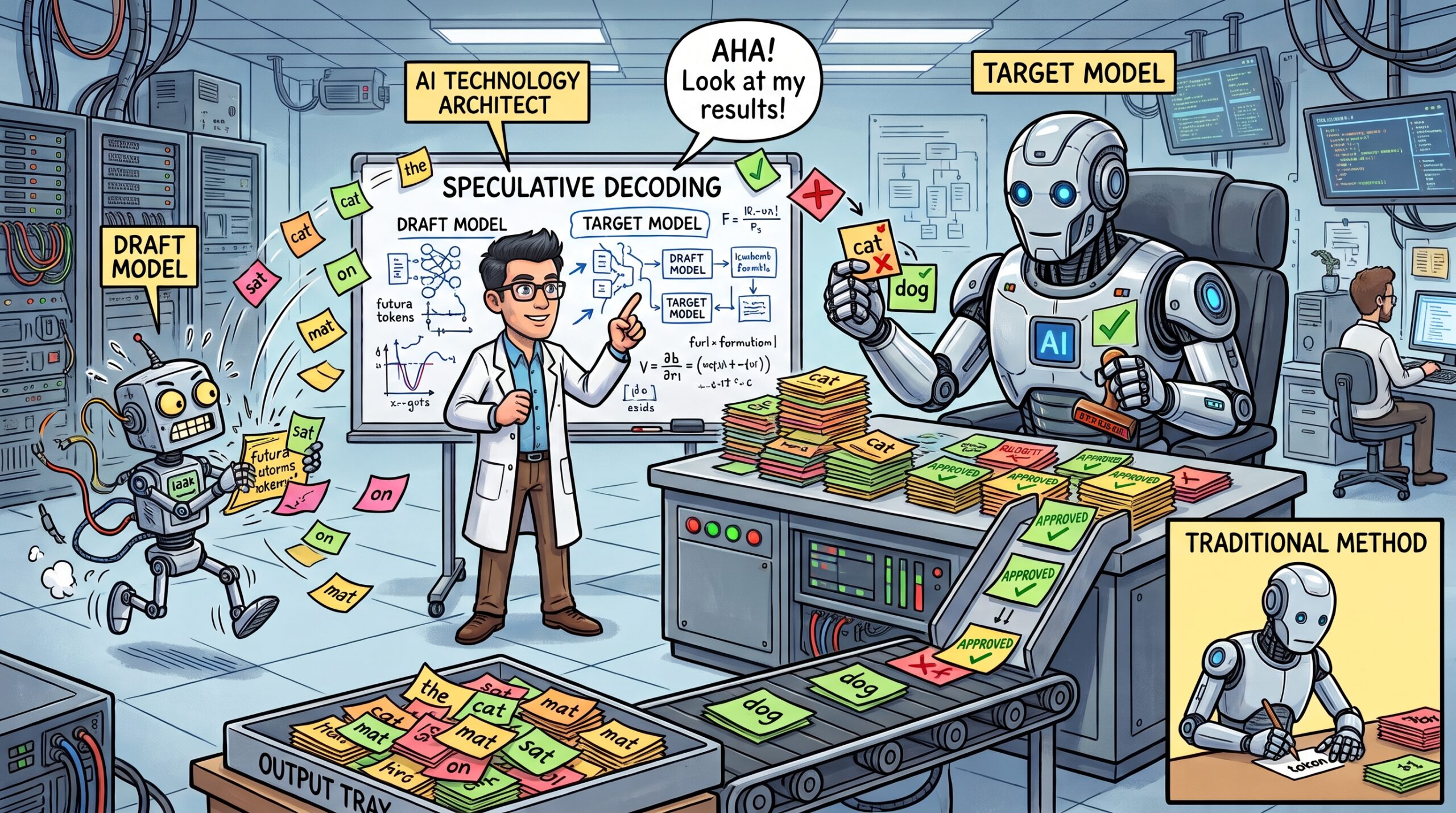
I was speaking to a colleague the other day about how LLMs process tokens and predict the next word (discussing the technical details of LLMs excites me), and when I brought up speculative decoding, which has been around since Google and DeepMind published papers on it in late 2022 and early 2023, I found it difficult to explain the concept without diagrams to support it. As I’ve always done in the past, I decided to write this post so I can point my future discussions to it.
Speculative decoding makes a model generate its answer faster without changing what the model writes, which sets it apart from the usual shortcuts, such as switching to a smaller model or quantizing more aggressively, that give up some quality in exchange for the speed. The speedup comes from getting several tokens out of each expensive pass through the model instead of one, and it helps anywhere a person is waiting on a response, which is why Google’s research team wrote that it enables AI Overviews in Google Search to produce results faster “while maintaining the same quality of responses.” One of the original papers, from DeepMind, reported a 2 to 2.5 times speedup on its 70 billion parameter Chinchilla model running across multiple accelerators.
The same benefit carries over to running models locally, and LM Studio’s own benchmarks when it added the feature in version 0.3.10 ranged from 1.36 to 2.43 times faster depending on the model pair and the hardware. A unified memory laptop is a good example of where it pays off, because generation on the HP ZBook Ultra G1a I have used for my local LLM posts this year is limited by how quickly weights can be read out of its shared LPDDR5X memory, so the GPU spends much of each token waiting and speculative decoding gives it something useful to do in the meantime. I used LM Studio 0.4.24 on the ZBook for this post, where the feature is a Speculative Decoding option in each model’s load settings, and the chat window shows the tokens per second for every answer so the difference is visible without any extra tooling. LM Studio Bionic, which I covered in my previous post, has its own speculative decoding settings under Local Model Defaults, but its chat window does not show tokens per second, which makes the classic LM Studio app the better place to see the effect.
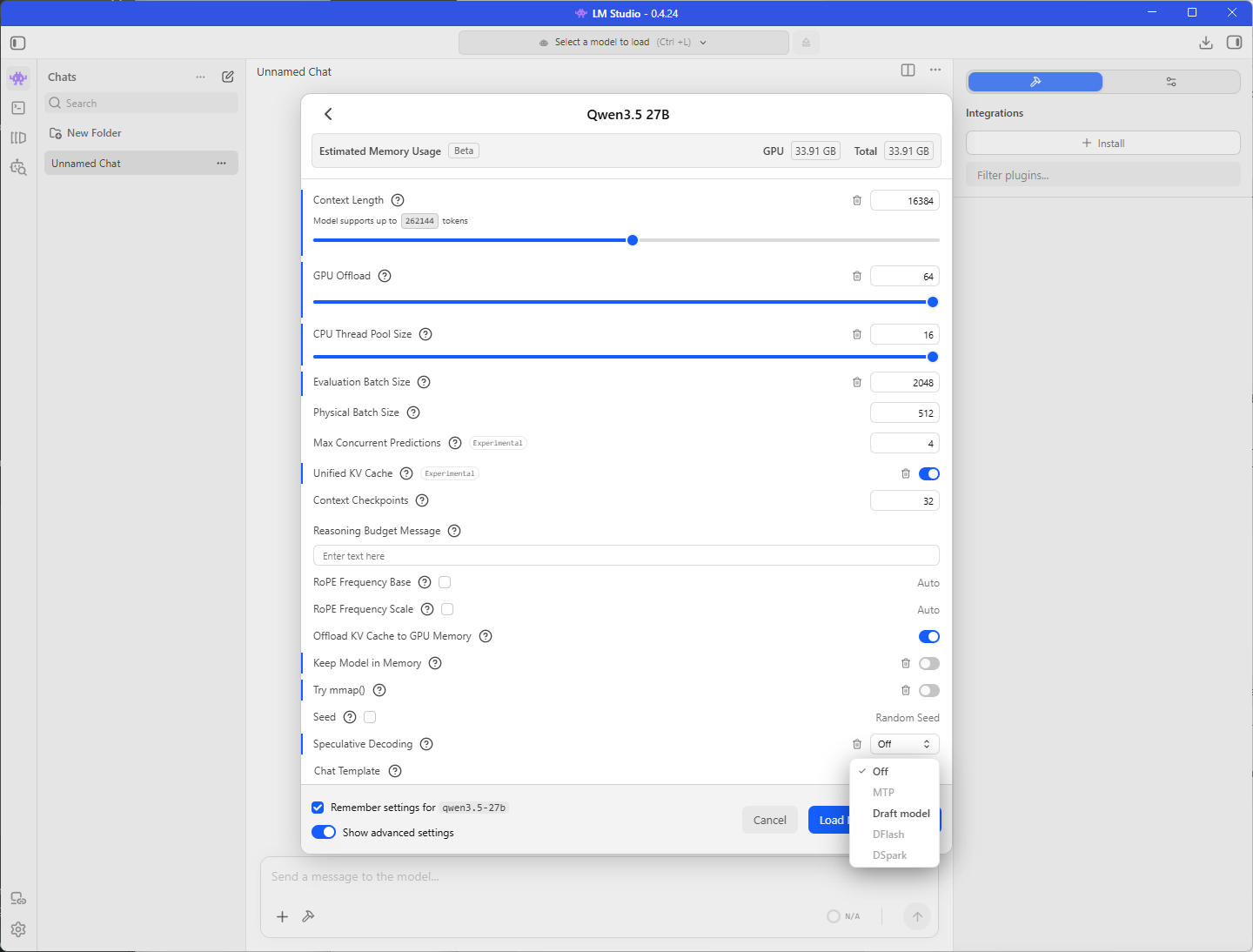
The technique started with a separate, smaller draft model doing the guessing, which is how both of the original papers described it, and that approach still works with almost any model family. Multi-token prediction (MTP), where the model is trained to make its own guesses so no second model is needed, is the direction things are heading, and LM Studio, Unsloth, and the vLLM project have all shipped or benchmarked MTP this year. I start with draft models because that is where it all began and I find the concept easy to grasp (also very cool), and everything shown in the diagrams below applies to MTP as well.
The setting helps only when the draft model is small enough to be worth running, and Hugging Face’s guidance that a draft model should be at least an order of magnitude smaller than the main model suggests the gpt-oss-120b and gpt-oss-20b pairing that circulates on forums is a poor fit, so I tested it against a Qwen3.5 pairing that follows the guidance to see how much difference the choice makes.
Those who have read my previous posts about using Browser MCP with LM Studio on this laptop, powering VS Code Insiders chat with a local model, and test driving LM Studio Bionic will recognise the hardware, an AMD Ryzen AI Max+ PRO 395 with 128 GB of LPDDR5X shared between the CPU and the integrated GPU.
How speculative decoding works
#1 – Standard decoding costs one full pass through the model per token
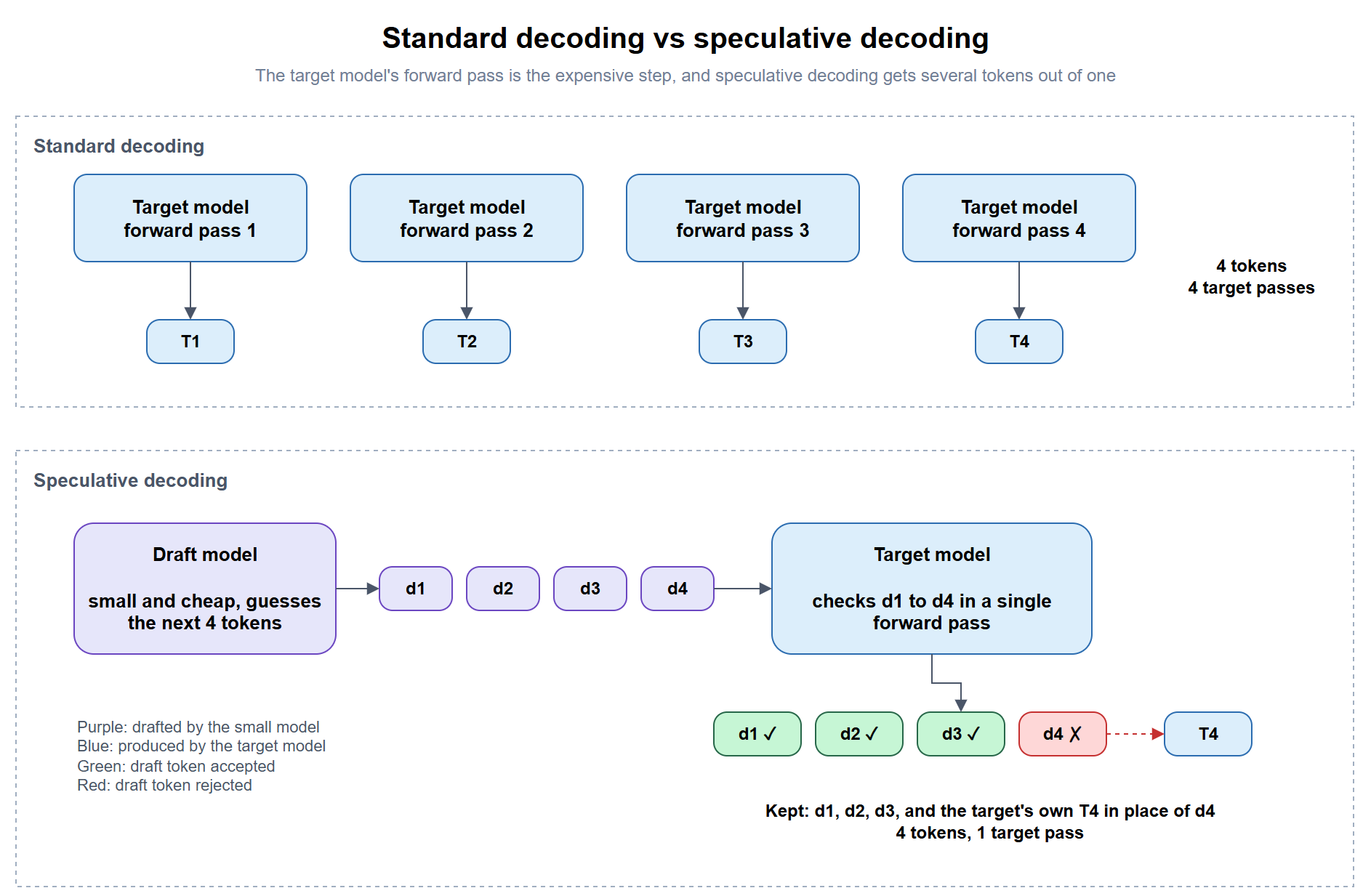
A language model generates text one token at a time, and every token requires a complete pass through the model, so a 500-token answer from gpt-oss-120b is 500 separate passes through the model’s weights. Reading a prompt is different because the model processes all of it at once in a single batch, which is why a long prompt is ingested quickly while the answer trickles out at a steady rate.
#2 – A draft model guesses, and the main model checks the guesses in one pass
Speculative decoding adds a second, much smaller model that uses the same tokenizer as the main model, which I will call the target model from here on. The draft model generates a few tokens the normal way, which is cheap because it is small, and the target model then checks all of the drafted tokens in a single pass, the same way it reads a prompt. Every drafted token up to the first disagreement is kept, and the target replaces the disagreeing token with its own choice and discards the rest of the draft, so a single target pass always produces at least one token and can produce several when the draft guesses well.
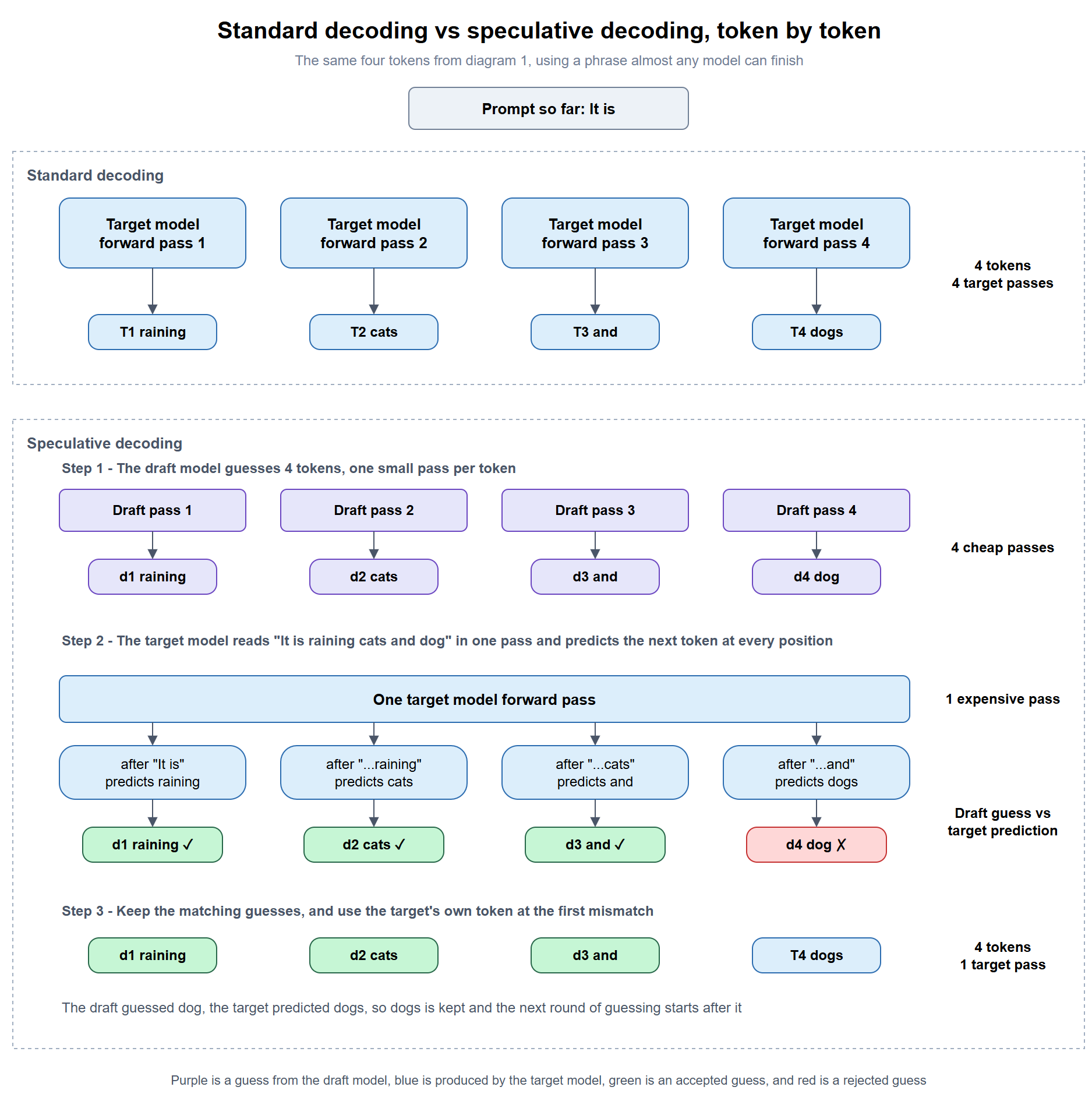
Here is the same process with a phrase almost any model can finish. Starting from the prompt “It is,” standard decoding needs four passes of the target model to produce “raining cats and dogs.” Speculative decoding has the draft model make four cheap guesses first, and it gets “raining,” “cats,” and “and” right before guessing “dog” where the target would have written “dogs.” One target pass then checks all four positions at once, keeps the three matching guesses, replaces “dog” with “dogs,” and the next round of guessing starts after “dogs.” I have shown each word as a single token to keep the diagram readable, although real tokenizers often split words differently. The diagrams also use four guesses to make the example easier to follow, while llama.cpp’s default is three.
#3 – The output is the same as running the target model alone
The acceptance rule is what makes this safe to turn on. With the temperature set to 0, a model always picks its single most likely next token, so a drafted token is only kept when it is exactly the token the target model would have picked, and the final text is identical to what the target would have written by itself. At higher temperatures, where the model samples from several likely tokens to vary its wording, the two papers that introduced the technique, one from Google and one from DeepMind, use an acceptance rule that keeps the target model’s word choices statistically the same. The answer itself is unchanged, so the only price is the memory and compute needed to run the draft model alongside the target.
Why it helps on a unified memory laptop
The clearest explanation I have found of why this works is a 2023 post on X by Andrej Karpathy. His point is that running a model over a handful of tokens in one batch takes about as long as running it over a single token, because a model serving one person at a time, which is exactly how a local model is used, is limited by how quickly it can read its weights from memory. He also points out that most drafted tokens get accepted because they are the easy ones, so even a much smaller draft model gets them right.
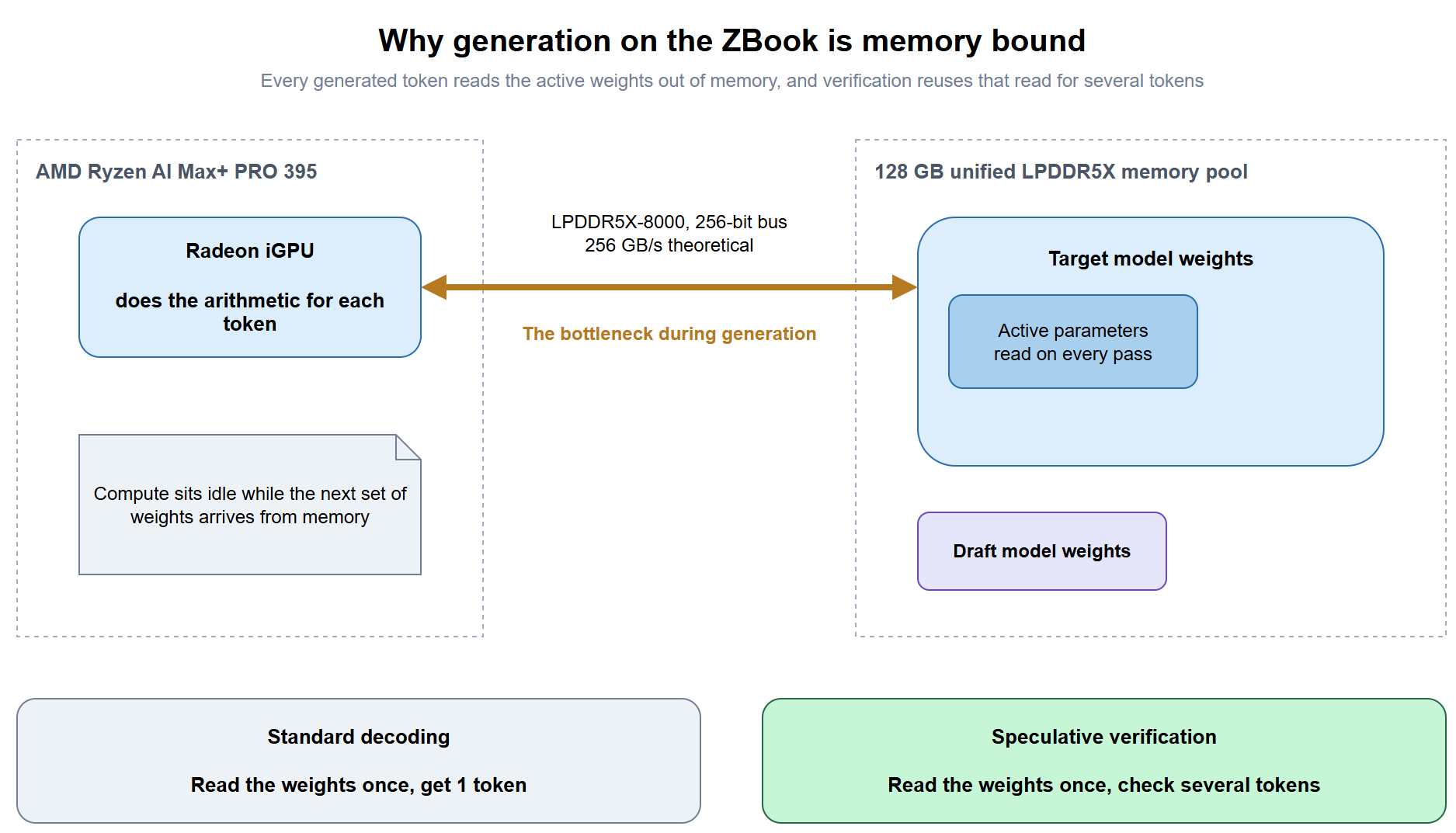
The ZBook is a good illustration of the memory limit, since its Ryzen AI Max+ PRO 395 pairs the integrated GPU with LPDDR5X-8000 on a 256-bit bus for a theoretical memory bandwidth of 256 GB/s, which is roughly double a typical laptop APU and far below a discrete datacenter GPU, so the GPU finishes its work for a token well before the next set of weights arrives. Checking several drafted tokens in one pass puts that idle time to use.
Qwen3.5 27B shows that limit clearly on this laptop. It is a dense model, so all 27.5 GB of its Q8_0 weights are read for every token, and dividing a theoretical 256 GB/s by 27.5 GB gives a ceiling of roughly 9 tokens per second before any other overhead, which lines up with the roughly 7 tokens per second I see from it in practice. Qwen3.6 35B A3B is a larger file at 37.47 GB in LM Studio’s model list, yet it answered at around 22 tokens per second in a short chat on the same laptop, roughly three times faster, because it is a mixture-of-experts model that only uses about 3B of its parameters for each token, so far less has to be read out of memory for every token it generates. A slow, dense model like Qwen3.5 27B is where speculative decoding has the most room to help, which is why it is one of the two targets in the demo, and a model that is already fast like Qwen3.6 35B A3B leaves a draft model much less to speed up.
Picking a draft model
Whether speculative decoding pays off comes down to how often the target model agrees with the draft’s guesses and how cheap the draft is compared with the target. The guidance below comes from LM Studio’s documentation and from the Hugging Face blog post Assisted Generation by Joao Gante, which introduced the same technique to the Transformers library in 2023.
| Rule | Why | Source |
|---|---|---|
| Use the exact same tokenizer as the target | The target checks the draft’s tokens directly, so both models must split text into tokens the same way | LM Studio docs, Hugging Face |
| Pick a draft at least an order of magnitude smaller than the target | A draft that is too large spends the time it was supposed to save, and Hugging Face adds that the bigger the difference, the better | Hugging Face |
| Roughly 1B for a 7B target, 3B for 14B, and 7B for 32B | These are LM Studio’s maximum recommended draft sizes | LM Studio docs |
| Skip it for a 3B target | LM Studio’s table lists no recommended draft size for a 3B main model, since there is little room left for a smaller draft to save time | LM Studio docs |
| Expect the best results on input-grounded tasks such as edits and summaries, and on factual or math answers | The answer is grounded in the input, so the draft guesses right more often than on creative writing where many continuations are valid | LM Studio docs, Hugging Face |
| Keep the temperature low | Low temperatures favour the draft model and keep most of the speed benefit | Hugging Face |
Mixture-of-experts models need a second look under the size rule, because they only run a portion of their parameters for each token, and that active count is what the draft is competing with.
| Pairing | Total parameters (target / draft) | Parameters used per token (target / draft) | Meets the order of magnitude guidance? |
|---|---|---|---|
| Qwen3.5 27B + Qwen3.5 2B | 27B / 2B | 27B / 2B | Yes, about 13 times smaller |
| gpt-oss-120b + gpt-oss-20b | 117B / 21B | 5.1B / 3.6B | No, the draft does most of the work the target does |
According to the gpt-oss model card, gpt-oss-120b uses 5.1B of its 117B parameters for each token and gpt-oss-20b uses 3.6B of its 21B, so the draft is nearly as expensive per token as the model it is drafting for. A Hacker News thread about the pairing opened with the poster saying they were not sure it improved the speed much, and a reply reported that calls to the target model dropped to a third, which can be true while the overall speed barely moves, because the draft model is doing almost as much work as the calls it removed.
MTP and the other drafting methods
A separate draft model is where speculative decoding started, and most of the research since 2023 has been about producing better drafts more cheaply. The llama.cpp engine that LM Studio runs on now supports several of them.
| Method | Where the draft comes from | Extra model to load |
|---|---|---|
| Draft model | A smaller model from the same family | Yes |
| MTP (multi-token prediction) | A small set of extra layers trained into the model itself, included in -MTP builds |
No |
| EAGLE-3 | A small add-on network trained against a specific target model | Yes, a small one |
| N-gram lookup | Word sequences already present in the prompt or the answer so far | No |
MTP arrived in LM Studio more than a year after draft models did, and it takes a different approach to producing the guesses. A normal model finishes each pass with one output layer that predicts the next token, while a model trained for multi-token prediction carries a small set of extra layers that also predict the few tokens after it, so the model produces its own guesses as a by-product of generating the current token. These guesses play the role of the draft, and the same model checks them on its next pass, which removes the need to download, match, and load a separate draft model. Those who would like to read more about how multi-token prediction works, including how the extra layers are used for speculative decoding, can refer to Sebastian Raschka’s explainer on MTP.
The extra layers have to be present in the model file, so a standard Qwen3.6 GGUF will not use MTP, and Unsloth publishes separate Qwen3.6-27B-MTP-GGUF and Qwen3.6-35B-A3B-MTP-GGUF files with those layers built in. Unsloth’s Qwen3.6 guide reports roughly 1.4 to 2.2 times faster generation with no change in accuracy, LM Studio 0.4.14 marked MTP speculative decoding stable for models that “include built-in multi-token prediction heads,” and Bionic 1.1.3 extended it to more models. Where a model ships with MTP layers, I would reach for MTP before a draft model, because the guessing layers were trained alongside that exact model and there is no second model to keep in memory. I’ll likely write a follow up post for MTP as this post is geared towards the draft model method and the demo below will demonstrate this.
The demo, draft model on and off with two pairings
The demo compares two pairings, Qwen3.5 27B with Qwen3.5 2B and gpt-oss-120b with gpt-oss-20b, by sending the same code edit prompt in LM Studio’s chat with the draft model off and then on, and reading the tokens per second shown under each answer.
Step #1 – Close Bionic and check the LM Studio version and runtime
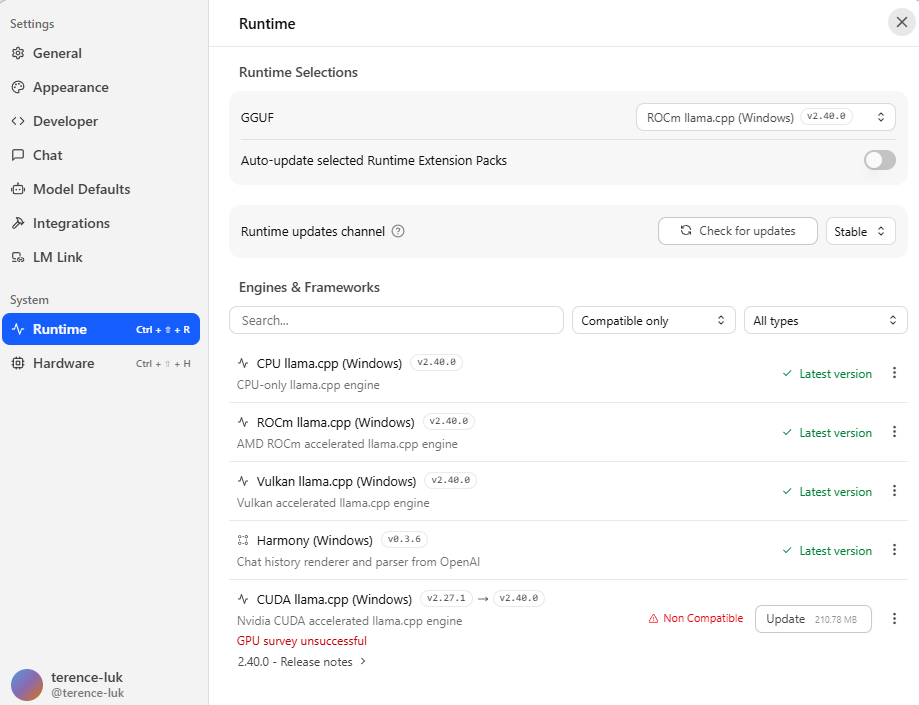
Close LM Studio Bionic first if it is running, because both apps use the same engine underneath and should not be competing for the same memory during a speed test. Open LM Studio, confirm the version is 0.4.24, then open the runtime settings and note which llama.cpp engine is selected for the GPU, because ROCm and Vulkan builds can produce different token rates on this chip and the comparison is only fair when every run uses the same one.
Step #2 – Download the four models
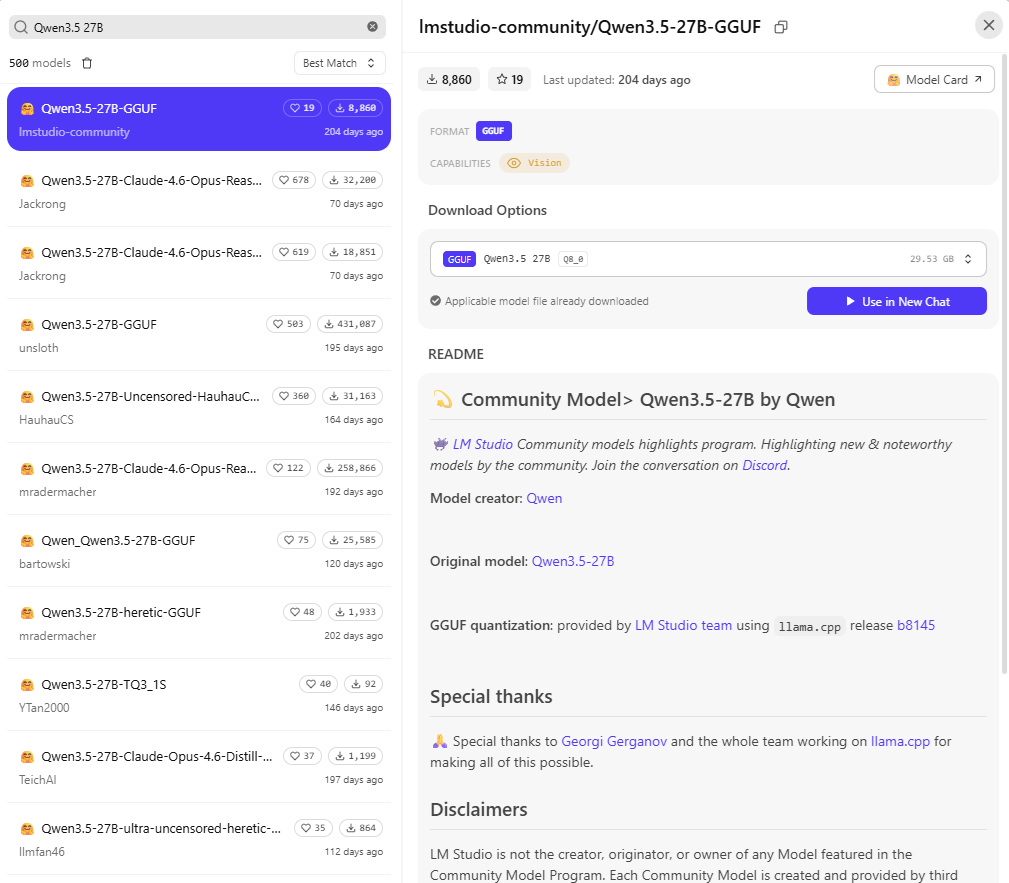
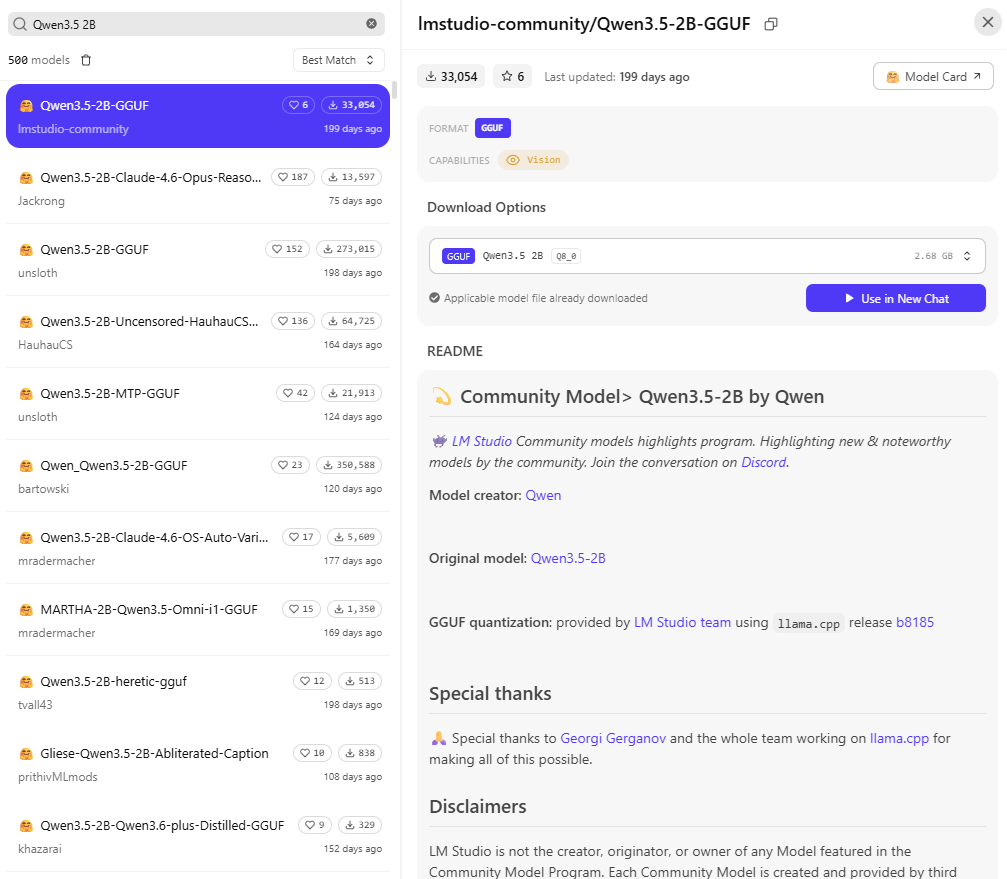
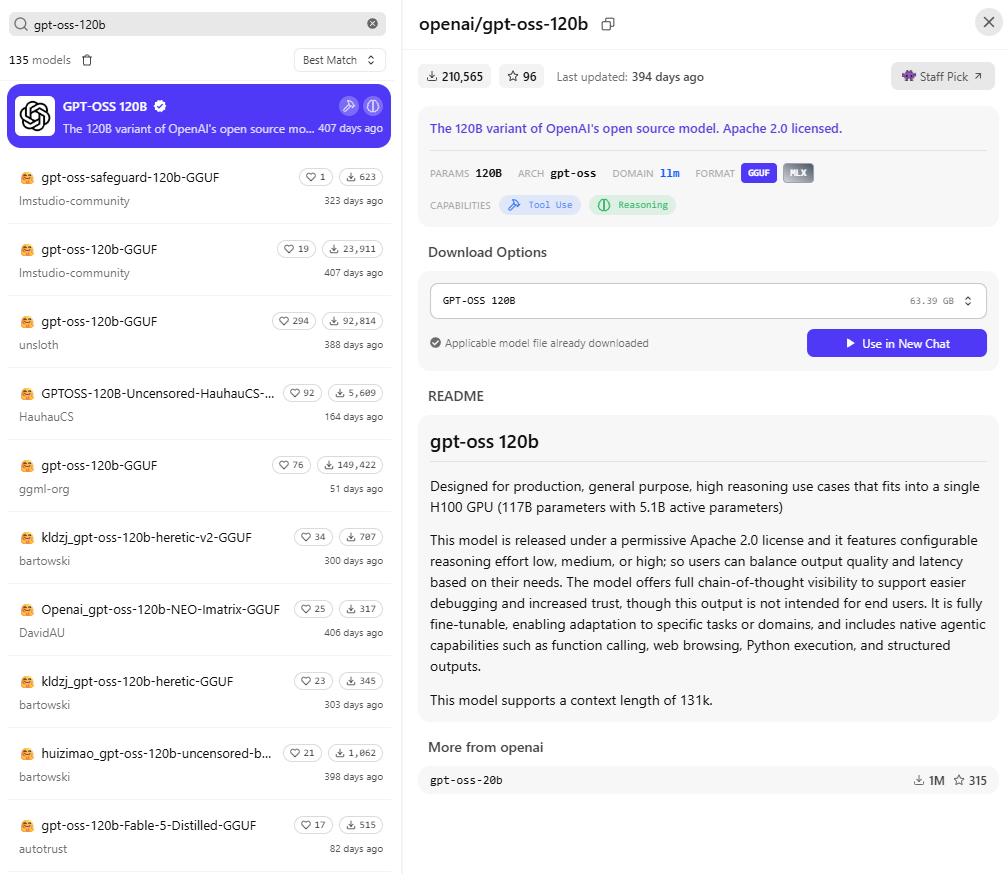
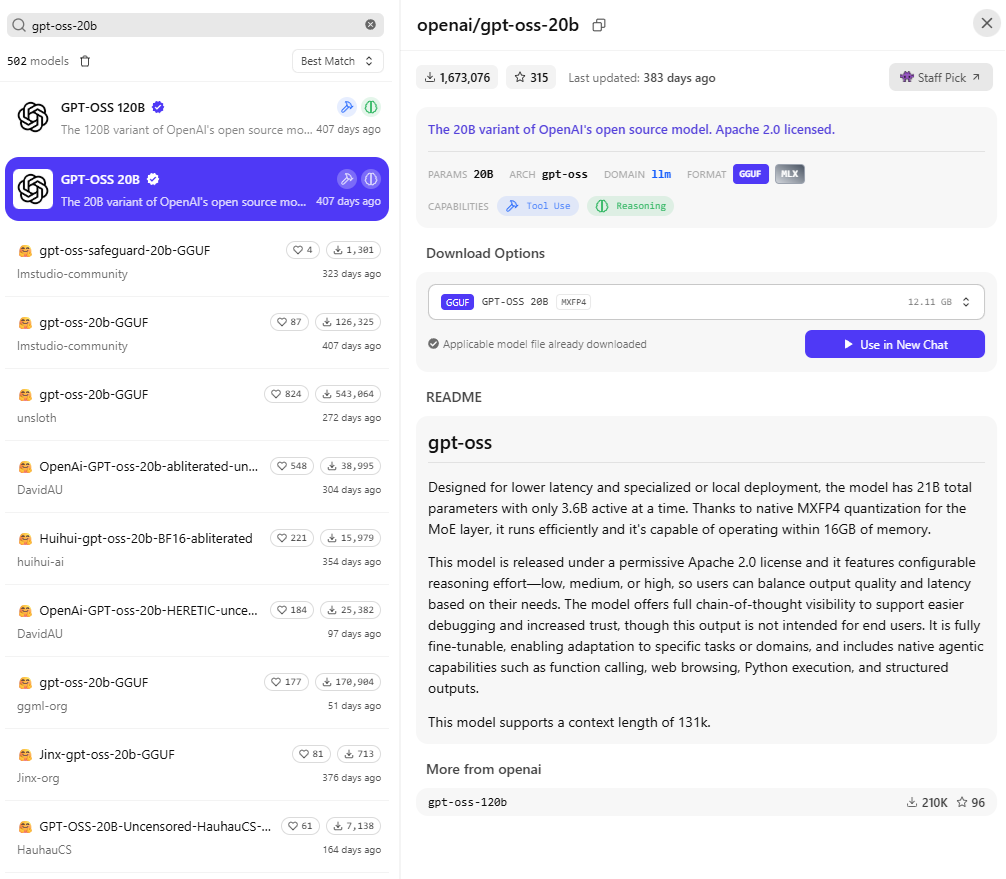
Use the Discover tab, which opens with Ctrl + 2 on Windows, to download the following models.
| Model | Role in the test | Quantization |
|---|---|---|
| Qwen3.5 27B | Target for pairing 1 | Q8_0 |
| Qwen3.5 2B | Draft for pairing 1 | Q8_0 |
| gpt-oss-120b | Target for pairing 2 | MXFP4 |
| gpt-oss-20b | Draft for pairing 2 | MXFP4 |
Step #3 – Check the Speculative Decoding load setting
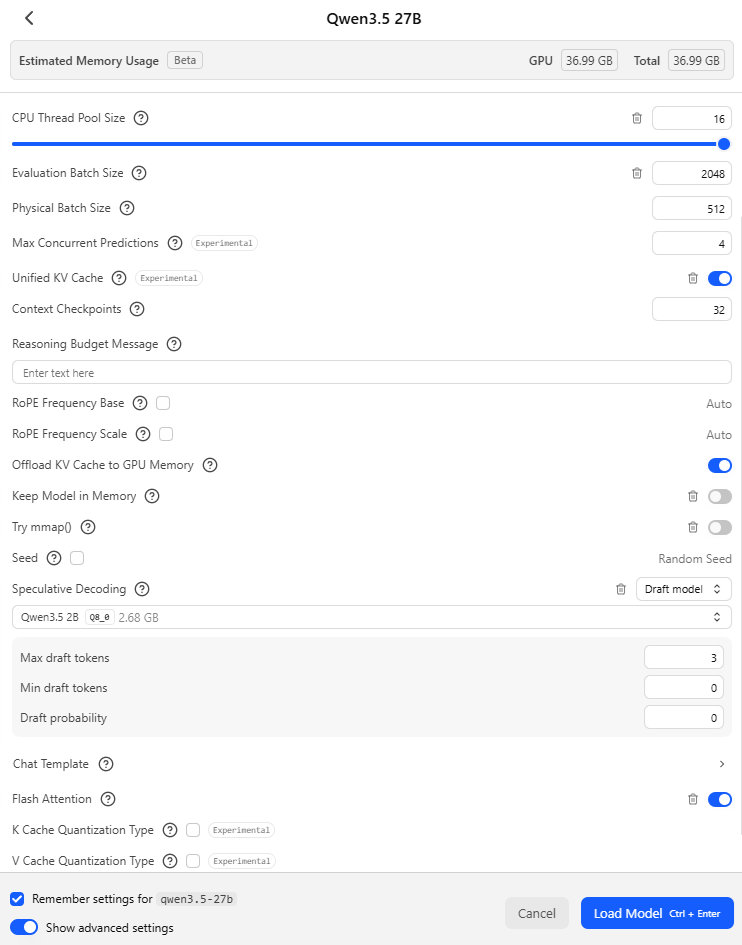
Open the model picker with Ctrl + L, hold Alt while selecting Qwen3.5 27B so LM Studio shows the load settings instead of loading the model straight away, and turn on Show advanced settings at the bottom of the dialog. Speculative Decoding appears further down the list and should read Off. Leave it that way for the first run, because Remember settings for qwen3.5-27b saves whatever is chosen in this dialog, and a draft model saved with the model would quietly turn a run without a draft into a run with one.
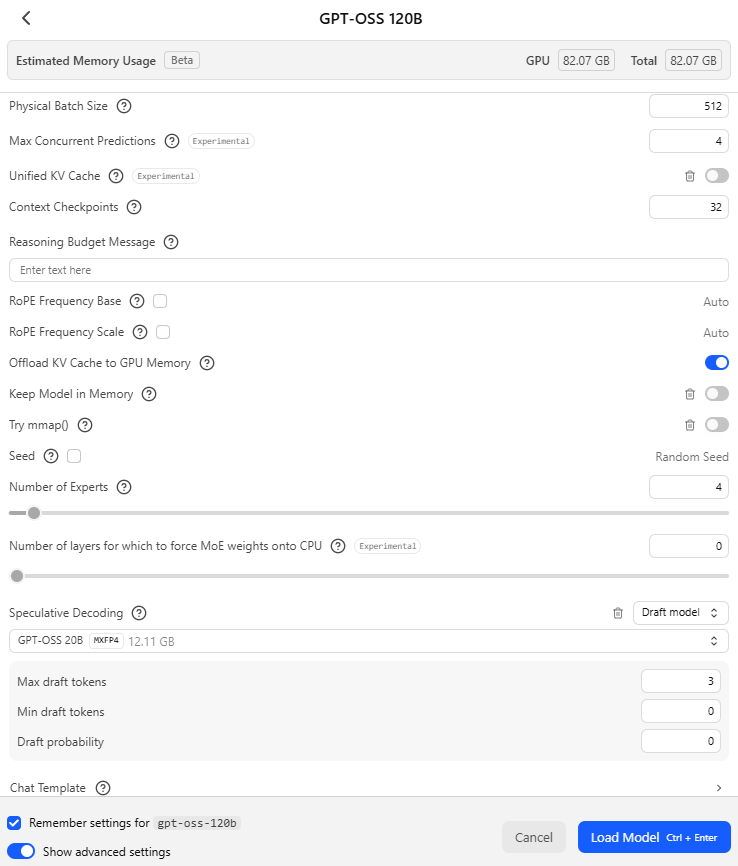
Changing the dropdown to Draft model adds a draft model selector and three settings, which use the same names as Bionic, and their defaults match llama.cpp’s own speculative decoding options, which suggests both apps pass them straight through to the engine.
| Setting | Default | What it controls |
|---|---|---|
| Max draft tokens | 3 | The most tokens the draft model guesses before the target checks them |
| Min draft tokens | 0 | The fewest guessed tokens worth sending to the target for checking |
| Draft probability | 0 | Stop guessing once the draft model’s confidence falls below this value |
Step #4 – Compare Qwen3.5 27B with and without the draft model
Load Qwen3.5 27B with Speculative Decoding set to Off, paste the prompt below into a new chat, and note the tokens per second shown under the answer once it finishes. The prompt asks the model to rename a variable in a short PowerShell function and return all of it, so most of the answer repeats text the model has already seen.
Rename the variable $vmList to $virtualMachines everywhere it appears in this PowerShell function and return the complete function with no explanation.

function Get-StoppedVm {
    param([string] $ResourceGroup)
    $vmList = Get-AzVM -ResourceGroupName $ResourceGroup -Status
    $stopped = @()
    foreach ($vm in $vmList) {
        if ($vm.PowerState -ne 'VM running') {
            $stopped += [pscustomobject]@{
                Name       = $vm.Name
                PowerState = $vm.PowerState
                Location   = $vm.Location
            }
        }
    }
    Write-Output "Checked $($vmList.Count) virtual machines"
    return $stopped
}
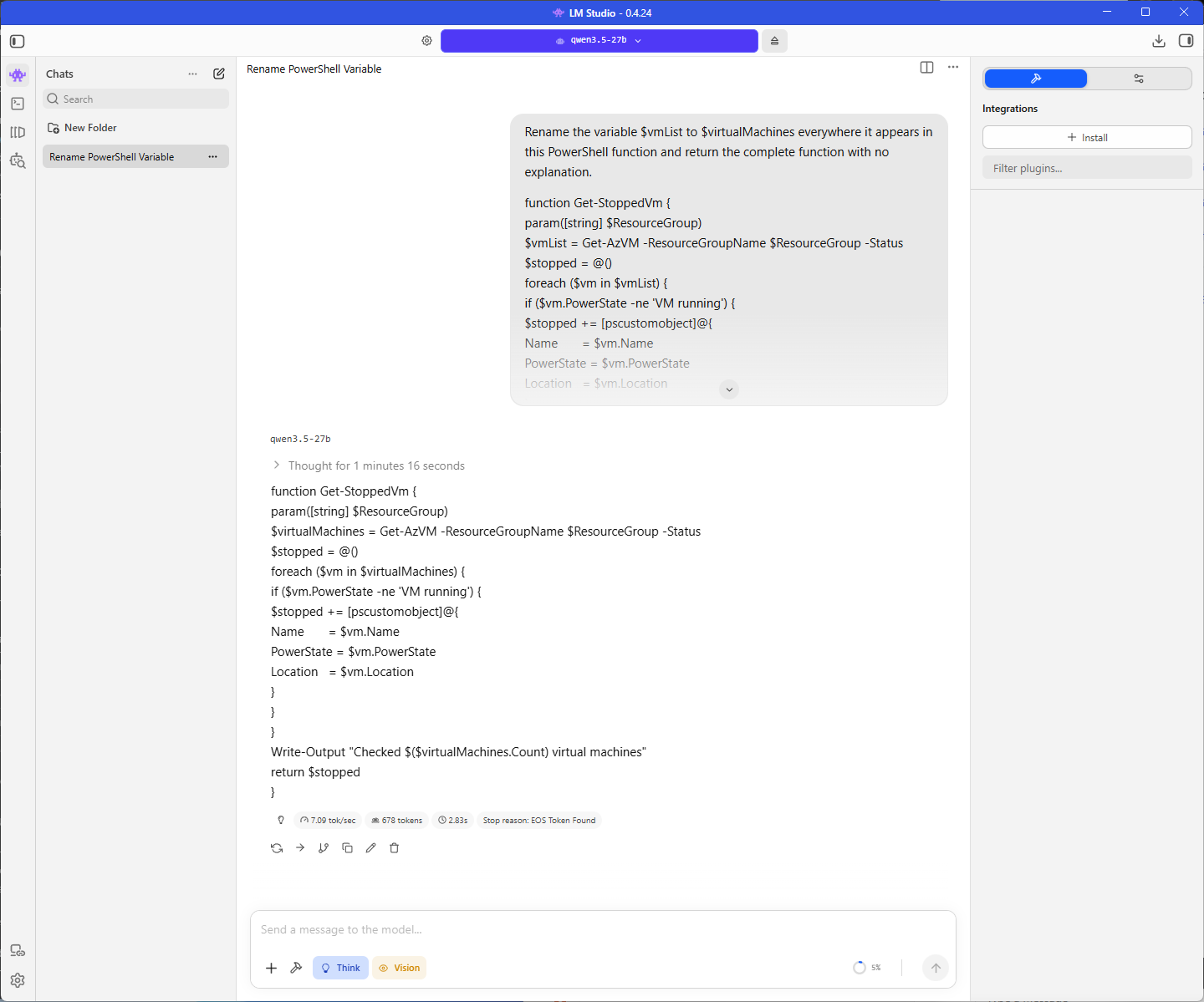
Note that the tok/sec is 7.09.
Eject the model, open its load settings again the same way, change Speculative Decoding to Draft model, and select Qwen3.5 2B as the draft. The estimated memory usage at the top of the dialog goes up by roughly the size of the draft model, which is the extra cost speculative decoding carries.
Load the model, start a new chat, and send the same prompt again, and the tokens per second should be higher on this edit.
Note that if Qwen3.5 2B does not appear in the draft model list, LM Studio likely has decided the two models are not compatible, which it sometimes does for pairings llama.cpp could run, so check the open issue on the LM Studio bug tracker before assuming the download is wrong.
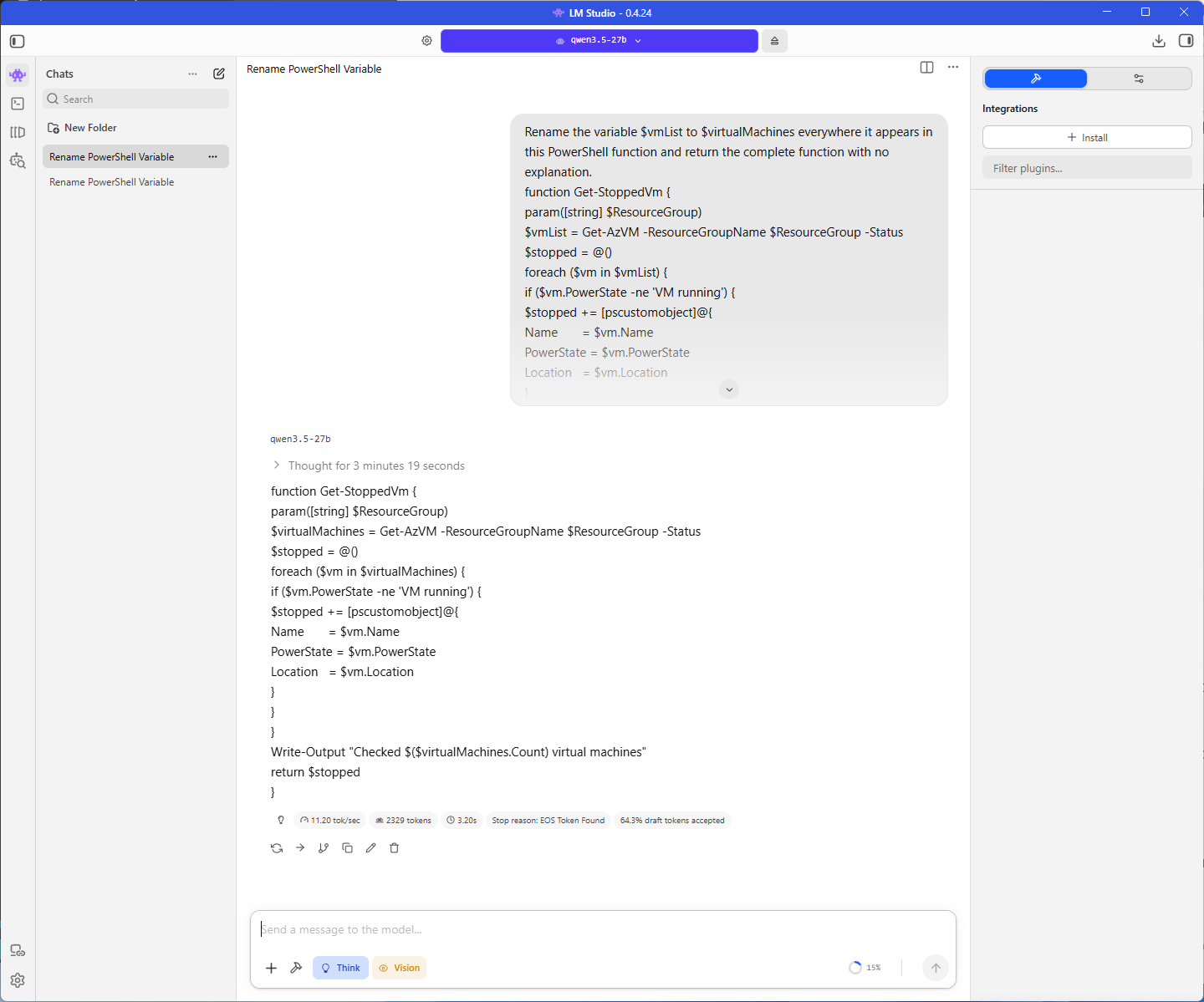
Note that the tok/sec is 11.20 with the extra 64.3% draft tokens accepted added results.
When you are done, set Speculative Decoding back to Off and load the model once more, so the saved settings do not leave a draft model attached the next time you use it.
Step #5 – Repeat the comparison with gpt-oss-120b
Eject Qwen3.5 27B and repeat Step #4 with gpt-oss-120b, starting with Speculative Decoding set to Off.
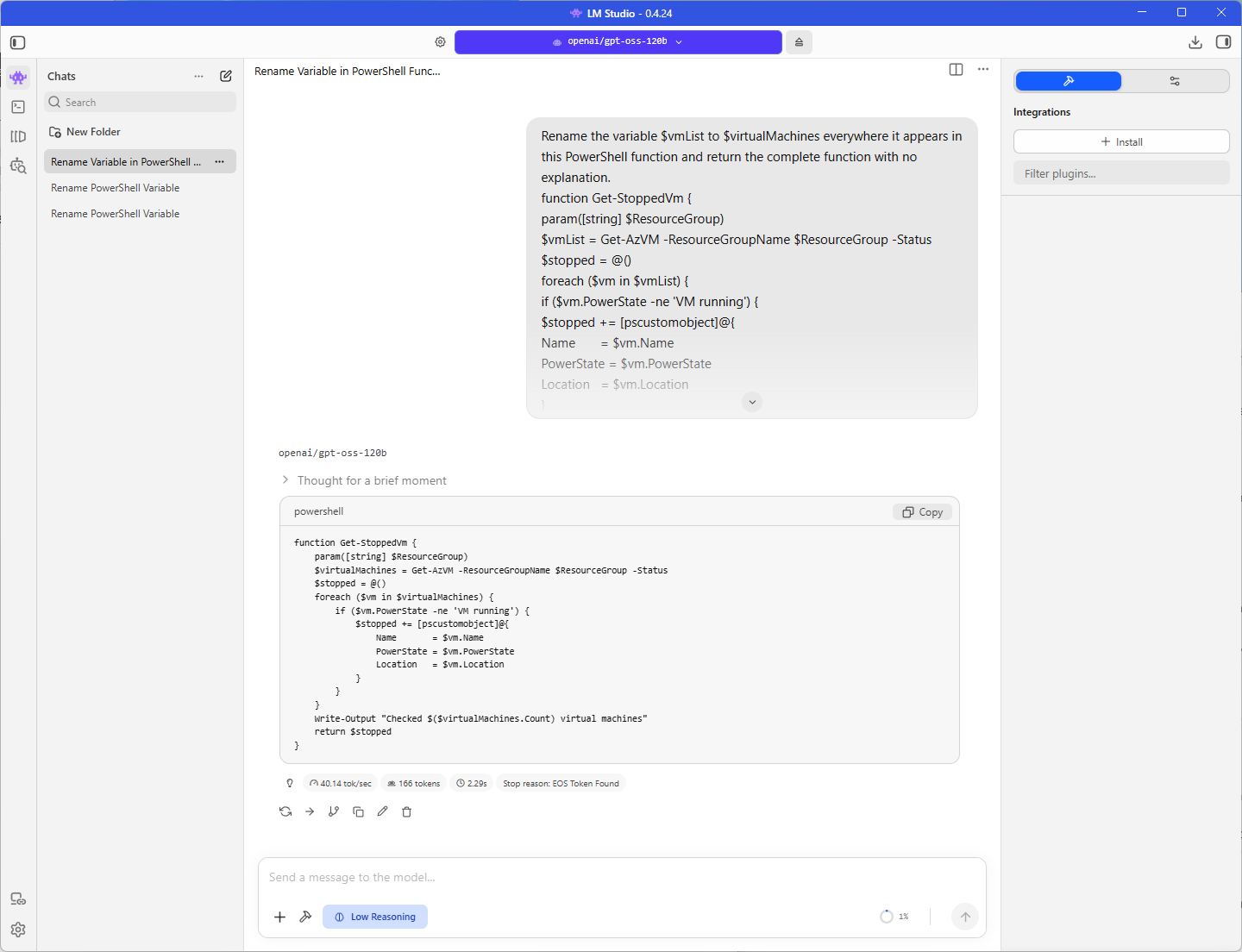
Note that the tok/sec is 40.14 tok/sec.
Load gpt-oss-120b again with gpt-oss-20b selected as the draft model and send the same prompt.
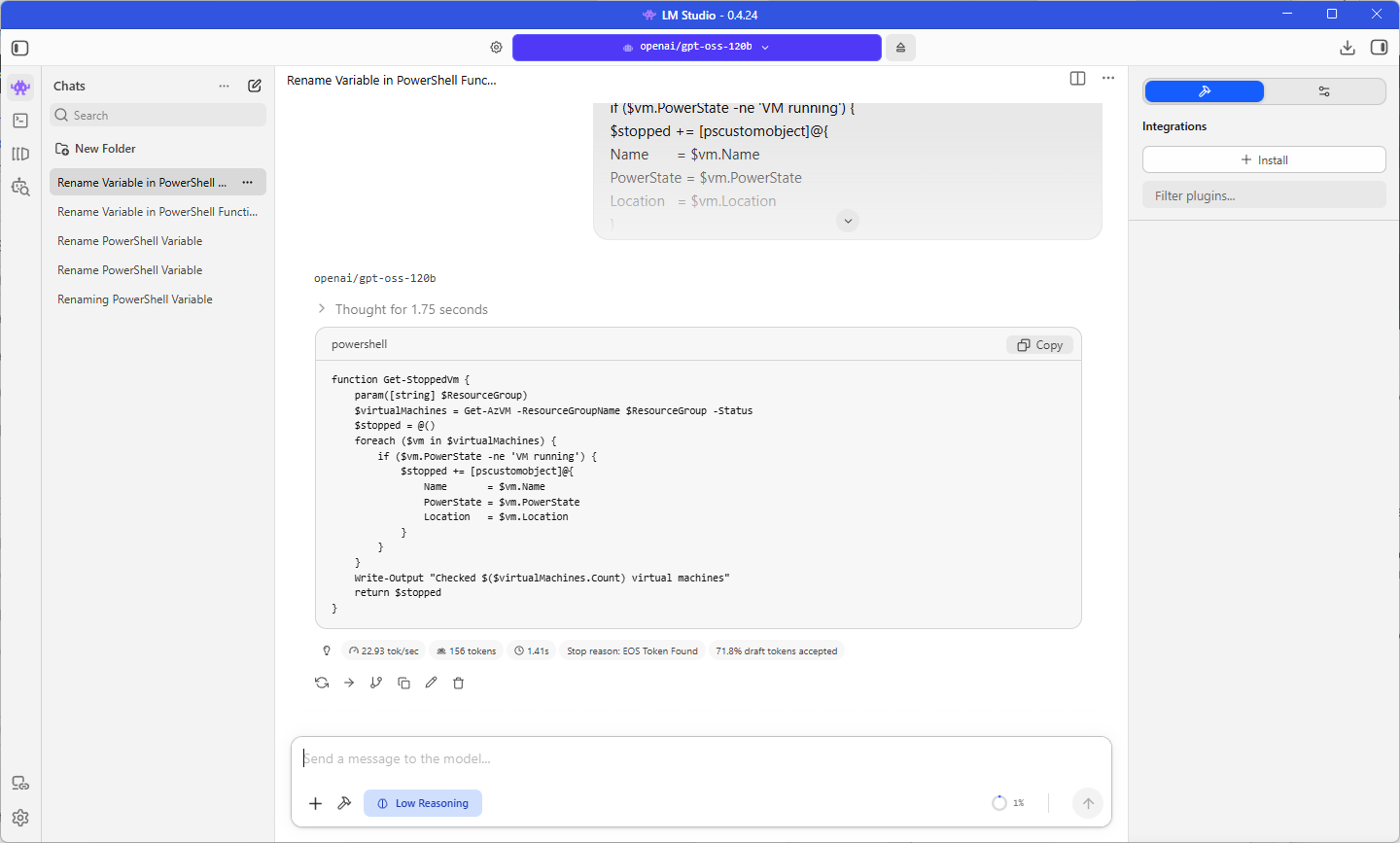
Note that the tok/sec is 22.93 with the extra 71.8% draft tokens accepted added results.
Step #6 – Compare the two pairings
| Pairing | Without draft tok/s | With draft tok/s | Draft Tokens Accepted | Speedup |
|---|---|---|---|---|
| Qwen3.5 27B + Qwen3.5 2B | 7.09 | 11.20 | 64.3% | 58% faster (11.20 ÷ 7.09) |
| gpt-oss-120b + gpt-oss-20b | 40.14 | 22.93 | 71.8% | 43% slower (22.93 ÷ 40.14) |
The Qwen3.5 pairing went from 7.09 to 11.20 tokens per second, which is 1.58 times faster, with 64.3% of the drafted tokens accepted. By comparison, the gpt-oss pairing dropped from 40.14 to 22.93 tokens per second, which is 43% slower, even though 71.8% of its drafted tokens were accepted, a higher rate than the Qwen3.5 pairing managed.
Final Thoughts
The draft model decides whether speculative decoding helps on the ZBook, and my two pairings produced both outcomes. Qwen3.5 27B went from 7.09 to 11.20 tokens per second with Qwen3.5 2B as its draft, which is 1.58 times faster, while gpt-oss-120b dropped from 40.14 to 22.93 tokens per second with gpt-oss-20b, which is 43% slower, even though gpt-oss accepted 71.8% of its drafted tokens compared with 64.3% for Qwen3.5.
The acceptance rate turned out to be the wrong figure to watch. gpt-oss-20b uses 3.6B parameters for each token against 5.1B for gpt-oss-120b, so drafting cost nearly as much as the passes it saved, and gpt-oss-120b was already fast enough at 40 tokens per second that there was little waiting time for a draft model to fill. Qwen3.5 27B was the opposite case, a slow dense model that reads all of its weights for every token, which left plenty of room for a draft 13 times smaller. LM Studio does not warn you when a pairing will make generation slower, so before selecting a draft model now, the first figure I would check is how many parameters each model uses per token, since Hugging Face’s order of magnitude guidance separated these two pairings before a single prompt was sent.
Is it a setting I would leave on for every model I load? No, because a draft model only suits targets from its own family, and the models I load change from one task to the next. Draft models are where speculative decoding began, and they are still the option for any model family without an MTP build. MTP is where things are heading, so I will likely write a follow-up once I have run Qwen3.6 27B MTP on the ZBook and can compare its numbers with the ones in this post.

