

Before getting into the setup, here are two short recordings of what this post builds. Both run entirely on my laptop through llama.cpp, with Laya making every decision locally.
Link to video on Youtube: https://youtu.be/VTfF4eVHa0E
Laya, a 449 MB decision model running locally on my laptop through llama.cpp, playing Space Invaders at 2x speed by reading a one-sentence description of the board before every move. How this game was built is covered in Step #9.
Link to video on Youtube: https://youtu.be/8GTBVGQF54M
The same model routing falling Azure Monitor alerts to the correct operations queue at 5x speed. How this game was built is covered in Step #8. OpenJev, the larger model in this post, is not in either recording because it takes half a second or more for each decision on my laptop, which makes it slow to watch, although it was the more accurate of the two.
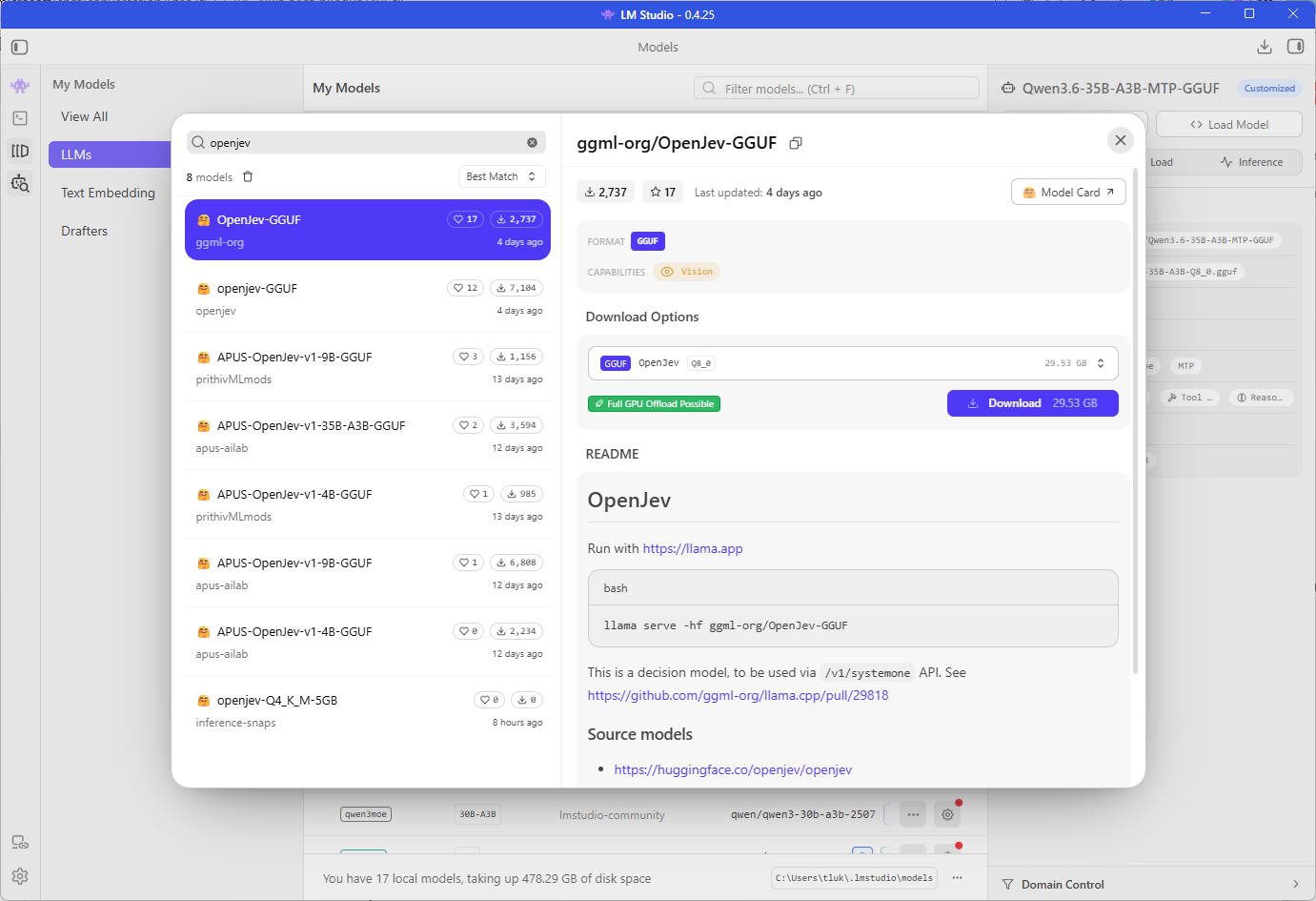
In my previous post I test-drove TypeSafe AI’s Jev through Vercel AI Gateway and closed by mentioning Laya, an open-weights model built around the same idea that I wanted to try on my own hardware. On October 5 I was browsing the model search in LM Studio when I noticed two entries published by ggml-org, the organization behind llama.cpp, named Laya-GGUF and OpenJev-GGUF, and both of their READMEs carried the same line stating that they are decision models to be used through a /v1/systemone API.
I downloaded both, and neither of these llama.cpp decision models worked the way the README described.
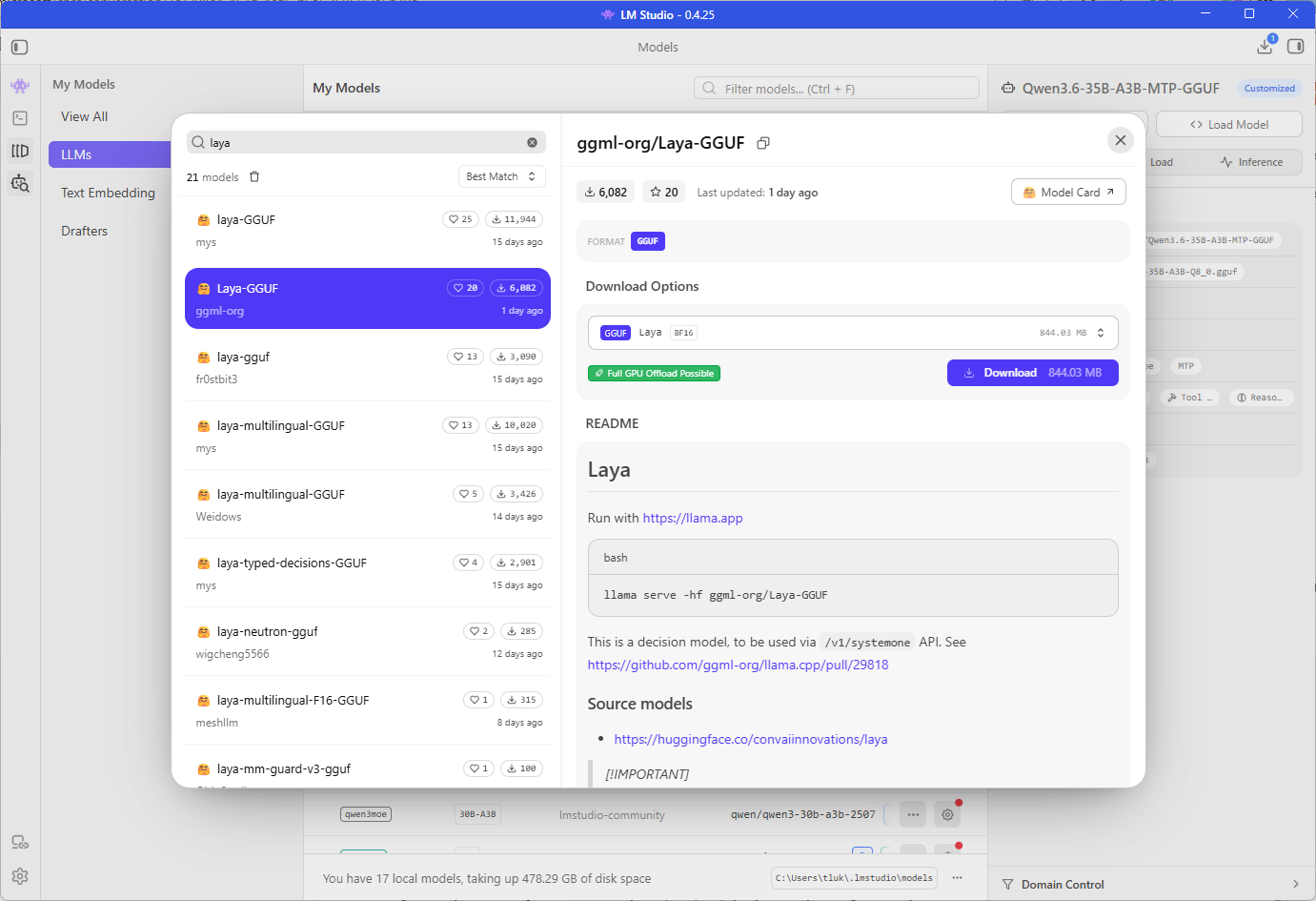
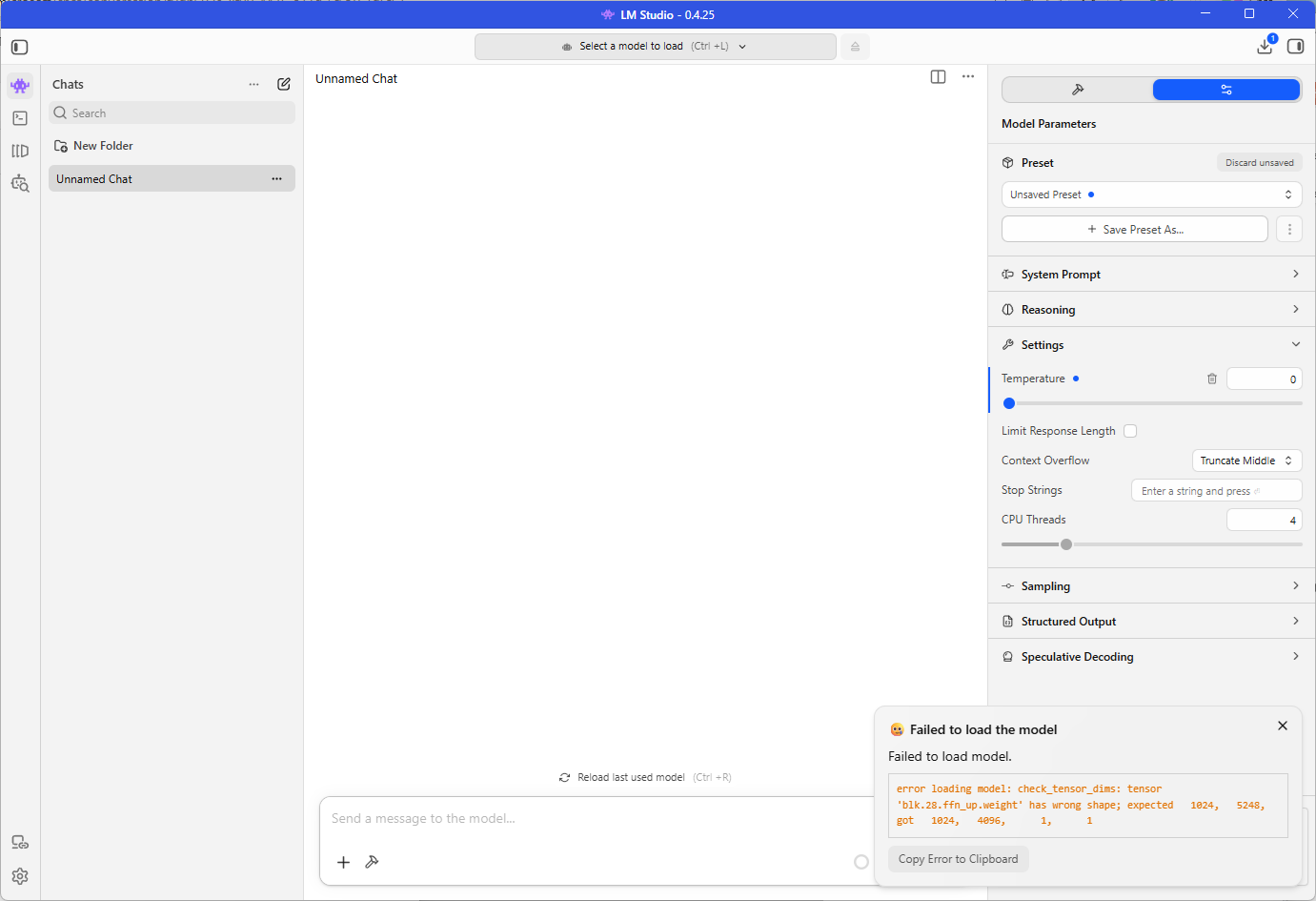
Laya refused to load in LM Studio at all.
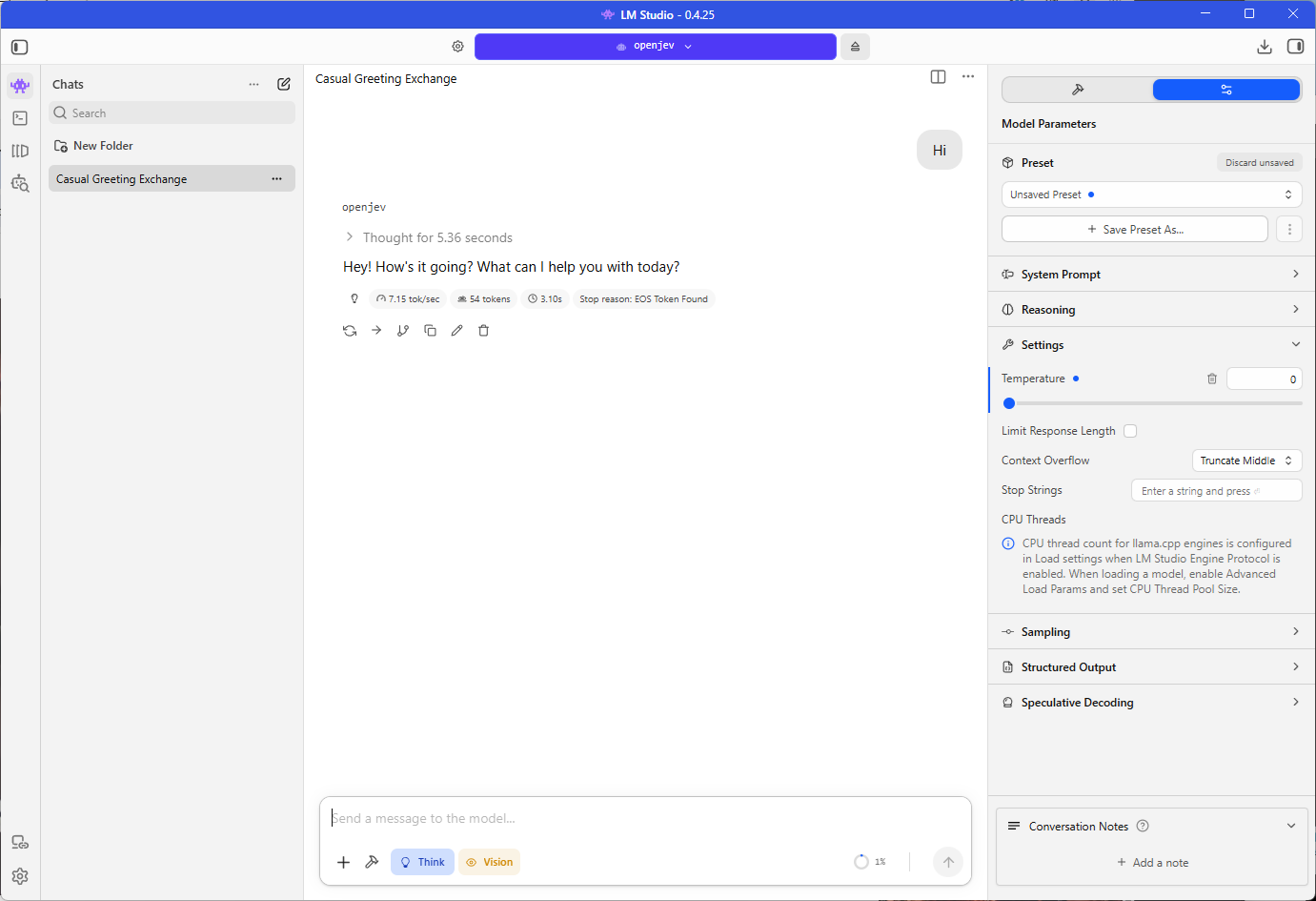
OpenJev loaded and let me chat with it as though it were an ordinary model, although the /v1/systemone endpoint was not available on LM Studio’s local server.
I went looking for an explanation and eventually found the announcement on the Hugging Face blog, New in llama.cpp: Decision Models, which was published on October 2, 2026, three days before I stumbled across the models.
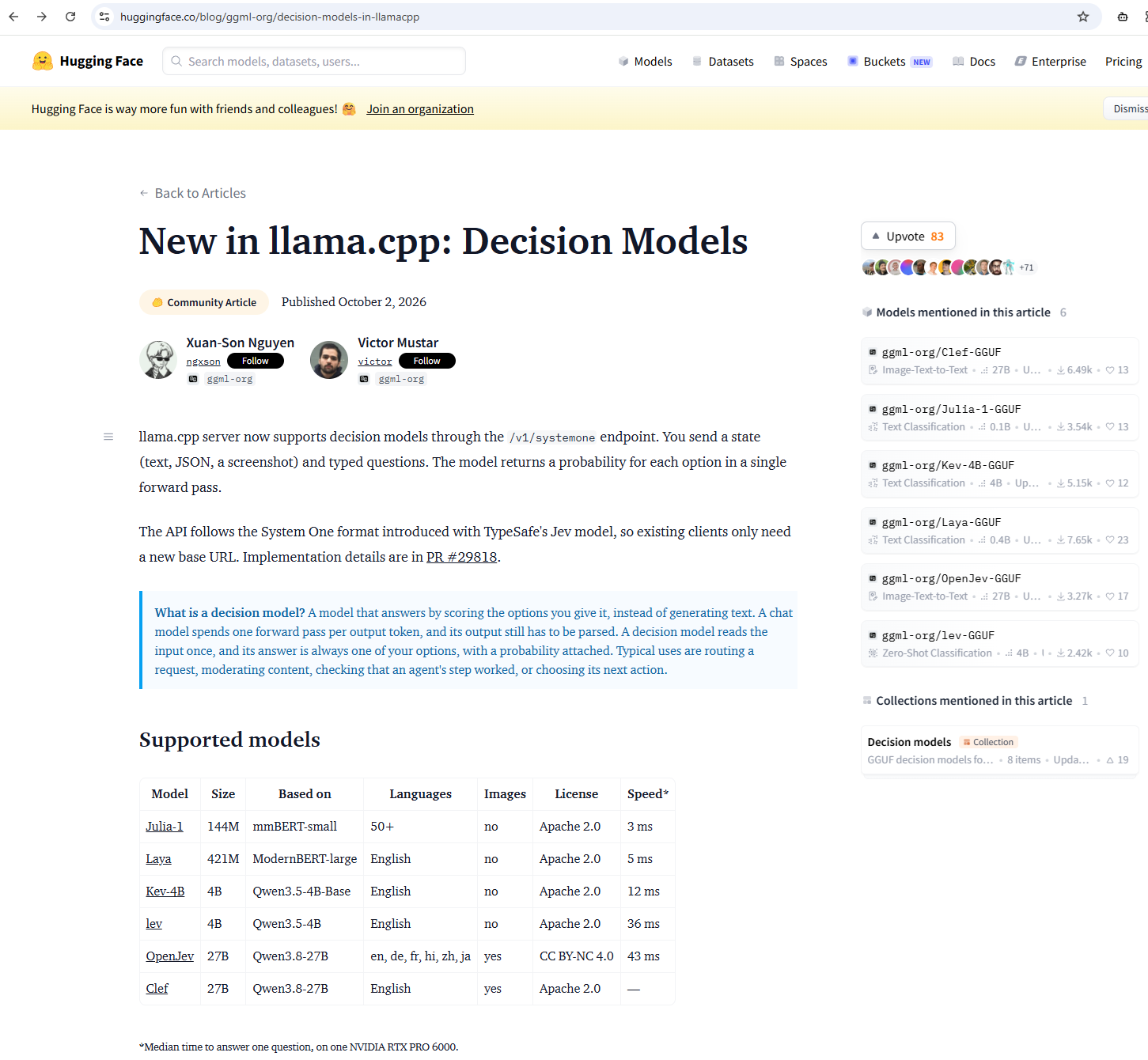
It introduces the endpoint, which arrived in llama.cpp pull request #29818, along with a list of open decision models that can be served through it, so the kind of typed, probability-scored answers I was getting from Jev through a hosted API can now be served from a laptop with a single command.
The announcement brought me back to llama.cpp, which I had not used in a while. Whenever I had run it before, I used the builds published on GitHub, and I had never tried the application the team now offers at llama.app, so I decided to use this as the occasion to test it.
Neither model is Jev, because TypeSafe has not released Jev’s weights. Laya comes from Convai Innovations, and OpenJev is an independent project whose model card states that it is not affiliated with TypeSafe. What both share with Jev is the shape of the request and the response, and I was able to get answers from Laya within a few minutes of installing the tooling on my HP ZBook Ultra G1a with 128GB RAM.
What is llama.cpp
llama.cpp is an open-source inference engine written in C and C++ that Georgi Gerganov started in March 2023, and it is the reason running a large language model on ordinary hardware became practical. It reads models in the GGUF format, runs them on a CPU or on almost any GPU, and supports the quantized files that let a model built for a data centre fit into the memory of a laptop. It is also the engine underneath many of the local AI tools I have written about, LM Studio included, which bundles its own copy of the llama.cpp runtime, and the copy in LM Studio 0.4.25 predates the decision model support described below, which is why neither model worked for me there.
For most of its life, llama.cpp was something you got from GitHub. Each release publishes a set of prebuilt archives for different operating systems and GPU backends, and the alternative is to clone the repository and compile it yourself, after which you start llama-server or llama-cli with whichever flags your model and hardware call for. That is how I had always used it, and it works well, although it leaves choosing the correct build, keeping it up to date, and working out sensible settings for each model to the person at the keyboard.
The team has since packaged all of that into llama.app, a small application built in collaboration with Hugging Face that sits in the menu bar on a Mac or the system tray on Windows 11, manages a llama serve process in the background, and installs a single llama command line tool. The Mac version came first and has had a long run of releases, reaching 0.44.0 at the time of writing.
The Windows version is much newer, a WinUI 3 port of the Mac app published in the ggml-org/Llama-Windows repository, with a first alpha tagged on July 27, 2026, version 0.6.0 two days later, and nine more releases in the four weeks that followed, ending with 0.11.0 on August 24, 2026. An application that is ten weeks old on Windows is going to have rough edges, and it is worth keeping that in mind when something does not behave as documented.
The most recent addition, and the reason for this post, is support for decision models. The pull request, authored by ngxson, adds a /v1/systemone endpoint to the llama.cpp server and builds it on the existing embedding model infrastructure, so a decision model is loaded much like an embedding model and the server reads the scores for each answer option instead of generating text. The pull request names Laya, Julia-1, Lev, OpenJev, and Kev, and the announcement lists six models at the time of writing, Julia-1, Laya, Kev-4B, lev, OpenJev, and Clef, with pre-converted GGUF files for each one published under ggml-org on Hugging Face.
The request takes a state, which is the text being judged, and a set of questions, each with one of three types:
| Type | What it asks | What comes back |
|---|---|---|
choice |
Pick one option from a list | The chosen label, a probability for every option, and a confidence value |
score |
Rate on an ordered scale | An expected value on the scale, a legend, a probability for every level, and a confidence value |
noul |
Probability that a statement is true | A single probability |
Anyone who followed along with the Jev post will recognize this as the same structure Vercel’s AI SDK sends to Jev, with noul in place of boolean.
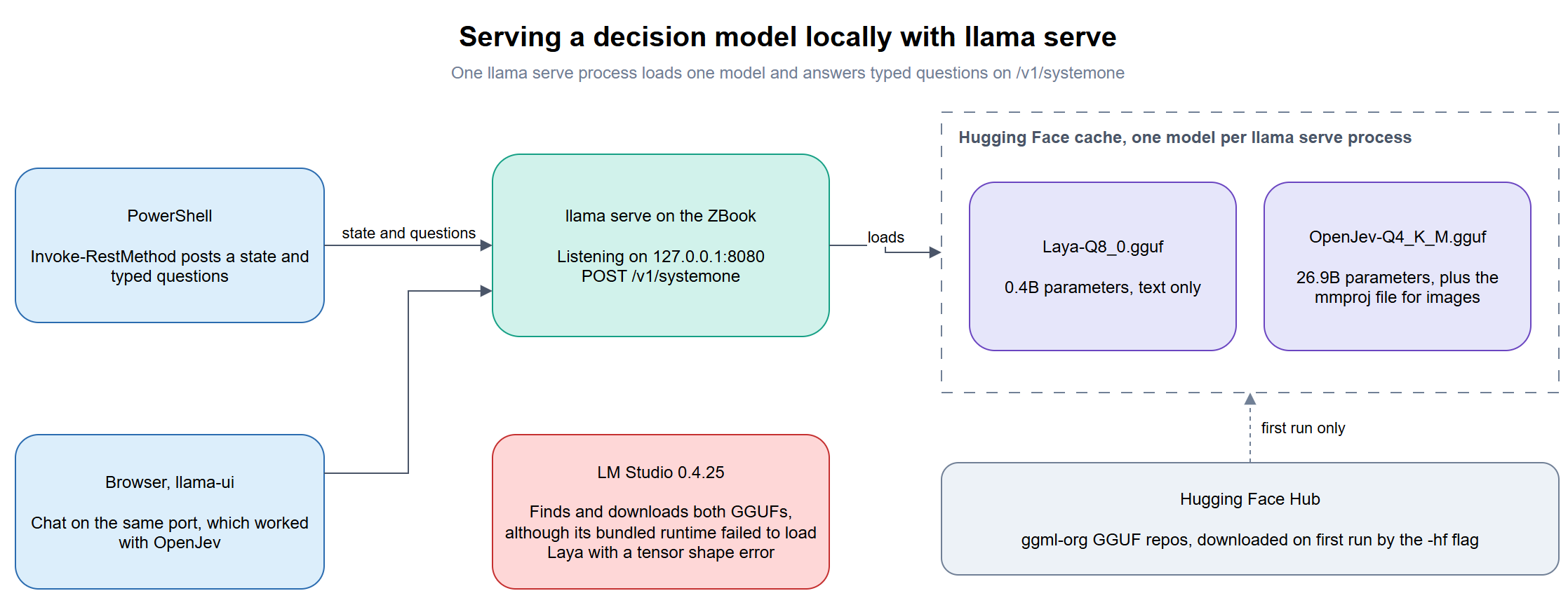
The two Decision Models models tested in this blog post
Laya and OpenJev sit at opposite ends of the size range, and the figures below combine what the model cards state with what llama.cpp reported when I loaded each one:
| Laya | OpenJev | |
|---|---|---|
| Publisher | Convai Innovations | OpenJev, an independent project |
| License | Apache 2.0 | CC BY-NC 4.0, non-commercial use only |
| Parameters | 0.4B | 26.9B |
| Architecture | ModernBERT encoder | Qwen3.8-27B |
| GGUF sizes | 449 MB (Q8_0), 844 MB (BF16) | 19 GB (Q4_K_M), 28.6 GB (Q8_0), 53.8 GB (BF16) |
Default download with -hf |
Q8_0 | Q4_K_M, plus a Q8_0 mmproj file for images |
| Input | Text | Text, with vision and video listed as modalities |
| Maker’s accuracy claim | 0.766 on typed-decisions, fine-tuned checkpoint | 84.0% against Jev’s 85.4% on a 10,000-question text benchmark |
Anyone doing client work should note that OpenJev’s weights are released for research and other non-commercial use only, and the model card directs commercial licensing enquiries to a contact address. I can test it for a blog post, although I could not place it in a customer’s pipeline without sorting out a commercial license first, while Laya’s Apache 2.0 license carries no such restriction. The accuracy claims in the last row were both measured by the projects themselves, and as I wrote in the Jev post, I am not ready to accept vendor benchmarks at face value.
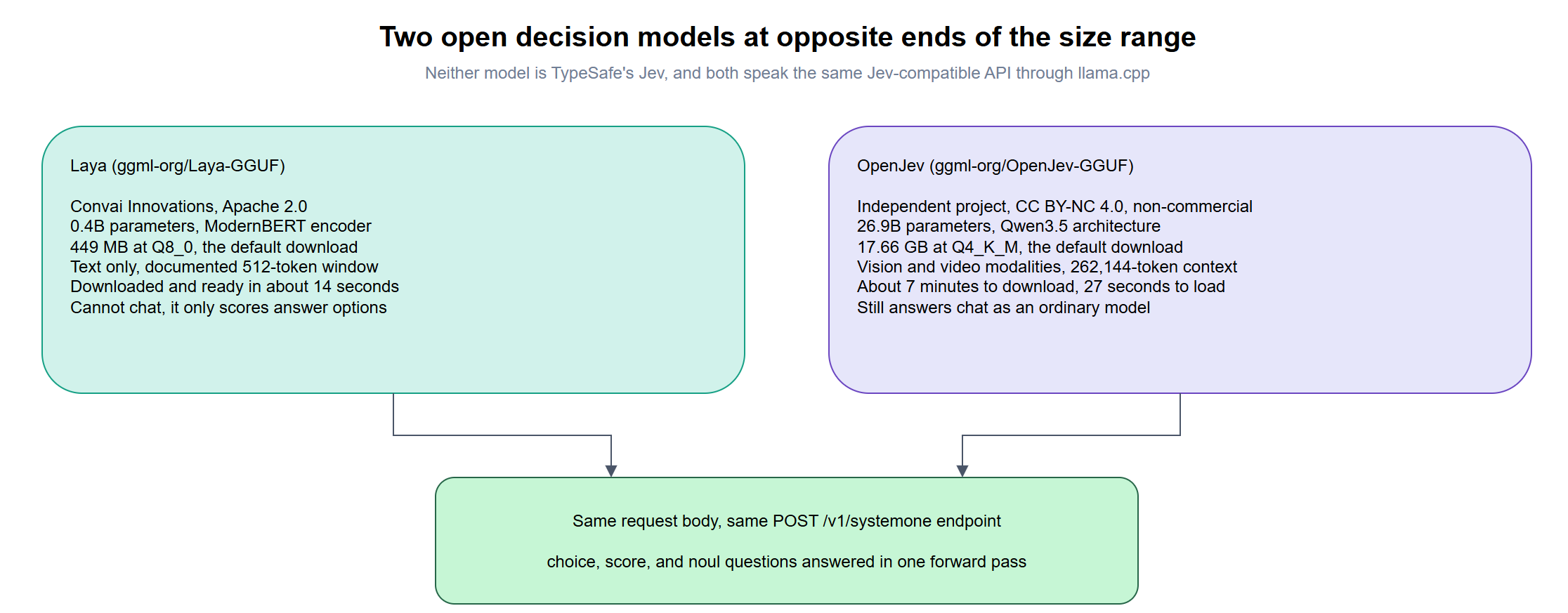
Step #1 – Install llama.app
There are three ways to get a current llama.cpp onto a Windows machine, and they differ mainly in how much is left for me to manage:
| Option | What it involves | What I have to manage |
|---|---|---|
| The llama.app download | Download the .msixbundle from llama.app or the Llama-Windows Releases page and open it, which covers both x64 and ARM64 |
Very little. The app installs the llama command, runs the server from the system tray, and reports when a newer version is available |
| Package manager or script | winget, or irm https://llama.app/install.ps1 | iex from PowerShell |
The same as the download, in a form that can be scripted across several machines |
| llama.cpp from GitHub | Download the release archive that matches the GPU backend from the llama.cpp Releases page, or clone the repository and compile it | Choosing the correct build for the hardware, putting it on the path, updating it by hand, and starting llama-server with my own flags |
All three end up running the same engine, and all three keep downloaded models in the same Hugging Face cache, so nothing is lost by moving between them. The GitHub route is still the one to use for anyone who wants a specific commit, a backend the app does not ship, or full control over the server flags. I have no such requirement here, because my interest is in the models, so for simplicity I used the download, which at the time of writing is LlamaApp-v0.11.0.msixbundle. Opening the file launches the Windows App Installer, and once it finishes, the llama command is available from any new Command Prompt or PowerShell window.

Step #2 – Serve Laya
Before starting the server, you’ll need to set the Hugging Face Access token using this for the command prompt:
set HF_TOKEN=hf_your_huggingface_access_token
Or this for Powershell:
$env:HF_TOKEN="hf_your_huggingface_access_token"
Starting the server and downloading the model is a single command, with the -hf flag pointing at the Hugging Face repository:
llama serve -hf ggml-org/Laya-GGUF
0.00.007.761 I srv  llama_server: initializing ...
0.00.557.245 W srv  llama_server: security: no API key is set and CORS allows all origins
Downloading Laya-Q8_0.gguf ---------------------------------------- 100%
0.12.281.299 W finalize_file: failed to create symlink: A required privilege is not held by the client.
0.12.281.309 W finalize_file: switching to degraded mode
0.12.292.476 I srv    load_model: loading model 'ggml-org/Laya-GGUF'
0.12.690.644 I decision model reads the embeddings output, enabling embedding mode
0.12.690.652 W embeddings enabled: setting n_batch = n_ubatch = 512
0.13.870.088 I srv          init: decision model type: laya
0.13.870.106 I srv    load_model: initializing, n_slots = 4, n_ctx_slot = 8192, kv_unified = 'true'
0.13.872.489 I srv  llama_server: model loaded
0.13.872.493 I srv  llama_server: listening on http://127.0.0.1:8080
0.13.872.495 W srv  llama_server: notice: server default port will be changed to :9931 in a future release
The model will be loaded once the download has completed.
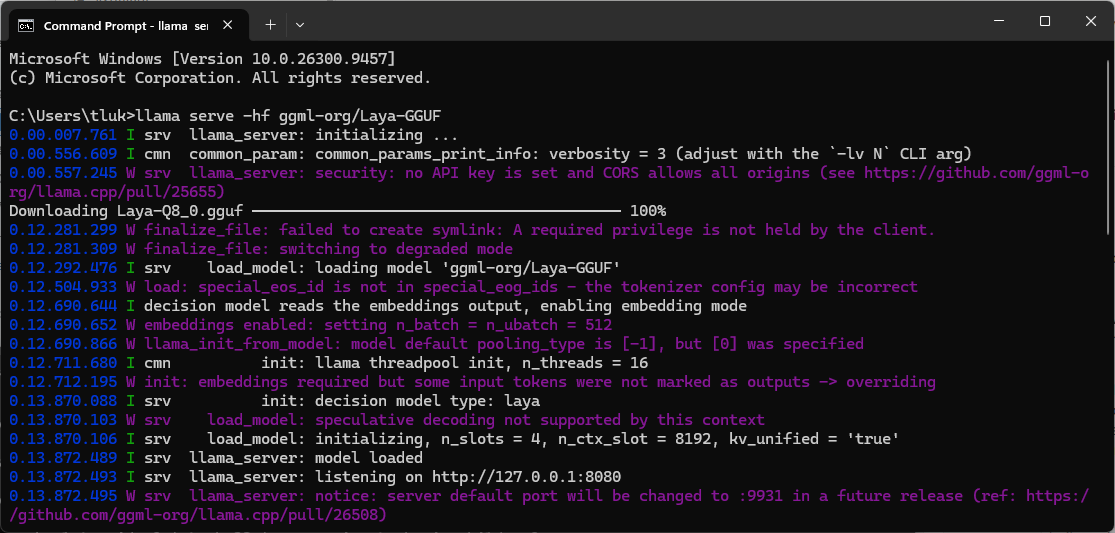
The whole sequence, from pressing Enter to a listening server, took just under 14 seconds, with roughly 12 of those spent downloading the 449 MB Q8_0 file. I looked up the lines in that log that stood out to me:
| Log line | What it means |
|---|---|
no API key is set and CORS allows all origins |
The server accepts requests from anything that can reach it. It binds to 127.0.0.1 by default, so it is only reachable from my own machine. |
failed to create symlink and switching to degraded mode |
The Hugging Face cache normally uses symbolic links, which Windows only allows with Developer Mode enabled or from an elevated prompt. The download still completed and the model loaded. |
decision model reads the embeddings output, enabling embedding mode |
This is the pull request’s design showing through, with the decision model handled as a wrapper around an embedding model. |
decision model type: laya |
llama.cpp detected the model family from the GGUF metadata, so no extra flag was needed. |
default port will be changed to :9931 |
The server listens on 8080 today, and the llama.app site already shows 9931, so scripts with a hard-coded port will need updating at some point. |
I noticed the server allocated a context of 8,192 tokens per slot while setting the batch size to 512, and 512 is the context window the Laya SDK documents for the English checkpoint. I’m not sure yet whether llama.cpp will accept a state longer than 512 tokens for Laya, and it is on my list to test with a full Azure Monitor alert payload.
The n_slots = 4 in the same line means the server will work on up to four requests at once, and it is the default, so I did not have to ask for it. This is more important for decision models than for chat because the typical use is an alert pipeline or an agent sending many small questions at the same moment. I have seen others say that Ollama cannot do this, which is not accurate, since Ollama supports parallel requests to a loaded model through the OLLAMA_NUM_PARALLEL setting, with a default that its documentation describes as 1.
The practical difference is that llama serve printed its slot count when the model loaded, so I knew what I had without looking up a setting, and one published comparison found a default Ollama install answering four simultaneous requests one after another until that variable was raised. The slots let requests overlap, although when I sent OpenJev four alerts at a time in Step #8, it finished no more decisions per second than it did with one, so on my hardware they did not add throughput.
Step #3 – Send a request with PowerShell
I used the sample request from the Hugging Face blog post as my test that was comprised of a single customer message with one question of each type. The body goes into a here-string so that the JSON does not need escaping:
$body = @'
{
  "state": "Customer message: I was charged twice for my order last week and nobody has replied.",
  "questions": {
    "route": {
      "type": "choice",
      "instructions": "Which team should handle this?",
      "criteria": {
        "billing": "payments, charges, refunds, invoices",
        "shipping": "delivery, tracking, lost or late parcels",
        "technical": "bugs, errors, login problems"
      }
    },
    "angry": {
      "type": "noul",
      "instructions": "Is the customer angry?"
    },
    "urgency": {
      "type": "score",
      "instructions": "How urgent is this?",
      "criteria": [
        "can wait",
        "this week",
        "today",
        "right now"
      ]
    }
  }
}
'@

Invoke-RestMethod `
    -Uri "http://localhost:8080/v1/systemone" `
    -Method Post `
    -ContentType "application/json" `
    -Body $body |
ConvertTo-Json -Depth 10
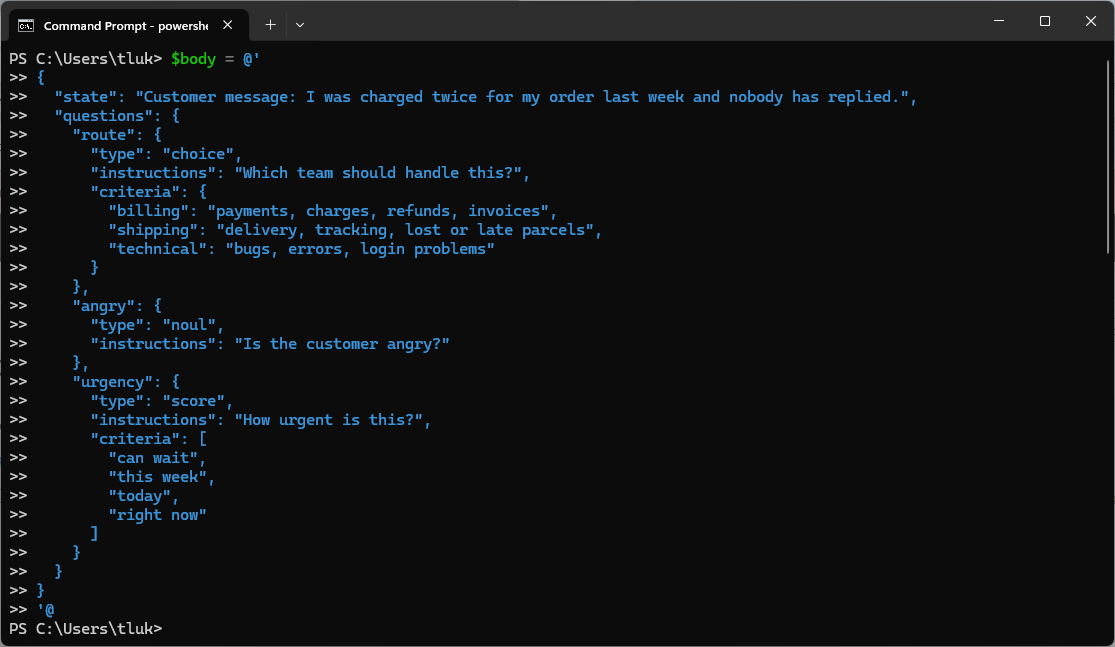
No API key, model name, or authentication header is required, because the server has one model loaded and is only listening locally.
Step #4 – Read Laya’s answers
{
    "model": "ggml-org/Laya-GGUF",
    "answers": {
        "route": {
            "type": "choice",
            "choice": "billing",
            "probabilities": {
                "billing": 0.982052039192289,
                "shipping": 0.009787107596097258,
                "technical": 0.00816085321161388
            },
            "confidence": 0.9730780587884333
        },
        "angry": {
            "type": "noul",
            "noul": 0.7890255315087449
        },
        "urgency": {
            "type": "score",
            "score": 1.8999467173363715,
            "legend": {
                "0": "can wait",
                "1": "this week",
                "2": "today",
                "3": "right now"
            },
            "probabilities": {
                "0": 0.036243120784383284,
                "1": 0.4717091453935498,
                "2": 0.047905629523379026,
                "3": 0.44414210429868795
            },
            "confidence": 0.027567041094861855
        }
    },
    "usage": {
        "input_tokens": 163,
        "output_tokens": 0
    }
}
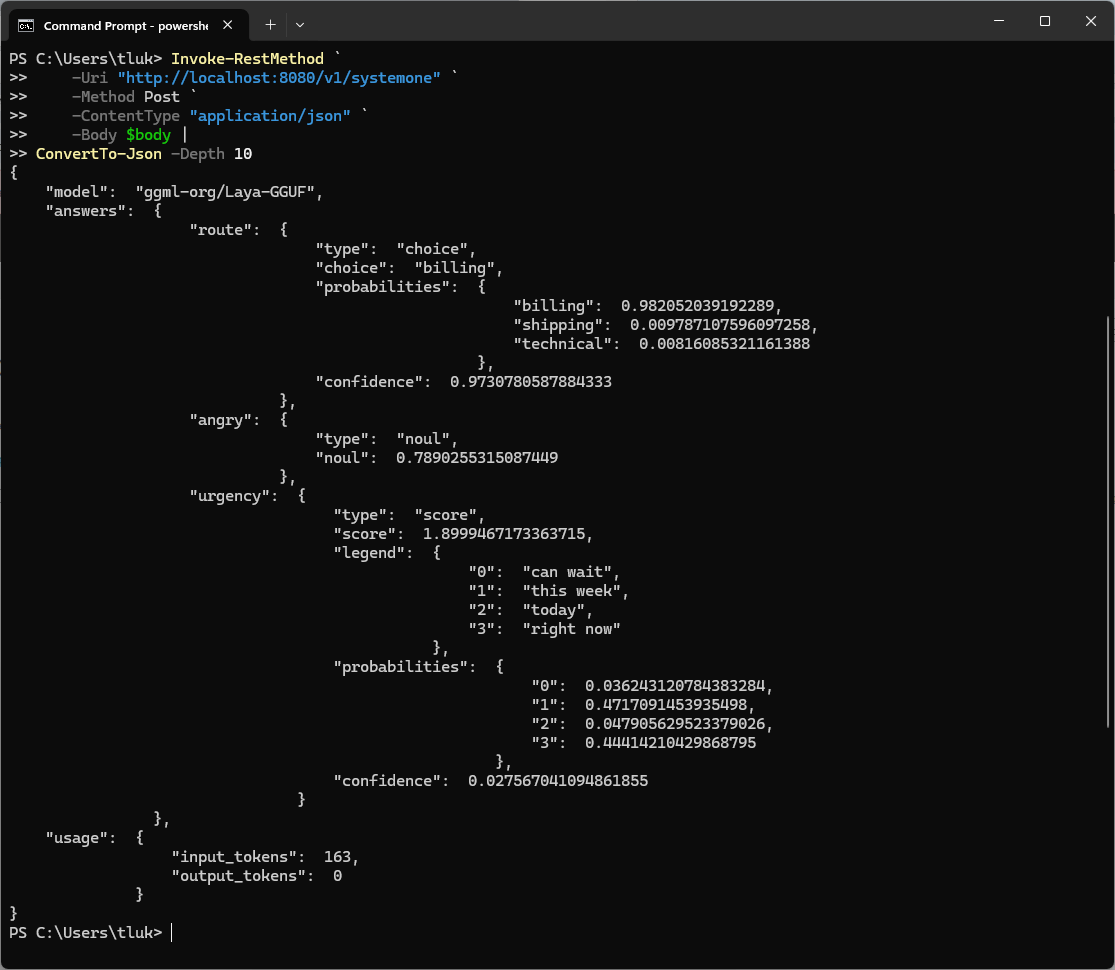
| Question | Answer | Confidence | My read |
|---|---|---|---|
route |
billing, 0.98 | 0.97 | Correct, and with almost no weight on the other two teams |
angry |
0.79 | None returned for noul |
Reasonable for a customer who was charged twice and ignored |
urgency |
1.90, which rounds to “today” | 0.03 | The score points to a level Laya gave less than 5 percent |
The routing answer is the result I was hoping for from a 449 MB model, since it put 0.98 on billing for a double charge and reported a confidence of 0.97, which would clear the 0.6 threshold I used in the Jev post with plenty of room. The usage block confirms how these models work, with 163 input tokens and 0 output tokens, because nothing is generated.
What surprised me was the urgency answer, because the score of 1.90 sits almost exactly on level 2, “today,” so a script that only read the score would file this ticket as due today. Looking at the probabilities, Laya gave “today” less than 5 percent, and split nearly all of the weight between “this week” at 0.47 and “right now” at 0.44. The score is an expected value, calculated by multiplying each level by its probability and adding the results, so two strong and opposing opinions averaged out to a level the model itself considered unlikely.
| Level | Label | Probability | Level x probability |
|---|---|---|---|
| 0 | can wait | 0.036 | 0.000 |
| 1 | this week | 0.472 | 0.472 |
| 2 | today | 0.048 | 0.096 |
| 3 | right now | 0.444 | 1.332 |
| Total | 1.900 |
The confidence value is the giveaway here at 0.03, which is Laya reporting that it has very little idea which level is correct. Any code consuming a score answer should check the confidence, or the spread of the probabilities, before acting on the number, and an answer like this one belongs in a human review queue. The Laya model card describes ordinal score questions as the weakest of its three question types, and this result is consistent with that.
Step #5 – Serve OpenJev
I stopped the Laya server with Ctrl+C and started OpenJev the same way, after setting my Hugging Face token for the session. I was working in Command Prompt at this point, which is why the token is set with set, and I only moved to PowerShell later because a here-string and Invoke-RestMethod make it much easier to build the request and call the API:
set HF_TOKEN=<your Hugging Face token>
llama serve -hf ggml-org/OpenJev-GGUF
0.00.002.795 I srv  llama_server: initializing ...
Downloading mmproj-OpenJev-Q8_0.gguf ------------------------------ 100%
Downloading OpenJev-Q4_K_M.gguf ----------------------------------- 100%
7.20.338.237 I srv    load_model: loading model 'ggml-org/OpenJev-GGUF'
7.42.608.933 I srv          init: decision model type: openjev
7.42.612.267 W load_hparams: Qwen-VL models require at minimum 1024 image tokens to function correctly on grounding tasks
7.42.612.276 W load_hparams: if you encounter problems with accuracy, try adding --image-min-tokens 1024
7.45.692.215 I srv    load_model: loaded multimodal model, '...\mmproj-OpenJev-Q8_0.gguf'
7.47.059.365 I srv    load_model: initializing, n_slots = 4, n_ctx_slot = 262144, kv_unified = 'true'
7.47.069.733 W srv          init: chat template supports preserving reasoning, it is enabled by default
7.47.069.846 I srv  llama_server: model loaded
7.47.069.849 I srv  llama_server: listening on http://127.0.0.1:8080
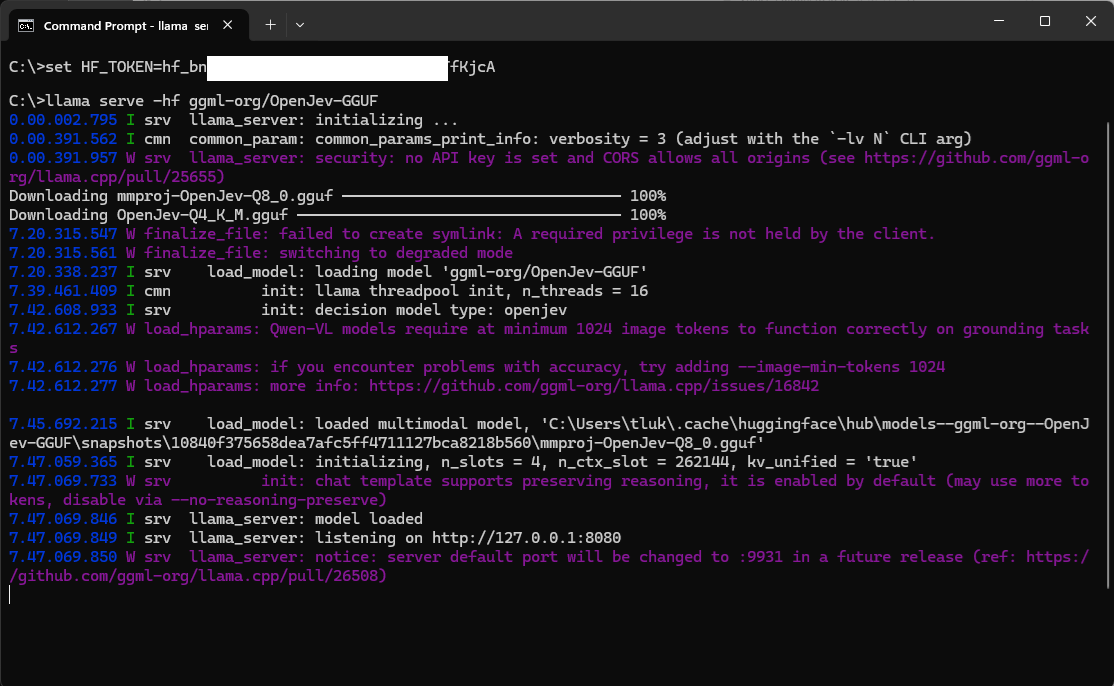
The difference in scale shows up in the timings, because the download took a little over 7 minutes and loading the model took another 27 seconds, compared with under 14 seconds for Laya from start to finish. Without a quantization tag, llama.cpp chose the Q4_K_M file for the model and paired it with a Q8_0 mmproj file, which is the projector that allows the model to accept images. The warning about Qwen-VL models needing at least 1,024 image tokens only matters for image input, and I have noted the --image-min-tokens 1024 flag for when I test screenshots.
I also noticed the line reporting that the chat template supports preserving reasoning, which is a hint that OpenJev is a different kind of model from Laya. Laya is an encoder that can only score answer options, while OpenJev is a full generative model that has been trained to make decisions.
Step #6 – Look at OpenJev in llama-ui
The server also hosts a web interface on the same port, so browsing to http://127.0.0.1:8080 opens a chat window with OpenJev selected.
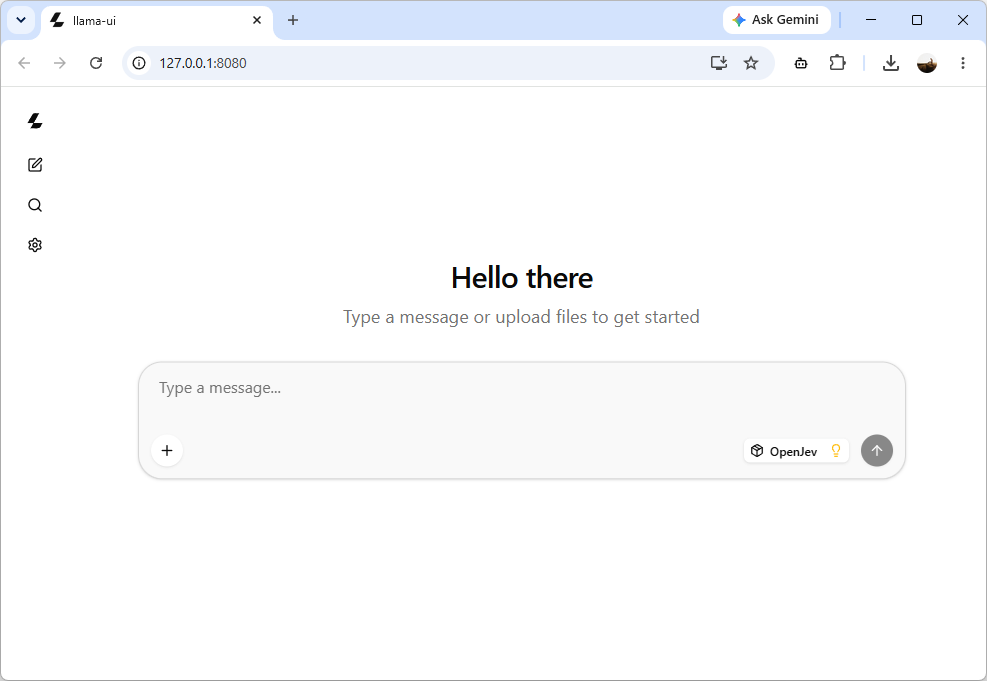
The model information panel lists what llama.cpp read from the GGUF file:
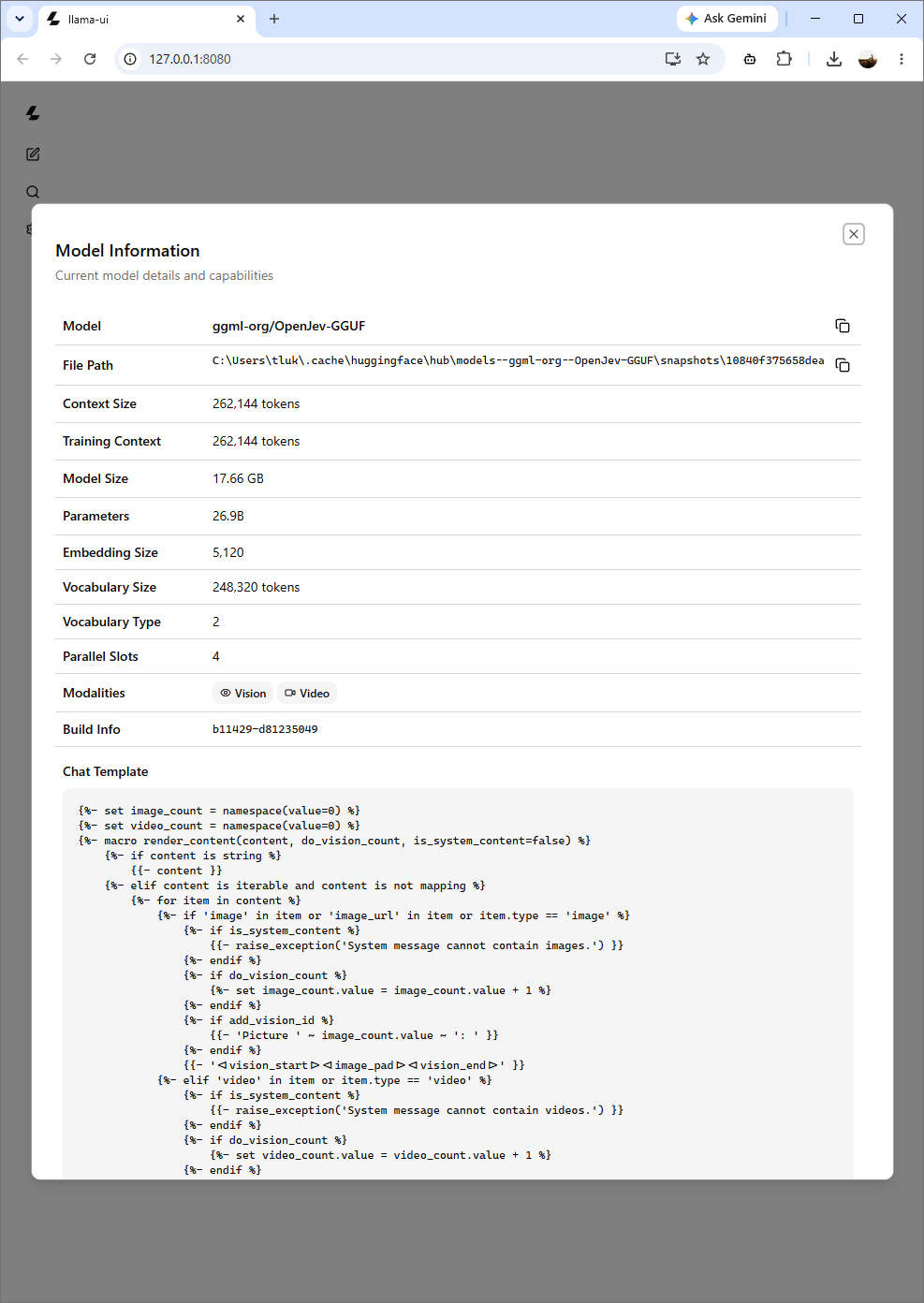
| Property | Value |
|---|---|
| Model | ggml-org/OpenJev-GGUF |
| Context size | 262,144 tokens |
| Model size | 17.66 GB |
| Parameters | 26.9B |
| Embedding size | 5,120 |
| Vocabulary size | 248,320 tokens |
| Parallel slots | 4 |
| Modalities | Vision, Video |
| Build | b11429-d81235049 |
OpenJev’s own model card lists a prompt limit of 16,384 tokens, so the 262,144 shown here is the context the underlying architecture was trained with, and I would stay within the documented limit until I have tested beyond it. Even at 16,384 tokens, a raw Azure Monitor alert payload fits with room to spare, which is not the case for Laya.
Out of curiosity I typed “Hi” into the chat box, and OpenJev answered like an ordinary chat model, with a collapsed reasoning block and a greeting, generating 35 tokens at 8.28 tokens per second.
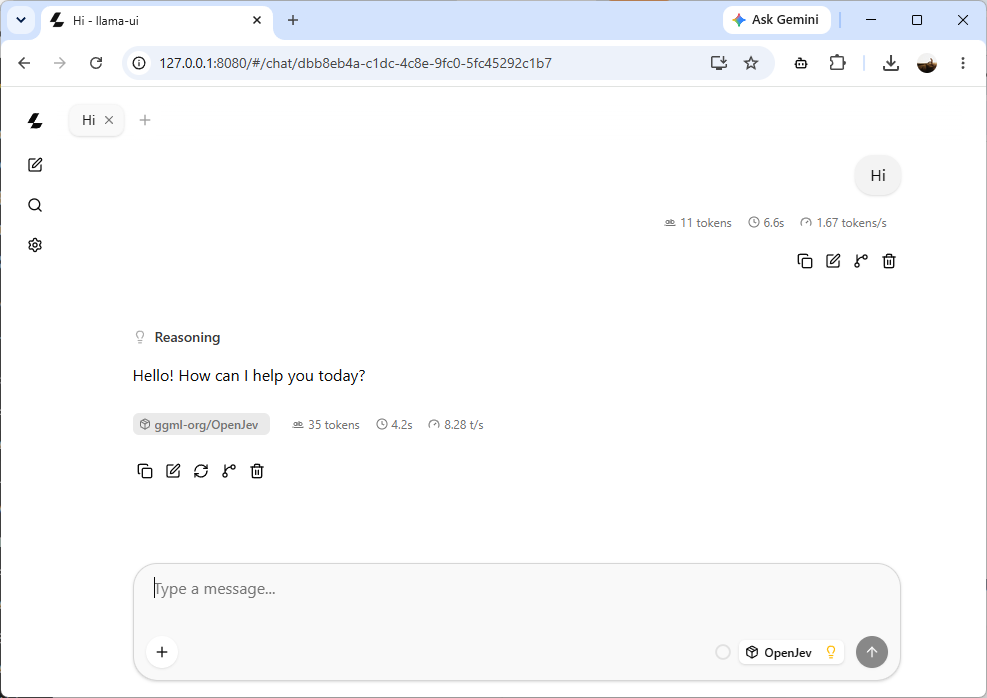
OpenJev had already held a conversation with me in LM Studio, so this was no surprise the second time, and it makes sense given that OpenJev is built on a general-purpose vision language model, and the /v1/systemone endpoint reads the scores at the first output position instead of letting the model write a reply.
Step #7 – Send the same request to OpenJev
Before sending the request I restarted the server with the Q8_0 file, because the ZBook has the memory for it and I wanted the result closest to the full-precision model. Adding the quantization as a tag after the repository name is all that is needed:
llama serve -hf ggml-org/OpenJev-GGUF:Q8_0
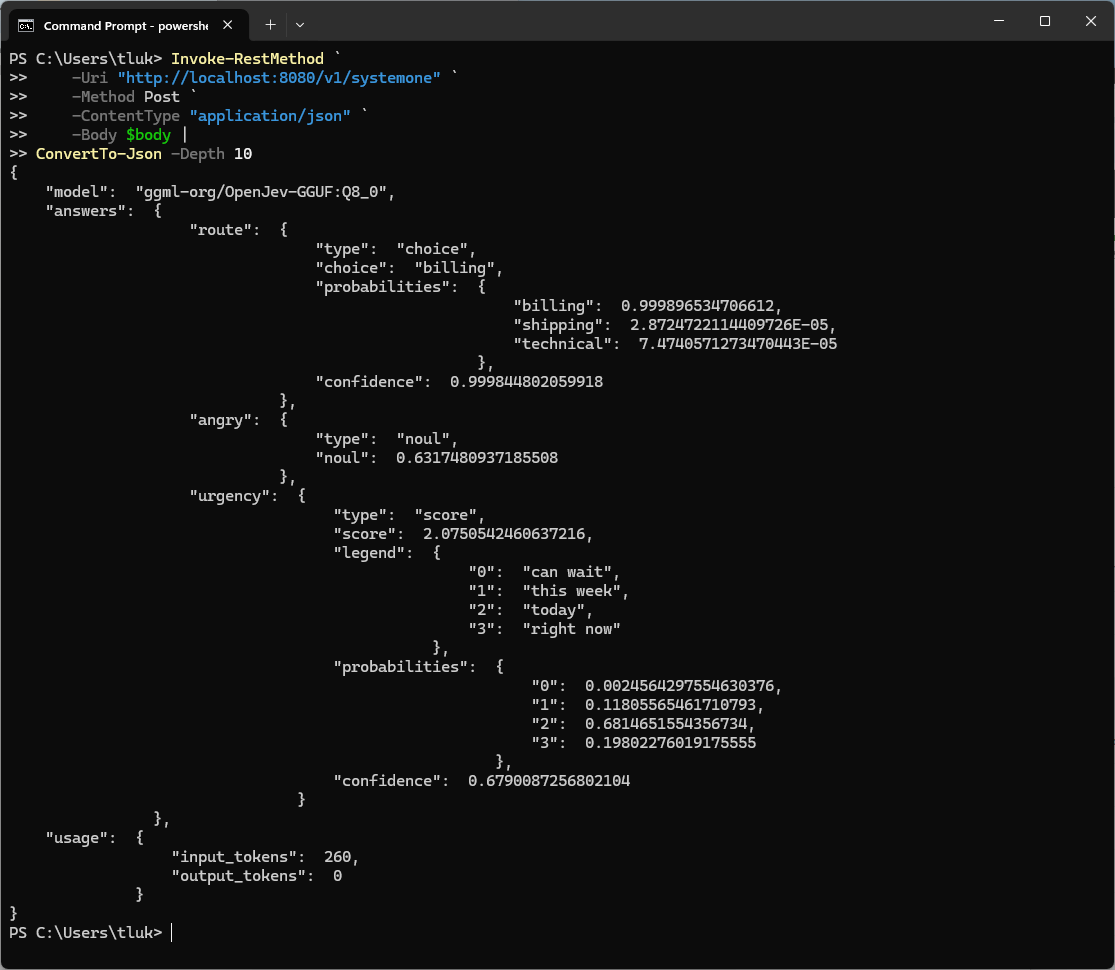
The request from Step #3 works against OpenJev without any changes, since both models are served through the same endpoint:
Invoke-RestMethod `
    -Uri "http://localhost:8080/v1/systemone" `
    -Method Post `
    -ContentType "application/json" `
    -Body $body |
ConvertTo-Json -Depth 10
{
    "model": "ggml-org/OpenJev-GGUF:Q8_0",
    "answers": {
        "route": {
            "type": "choice",
            "choice": "billing",
            "probabilities": {
                "billing": 0.999896534706612,
                "shipping": 2.8724722114409726E-05,
                "technical": 7.4740571273470443E-05
            },
            "confidence": 0.999844802059918
        },
        "angry": {
            "type": "noul",
            "noul": 0.6317480937185508
        },
        "urgency": {
            "type": "score",
            "score": 2.0750542460637216,
            "legend": {
                "0": "can wait",
                "1": "this week",
                "2": "today",
                "3": "right now"
            },
            "probabilities": {
                "0": 0.0024564297554630376,
                "1": 0.11805565461710793,
                "2": 0.6814651554356734,
                "3": 0.19802276019175555
            },
            "confidence": 0.6790087256802104
        }
    },
    "usage": {
        "input_tokens": 260,
        "output_tokens": 0
    }
}
| Question | Laya, Q8_0 | OpenJev, Q8_0 |
|---|---|---|
route |
billing, 0.98, confidence 0.97 | billing, 0.9999, confidence 0.9998 |
angry |
0.79 | 0.63 |
urgency score |
1.90, confidence 0.03 | 2.08, confidence 0.68 |
urgency probabilities |
0.04, 0.47, 0.05, 0.44 | 0.00, 0.12, 0.68, 0.20 |
| Input tokens | 163 | 260 |
| Model file | 449 MB | 28.6 GB |
Both models sent the ticket to billing, and OpenJev did so with a probability so close to 1 that PowerShell printed the other two options in scientific notation. The urgency question is where the difference between the two models started to show, because the two scores look almost identical at 1.90 and 2.08, yet OpenJev put 0.68 on “today” and reported a confidence of 0.68, while Laya arrived at nearly the same number by averaging two levels it could not decide between and reported a confidence of 0.03. Looking only at the scores, the answers seem similar. Looking at the probability distribution, they really aren’t.
OpenJev was less sure than Laya that the customer is angry, with 0.63 against 0.79, and reading the message again I think the lower number is the fairer one, since the customer states two facts and makes no threat or demand. The same request also cost 260 input tokens on OpenJev compared with 163 on Laya, which comes down to the two models using different tokenizers and prompt formats around the same state and questions.
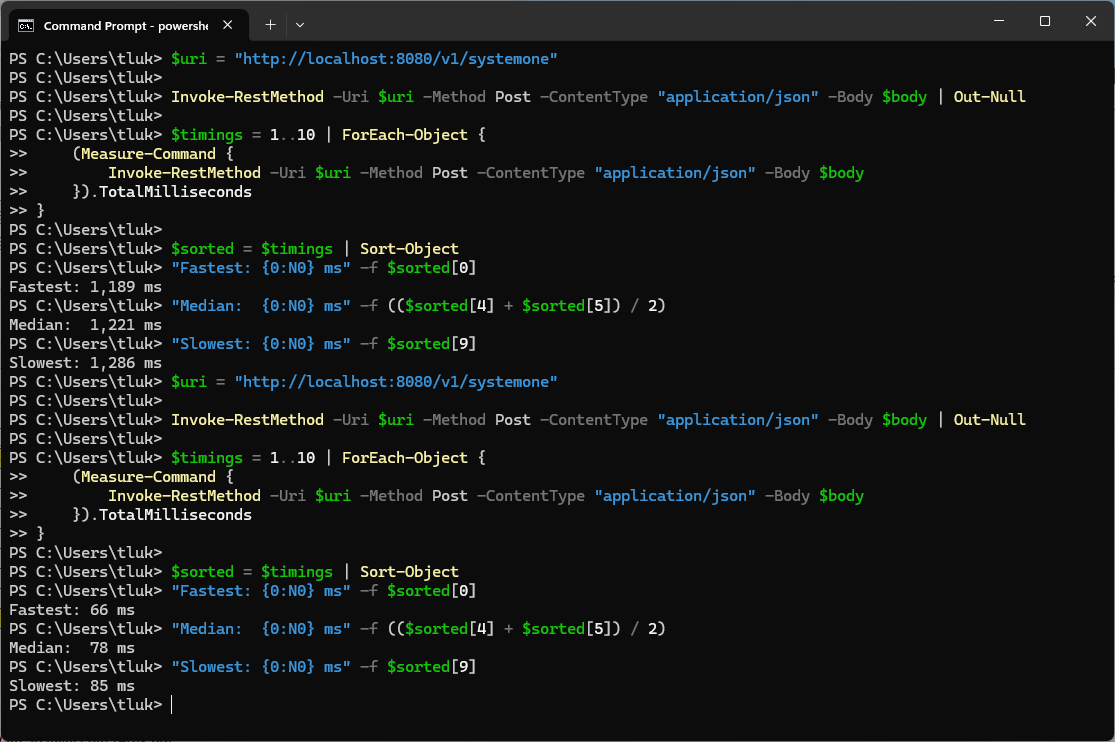
To find out how long each model takes to answer, I wrapped the same call in Measure-Command, ran it once to warm the model up, and then timed ten requests:
$uri = "http://localhost:8080/v1/systemone"

Invoke-RestMethod -Uri $uri -Method Post -ContentType "application/json" -Body $body | Out-Null

$timings = 1..10 | ForEach-Object {
    (Measure-Command {
        Invoke-RestMethod -Uri $uri -Method Post -ContentType "application/json" -Body $body
    }).TotalMilliseconds
}

$sorted = $timings | Sort-Object
"Fastest: {0:N0} ms" -f $sorted[0]
"Median:  {0:N0} ms" -f (($sorted[4] + $sorted[5]) / 2)
"Slowest: {0:N0} ms" -f $sorted[9]
Fastest: 1,189 ms
Median:  1,221 ms
Slowest: 1,286 ms
Those are OpenJev’s numbers, and after stopping the server and loading Laya, the same script returned:
Fastest: 66 ms
Median:  78 ms
Slowest: 85 ms
| Laya, Q8_0 | OpenJev, Q8_0 | |
|---|---|---|
| Fastest | 66 ms | 1,189 ms |
| Median | 78 ms | 1,221 ms |
| Slowest | 85 ms | 1,286 ms |
| Median per question | 26 ms | 407 ms |
| Spread, fastest to slowest | 19 ms | 97 ms |
Laya answered all three questions in a median of 78 ms, which is about 16 times faster than OpenJev’s 1,221 ms on the same hardware, and both models were consistent from one request to the next, with a spread of under 100 ms across ten runs each. These timings were taken from PowerShell, so they include the overhead of Invoke-RestMethod and a local HTTP round trip, which is a meaningful share of Laya’s 78 ms and a negligible share of OpenJev’s 1,221 ms.
For comparison, the hosted Jev calls in my previous post ranged from 0.19 to over 3 seconds once the network and the gateway were included, so a 27B model answering in 1.2 seconds on a laptop is in the same range as the hosted service on a slow day, and Laya is faster than the best Jev response I recorded.
The PowerShell request and the two serve commands are in this repo: GitHub Repository
Step #8 – Alert Invaders, a game for the alert triage problem
A table of milliseconds does not convey what 78 ms feels like, and every launch of a decision model seems to arrive with a video of it playing a game, so I wanted one of my own. Doom, Pac-Man, Snake, Flappy Bird, Pong, Tetris, and a long list of others had already been built for Jev and Laya when I looked through the community build directory, so I went with a game more relatable on my own day job, and as far as I could find nobody has built this one.
In Alert Invaders, Azure Monitor alerts fall from the top of the screen, and the model has to route each one to the correct operations queue before it lands. The queues are the same five I used for the alert triage example in the Jev post, with a sixth column for human review and a seventh for alerts that were missed:
| Outcome | What happened | Colour |
|---|---|---|
| Routed correctly | The model answered in time, with confidence at or above the gate, and chose the right queue | Green |
| Routed wrongly | The model answered in time and with confidence, although it chose the wrong queue | Red |
| Human review | The model answered in time, with a confidence below the gate, which defaults to 0.6 | Amber |
| Missed | The alert landed before the model answered | Grey |
Every alert that appears is sent to the server as its own request, with the alert text as the state and a single choice question:
{
  "state": "Azure Monitor alert: Azure Firewall SNAT port utilization reached 95 percent.",
  "questions": {
    "route": {
      "type": "choice",
      "instructions": "Which operations queue should own this Azure Monitor alert?",
      "criteria": {
        "identity": "Entra ID sign-ins, Conditional Access, MFA, and account lockouts",
        "network": "Virtual networks, firewalls, VPN, ExpressRoute, DNS, and load balancers",
        "compute": "Virtual machines, App Service, Functions, and container workloads",
        "data": "Storage accounts, SQL, Cosmos DB, and backups",
        "cost": "Budgets, spend anomalies, and quota"
      }
    }
  }
}
The game runs for ten waves of ten alerts, and each wave is faster than the one before it:
| Wave | Alerts per second | Seconds to land |
|---|---|---|
| 1 | 0.5 | 7.0 |
| 3 | 0.7 | 5.7 |
| 5 | 1.1 | 4.6 |
| 7 | 1.7 | 3.7 |
| 10 | 3.4 | 2.7 |
The whole game is a single HTML file with no dependencies, so there is nothing to install. With llama serve running and a model loaded, opening alert-invaders.html in a browser and pressing Start is all it takes, and the page can call the server directly because, as the log in Step #2 showed, the server allows requests from any origin. The Parallel requests setting controls how many alerts the page will have in flight at once, which makes it a convenient way to exercise the four slots the server reported.
A fast model clears alerts quicker than anyone can read them, so every alert stays in the column it landed in once it has been dealt with, newest at the top, along with the queue the model chose, its confidence, how long the answer took, and the queue the alert belonged in whenever the model got it wrong. Pause freezes the board and holds any answers that arrive in the meantime, Stop ends the run early and files whatever is still on screen, and the columns remain after the game is over so the whole run can be reviewed.
Speed aside, I wanted to know how well Laya reads these alerts before the clock is involved, so I sent all 40 sample alerts to it once with no time pressure. It routed 34 of the 40 to the correct queue, which is 85% without any fine-tuning, and every one of the six mistakes involved an alert that mentions a compute or network term while belonging to another team, such as a vCPU quota alert going to compute when it belongs with cost, or a failed backup of a SQL virtual machine going to compute when it belongs with data.
| Confidence gate | Routed correctly | Routed wrongly | Sent to human review |
|---|---|---|---|
| 0.6 (the default) | 20 | 3 | 17 |
| 0.4 | 25 | 5 | 10 |
| 0.2 | 34 | 6 | 0 |
Raising the threshold reduced the number of mistakes, but it was far from perfect, because two of the wrong answers came back with a confidence of 0.81, well above the gate and higher than many of the correct ones. That is the calibration problem the Laya model card warns about, showing up on my own alerts.
I ran it four times at 1x speed, once for each model with one request at a time, and once for each model with four in parallel.
| Run | Correct | Wrong | Human review | Missed | Median latency | First wave with a miss |
|---|---|---|---|---|---|---|
| Laya, 1 parallel | 53 | 7 | 40 | 0 | 62 ms | None |
| Laya, 4 parallel | 52 | 7 | 41 | 0 | 64 ms | None |
| OpenJev, 1 parallel | 72 | 0 | 2 | 26 | 706 ms | Wave 8 |
| OpenJev, 4 parallel | 74 | 0 | 1 | 25 | 1,051 ms | Wave 8 |
Laya never missed an alert. Even in the last wave, with an alert arriving every 0.3 seconds, it was answering in around 60 ms, so the game at 1x speed does not come close to its limit.
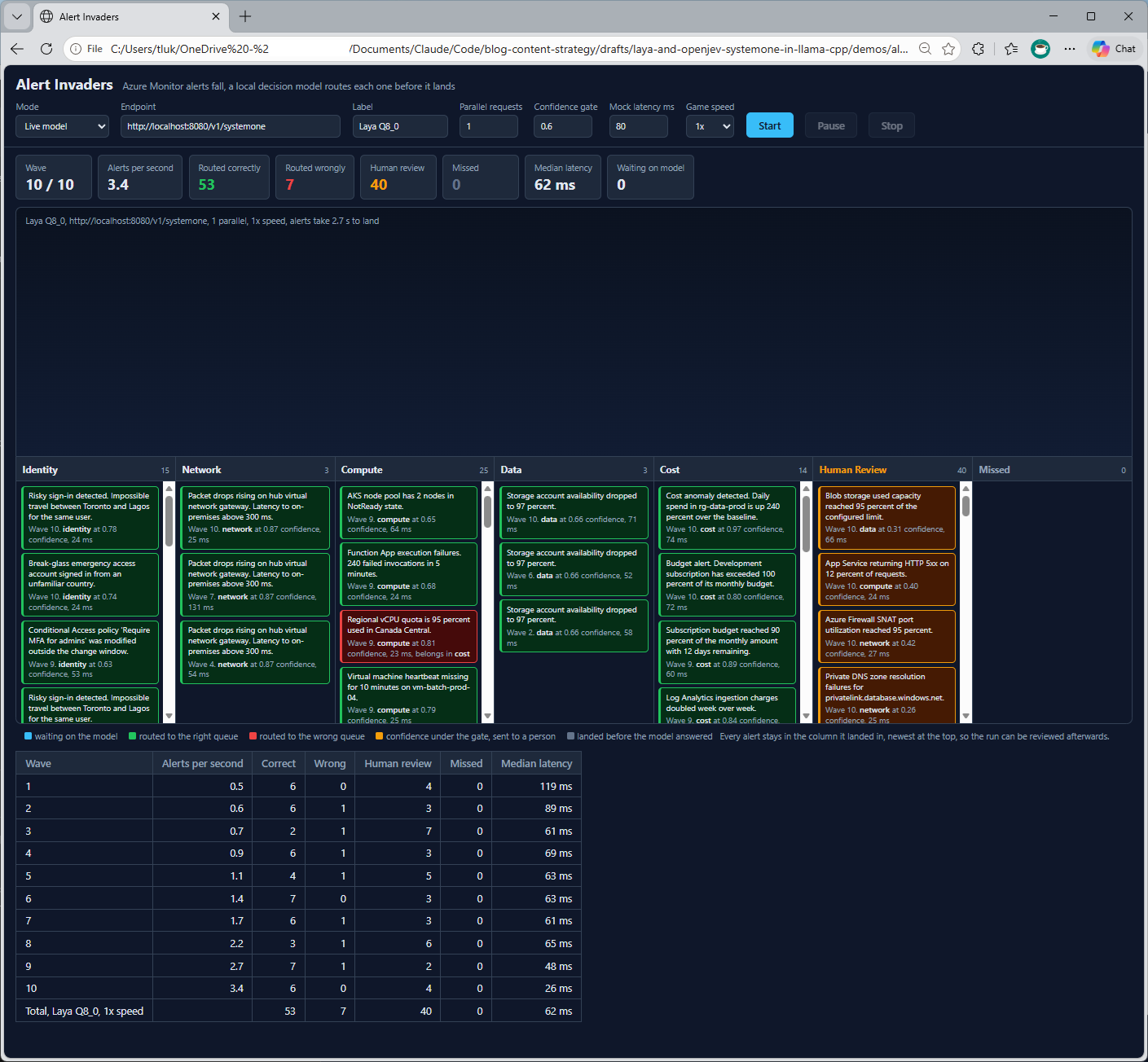
What Laya gave up was certainty. It sent 40 of the 100 alerts to human review because its confidence was under the 0.6 gate, and of the 60 it did route on its own, 53 went to the correct queue and 7 went to the wrong one, which is 88% of the alerts it was confident about. The mistakes were the same kind I saw in the test with no time pressure, such as the vCPU quota alert going to compute at 0.81 confidence when it belongs with cost.
OpenJev was the opposite in every respect. It did not route a single alert to the wrong queue in either run, and almost every answer came back at a confidence of 1.00. The only alerts it sent to human review were the vCPU quota alert, which it placed in cost, the correct queue, at 0.54 confidence. That is the same alert Laya got wrong with a confidence of 0.81, so on the one alert that is hard to call, the larger model was right and unsure while the smaller model was wrong and sure.
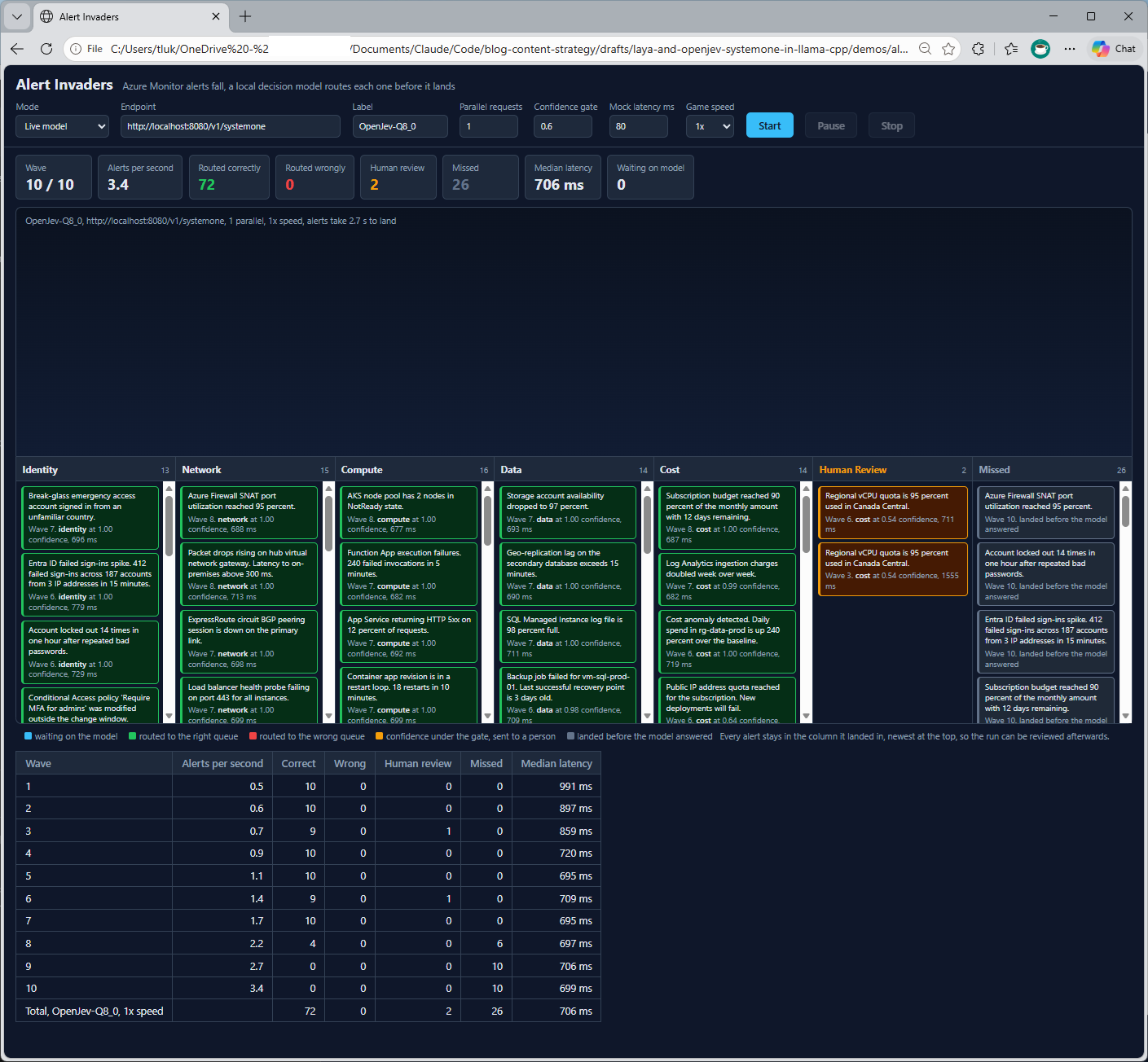
OpenJev’s weakness was speed. It kept up through wave 7, at 1.7 alerts per second, and then fell behind in wave 8 and missed every alert in waves 9 and 10:
| Wave | Alerts per second | OpenJev, 1 parallel | OpenJev, 4 parallel |
|---|---|---|---|
| 7 | 1.7 | 10 correct, 695 ms | 10 correct, 1,138 ms |
| 8 | 2.2 | 4 correct, 6 missed, 697 ms | 5 correct, 5 missed, 2,600 ms |
| 9 | 2.7 | 10 missed, 706 ms | 10 missed, 2,712 ms |
| 10 | 3.4 | 10 missed, 699 ms | 10 missed, 2,707 ms |
At about 700 ms for each answer, OpenJev can clear roughly 1.4 alerts per second, and it survived wave 7 only because alerts take a few seconds to fall, which gave it a small buffer. Once the alerts arrived faster than that, a queue built up behind the request in progress, and by wave 9 every alert landed before its turn came.
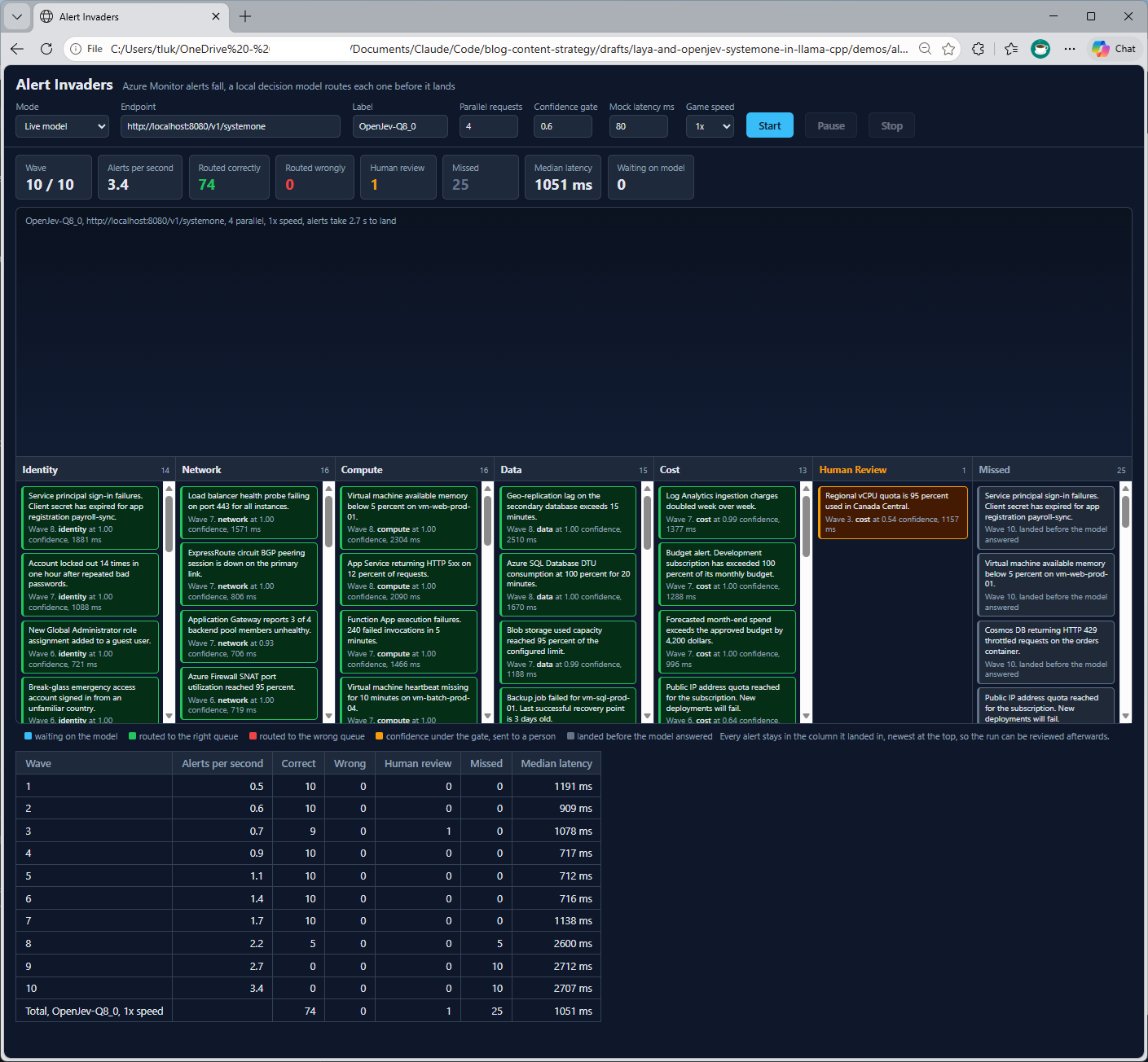
Four parallel requests did not help. I expected the four slots the server reported in Step #2 to let OpenJev work on four alerts at once, and the result was one fewer missed alert out of a hundred, which is within the noise of a single run. The latency column shows why, because with four requests in flight each one took about 2,700 ms in the late waves, close to four times the 700 ms a single request takes, so the server was accepting four requests at a time and finishing them at the same overall rate.
On my hardware, with one 27B model, the slots allow requests to overlap and do not add throughput. Laya’s results were unchanged by the setting as well, since it finishes each alert before the next one arrives and never has four in flight to begin with.
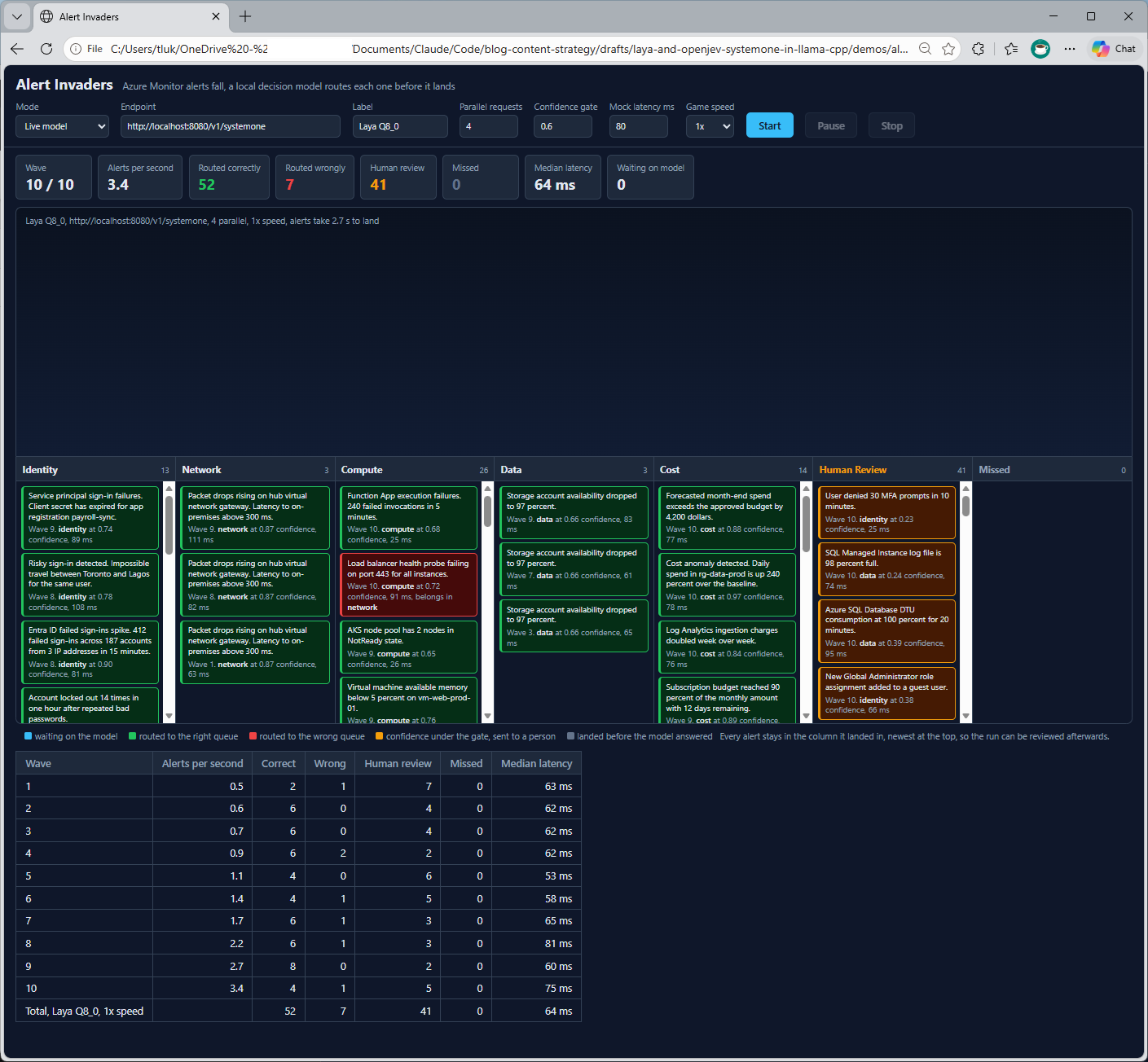
Neither model is the better alert router on these results. Laya handled every alert at any rate the game could produce and needed a person for 40% of them, with a 12% error rate on the rest, while OpenJev made no mistakes and needed a person for almost none, as long as the alerts arrived no faster than about one and a half a second. For the alert volumes I see in most Azure environments, that rate is more than enough, so the choice comes back to the license and to how much a wrong route costs.
Step #9 – Space Invaders, you against the model
Alert Invaders only means something to people who have stared at an alert queue, so I built a second game that everyone has played. The page shows two identical Space Invaders boards side by side, with me on the left using the arrow keys and the space bar, and the model on the right, and both boards run in real time for 90 seconds.
The model cannot see the screen, so before every decision the page describes the board in plain sentences and sends that as the state. The cannon keeps doing whatever the last answer said until the next answer arrives, and the page sends a new request the moment the previous one returns, which is what makes this a test of speed. The panel under the model’s board shows the exact text it was sent and the answer that came back, so every move can be traced to a sentence the model read.
Like Alert Invaders, this is a single HTML file that only needs llama serve running, and it has a Mock mode for anyone who wants to try it without a model.
The first attempt went badly
My first version described everything about the board in one state and asked two questions, a choice for movement and a noul for firing:
{
  "state": "No bombs are near the cannon. The nearest invader is a short way to the right. The cannon is ready to fire. The cannon is at the left wall.",
  "questions": {
    "move": {
      "type": "choice",
      "instructions": "Which way should the cannon move next? Getting out from under a falling bomb comes first, and lining up under the nearest invader comes second.",
      "criteria": {
        "left": "Move left, because the clear side is the left, or the nearest invader is to the left and no bomb is in the way",
        "right": "Move right, because the clear side is the right, or the nearest invader is to the right and no bomb is in the way",
        "stay": "Stay still, because an invader is directly above the cannon and no bomb is overhead"
      }
    },
    "fire": {
      "type": "noul",
      "instructions": "Should the cannon fire now?",
      "criteria": {
        "true": "An invader is directly above the cannon and the cannon is ready to fire.",
        "false": "No invader is directly above the cannon, or a shot is already in the air."
      }
    }
  }
}
Laya was fast, and it played poorly. The cannon shook left and right at the start whenever it was shot at, then drifted to the left wall and stayed there, firing only when the invaders happened to march over it.
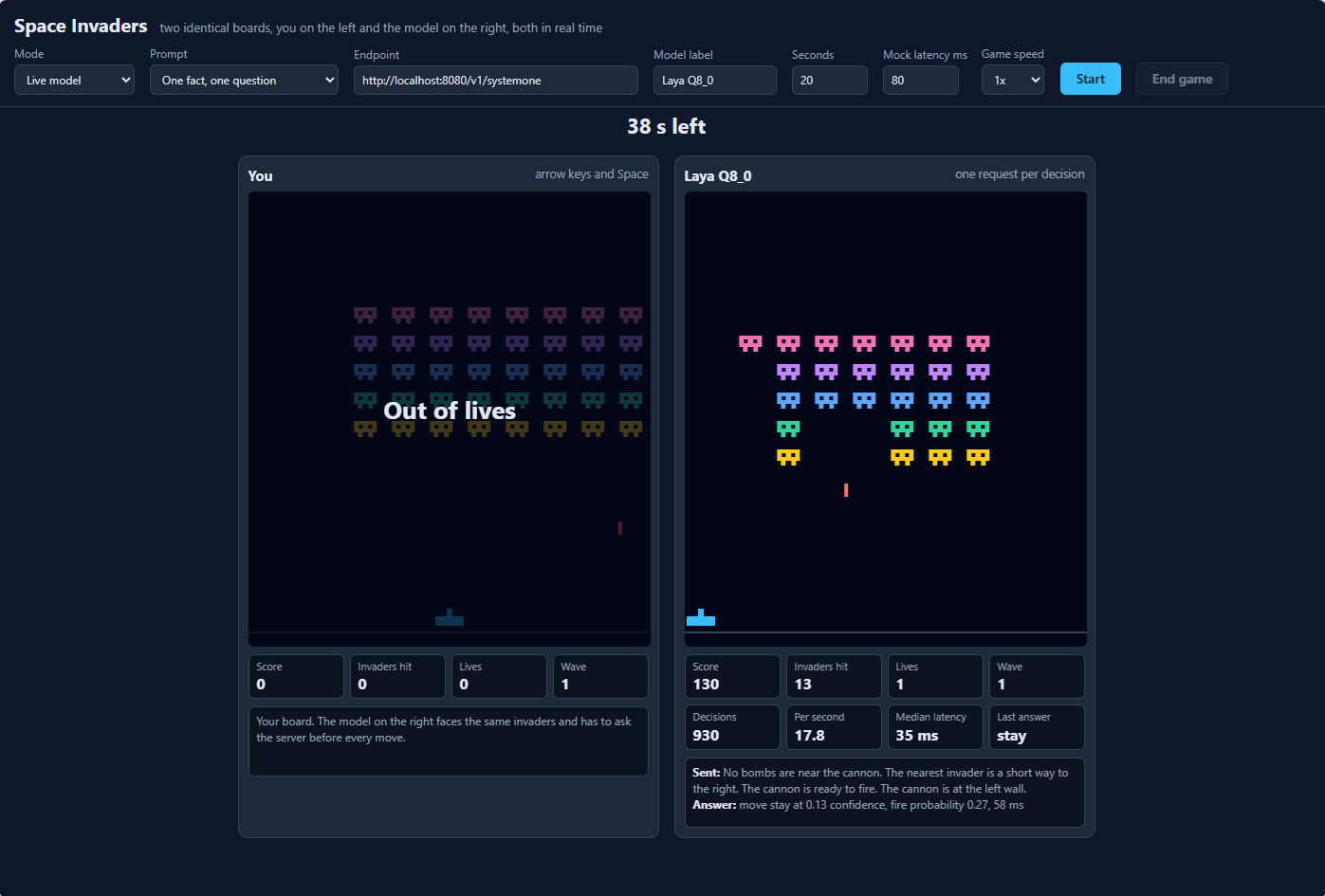
The numbers in that screenshot, taken 52 seconds into the game, tell both halves of the story. Laya had made 930 decisions at 17.8 per second with a median latency of 35 ms, which is faster than the 78 ms I measured from PowerShell in Step #7, and it had hit 13 invaders and lost two lives. The panel underneath shows why, because the state says the nearest invader is to the right and the cannon is ready to fire, and Laya answered “stay” with a confidence of 0.13, which for a three-option question is barely above a coin toss.
Measuring what each model can read
To find out whether this was the game, the wording, or the model, I wrote a script that builds 98 board situations, each with a known sensible move, and asks the same question in several different wordings. It is in the repo as prompt-eval.py, and I ran it against both models.
| Wording | Laya, correct of 98 | OpenJev, correct of 98 |
|---|---|---|
| Full description, long criteria (the first attempt) | 34 (35%) | 72 (73%) |
| Full description, short criteria | 54 (55%) | 70 (71%) |
| Two facts (bombs, then the nearest invader), short criteria | 68 (69%) | 78 (80%) |
| One fact, short criteria | 82 (84%) | 82 (84%) |
| One fact, four options with criteria written as facts | 98 (100%) | 98 (100%) |
With three options, 35% is what guessing would score, and Laya answered “left” in 65 of the 98 situations regardless of what the state said, which is exactly the drift to the left wall I watched on screen. Accuracy climbed with every piece of reasoning I took away from the model. The first attempt asked it to read four sentences, work out which one mattered most, and match that to a long criterion containing its own “or” and “because.” The last row has the page apply the priority rule, bombs first and then the target, and send only the one sentence that matters, so the model only has to match a sentence to an option.
OpenJev’s column answers the question I had after fixing the game, which was whether the first attempt failed because of my wording or because of Laya. It was some of both. Given the same full description, OpenJev chose the sensible move 73% of the time, more than double Laya’s score, and it showed no lean towards one side, with 47 answers of “left” and 43 of “right.” A larger model can do a good share of the reasoning that Laya could not do at all.
It was still wrong in a quarter of the situations, though, and it improved in the same way Laya did as the question became simpler, reaching 100% on the same final wording. Nearly all of OpenJev’s mistakes on the first attempt were situations where the cannon should have held still, which it chose only 8 times against the 34 that called for it, and looking back at my criteria, the “stay” option only described an invader being directly overhead and said nothing about waiting for a bomb to pass, so part of that is on the instructions I wrote.
The same test surfaced two other issues I wasn’t expecting. The first is that the order of the options matters. When I worded the four criteria as actions, such as “shoot, an invader is directly overhead,” Laya scored 51% with the options in one order and 84% with the same options reversed, and OpenJev scored 100% and 84% on the same pair, so neither model is immune. Wording the criteria as plain facts, such as “an invader is directly overhead,” scored 100% in both orders for both models.
The second is confidence. Even at 100% accuracy Laya’s average confidence was only 0.37, so the 0.6 confidence gate I used in Alert Invaders would have sent most of its correct answers to human review, while OpenJev averaged 0.89 on the same questions. OpenJev’s confidence has its own problem, because on the full description its wrong answers averaged 0.89 as well, compared with 0.98 for its right ones, which means a confidence gate would not have caught them.
| Laya, Q8_0 | OpenJev, Q4_K_M | |
|---|---|---|
| Full description, accuracy | 35% | 73% |
| Full description, confidence when right | 0.21 | 0.98 |
| Full description, confidence when wrong | 0.14 | 0.89 |
| One fact, accuracy | 100% | 100% |
| One fact, confidence when right | 0.37 | 0.89 |
| Affected by option order | Yes, 51% against 84% | Yes, 100% against 84% |
The Laya model card states that the base checkpoints score below a majority-class guess without fine-tuning, so a poor first result is consistent with what Convai Innovations published. What the two columns add is a picture of where the boundary sits for each model, because Laya out of the box can match one sentence to one option quickly and reliably and cannot weigh several facts against each other, and OpenJev can weigh them most of the time, although it also does its best work when the question is simple. OpenJev was running the Q4_K_M file for this test and the Q8_0 file everywhere else in this post.
The fix
I changed the game to send the wording from the last row of that table. The page now works out which single fact matters most, with a falling bomb taking priority over lining up a shot, and sends only that sentence along with one question that has four options:
{
  "state": "A bomb is directly overhead. The only clear side is the left.",
  "questions": {
    "act": {
      "type": "choice",
      "instructions": "What should the cannon do?",
      "criteria": {
        "left": "the clear side or the nearest invader is to the left",
        "right": "the clear side or the nearest invader is to the right",
        "fire": "an invader is directly overhead",
        "wait": "a bomb is blocking the way"
      }
    }
  }
}
With that change, Laya no longer drifts to the left wall and stays there, and OpenJev plays from the same wording. The cannon moves under the nearest invader, fires when one is overhead, and steps out of the way of a falling bomb, which is how I would expect a person to play. The original wording is still available in the game as a Prompt setting named “Full description, two questions,” for anyone who wants to watch the difference for themselves.
Laya is the same model in both attempts, so all of the improvement came from asking it a question it is capable of answering, and that is the lesson I took from this game. A small decision model like Laya is quick and dependable at matching one sentence to one option, and the work of deciding which sentence to send has to be done by the code around it. A larger model like OpenJev tolerates a looser question, although the test above shows it rewards a tight one as well.
Reading response times from the llama serve console
The timings so far were all taken from the client, first with Measure-Command in PowerShell and then by the game pages in the browser, so they include the HTTP round trip along with the model’s own work. The llama serve console window gives the other half of the picture. It does not print a duration for each request, although every line starts with a timestamp, and the time the model spent on a decision can be worked out by subtracting one from another.
The following is what the console looked like with Laya loaded while Space Invaders was running at 2x speed:
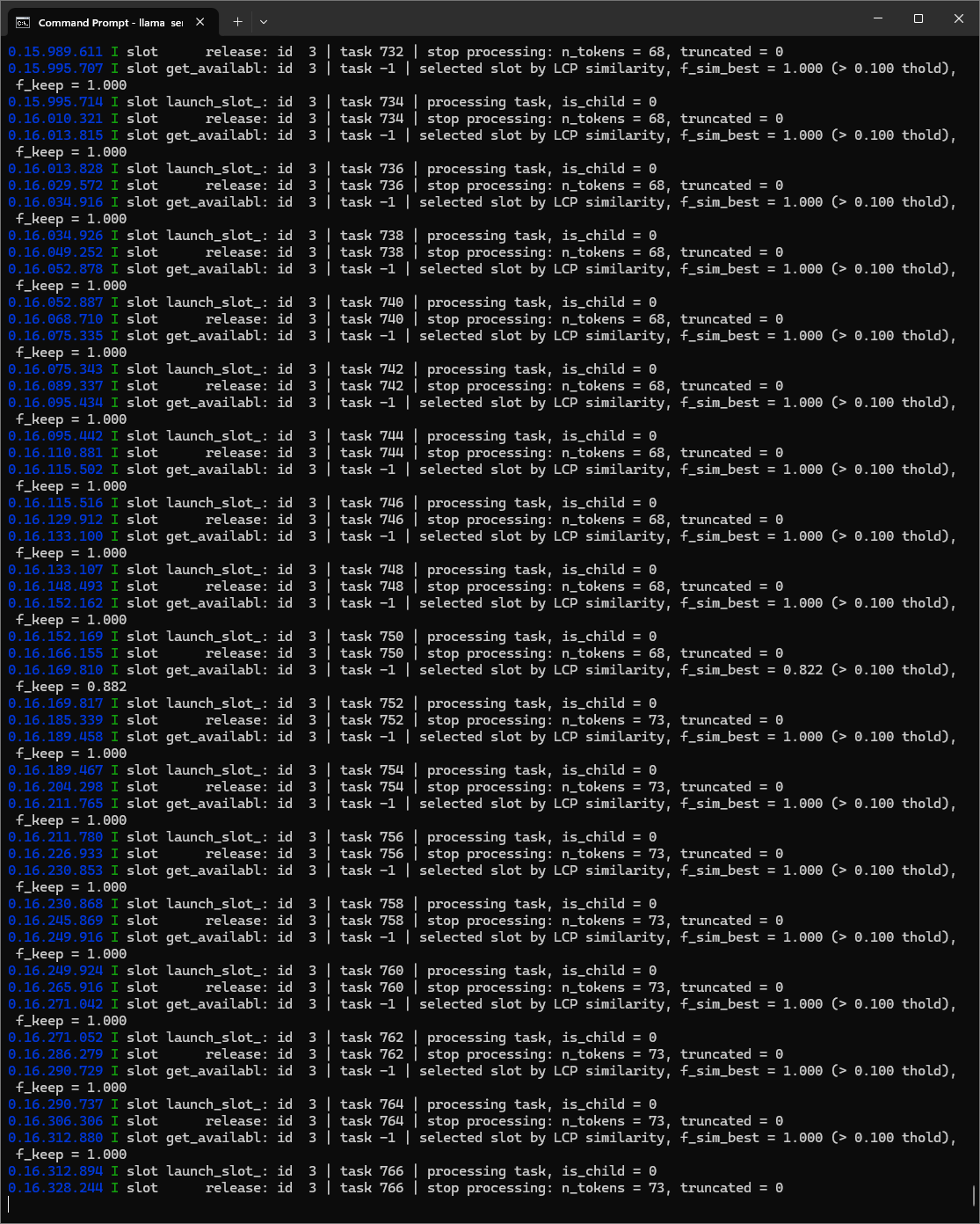
The timestamp is the time since the server started, written as minutes, seconds, milliseconds, and microseconds, so 0.15.995.714 is 15.995714 seconds in. Each decision produces three lines:
| Line | What it marks |
|---|---|
slot get_availabl |
The request arrived and the server chose a slot for it |
slot launch_slot_ |
The model started processing, with the task number |
slot release ... stop processing |
The model finished, with the number of tokens in the request |
Subtracting the launch_slot_ timestamp from the release timestamp for the same task number gives the time the model spent on that decision:
| Task | Started | Finished | Model time |
|---|---|---|---|
| 734 | 15.995.714 | 16.010.321 | 14.6 ms |
| 736 | 16.013.828 | 16.029.572 | 15.7 ms |
| 738 | 16.034.926 | 16.049.252 | 14.3 ms |
| 740 | 16.052.887 | 16.068.710 | 15.8 ms |
| 742 | 16.075.343 | 16.089.337 | 14.0 ms |
| 744 | 16.095.442 | 16.110.881 | 15.4 ms |
| 746 | 16.115.516 | 16.129.912 | 14.4 ms |
| 748 | 16.133.107 | 16.148.493 | 15.4 ms |
| 750 | 16.152.169 | 16.166.155 | 14.0 ms |
| 752 | 16.169.817 | 16.185.339 | 15.5 ms |
| 754 | 16.189.467 | 16.204.298 | 14.8 ms |
| 756 | 16.211.780 | 16.226.933 | 15.2 ms |
| 758 | 16.230.868 | 16.245.869 | 15.0 ms |
| 760 | 16.249.924 | 16.265.916 | 16.0 ms |
| 762 | 16.271.052 | 16.286.279 | 15.2 ms |
| 764 | 16.290.737 | 16.306.306 | 15.6 ms |
| 766 | 16.312.894 | 16.328.244 | 15.4 ms |
Laya spent between 14.0 and 16.0 ms on each of these 17 decisions, with a median of 15.2 ms, and there is almost no variation from one to the next. The gap between one decision finishing and the next request arriving was 3 to 8 ms, which is the time spent outside the model on the HTTP round trip and on the page building its next request, so a full cycle came to just under 20 ms, or about 50 decisions per second.
The other fields on the release line are useful as well, because n_tokens shows each request was only 68 to 73 tokens and truncated = 0 confirms that nothing was cut off to fit Laya’s context window. Every line also reads id 3, which means all of these requests were handled by the same one of the four slots, one after another.
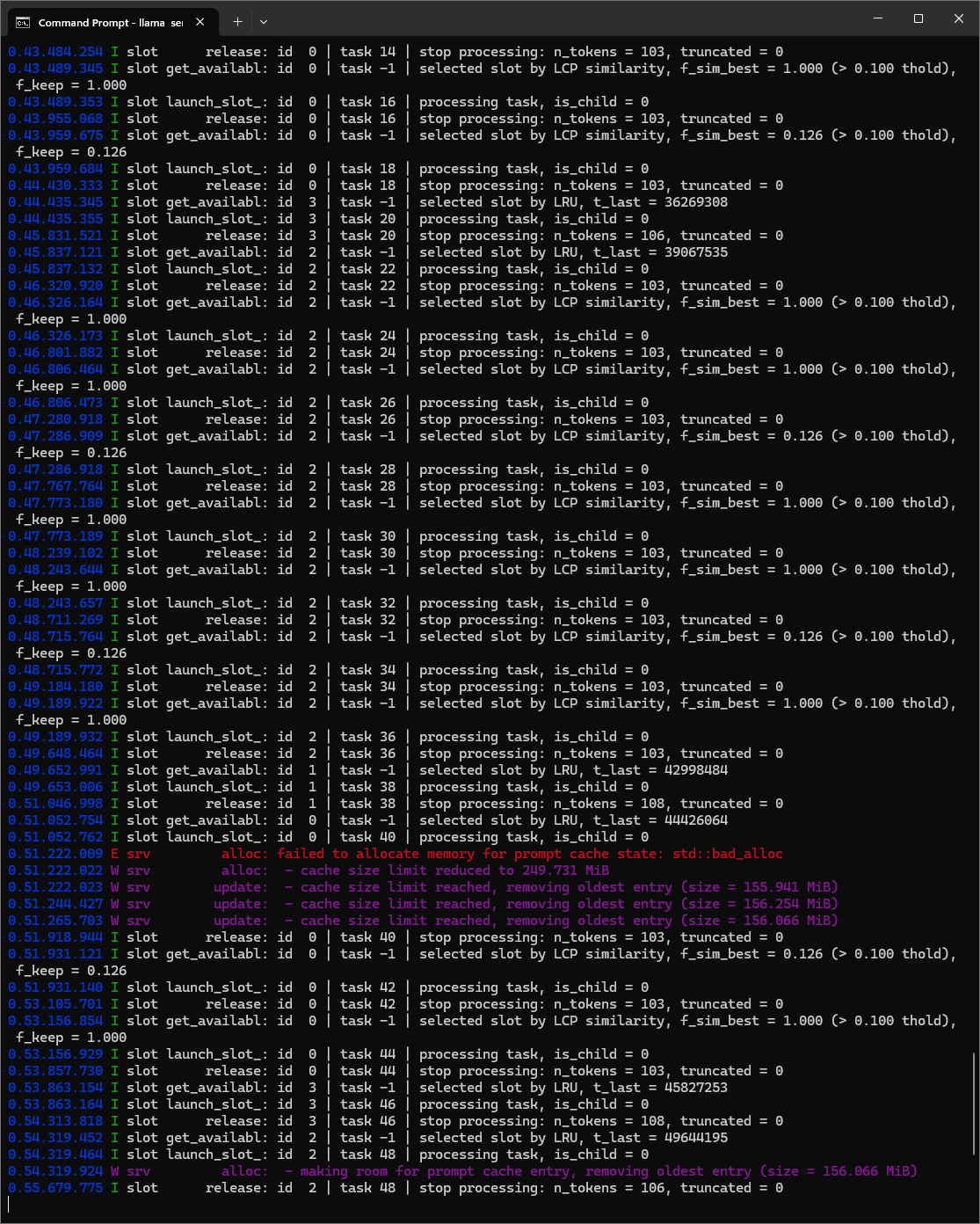
The same console with OpenJev loaded, playing the same game at the same 2x speed, shows a much less even pattern:
| Task | Slot | Slot chosen by | Started | Finished | Model time |
|---|---|---|---|---|---|
| 16 | 0 | Similarity | 43.489.353 | 43.955.068 | 466 ms |
| 18 | 0 | Similarity | 43.959.684 | 44.430.333 | 471 ms |
| 20 | 3 | LRU | 44.435.355 | 45.831.521 | 1,396 ms |
| 22 | 2 | LRU | 45.837.132 | 46.320.920 | 484 ms |
| 24 | 2 | Similarity | 46.326.173 | 46.801.882 | 476 ms |
| 26 | 2 | Similarity | 46.806.473 | 47.280.918 | 474 ms |
| 28 | 2 | Similarity | 47.286.918 | 47.767.764 | 481 ms |
| 30 | 2 | Similarity | 47.773.189 | 48.239.102 | 466 ms |
| 32 | 2 | Similarity | 48.243.657 | 48.711.269 | 468 ms |
| 34 | 2 | Similarity | 48.715.772 | 49.184.180 | 468 ms |
| 36 | 2 | Similarity | 49.189.932 | 49.648.464 | 459 ms |
| 38 | 1 | LRU | 49.653.006 | 51.046.998 | 1,394 ms |
| 40 | 0 | LRU | 51.052.762 | 51.918.944 | 866 ms |
| 42 | 0 | Similarity | 51.931.140 | 53.105.701 | 1,175 ms |
| 44 | 0 | Similarity | 53.156.929 | 53.857.730 | 701 ms |
| 46 | 3 | LRU | 53.863.164 | 54.313.818 | 451 ms |
| 48 | 2 | LRU | 54.319.464 | 55.679.775 | 1,360 ms |
Eleven of the 17 decisions took between 451 and 484 ms, and the other six took between 701 and 1,396 ms, so the median is 476 ms while the average is 709 ms. Interestingly enough, the console shows what was happening around the slow ones. Most of the time the server picks a slot “by LCP similarity,” which means the new request closely matches what that slot processed last and the server can reuse its cached work, and those decisions are the fast ones. When a request does not match well enough, the server falls back to “LRU,” the least recently used slot, and three of the six slot changes in this sample took about 1.4 seconds each.
The middle of the screenshot also has a line in red that I did not expect to see, failed to allocate memory for prompt cache state: std::bad_alloc, followed by the server reducing its prompt cache limit to 249.731 MiB and removing three cached entries of about 156 MiB each. The three decisions around that error took 866, 1,175, and 701 ms, so the server recovered without failing a request, although it was slower while it did. I have not yet looked into whether running the server with a single slot, or with a different prompt cache setting, avoids the slot changes and the allocation error, and it is on my list to test.
| Laya, Q8_0 | OpenJev, Q8_0 | |
|---|---|---|
| Decisions in the sample | 17 | 17 |
| Model time per decision, median | 15.2 ms | 476 ms |
| Fastest | 14.0 ms | 451 ms |
| Slowest | 16.0 ms | 1,396 ms |
| Tokens per request | 68 to 73 | 103 to 108 |
| Slots used | One slot throughout | All four, with six changes |
On model time alone, Laya was about 31 times faster than OpenJev at its median, and far steadier. These numbers come from 17 consecutive requests for each model, read from a screenshot, so they are a sample and should be treated as one. They are also not directly comparable with the timings in Step #7, because the requests the game sends are smaller than the three-question support ticket I measured there.
Where llama.app keeps the models
llama.app does not have its own model folder. Everything downloaded with -hf goes into the standard Hugging Face cache, which is shared with llama.cpp and any other tool that uses the Hugging Face libraries, and the path was visible in my OpenJev server log in Step #5.
| Windows | Mac | |
|---|---|---|
| Model cache | %USERPROFILE%\.cache\huggingface\hub |
~/.cache/huggingface/hub |
| App settings and logs | %LOCALAPPDATA%\Llama |
~/Library/Application Support/Llama/models.ini |
| List what is downloaded | dir $env:USERPROFILE\.cache\huggingface\hub |
ls ~/.cache/huggingface/hub |
Each repository gets a folder named after its owner and name, such as models--ggml-org--Laya-GGUF and models--ggml-org--OpenJev-GGUF, and the GGUF files sit a few levels down under snapshots. Both locations move if the HF_HOME environment variable is set. To see the individual files and their sizes on Windows, the following lists every GGUF in the cache with the largest first:
Get-ChildItem "$env:USERPROFILE\.cache\huggingface\hub" -Recurse -Filter *.gguf |
    Sort-Object Length -Descending |
    Select-Object @{n='GB';e={[math]::Round($_.Length / 1GB, 2)}}, Name, DirectoryName
The equivalent on a Mac is:
find ~/.cache/huggingface/hub -name "*.gguf" -exec ls -lh {} \;
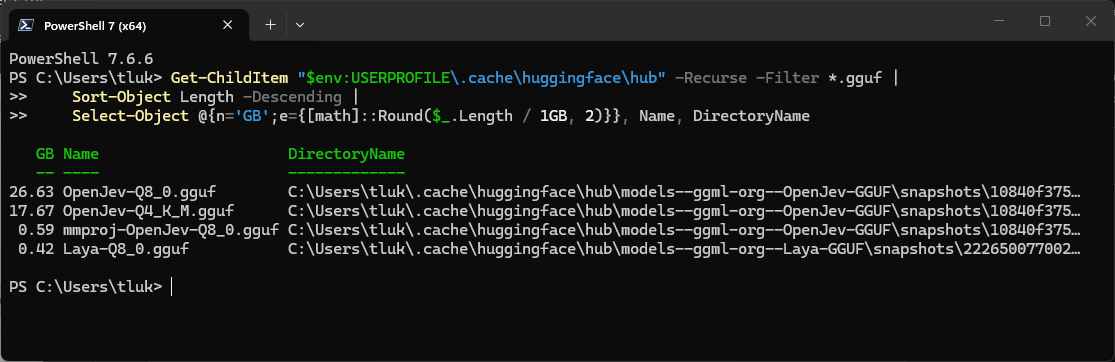
Checking this folder is worthwhile after experimenting with quantizations, because each tag is a separate download and nothing is removed automatically. Running OpenJev at both Q4_K_M and Q8_0 left two copies of a 27B model on my disk along with the mmproj file, which comes to more than 47 GB before Laya is counted, and the cleanest way to reclaim the space is to delete the whole models--ggml-org--OpenJev-GGUF folder and download the one quantization I intend to keep.
Removing a single file from snapshots should also free the space on my machine, because the cache fell back to plain copies when it could not create symbolic links, although on a Mac, or on Windows with Developer Mode enabled, the entries under snapshots are links to files in a neighbouring blobs folder, and deleting the link leaves the data behind.
Final Thoughts on llama.cpp Decision Models
Setting up and getting a decision model answering typed questions on my own laptop was a lot of fun as it brought me back to llama.cpp, which I haven’t used for quite some time. Unlike LM Studio which was more GUI driven, I had to look up the commands in order to get it to download and serve the published quantized files before being able to send the same JSON request I was sending to Jev. The first attempt to test Laya took a bit of time because I had forgotten the commands but the second attempt to use OpenJev was quick.
The urgency classification was the part that stood out to me during my tests. A score answer averages the probabilities, so a model that is split between two levels can return a number that points to a level it does not strongly support. The confidence value is the only indication that this has happened. Laya and OpenJev returned scores of 1.90 and 2.08 for the same ticket, with confidence values of 0.03 and 0.68.
The scores are close, but the confidence values are not. A script acting on the OpenJev result would be making a very different bet than one acting on the Laya result. The OpenJev answer took 1.2 seconds compared to Laya’s 78 ms, so the question becomes whether the smaller model can answer the workload with enough confidence to trust the result.
The two games showed the same trade-off from a different angle. In Alert Invaders, Laya kept up with every alert at 1x speed and needed a human for 40 out of every 100 alerts. OpenJev made no routing mistakes but could not keep up beyond about one and a half alerts per second, and sending four requests at a time did not improve throughput.
In Space Invaders, Laya was fast enough to make more than a dozen decisions a second and still parked itself against the left wall until I changed the question to one it could answer. When I gave OpenJev the original question, it scored 73% where Laya scored 35%. The larger model handled the additional context better, and both models performed better when there was less information to process.
It has been a fun experience testing decision models locally on my laptop. The more time I spend with them, the more interested I become in where this space is heading. Most of the attention around local AI has been focused on chat, coding assistants, and content generation, but the latest System One for decision-making workloads is very interesting. There is something satisfying about asking a model a specific question, getting back a structured answer, and having confidence scores and probabilities available to show how sure it was. The models are small, fast, inexpensive to run, and surprisingly capable when given questions they are suited to answer.
What I am most interested in now is seeing how their use evolves outside of the demos that are everywhere today. There are plenty of practical scenarios where fast, inexpensive decision models could be used to support existing workflows, and this post only scratched the surface. I already have more ideas I want to test, and I expect I will be returning to this topic again in future posts.

