
Those who have been working with the Power Platform (e.g. Power BI, Power Automate) would be familiar with the On-premises data gateway deployment that is simple to set up and effective but as with many other similar components such as Data Factory/Synapse’s Integration Runtime or Hybrid Workers, administrators would much rather move away from IaaS integration components where they would need to manage, secure, and patch over time. This is why I’m happy to see that Microsoft released the virtual network support for Power Platform as described in the following Learn documentation:
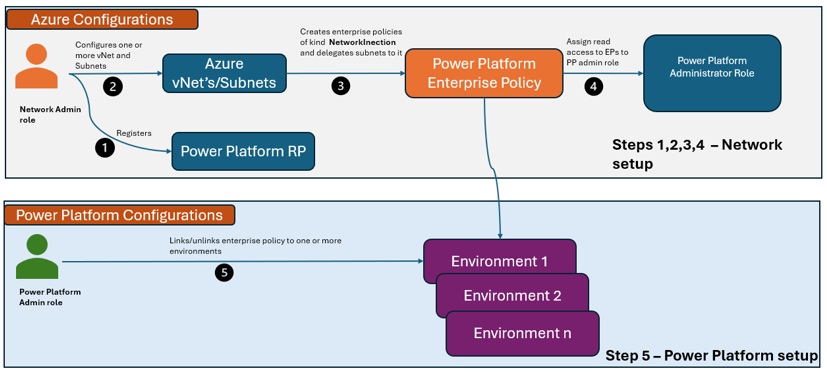
Set up virtual network support for Power Platform
https://learn.microsoft.com/en-us/power-platform/admin/vnet-support-overview
Virtual Network support overview
https://learn.microsoft.com/en-us/power-platform/admin/vnet-support-setup-configure?tabs=new
The set up is fairly straight forward but require either using an ARM template or running a PS script to create the Enterprise Policy object in Azure. As most environments I work in have adopted IaC, I dig a bit of digging to see if there was a way to create this with code and that lead me to this document where it provides Bicep, ARM, and Terraform:
Microsoft.PowerPlatform enterprisePolicies
https://learn.microsoft.com/en-us/azure/templates/microsoft.powerplatform/enterprisepolicies?pivots=deployment-language-terraform
I’m not sure if it’s just me but I didn’t find the template very clear on what the parameters were so I did some testing and managed to create the Enterprise Policy with Terraform.
What I’d like to share today is my set of Terraform code that will create:
- Virtual Networks
- Route Tables
- NSGs
- Route Table and NSG assignment
- Enterprise Policy
- Link virtual networks to Private DNS Zones in the Hub resource group
This should result in the following resources created:
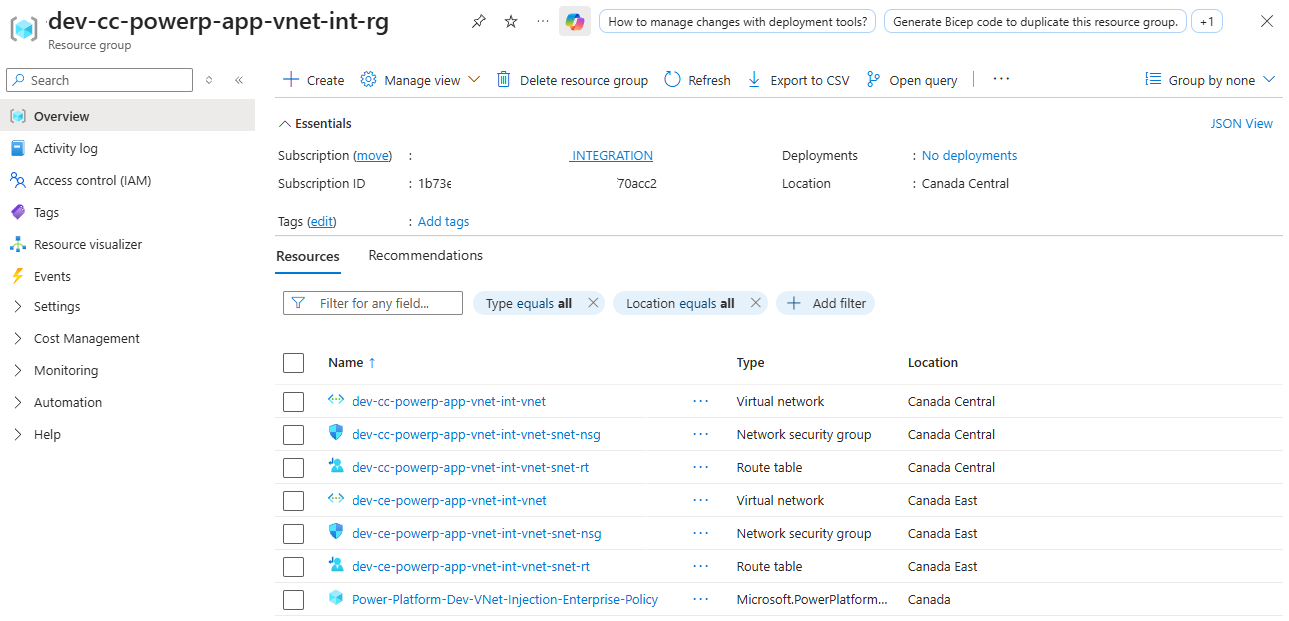
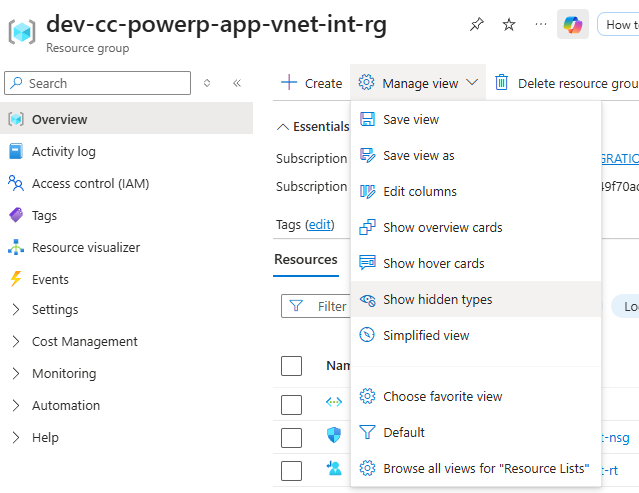
Note that the Power Platform Enterprise Policy is a hidden object and the Azure UI has changed where the checkbox to show hidden objects is no longer present and the option is tucked into the Manage view options:
Last note I’d like to make is that I originally intended to split the virtual network and their resources into their own Resource Groups in different regions but all the demonstrations I’ve found places them in the same RG so 1 Enterprise Policy is created.
I’ve split up the Terraform code to the following:
Create Power Platform Enterprise Policy single TF: https://github.com/terenceluk/Power-Apps-Azure-VNet-Support/tree/main/Enterprise-Policy-Single-TF <– Meant to help clarify what the parameters’ values are
Create Power Platform Enterprise Policy: https://github.com/terenceluk/Power-Apps-Azure-VNet-Support/tree/main/Enterprise-Policy <– Rather than hardcoding parameter values, this uses a tfvar file
Combining the creation of VNet, Subnets, NSGs, Route Tables, NSG and Route Table assignments, Private DNS links, and Power Platform Enterprise Policy: https://github.com/terenceluk/Power-Apps-Azure-VNet-Support/tree/main/Dev <– Soup to nuts deployment
Hope this helps anyone who may be looking for this information.

