
In my previous post, I used the image input that TypeSafe added in Jev 1.14 to sort photos of receipts into expense categories, which depended on Jev reading the text printed on each receipt. Jev put all 23 of my images in the category I expected and only sent the one receipt I couldn’t categorize myself to review.
In this post, I will switch to pet photos that have to be judged by appearance and use the Oxford-IIIT Pet dataset to see whether Jev can identify the breed in 74 photos covering 37 breeds of cats and dogs and then test Jev Box questions, the new question type in 1.14 that returns the location of a target in an image.
The previous post covers what 1.14 added, how images are attached to a request, and the size limits they have to fit within so I won’t repeat any of that here.
Here are two short demonstrations of Jev identifying pet breeds and finding heads with Box questions before I get into the details.
Here is the link to the video recording on YouTube: https://youtu.be/_MVbQls0bCo
Here is the link to the video recording on YouTube: https://youtu.be/Iubry6tSOBY
How Do Jev Box Questions Work
A Box question asks Jev to find something in an image and returns the smallest rectangle around it. The answer comes back as four edges, top, bottom, left, and right, each expressed as a fraction between 0 and 1 of the image’s height or width, along with a confidence value. Multiplying the edges by the image’s pixel dimensions gives a crop and because the values are fractions, the same answer works at any resolution.
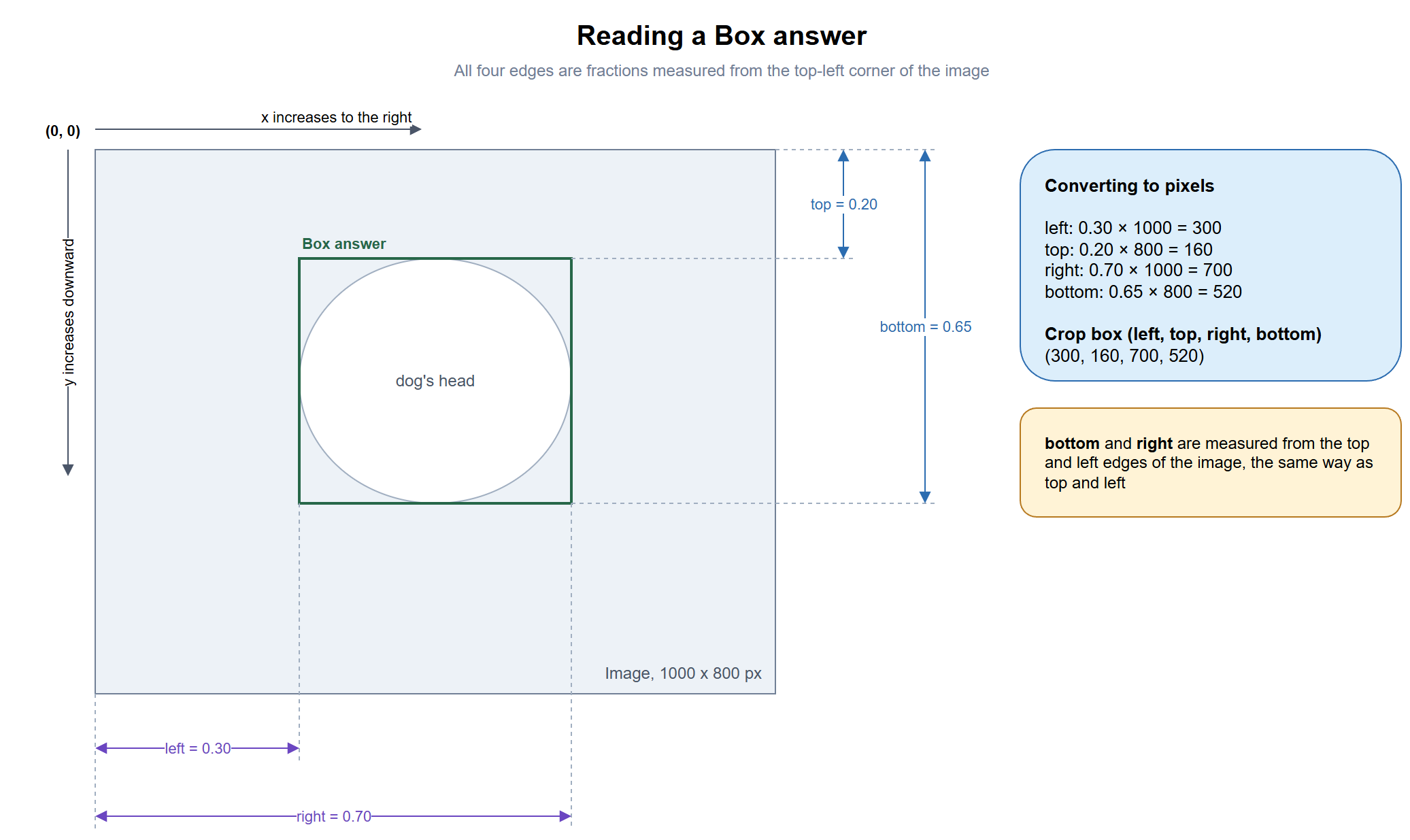
Box always returns an answer, even when the target is missing from the image. There is no “not found” response so asking for a dog’s head in a photo of a receipt will still produce coordinates. The documentation recommends pairing each Box question with a noul question that checks whether the target is present at all. Each Box question also finds one target so locating three objects takes three questions.
The Images I Used
| Source | Licence | Images |
|---|---|---|
| Oxford-IIIT Pet dataset | CC BY-SA 4.0 | 74, two photos for each of the 37 breeds |
The Oxford-IIIT Pet dataset from the University of Oxford’s Visual Geometry Group contains roughly 200 photos for each of 12 cat breeds and 25 dog breeds, which comes to about 7,400 photos in total. Every photo is labelled with its species and breed. The annotations archive has a bounding box around the animal’s head for 3,671 of the 7,349 listed photos, all of them from the training and validation split. I didn’t need anywhere near the full dataset for this post so I sampled two from each breed for a total of 74, picked only from those with a head box.
Those head boxes make it possible to score Jev’s Box answers against a known answer instead of judging a crop by eye. Omkar Parkhi, Andrea Vedaldi, Andrew Zisserman, and C. V. Jawahar published the dataset under CC BY-SA 4.0. For this post, I upscaled 14 of the photos, saved all 74 again as JPEGs, and drew head boxes over them in the reports. The copyright on the photos remains with their original owners so my GitHub repo includes a script that downloads the dataset instead of a copy of the images.
Setting Up
This post uses its own jev-image-sorting-with-pets folder and virtual environment. It needs the API key, jev_client.py, and prepare_images.py from my previous post so follow Steps #1 to #3 there first if you haven’t already. The receipt project is named jev-image-sorting-with-receipts in my GitHub repo and in the commands below so change that name to jev-image-sorting if you created the folder by following the previous post.
Run these commands from the directory that contains the receipt folder to create the new folder next to it, copy the two scripts, and set up the environment:
mkdir jev-image-sorting-with-pets
cd jev-image-sorting-with-pets
copy ..\jev-image-sorting-with-receipts\jev_client.py .
copy ..\jev-image-sorting-with-receipts\prepare_images.py .
py -3.12 -m venv .venv
.\.venv\Scripts\Activate.ps1
pip install requests pillow
$env:TYPESAFE_API_KEY = "<your-typesafe-api-key>"
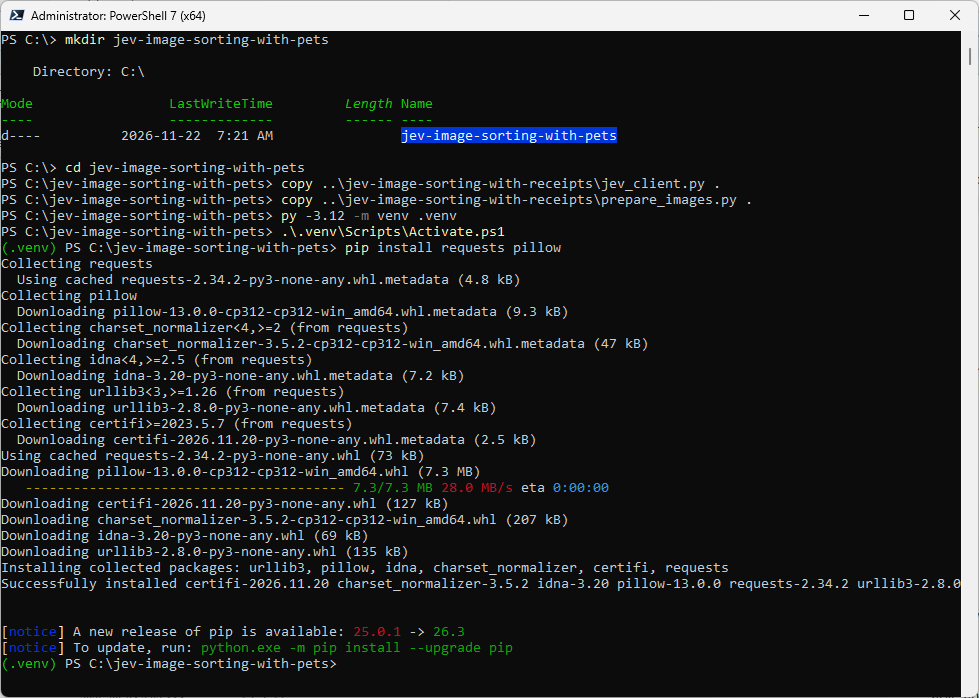
The environment uses Python 3.12 because the download script in Step #1 needs the safer filter option for extracting archives, which was added in that release and backported to 3.9.17, 3.10.12, and 3.11.4 as a security fix. Every command in the rest of this post is run from the jev-image-sorting-with-pets folder with the virtual environment activated. These are the files and folders you will end up with:
jev-image-sorting-with-pets\
├── .venv\
├── jev_client.py           copied from my previous post
├── prepare_images.py       copied from my previous post
├── get_pets.py             Step #1
├── pet_report.py           Step #2
├── sort_pets.py            Step #2
├── presence_check.py       Step #6
└── pets\
    ├── downloads\          Oxford archives downloaded by get_pets.py
    ├── raw\                the 74 sampled photos copied by get_pets.py
    ├── prepared\           resized JPEG copies written by prepare_images.py
    ├── labels.csv          written by get_pets.py
    ├── results-*.csv       written by sort_pets.py
    ├── results-*.html      visual reports written by sort_pets.py
    └── presence-*.html     visual reports written by presence_check.py
Identifying Breeds and Finding Heads
Step #1 – Download a sample of the Oxford-IIIT Pet dataset
The download script fetches the images and annotations archives from Oxford, picks two photos from each of the 37 breeds that have a labelled head box, and writes a pets\labels.csv with the species, the breed, and the head box converted to the same 0 to 1 fractions that Jev returns. A fixed random seed means the same 74 photos are picked on every run. Save it as get_pets.py:
import csv
import random
import shutil
import tarfile
import urllib.request
import xml.etree.ElementTree as ElementTree
from pathlib import Path

BASE_URL = "https://thor.robots.ox.ac.uk/~vgg/data/pets"
DOWNLOADS = Path("pets/downloads")
RAW = Path("pets/raw")
PHOTOS_PER_BREED = 2


def download_and_extract(name):
    archive = DOWNLOADS / name
    if not archive.exists():
        print(f"Downloading {name}")
        partial = DOWNLOADS / f"{name}.part"
        urllib.request.urlretrieve(f"{BASE_URL}/{name}", partial)
        partial.replace(archive)
    with tarfile.open(archive) as tar:
        tar.extractall(DOWNLOADS, filter="data")


def head_box(xml_path):
    root = ElementTree.parse(xml_path).getroot()
    width = float(root.find("size/width").text)
    height = float(root.find("size/height").text)
    box = root.find("object/bndbox")
    return {
        "top": float(box.find("ymin").text) / height,
        "bottom": float(box.find("ymax").text) / height,
        "left": float(box.find("xmin").text) / width,
        "right": float(box.find("xmax").text) / width,
    }


def main():
    DOWNLOADS.mkdir(parents=True, exist_ok=True)
    RAW.mkdir(parents=True, exist_ok=True)
    download_and_extract("images.tar.gz")
    download_and_extract("annotations.tar.gz")

    breeds = {}
    for line in (DOWNLOADS / "annotations" / "list.txt").read_text().splitlines():
        if line.startswith("#"):
            continue
        name, _, species, _ = line.split()
        if not (DOWNLOADS / "annotations" / "xmls" / f"{name}.xml").exists():
            continue
        breed = name.rsplit("_", 1)[0].lower()
        breeds.setdefault(breed, []).append((name, "cat" if species == "1" else "dog"))

    picker = random.Random(42)
    rows = []
    for breed, photos in sorted(breeds.items()):
        for name, species in picker.sample(photos, PHOTOS_PER_BREED):
            shutil.copy(DOWNLOADS / "images" / f"{name}.jpg", RAW / f"{name}.jpg")
            box = head_box(DOWNLOADS / "annotations" / "xmls" / f"{name}.xml")
            rows.append({"filename": f"{name}.jpg", "species": species, "breed": breed, **box})

    with open("pets/labels.csv", "w", newline="") as file:
        writer = csv.DictWriter(file, fieldnames=rows[0].keys())
        writer.writeheader()
        writer.writerows(rows)
    print(f"Copied {len(rows)} photos from {len(breeds)} breeds")


if __name__ == "__main__":
    main()
The images archive is about 755 MB and the Oxford server was slow for me, with my browser estimating over an hour. If you would rather download the two archives yourself from the dataset page or through its torrent, place images.tar.gz and annotations.tar.gz into a pets\downloads folder before running the script and it will skip the download and go straight to extracting them:
mkdir pets\downloads
move "$env:USERPROFILE\Downloads\images.tar.gz" pets\downloads\
move "$env:USERPROFILE\Downloads\annotations.tar.gz" pets\downloads\
Then run the script to pick the 74 photos and prepare them the same way as the receipts in my previous post:
python get_pets.py
python prepare_images.py pets\raw pets\prepared
Copied 74 photos from 37 breeds
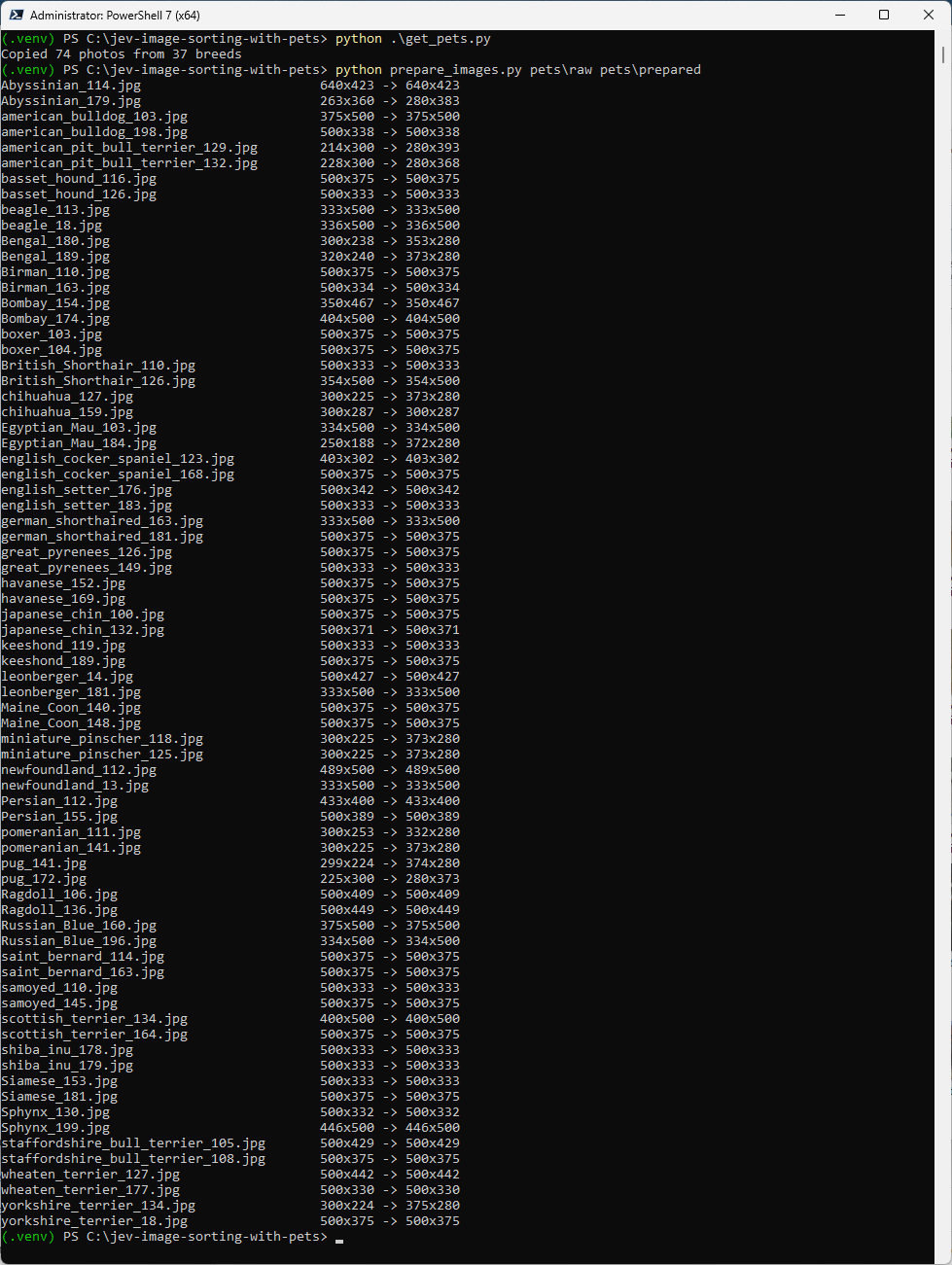
In my sample, 14 of the photos had a side under 280 px and were scaled up to meet the minimum, while none needed padding.
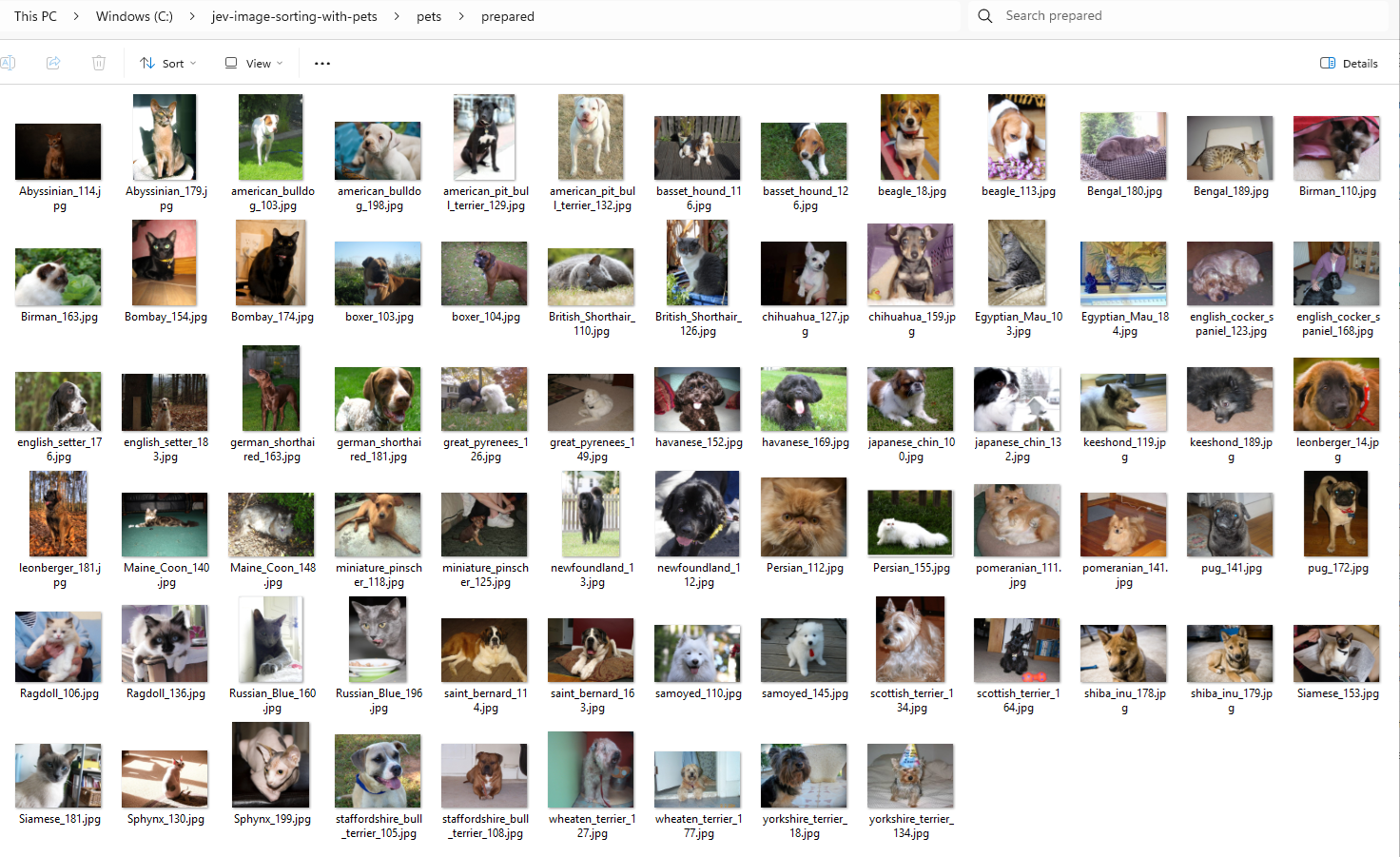
The prepare script only adds padding when a photo is too long and narrow to fit within both the 280 px and 1,568 px limits. Scaling alone keeps the head box fractions from the original annotations lined up with the prepared images, while padding would shift them.
Step #2 – All 37 breeds in one question
The first pet test is the most direct approach, which is a single choice question with all 37 breeds as options. jev_client.py uploads each photo under its filename, such as boxer_104.jpg, which names the breed. If Jev could read the filename, it could answer from the name instead of the photo so I checked the input tokens, which would grow with a longer name. Photos with the same dimensions used about the same number of tokens whether the name was 13 characters long, like boxer_104.jpg, or 34, like staffordshire_bull_terrier_108.jpg, which suggests the filename never reached the model.
As with the receipts in my previous post, I wanted to watch the answers arrive so I wrote a small module that builds an HTML report for each test. The page refreshes every second during a run and shows a card for each photo with Jev’s answer, the expected answer, and the confidence. Save it as pet_report.py:
import html
import json
import time
import webbrowser
from pathlib import Path
TITLES = {
"breed37": "All 37 breeds in one question",
"split": "Breeds split by species",
"head": "Head boxes",
}
HARD_PAIRS = [
("american_pit_bull_terrier", "staffordshire_bull_terrier"),
("ragdoll", "birman"),
]
EDGES = ("top", "bottom", "left", "right")
STYLE = """
* { box-sizing: border-box; }
body { margin: 0; background: #f4f5f7; color: #1f2933; font: 13px "Segoe UI", system-ui, sans-serif; }
header { display: flex; flex-wrap: wrap; align-items: center; gap: 14px 28px; padding: 16px 28px; background: #1f2933; color: #fff; }
h1 { margin: 0; font-size: 20px; }
h2 { margin: 24px 0 10px; font-size: 16px; }
.now { display: flex; align-items: center; gap: 12px; color: #9fb3c8; }
.now img { width: 64px; height: 64px; object-fit: cover; border: 2px solid #f59f00; border-radius: 6px; }
.stats { display: flex; gap: 10px; margin-left: auto; }
.stats div { min-width: 100px; padding: 6px 12px; border-radius: 8px; background: #334e68; text-align: center; }
.stats b { display: block; font-size: 22px; }
.progress { height: 4px; background: #334e68; }
.progress i { display: block; height: 100%; background: #f59f00; }
main { padding: 12px 28px 28px; }
.grid { display: grid; grid-template-columns: repeat(auto-fill, minmax(220px, 1fr)); gap: 12px; align-items: start; }
.pair { display: grid; grid-template-columns: repeat(4, minmax(0, 1fr)); gap: 12px; max-width: 1100px; margin-bottom: 12px; }
.single { max-width: 520px; }
.card { overflow: hidden; border-left: 5px solid #adb5bd; border-radius: 8px; background: #fff; }
.card.good { border-left-color: #2f9e44; }
.card.bad { border-left-color: #e03131; }
.card.newest { outline: 3px solid #f59f00; }
.thumb { display: block; width: 100%; height: 170px; object-fit: contain; background: #e9ecef; }
.boxed { position: relative; }
.boxed img { display: block; width: 100%; height: auto; }
.box { position: absolute; border: 3px solid; }
.box.jev { border-color: #ff2d95; }
.box.label { border-color: #00c2ff; border-style: dashed; }
.meta { padding: 8px 10px; line-height: 1.5; overflow-wrap: anywhere; }
.bar { height: 5px; margin: 3px 0 6px; background: #e9ecef; }
.bar i { display: block; height: 100%; background: #1c7ed6; }
"""
def name_of(breed):
return html.escape(breed.replace("_", " ").title())
def bar(text, value):
return f'<div>{text} {value:.2f}</div><div class="bar"><i style="width:{value * 100:.1f}%"></i></div>'
def box_overlay(box, kind):
return (f'<span class="box {kind}" style="left:{box["left"] * 100:.2f}%;top:{box["top"] * 100:.2f}%;'
f'width:{(box["right"] - box["left"]) * 100:.2f}%;'
f'height:{(box["bottom"] - box["top"]) * 100:.2f}%"></span>')
def card(mode, row, newest=False, pair=None):
source = "prepared/" + html.escape(row["filename"])
mark = "✔" if row["correct"] else "✘"
if mode == "head":
boxes = box_overlay({edge: row[f"label_{edge}"] for edge in EDGES}, "label")
boxes += box_overlay({edge: row[f"box_{edge}"] for edge in EDGES}, "jev")
picture = f'<div class="boxed"><img src="{source}">{boxes}</div>'
details = f"<b>{mark} IoU {row['iou']:.3f}</b><div>{name_of(row['breed'])}</div>"
else:
picture = f'<img class="thumb" src="{source}">'
details = f"<b>{mark} {name_of(row['predicted'])}</b><div>Expected {name_of(row['breed'])}</div>"
if mode == "split":
species = "Cat" if row["is_cat"] >= 0.5 else "Dog"
wrong = "" if row["species_correct"] else " (wrong species)"
details += f"<div>{species}{wrong}, is_cat {row['is_cat']:.2f}</div>"
details += bar("Confidence", row["confidence"])
if pair:
probabilities = json.loads(row["probabilities"])
details += "".join(bar(name_of(breed), probabilities.get(breed, 0.0)) for breed in pair)
details += f"<small>{html.escape(row['filename'])}</small>"
classes = ("good" if row["correct"] else "bad") + (" newest" if newest else "")
return f'<div class="card {classes}">{picture}<div class="meta">{details}</div></div>'
def save_page(path, title, header, body, running=False, percent=100):
refresh = '<meta http-equiv="refresh" content="1">' if running else ""
page = (f'<!doctype html><html><head><meta charset="utf-8">{refresh}<title>{title}</title>'
f"<style>{STYLE}</style></head><body><header><h1>{title}</h1>{header}</header>"
f'<div class="progress"><i style="width:{percent:.0f}%"></i></div><main>{body}</main></body></html>')
temporary = path.with_suffix(".tmp")
temporary.write_text(page, encoding="utf-8")
# Windows refuses to replace a file while the browser is reading it
for _ in range(100):
try:
temporary.replace(path)
return
except PermissionError:
time.sleep(0.05)
print(f"Could not update {path}")
def write_report(mode, rows, current=None, total=0):
"""Write pets/results-<mode>.html, which refreshes every second until the run finishes."""
running = current is not None
if running:
status = (f'<div class="now"><img src="prepared/{html.escape(current)}">'
f"<span>Asking Jev about photo {len(rows) + 1} of {total}<br>{html.escape(current)}</span></div>")
else:
status = '<div class="now">Finished</div>'
def average(key):
return f"{sum(row[key] for row in rows) / len(rows):.2f}" if rows else "-"
stats = [(len(rows), "photos done"),
(sum(row["correct"] for row in rows), "hits" if mode == "head" else "correct"),
(average("confidence"), "average confidence")]
if mode == "split":
stats.append((sum(row["species_correct"] for row in rows), "species correct"))
if mode == "head":
stats.append((average("iou"), "average IoU"))
tiles = "".join(f"<div><b>{value}</b>{label}</div>" for value, label in stats)
newest = rows[-1] if running and rows else None
ordered = rows[::-1] if running else rows
body = "<p>A green edge is a correct answer and a red edge is a wrong one.</p>"
if mode == "head":
body = ("<p>The solid pink box is Jev's answer and the dashed blue box is the dataset's label. "
"A green edge is an IoU of 0.5 or higher.</p>")
if not running:
ordered = sorted(rows, key=lambda row: row["iou"], reverse=True)
groups = [("Newest first" if running else "Highest to lowest IoU", ordered)]
else:
if mode == "split" and not running:
body += "<h2>Hard pairs</h2>"
for pair in HARD_PAIRS:
cards = [card(mode, row, pair=pair) for breed in pair for row in rows if row["breed"] == breed]
body += f'<div class="pair">{"".join(cards)}</div>'
if running:
groups = [("Newest first", ordered)]
else:
groups = [("Cats", [row for row in rows if row["species"] == "cat"]),
("Dogs", [row for row in rows if row["species"] == "dog"])]
for heading, group in groups:
cards = "".join(card(mode, row, row is newest) for row in group)
body += f'<h2>{heading}</h2><div class="grid">{cards}</div>'
path = Path(f"pets/results-{mode}.html")
percent = len(rows) / total * 100 if total else 100
save_page(path, TITLES[mode], f'{status}<div class="stats">{tiles}</div>', body, running, percent)
return path
def write_presence_report(image_path, answers):
"""Write a page with the Box answer drawn on the image next to the presence answer."""
image = Path(image_path).resolve()
present = answers["has_animal"]["noul"]
if present >= 0.7:
verdict, edge = "An animal is present so the box can be used", "good"
elif present <= 0.3:
verdict, edge = "No animal is present so the box should be discarded", "bad"
else:
verdict, edge = "The presence answer is unclear so the box needs a review", ""
body = (f'<div class="single card {edge}"><div class="boxed"><img src="{image.as_uri()}">'
f'{box_overlay(answers["head"]["box"], "jev")}</div><div class="meta"><b>{verdict}</b>'
f'{bar("has_animal", present)}{bar("Box confidence", answers["head"]["confidence"])}'
f"<small>{html.escape(image.name)}</small></div></div>")
path = Path(f"pets/presence-{image.stem}.html")
save_page(path, "Box presence check", "", body)
return path
def open_report(path):
webbrowser.open(path.resolve().as_uri())
Each test in this post runs as a separate mode of the next script so that the tokens and response time of each test can be measured on their own. It opens the report in the default browser when it starts and pauses for a second after each photo so the page can be followed. Setting LIVE_DELAY to 0 removes the pause, which isn’t counted in the response times. Each run overwrites the previous results for that mode so copy the CSV and HTML files before repeating a test. Save the script as sort_pets.py:
import csv
import json
import sys
import time
from pathlib import Path

from jev_client import ask
from pet_report import open_report, write_report

CAT_BREEDS = [
    "abyssinian", "bengal", "birman", "bombay", "british_shorthair", "egyptian_mau",
    "maine_coon", "persian", "ragdoll", "russian_blue", "siamese", "sphynx",
]
DOG_BREEDS = [
    "american_bulldog", "american_pit_bull_terrier", "basset_hound", "beagle", "boxer",
    "chihuahua", "english_cocker_spaniel", "english_setter", "german_shorthaired",
    "great_pyrenees", "havanese", "japanese_chin", "keeshond", "leonberger",
    "miniature_pinscher", "newfoundland", "pomeranian", "pug", "saint_bernard", "samoyed",
    "scottish_terrier", "shiba_inu", "staffordshire_bull_terrier", "wheaten_terrier",
    "yorkshire_terrier",
]
PREPARED = Path("pets/prepared")
LIVE_DELAY = 1.0  # seconds to pause after each photo, 0 turns it off


def breed_criteria(breeds):
    return {breed: breed.replace("_", " ").title() for breed in breeds}


def questions_for(mode):
    if mode == "breed37":
        return {
            "breed": {
                "type": "choice",
                "instructions": "Which breed is the cat or dog in `photo`?",
                "criteria": breed_criteria(CAT_BREEDS + DOG_BREEDS),
            }
        }
    if mode == "split":
        return {
            "is_cat": {"type": "noul", "instructions": "Is the animal in `photo` a cat?"},
            "cat_breed": {
                "type": "choice",
                "instructions": "Assuming the animal in `photo` is a cat, which breed is it?",
                "criteria": breed_criteria(CAT_BREEDS),
            },
            "dog_breed": {
                "type": "choice",
                "instructions": "Assuming the animal in `photo` is a dog, which breed is it?",
                "criteria": breed_criteria(DOG_BREEDS),
            },
        }
    if mode == "head":
        return {"head": {"type": "box", "instructions": "the head of the cat or dog in `photo`"}}
    raise SystemExit("Mode must be breed37, split or head")


def iou(a, b):
    """Intersection over union of two boxes expressed as 0 to 1 fractions."""
    overlap_width = max(0.0, min(a["right"], b["right"]) - max(a["left"], b["left"]))
    overlap_height = max(0.0, min(a["bottom"], b["bottom"]) - max(a["top"], b["top"]))
    overlap = overlap_width * overlap_height
    area_a = (a["right"] - a["left"]) * (a["bottom"] - a["top"])
    area_b = (b["right"] - b["left"]) * (b["bottom"] - b["top"])
    return overlap / (area_a + area_b - overlap)


def main(mode):
    questions = questions_for(mode)
    with open("pets/labels.csv", newline="") as file:
        labels = list(csv.DictReader(file))

    rows = []
    open_report(write_report(mode, rows, labels[0]["filename"], len(labels)))
    for label in labels:
        write_report(mode, rows, label["filename"], len(labels))
        result = ask(PREPARED / label["filename"], questions, image_name="photo")
        answers = result["answers"]
        row = {"filename": label["filename"], "species": label["species"], "breed": label["breed"]}

        if mode == "breed37":
            row["predicted"] = answers["breed"]["choice"]
            row["confidence"] = answers["breed"]["confidence"]
            row["correct"] = row["predicted"] == label["breed"]
        elif mode == "split":
            row["is_cat"] = answers["is_cat"]["noul"]
            picked = answers["cat_breed"] if row["is_cat"] >= 0.5 else answers["dog_breed"]
            row["species_correct"] = ("cat" if row["is_cat"] >= 0.5 else "dog") == label["species"]
            row["predicted"] = picked["choice"]
            row["confidence"] = picked["confidence"]
            row["probabilities"] = json.dumps(picked["probabilities"])
            row["correct"] = row["predicted"] == label["breed"]
        else:
            truth = {edge: float(label[edge]) for edge in ("top", "bottom", "left", "right")}
            row["iou"] = round(iou(answers["head"]["box"], truth), 3)
            row["confidence"] = answers["head"]["confidence"]
            row["correct"] = row["iou"] >= 0.5
            for edge in truth:
                row[f"box_{edge}"] = answers["head"]["box"][edge]
                row[f"label_{edge}"] = truth[edge]

        row["input_tokens"] = result["usage"]["input_tokens"]
        row["elapsed_ms"] = result["elapsed_ms"]
        rows.append(row)
        hidden = ("probabilities", "box_", "label_")
        print({key: value for key, value in row.items() if not key.startswith(hidden)})
        time.sleep(LIVE_DELAY)
    write_report(mode, rows)

    correct = sum(1 for row in rows if row["correct"])
    average_tokens = sum(row["input_tokens"] for row in rows) / len(rows)
    average_ms = sum(row["elapsed_ms"] for row in rows) / len(rows)
    print(f"\n{mode}: {correct} of {len(rows)} correct, "
          f"{average_tokens:.0f} input tokens and {average_ms:.0f} ms per request on average")
    print(f"Average confidence: {sum(row['confidence'] for row in rows) / len(rows):.2f}")
    if mode == "split":
        print(f"Species correct: {sum(row['species_correct'] for row in rows)} of {len(rows)}")
    if mode == "head":
        for name, hit in (("Hits", True), ("Misses", False)):
            scores = [row["confidence"] for row in rows if row["correct"] == hit]
            average = f"{sum(scores) / len(scores):.2f}" if scores else "n/a"
            below = sum(score < 0.6 for score in scores)
            print(f"{name}: {len(scores)} photos, average confidence {average}, {below} below 0.6")

    with open(f"pets/results-{mode}.csv", "w", newline="") as file:
        writer = csv.DictWriter(file, fieldnames=rows[0].keys())
        writer.writeheader()
        writer.writerows(rows)


if __name__ == "__main__":
    main(sys.argv[1])
python sort_pets.py breed37
breed37: 61 of 74 correct, 1433 input tokens and 592 ms per request on average
Average confidence: 0.85
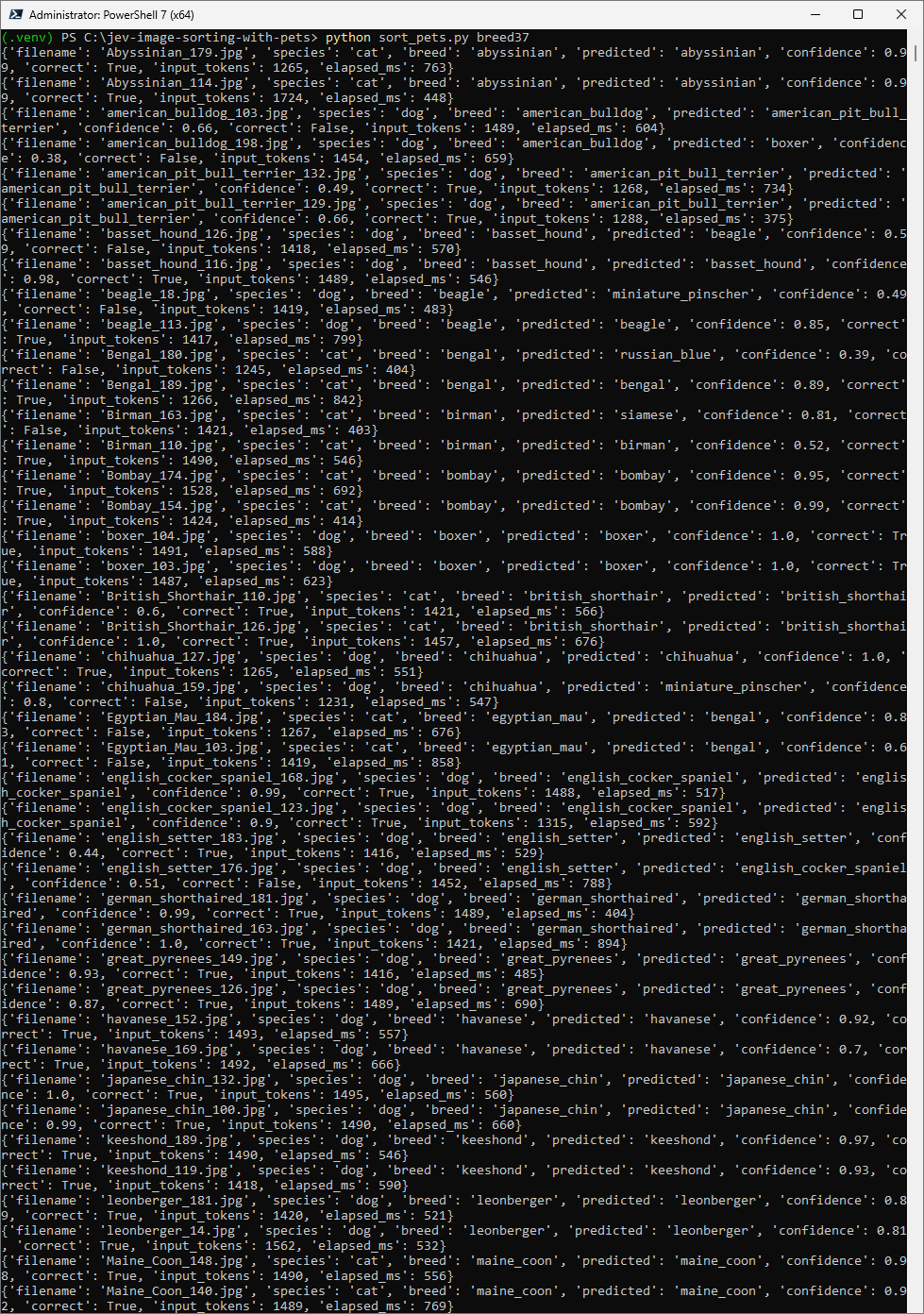
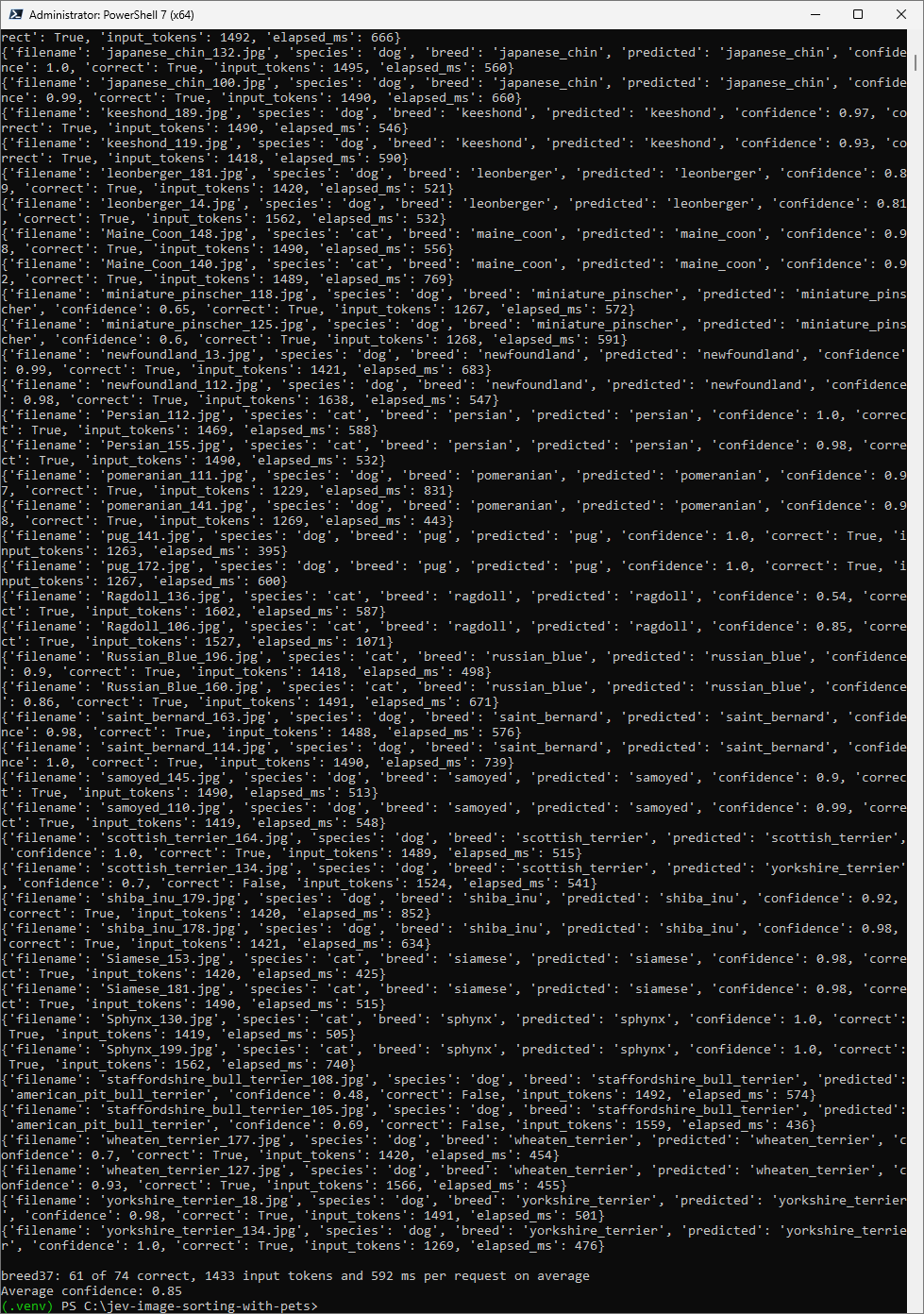
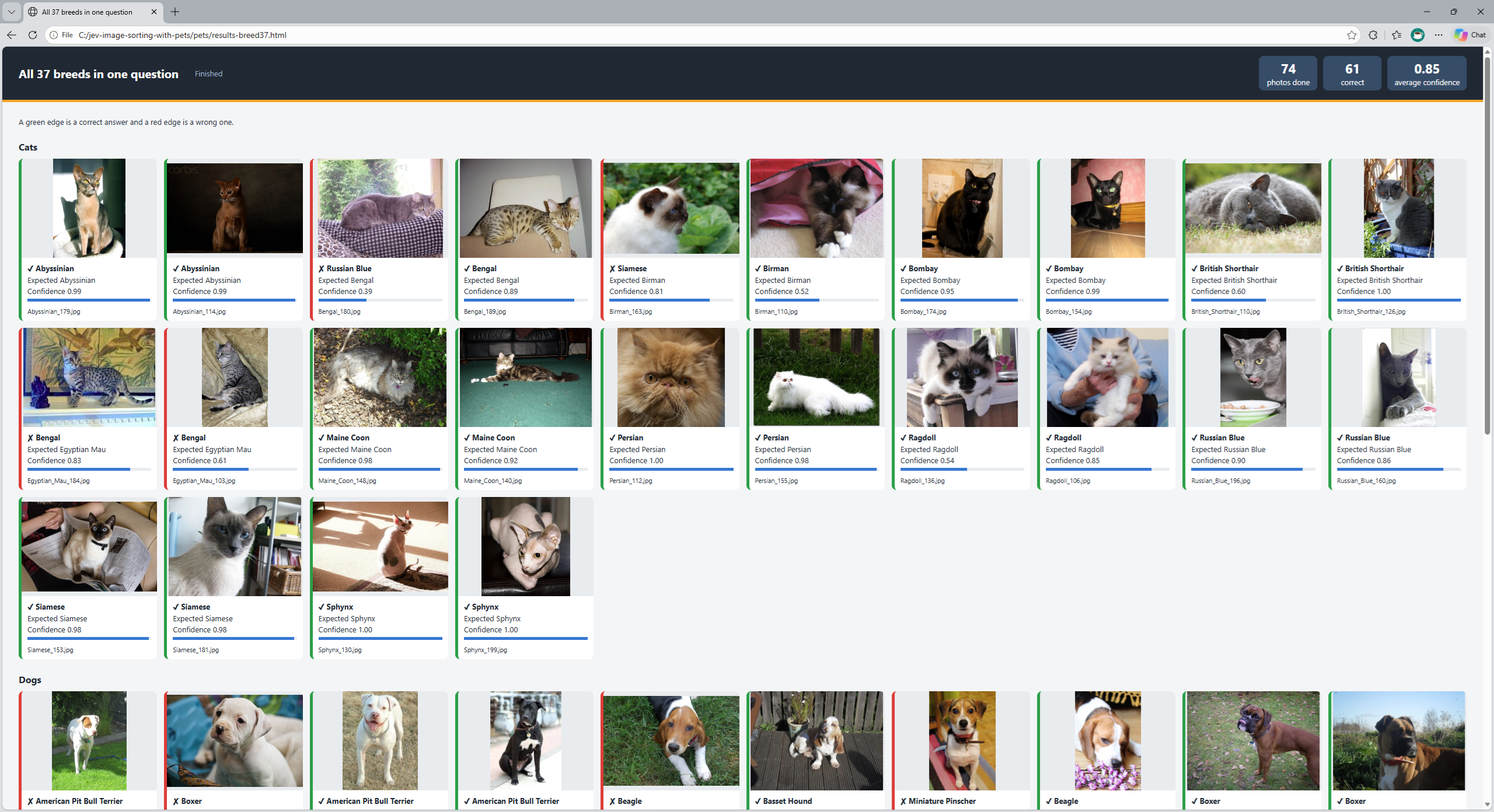
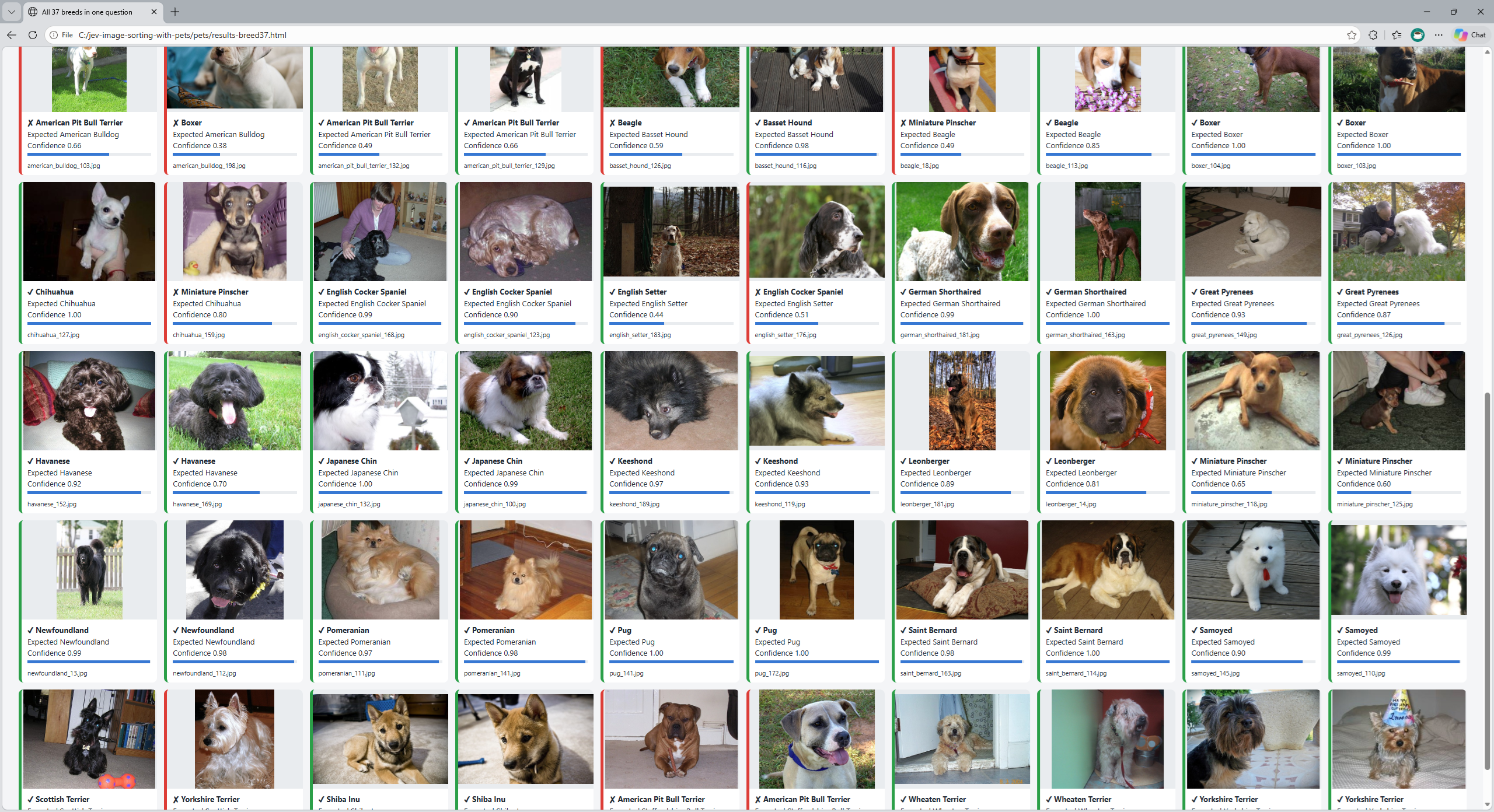
Jev picked the correct breed for 61 of the 74 photos, which is 82%, and got 20 of the 24 cats and 41 of the 50 dogs right. All 13 misses stayed within the correct species and several were between breeds that look alike, such as both Egyptian Maus identified as Bengals and both Staffordshire Bull Terriers identified as American Pit Bull Terriers. American Bulldog was the only other breed where both photos were missed, with one identified as an American Pit Bull Terrier and the other as a Boxer.
I noticed that the confidence dropped when Jev was wrong, averaging 0.61 across the misses and 0.90 across the correct answers. The two ranges still overlap because three of the misses had a confidence of 0.80 or higher and one correct answer was as low as 0.44. Every one of the 50 answers above 0.83 was correct in this run, although two wrong answers reached 0.84 in a later run so it would be prudent to perform more testing before any definitive conclusions are drawn.
I ran the same test two more times and Jev got 62 and then 61 of the 74 photos right with the average confidence at 0.85 in both. The only answer that changed across the three runs was an English Setter, which was identified as an English Cocker Spaniel in the first and third runs and correctly in the second. Confidence values moved on 51 of the photos by up to 0.08 so I wouldn’t read much into a difference of one photo when comparing the tests in this post.
Step #3 – Split the question by species
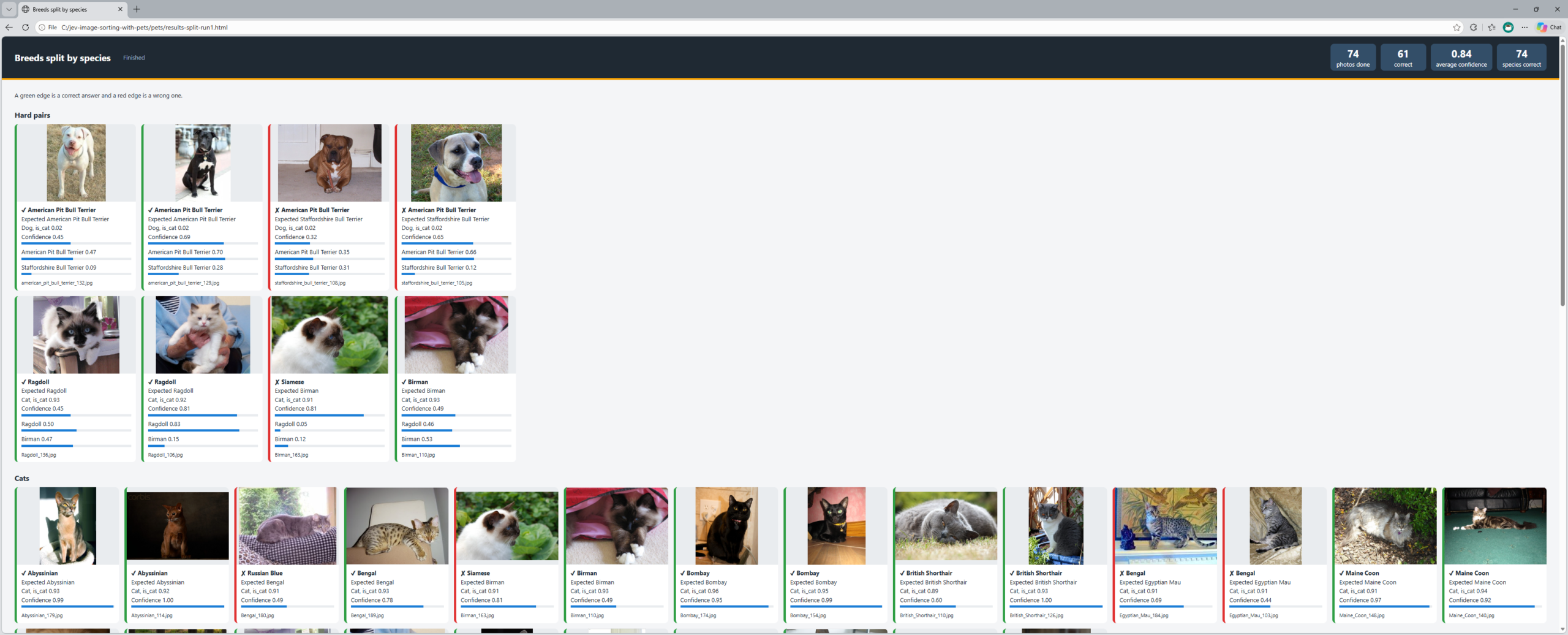
TypeSafe recommends breaking visual questions into the simplest parts possible so the second test asks three questions instead of one. A noul question decides whether the animal is a cat and two separate choice questions pick a breed from the 12 cat breeds and from the 25 dog breeds. The script then keeps whichever breed answer matches the species answer.
I originally planned to run this as two requests with one for the species and one for the breed but all three questions can go into a single request because the image is referenced once in state and every question can see it. The request costs one copy of the image and Jev answers the questions in parallel so the split version shouldn’t be noticeably slower than the single question. This species question also doubles as an easy control test since telling a cat from a dog should be close to perfect if the image is reaching the model intact.
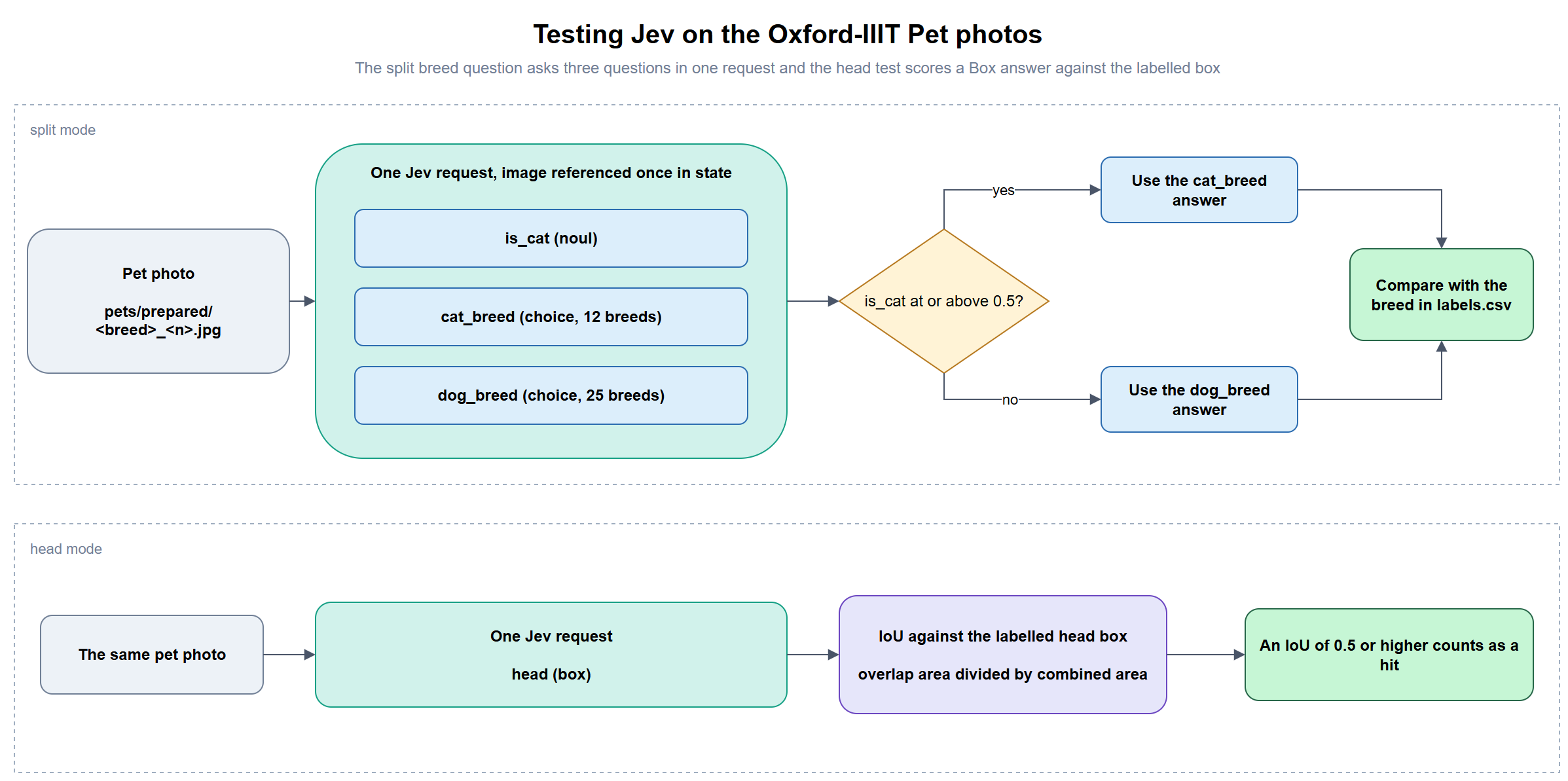
python sort_pets.py split
split: 61 of 74 correct, 1489 input tokens and 554 ms per request on average
Average confidence: 0.84
Species correct: 74 of 74
| Approach | Breeds correct (of 74) | Species correct (of 74) | Average confidence | Average input tokens | Average response time |
|---|---|---|---|---|---|
| One question, 37 breeds | 61 | n/a | 0.85 | 1,433 | 592 ms |
| Split by species | 61 | 74 | 0.84 | 1,489 | 554 ms |
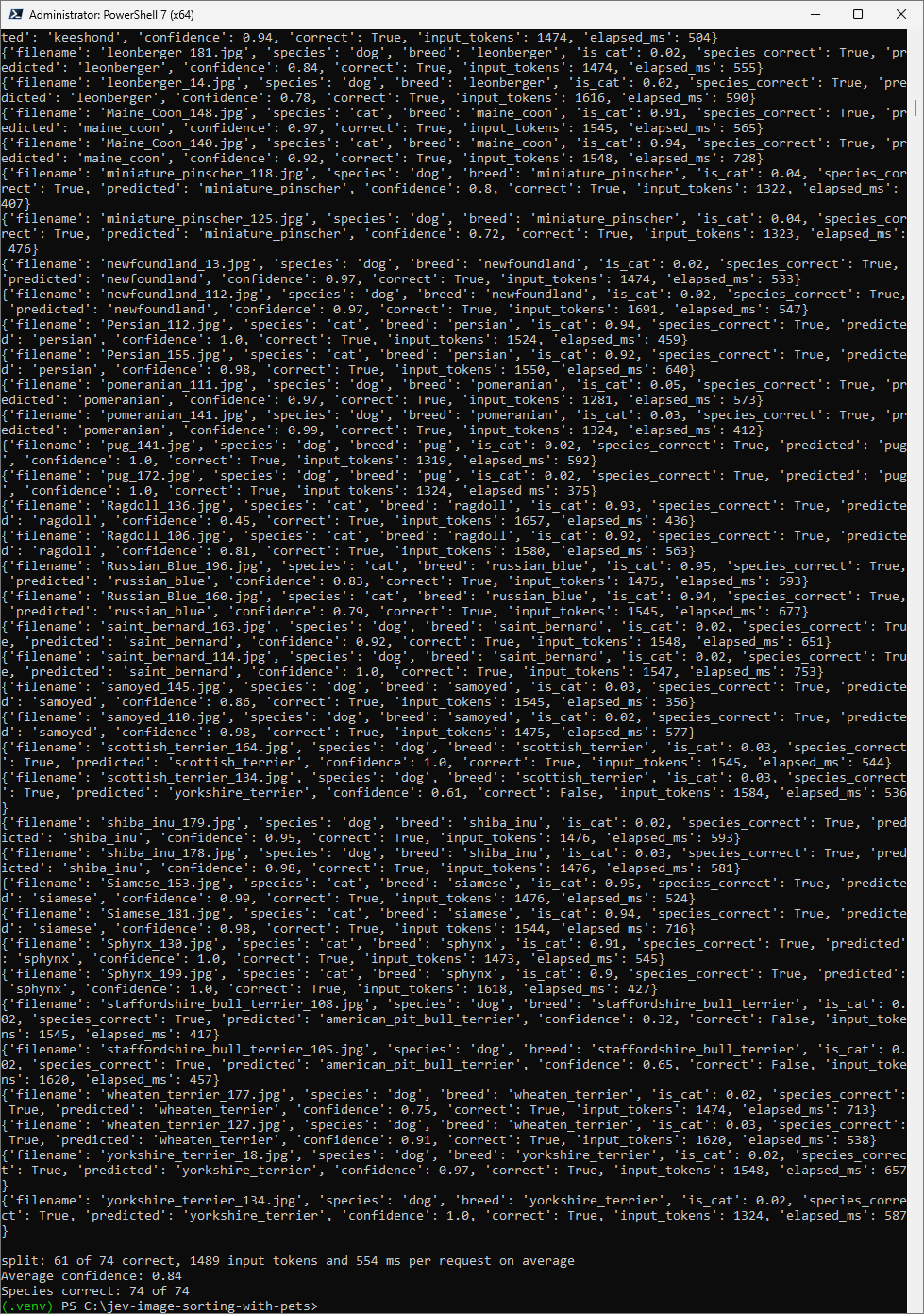
The split didn’t improve the accuracy on my sample and both split runs repeated all 13 wrong answers from my first run with a single question. Jev had no trouble with the species control, which was correct for all 74 photos in both runs with is_cat at 0.89 or higher for every cat and 0.05 or lower for every dog. A high confidence still didn’t guarantee the correct breed since one of the Chihuahuas was identified as a Miniature Pinscher at 0.89 and then 0.90, which is higher than any wrong answer in the three runs from Step #2.
Step #4 – The hard breed pairs
Two pairs of breeds in the dataset are difficult for people to tell apart so I used them to see how Jev’s probabilities were distributed between them:
| Pair | Why they are confused |
|---|---|
| American Pit Bull Terrier and Staffordshire Bull Terrier | Similar build, coat, and head shape, with size being the main difference |
| Ragdoll and Birman | Both are long-haired colour-point cats with blue eyes and most Ragdoll patterns share the Birman’s white markings |
The split run saves the probability of every breed option to the probabilities column of pets\results-split.csv and the finished pets\results-split.html page groups these eight photos under Hard pairs. These are the three highest probabilities for each photo in my first split run:
| Photo | Highest | Second | Third |
|---|---|---|---|
american_pit_bull_terrier_132.jpg |
American Pit Bull Terrier 0.47 | American Bulldog 0.44 | Staffordshire Bull Terrier 0.09 |
american_pit_bull_terrier_129.jpg |
American Pit Bull Terrier 0.70 | Staffordshire Bull Terrier 0.28 | American Bulldog and Miniature Pinscher, both 0.01 |
staffordshire_bull_terrier_108.jpg |
American Pit Bull Terrier 0.35 | American Bulldog 0.33 | Staffordshire Bull Terrier 0.31 |
staffordshire_bull_terrier_105.jpg |
American Pit Bull Terrier 0.66 | American Bulldog 0.19 | Staffordshire Bull Terrier 0.12 |
Ragdoll_136.jpg |
Ragdoll 0.50 | Birman 0.47 | Siamese 0.03 |
Ragdoll_106.jpg |
Ragdoll 0.83 | Birman 0.15 | Maine Coon and Siamese, both 0.01 |
Birman_163.jpg |
Siamese 0.83 | Birman 0.12 | Ragdoll 0.05 |
Birman_110.jpg |
Birman 0.53 | Ragdoll 0.46 | Siamese 0.01 |
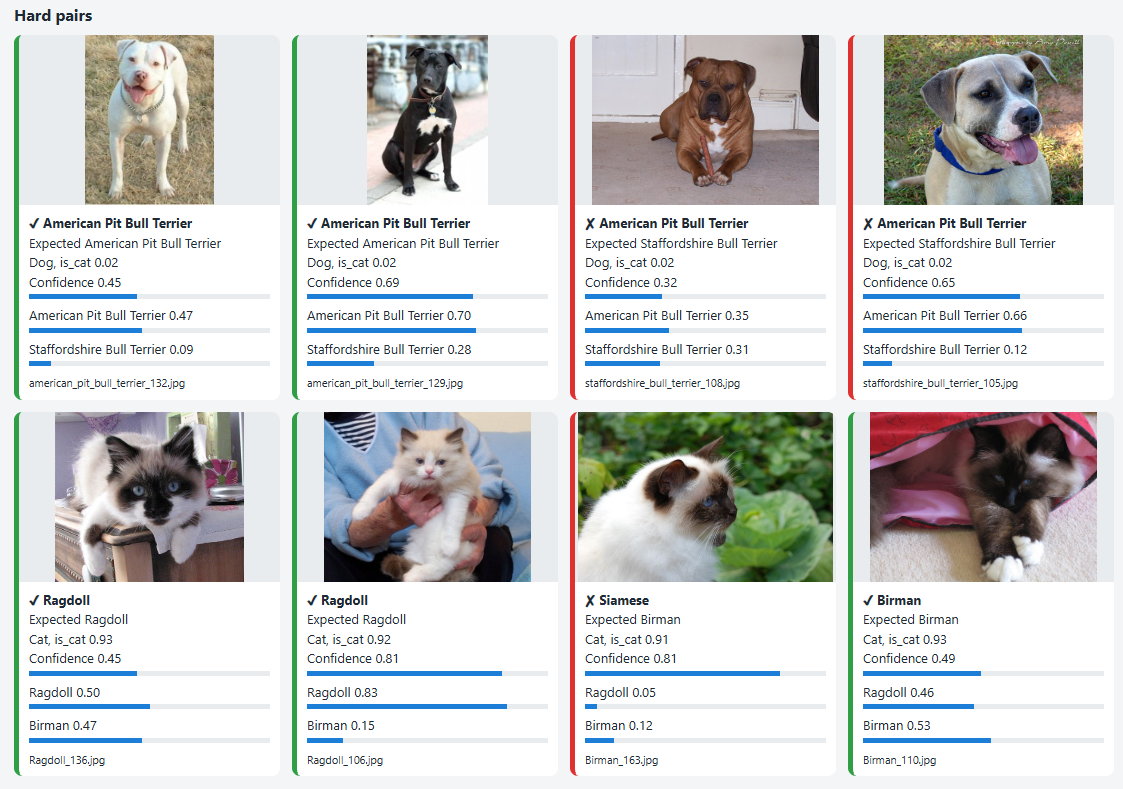
Jev split its probability almost evenly between Ragdoll and Birman on one photo of each breed and still picked the correct one, while the Birman it missed went to Siamese with a probability of 0.83. I also noticed that American Bulldog was competing in the pit bull pair with 0.44 on one of the American Pit Bull Terriers and 0.33 on one of the Staffordshire Bull Terriers, which isn’t visible in the report because it only draws bars for the two breeds in each pair. Confidence across these eight photos averaged 0.58 compared with 0.87 for the rest of the sample.
With only two photos per breed, this is too small a sample to say anything definite about a single breed and I would want to run 20 or more photos of each of these four breeds before relying on the pattern.
Step #5 – Find each animal’s head with a Box question
The last pet test asks a single Box question for the head of the animal and compares Jev’s box with the labelled head box using intersection over union, or IoU. IoU divides the area where the two boxes overlap by the total area they cover together so 1.0 means the boxes are identical and 0 means they don’t touch. A box with an IoU of 0.5 or higher counts as a hit, which is the same threshold the PASCAL VOC object detection benchmark used. The script also counts how many answers have a confidence below 0.6, which is the example value in the Box documentation, although TypeSafe says there is no recommended threshold yet.
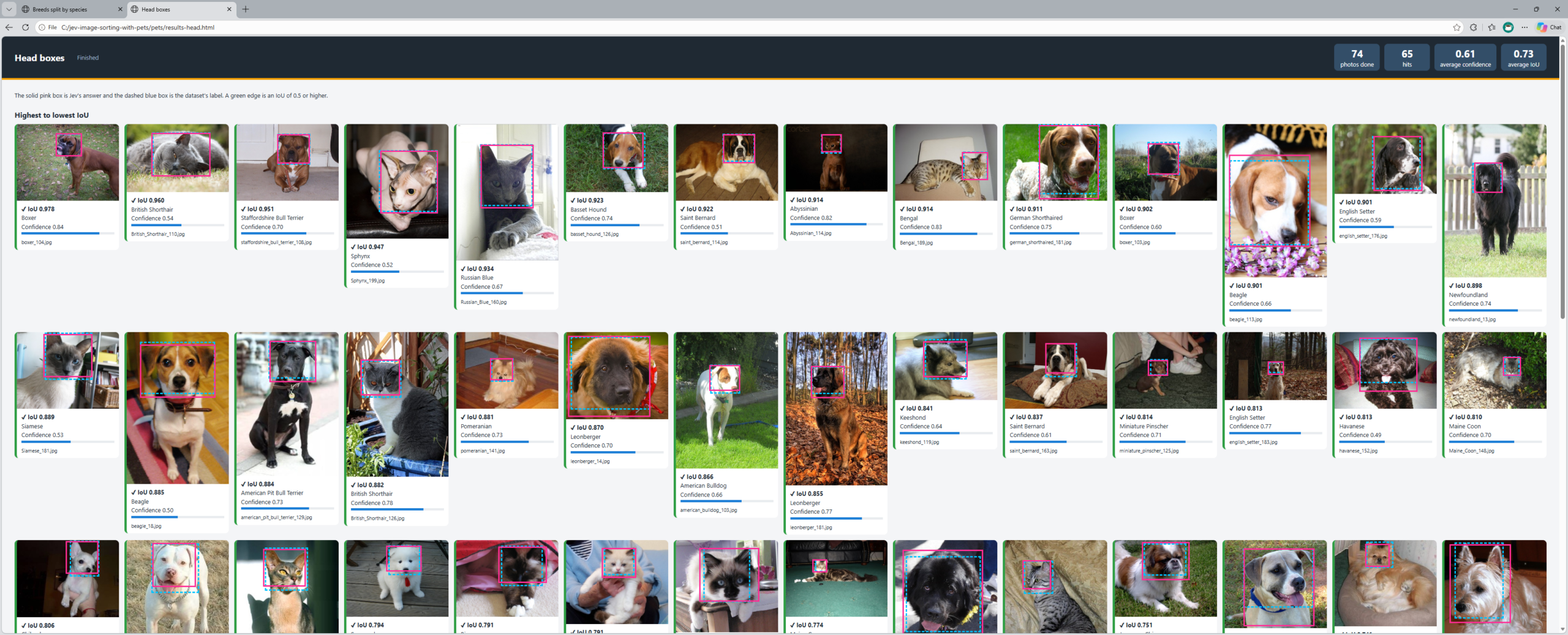
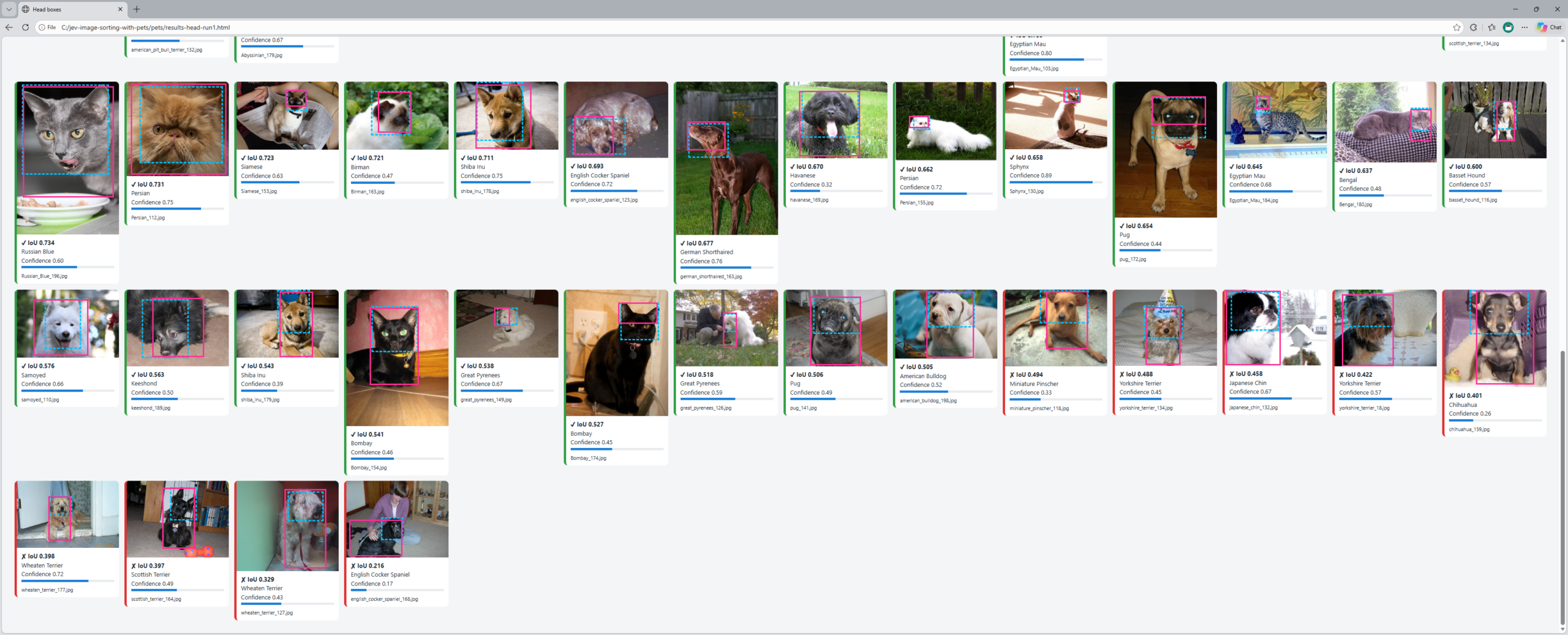
The report for this test draws Jev’s box in solid pink and the labelled box in dashed blue on each photo and orders the photos from the highest IoU to the lowest once the run finishes. Both sets of coordinates are also saved to pets\results-head.csv.
python sort_pets.py head
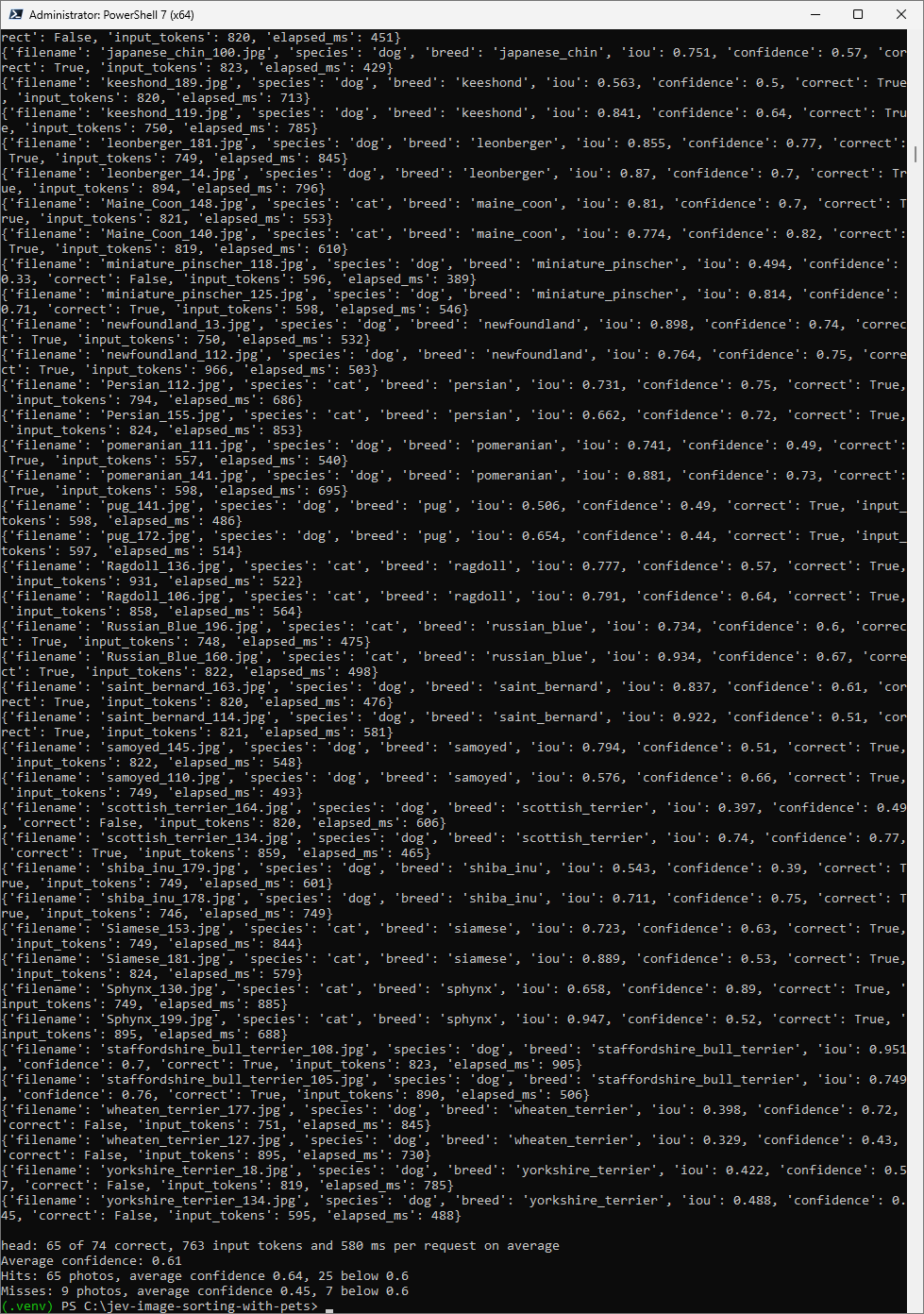
head: 65 of 74 correct, 763 input tokens and 580 ms per request on average
Average confidence: 0.61
Hits: 65 photos, average confidence 0.64, 25 below 0.6
Misses: 9 photos, average confidence 0.45, 7 below 0.6
| Result | Photos | Average Box confidence |
|---|---|---|
| IoU of 0.5 or higher | 65 | 0.64 |
| IoU below 0.5 | 9 | 0.45 |
Jev’s box was a hit on 65 of the 74 photos, which is 88%, with an average IoU of 0.73 across the sample. I noticed that all 24 cats were hits and that each of the nine misses was a dog with a box that continued below the head into the neck, chest, or body, making it 1.6 to 2.6 times as tall as the labelled box. Confidence was lower on the misses, although a cutoff of 0.6 wouldn’t have worked well as a filter on this sample because it flags 25 of the 65 hits along with 7 of the 9 misses.
Step #6 – Box always returns a box
The documentation is clear that Box never answers “not found” and I wanted to see that for myself so this script asks for an animal’s head in a photo that has no animal in it. It pairs the Box question with a noul presence check, which is the pattern the Box documentation recommends. The script also opens a page that shows the presence value and draws the box on the image. Save it as presence_check.py:
import json
import sys

from jev_client import ask
from pet_report import open_report, write_presence_report

questions = {
    "has_animal": {"type": "noul", "instructions": "Is there a cat or dog in `photo`?"},
    "head": {"type": "box", "instructions": "the head of the cat or dog in `photo`"},
}

result = ask(sys.argv[1], questions, image_name="photo")
print(json.dumps(result["answers"], indent=2))
open_report(write_presence_report(sys.argv[1], result["answers"]))
I ran it against one of the prepared receipts from my previous post and one of the pet photos. Any image without a cat or dog in it will work in place of the receipt:
python presence_check.py ..\jev-image-sorting-with-receipts\receipts\prepared\1017-receipt.jpg
python presence_check.py pets\prepared\boxer_104.jpg
{
  "has_animal": {
    "type": "noul",
    "noul": 0.04
  },
  "head": {
    "type": "box",
    "box": {
      "top": 0.02,
      "bottom": 0.1,
      "left": 0.03,
      "right": 0.14
    },
    "confidence": 0.16
  }
}
{
  "has_animal": {
    "type": "noul",
    "noul": 0.96
  },
  "head": {
    "type": "box",
    "box": {
      "top": 0.12,
      "bottom": 0.42,
      "left": 0.38,
      "right": 0.64
    },
    "confidence": 0.77
  }
}
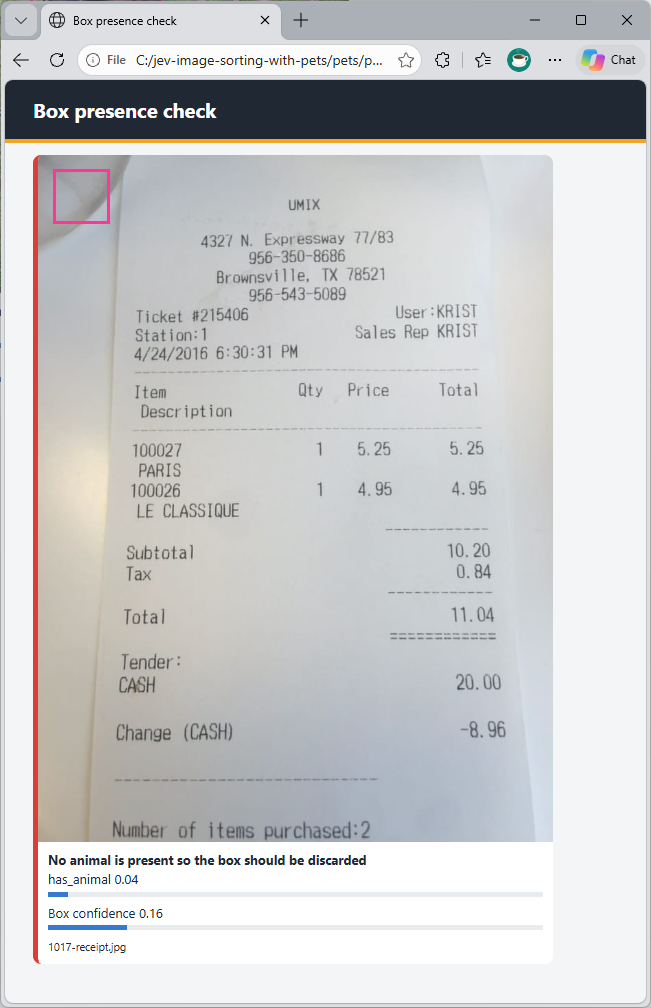
Jev still returned a head box for the receipt and placed it over the background in the top left corner of the photo with a confidence of 0.16. The presence check scored 0.04 for the receipt and 0.96 for the Boxer, whose head box had a confidence of 0.77.
Any script that crops or acts on a Box answer needs to check the presence answer first and discard the box when it is low because the coordinates on their own look just as valid when the target isn’t in the image. TypeSafe’s Noul documentation suggests starting with 0.7 for a yes and 0.3 for a no and adjusting them based on the cost of a wrong answer.
Step #7 – Tokens, latency, and cost
Every response includes usage.input_tokens and sort_pets.py saved it along with the round-trip time for each request. The TypeSafe console also shows the usage against my credits.
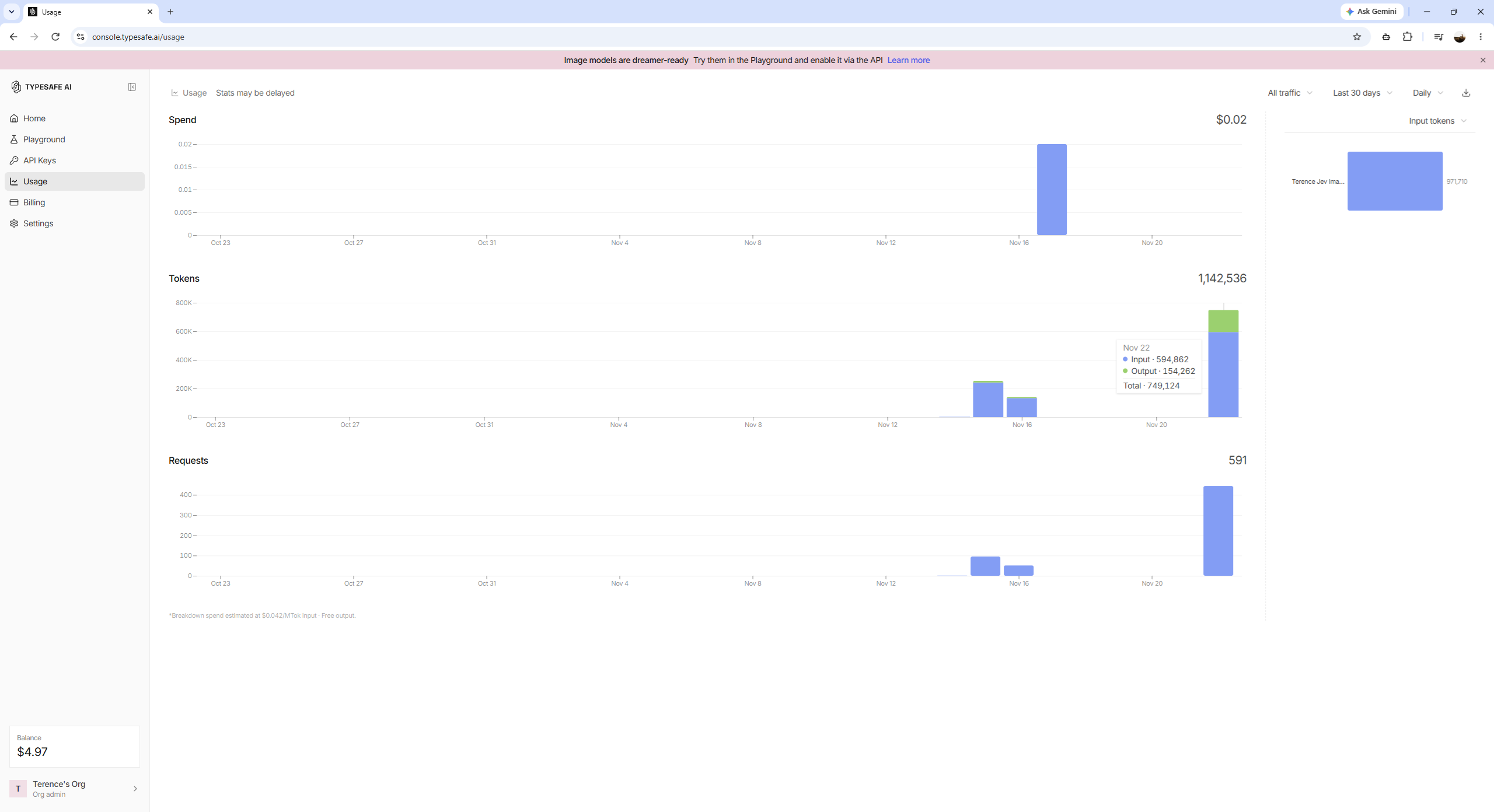
The Nov 22 bar shows 594,862 input tokens, which works out to about $0.025. That is the exact total of the six test runs in this post. TypeSafe notes on the page that its stats may be delayed so neither that day’s spend nor the two presence checks from Step #6 had appeared when I took the screenshot.
| Request | Average input tokens | Average response time | Cost per 1,000 images at $0.042 per million input tokens |
|---|---|---|---|
| Pet breeds, one question with 37 options (Step #2) | 1,433 | 592 ms | about $0.06 |
| Pet breeds, split into three questions (Step #3) | 1,489 | 554 ms | about $0.06 |
| Pet head Box question (Step #5) | 763 | 580 ms | about $0.03 |
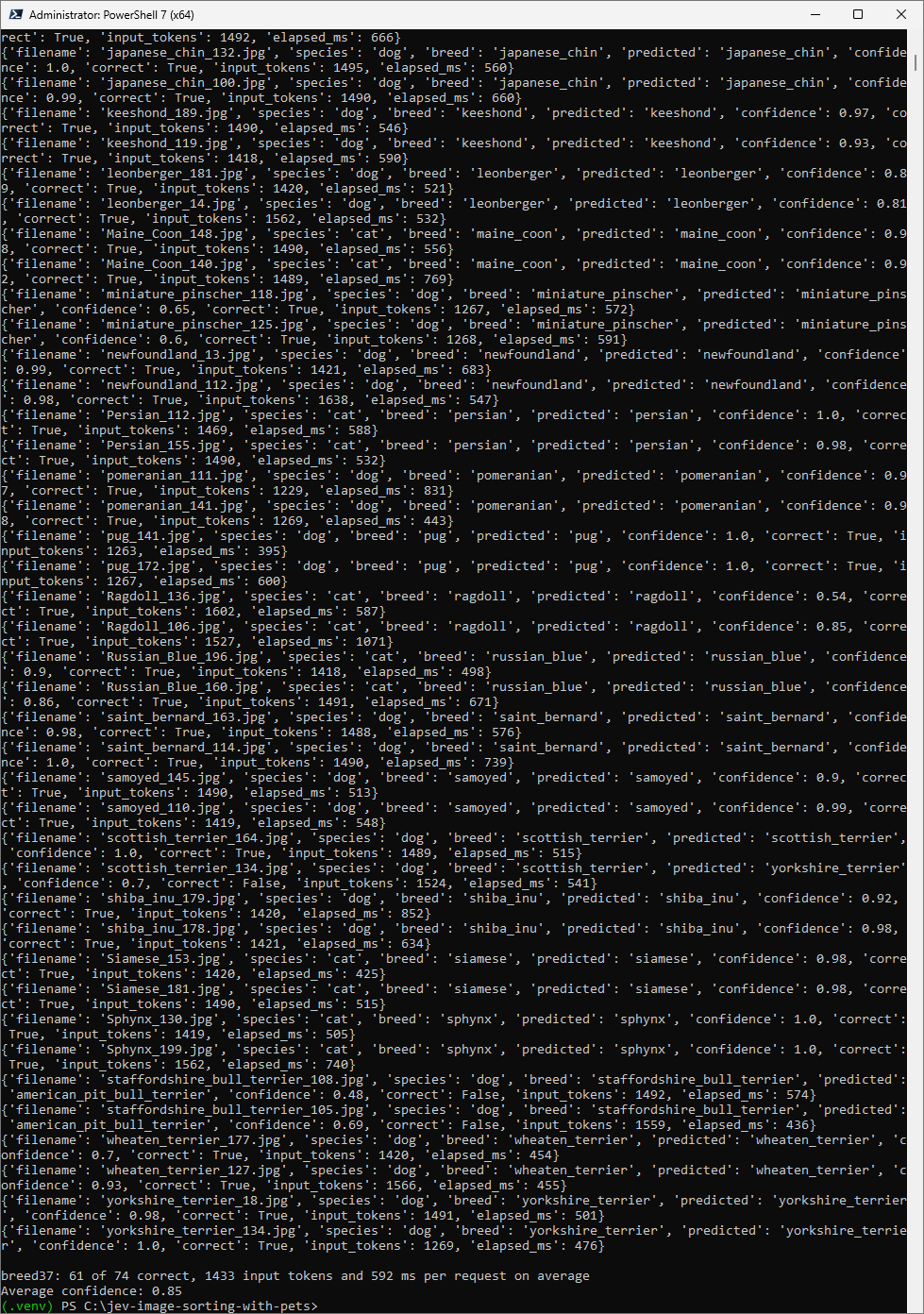
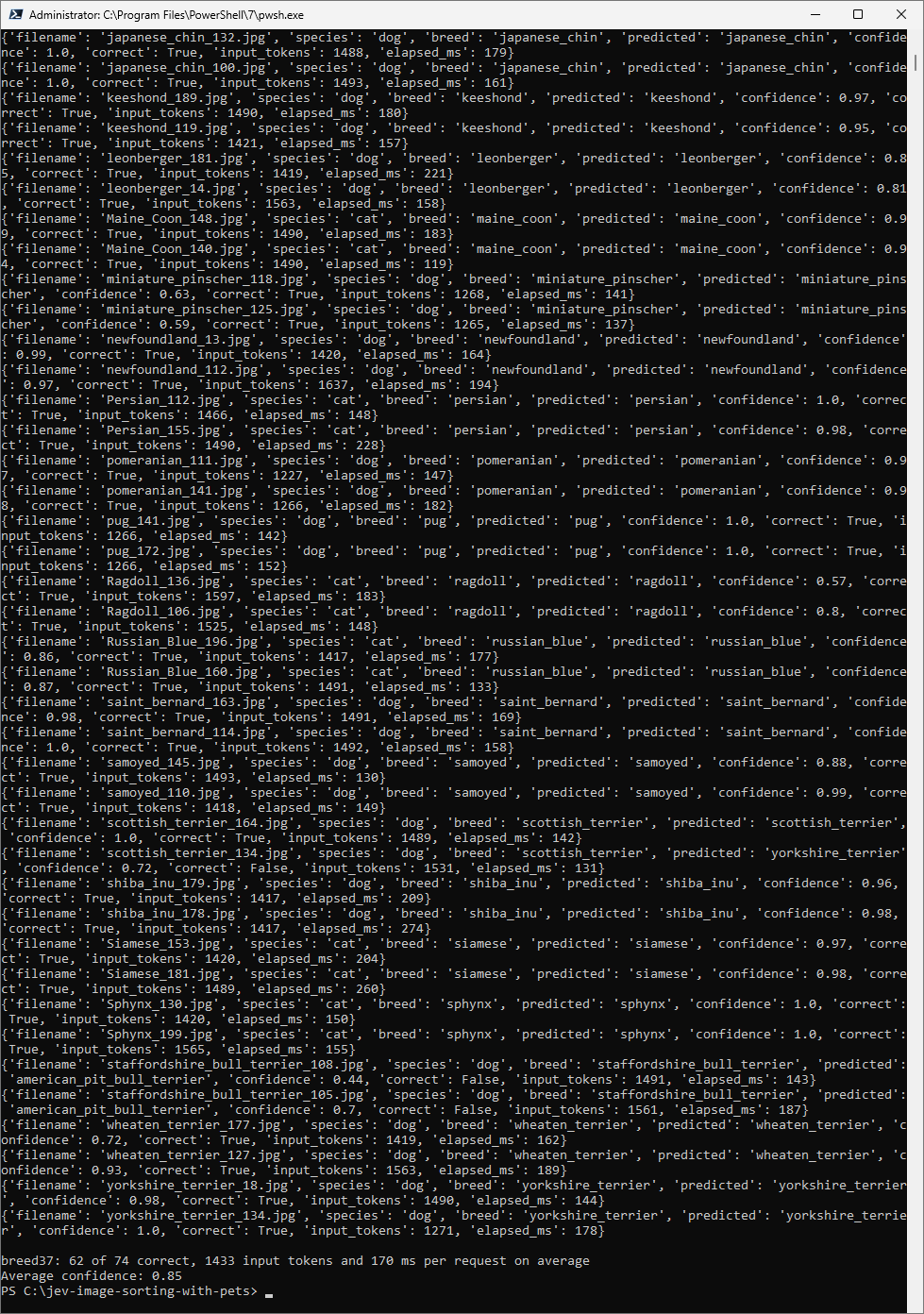
My first and third breed37 runs used Python 3.12 and averaged 592 ms and 542 ms, while the second used Python 3.9 and averaged 170 ms.
A local test without any calls to Jev showed that Python 3.12.10 typically added 300 to 400 ms to each HTTPS request on my laptop while loading certificates so most of that difference is client overhead. All of the response times in the table include this overhead, which means they can’t be compared directly with my previous post. Both split runs also used Python 3.12 and their averages of 554 ms and 543 ms are within the range of the two breed37 runs on that version so the extra questions didn’t make the requests noticeably slower.
The second breed37 run used Python 3.9 because I ran it from a window without the virtual environment activated, which is why its prompt has no (.venv) in front of it. These are the ends of the first and second runs:
Jev’s published price is $0.042 per million input tokens with output tokens free of charge. Images are billed at the same rate as text. A pet photo with the 37-option question averaged 1,433 input tokens, which is well below the 2,263 for the single receipt in my previous post. With the three split questions, the average only increased by about 4% to 1,489 because the image is still sent once.
Final Thoughts on Jev Box Questions
I think Jev could be useful for a first pass at identifying breeds and finding heads in photos like these. It got the breed right for 61 of the 74 photos, and 65 of the head boxes met the IoU threshold. I still wouldn’t trust the results without someone reviewing them though. One wrong breed came back with 0.90 confidence, and one of the missed head boxes still had 0.72 confidence.
This was quite different from the receipt test in my previous post. There, Jev was reading a merchant name and items printed on a receipt. Here, telling a Ragdoll from a Birman comes down entirely to what the cat looks like. Jev got all 23 receipt labels right compared with 82% of the breed labels. That’s an interesting difference, but I don’t think it’s enough to prove TypeSafe’s point that models perform worse on images than text. Both of my tests were still using images, and the breed test also had 37 possible answers compared with nine for the receipts.
I also wanted to see whether splitting the breed question by species would make any difference. TypeSafe recommends breaking visual questions into simpler parts, so this seemed like a good way to test that. All three questions can go into the same request, so Jev still only needs the image once. In my testing, though, splitting the question didn’t identify any additional breeds correctly. Unless I actually need the species returned separately, I’d probably just stick with the single breed question.
Box was another interesting one because it’s the first Jev question type I’ve tested that returns a location. One important note to be aware of is that Jev will return a box when the target isn’t there. If you’re going to crop an image or do something based on that box, you really need a presence check as well. For now, I could see myself using it to suggest where a head is and then having someone approve it. I wouldn’t automatically act on the result yet. Nine of the dog boxes extended too far below the head, and seven of the successful matches only just passed with an IoU below 0.55.
There’s also an important caveat with all of this. TypeSafe currently labels image and Box questions as not ready for production and says their results can change between releases. My helper pins every request to jev-1.14.0, so these are really results for that specific version in November 2026. I wouldn’t assume the same tests will produce the same results with a later release.
The scripts from this post and the two copied from my previous post are in my GitHub repo.