

In my previous post, What is Speculative Decoding and How Does a Draft Model Work?, I walked through how a small draft model guesses a few tokens ahead so a much larger target model can check all of them in a single pass, and I closed it by saying I would follow up with multi-token prediction (MTP).
I have now had the time to do that, and I kept the laptop, the PowerShell prompt, and the Qwen3.5 27B model the same as last time, although the MTP file comes from Unsloth and the draft model test used the lmstudio-community file, so the MTP results can be compared with the draft model results. At 3 draft tokens MTP sped up all three models I tested, taking Qwen3.5 27B from 7.06 to 19.4 tokens per second, about 1.6 times the 12.4 the draft model reached on the same file, and 6 draft tokens took Qwen3.6 27B from 7.16 to 22.33.
Multi-token prediction is speculative decoding where the target model makes its own guesses. The guess and check loop, the rule for accepting a guess, and in principle the guarantee that the answer at a temperature of 0 is identical to the target model running alone all carry over from the draft model approach, and the only change is where the guesses come from.
A draft model is a second, complete model that sees nothing but the tokens the target has written, whereas MTP is a small extra layer inside the target that starts from the target’s own internal state, so it guesses with the benefit of everything the target has already worked out and costs roughly 1 GB of memory according to Unsloth’s Qwen3.6 guide.
Those who have not read the previous post may want to start there, because this post builds on its diagrams and on the Qwen3.5 27B result from its demo, where the Qwen3.5 2B draft model took the target from 7.09 to 11.20 tokens per second with 64.3% of the drafted tokens accepted.
How Multi-Token Prediction (MTP) works
#1 – What carries over from the draft model
Everything the target model does in the previous post stays the same. It reads a batch of guessed tokens in one pass, keeps every guess up to the first one it disagrees with, replaces that token with its own choice, and discards the rest.
| Part of the loop | Draft model | MTP |
|---|---|---|
| Who makes the guesses | A separate, smaller model from the same family | Extra layers trained into the target model |
| Who checks the guesses | The target model, in one pass | The target model, in one pass |
| What is kept | Every guess up to the first mismatch, plus the target’s own token | Every guess up to the first mismatch, plus the target’s own token |
| Output at a temperature of 0 | Identical to the target alone in principle | Identical to the target alone in principle |
| What the guesser can see | Only the tokens written so far | The target’s final hidden state plus the latest token |
#2 – How the guesses are generated
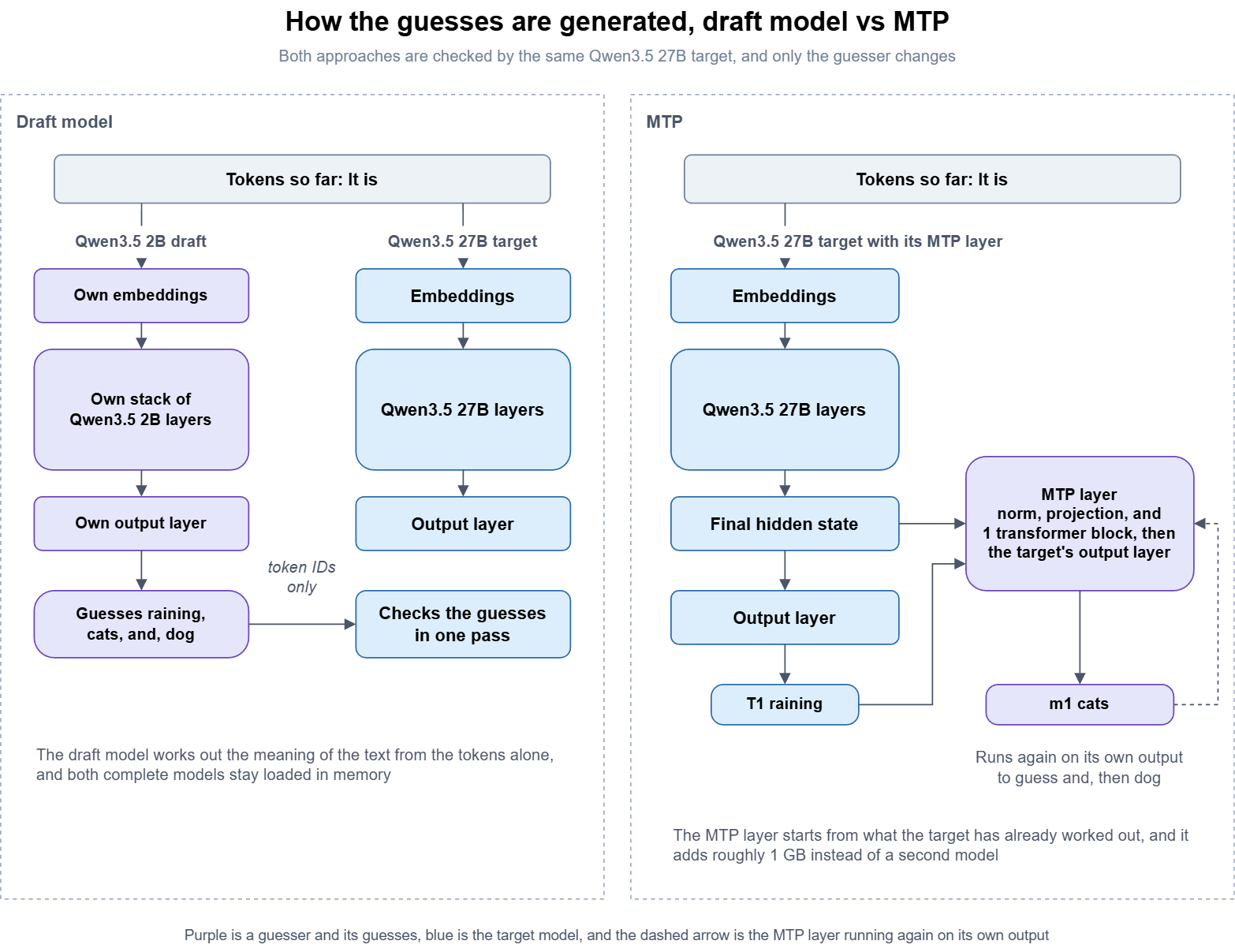
An embedding is the list of numbers a model uses to represent a single token, the hidden state is the list of numbers the model ends up with for a position in the text after every layer has run, and the output layer is the final step that turns a hidden state into a probability for every possible next token.
I think of the hidden state as the model’s working notes, because by the end of a pass it holds everything the model has worked out about the text so far, and the output layer reads those notes to choose the next token.
A draft model never sees those notes. It is a separate model with its own embeddings, its own stack of layers, and its own output layer, so its 2B parameters read the same tokens as the target and have to build their own working notes from scratch before they can guess what comes next.
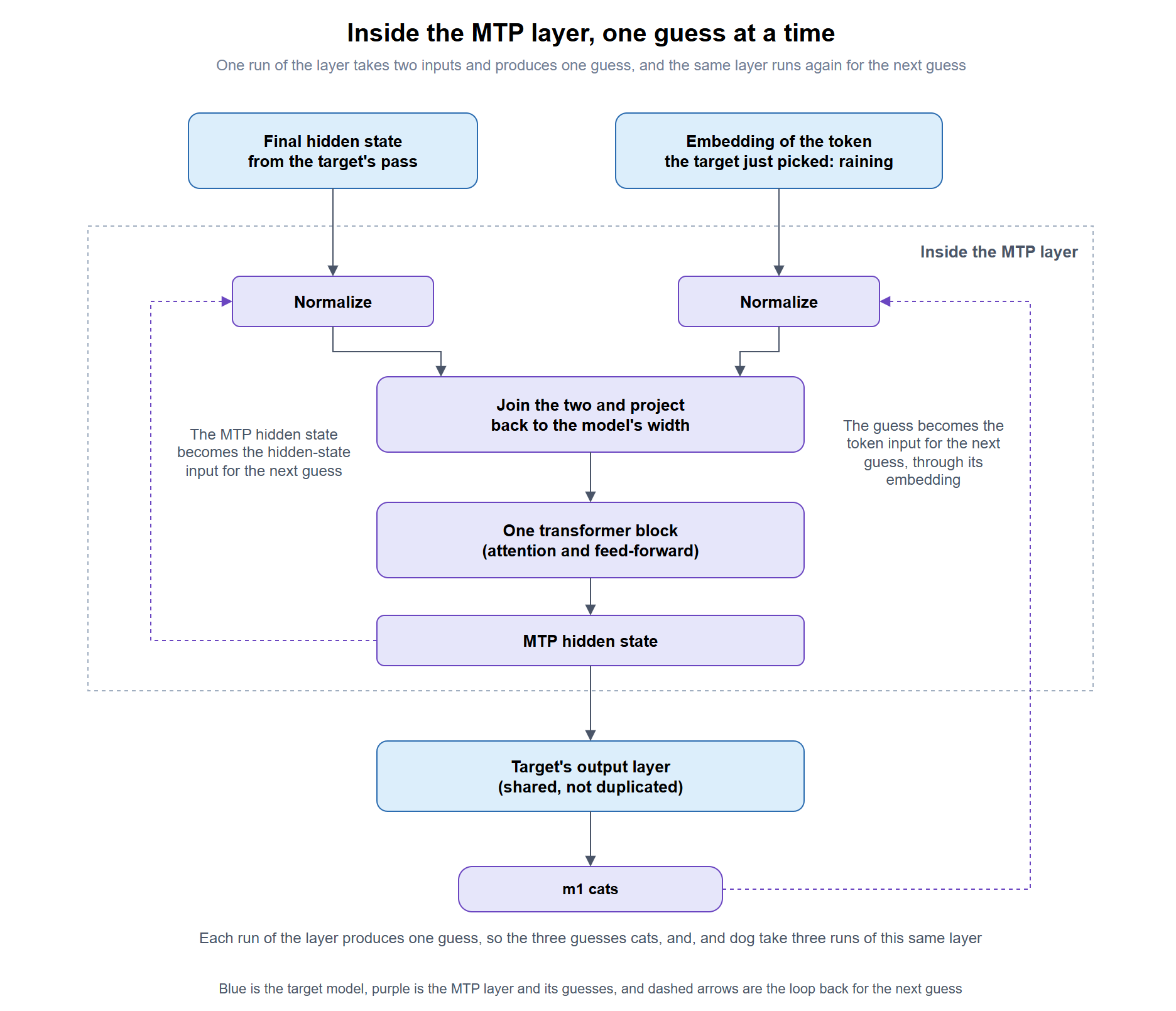
An MTP layer is handed the target’s notes instead. It takes two inputs, the hidden state the target just produced and the embedding of the token the target just picked, and the only question it has to answer is what comes after that token. The design Qwen follows comes from the DeepSeek-V3 technical report, where the module normalizes both inputs, combines them with a projection, and runs the result through a single transformer block, which is one layer of the same kind the target stacks many times over.
That output then goes through the target’s own output layer, which the MTP module shares instead of duplicating, to produce a guess for the token after the one the target just wrote. Qwen3.5 ships with one of these modules, set by mtp_num_hidden_layers = 1 in the model’s configuration, so the entire guessing apparatus is one transformer block sitting beside the target’s full stack.
The guesses are good because the hard work is already done. Building the hidden state took the target’s full stack of layers, so the MTP layer only has to take one more step from there, where a draft model has to do all of that work itself with far fewer parameters. Because the layer is trained together with the target, it learns to read exactly the kind of hidden state this model produces, which is why the layer has to be present in the model file and why a standard GGUF without it cannot do MTP.
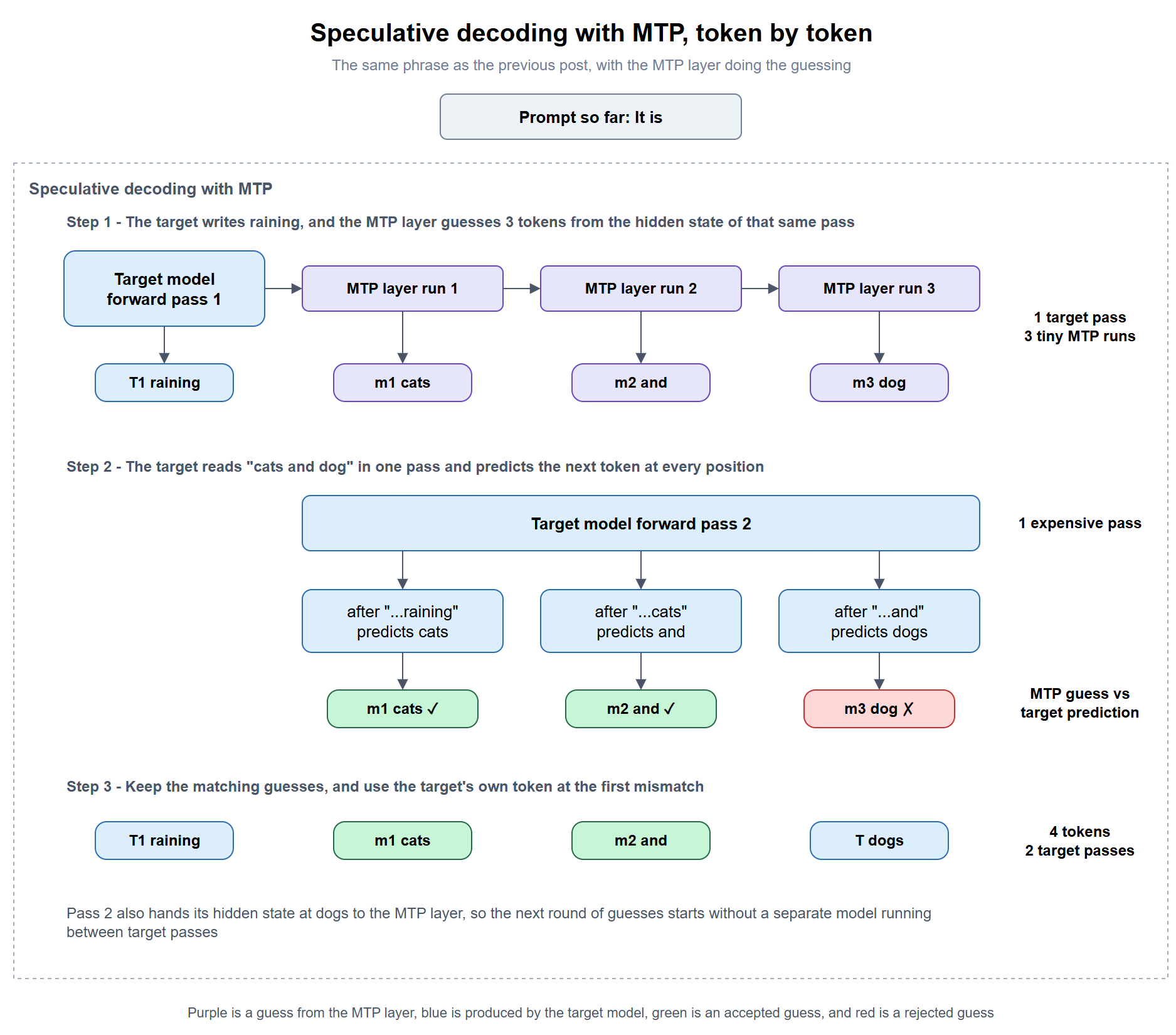
Here is one round of the “It is raining cats and dogs” example from the previous post with MTP doing the guessing.
- The target runs a normal pass over “It is” and ends with its hidden state and the token “raining.”
- The MTP layer takes that hidden state and the embedding of “raining” and guesses the token after it, “cats.”
- It runs again on its own output, this time with the embedding of “cats,” to guess “and,” and once more to guess “dog.”
- On the next pass the target checks “cats,” “and,” and “dog” together in one pass, keeps “cats” and “and,” and replaces “dog” with its own choice, “dogs.”
- The hidden state from that checking pass goes to the MTP layer to start the next round, so there is never a separate model running between the target’s passes.
The idea itself is older than DeepSeek-V3. Meta’s 2024 paper Better & Faster Large Language Models via Multi-token Prediction trained models with several independent output heads that each predicted a different distance ahead, mainly because the extra prediction targets made the model learn better, and it showed the heads could then be used to speed up inference.
DeepSeek-V3 chained the modules one after another so each prediction builds on the previous one, and the report states that the second predicted token was accepted between 85% and 90% of the time, which increased generation speed by 1.8 times. Sebastian Raschka’s explainer on MTP has a clear comparison of the two designs for those who would like more detail.
#3 – Choosing the number of draft tokens
Only the first guess comes from the target’s hidden state. To guess further ahead, the single MTP layer is run again on its own output, so each later guess builds on the guesses before it. Unsloth reports that the acceptance rate drops from 83% to 50% with 4 draft tokens, which is why their guide recommends 2 draft tokens for Qwen3.6 and suggests testing values between 1 and 6 on your own hardware.
The previous post used llama.cpp’s default of 3 draft tokens for the Qwen3.5 2B draft model, and on the ZBook, both Qwen3.5 27B MTP and Qwen3.6 27B MTP kept getting faster as the count went up, with Qwen3.6 peaking at 6 in my runs, which fits Unsloth’s advice to test the value on your own hardware.
#4 – What you need to run MTP
The MTP layer has to exist in the model file, so you need an MTP build of the model. A standard Qwen3.5 or Qwen3.6 GGUF leaves the layer out and will not offer MTP, and Unsloth publishes separate files such as Qwen3.5-27B-MTP-GGUF and Qwen3.6-27B-MTP-GGUF that keep it. Keeping both the standard file and the MTP file for the same model doubles the disk space, at 29 GB for each 27B model at Q8_0. Unsloth’s model pages note that parallel slots (-np greater than 1) and vision (–mmproj) are not yet supported with MTP in llama.cpp.
| Draft model | MTP | |
|---|---|---|
| Extra memory | The full draft model, 2.50 GB for Qwen3.5 2B at Q8_0 | Roughly 1 GB according to Unsloth |
| Compatibility check | Same tokenizer required, and LM Studio can hide a compatible draft from the list | None, because the layer was trained with the model |
| Model families | Any family with a small sibling | Only models trained with MTP and files that keep the layer |
| Draft tokens | 3 in the previous post, llama.cpp’s default | 2 for Qwen3.6 according to Unsloth, and 6 was the fastest of the 1 to 7 I measured on Qwen3.6 27B |
| Vision and parallel requests | Not tested | Not yet supported in llama.cpp, according to Unsloth |
#5 – Mixture-of-experts models
Unsloth reports 1.4 to 2 times faster generation for dense models with MTP but only 1.15 to 1.25 times for mixture-of-experts models, and that gap follows the same reasoning that made the gpt-oss-120b and gpt-oss-20b pairing slower in the previous post.
A mixture-of-experts target such as Qwen3.6 35B A3B only reads about 3B of its parameters for each token, so each target pass is already cheap and there is much less time for speculative decoding to win back, even when the guesses come from a layer as light as MTP. On the ZBook the pattern held in relative terms, with Qwen3.6 35B A3B gaining 63% at best against 212% for the dense Qwen3.6 27B, although both gains were larger than the figures Unsloth reports.
The demo, MTP on and off on the ZBook
The demo sends the same code edit prompt from the previous post to three MTP builds in LM Studio with MTP off and then on, reading the tokens per second shown under each answer, and then compares Qwen3.5 27B with MTP against the Qwen3.5 2B draft model result from last time.
Step #1 – Check the LM Studio version and runtime
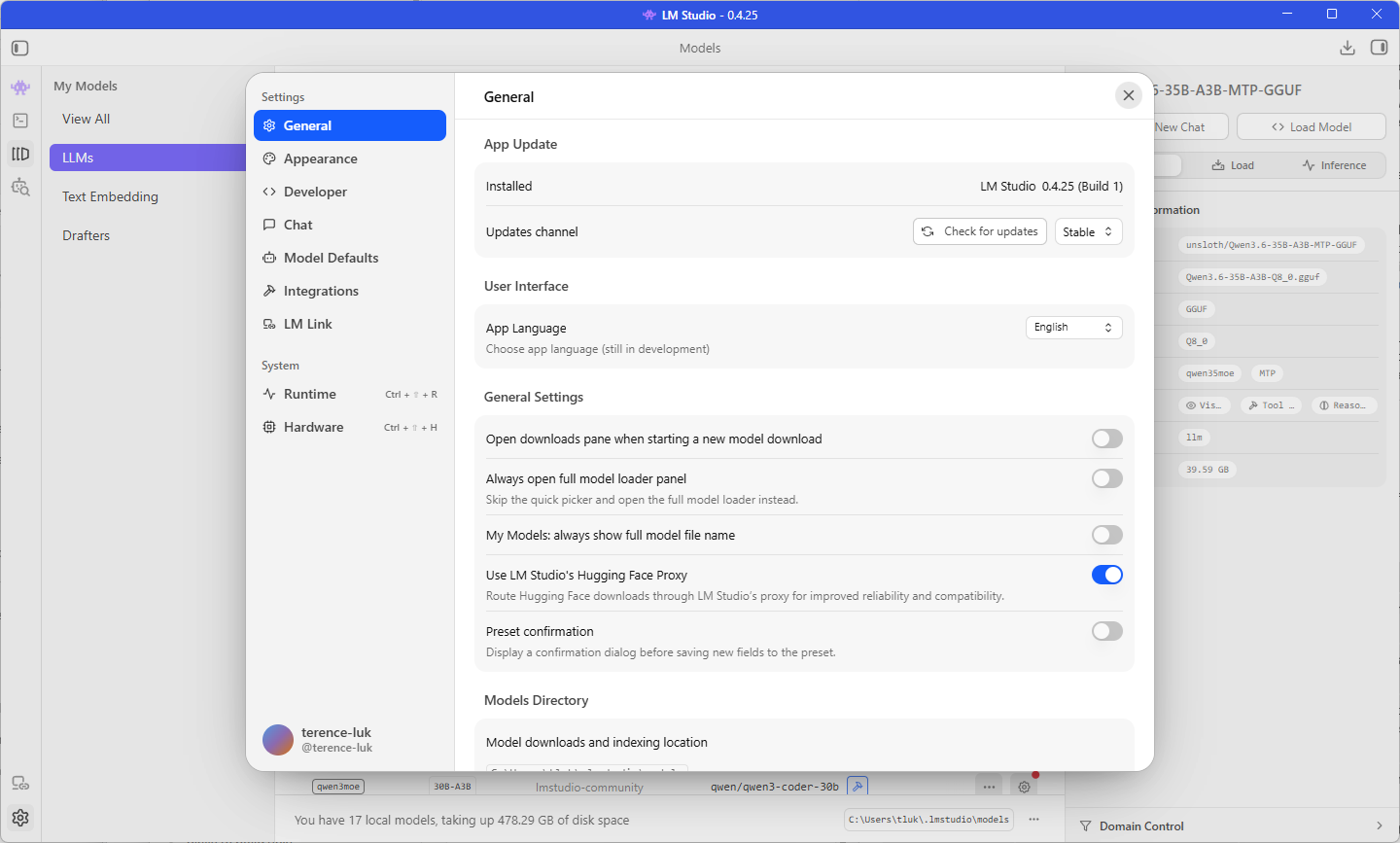
The LM Studio version is displayed in the title bar, and the version I’m using for this post is 0.4.25, one release newer than the 0.4.24 I used for the previous post. Open the Developer Logs at the bottom of the Developer tab to confirm the runtime, which was llama.cpp-win-x86_64-amd-rocm-avx2 version 2.40.0 in the previous post, because the comparison with the draft model results only holds if the runtime has not changed.
Step #2 – Download the MTP builds
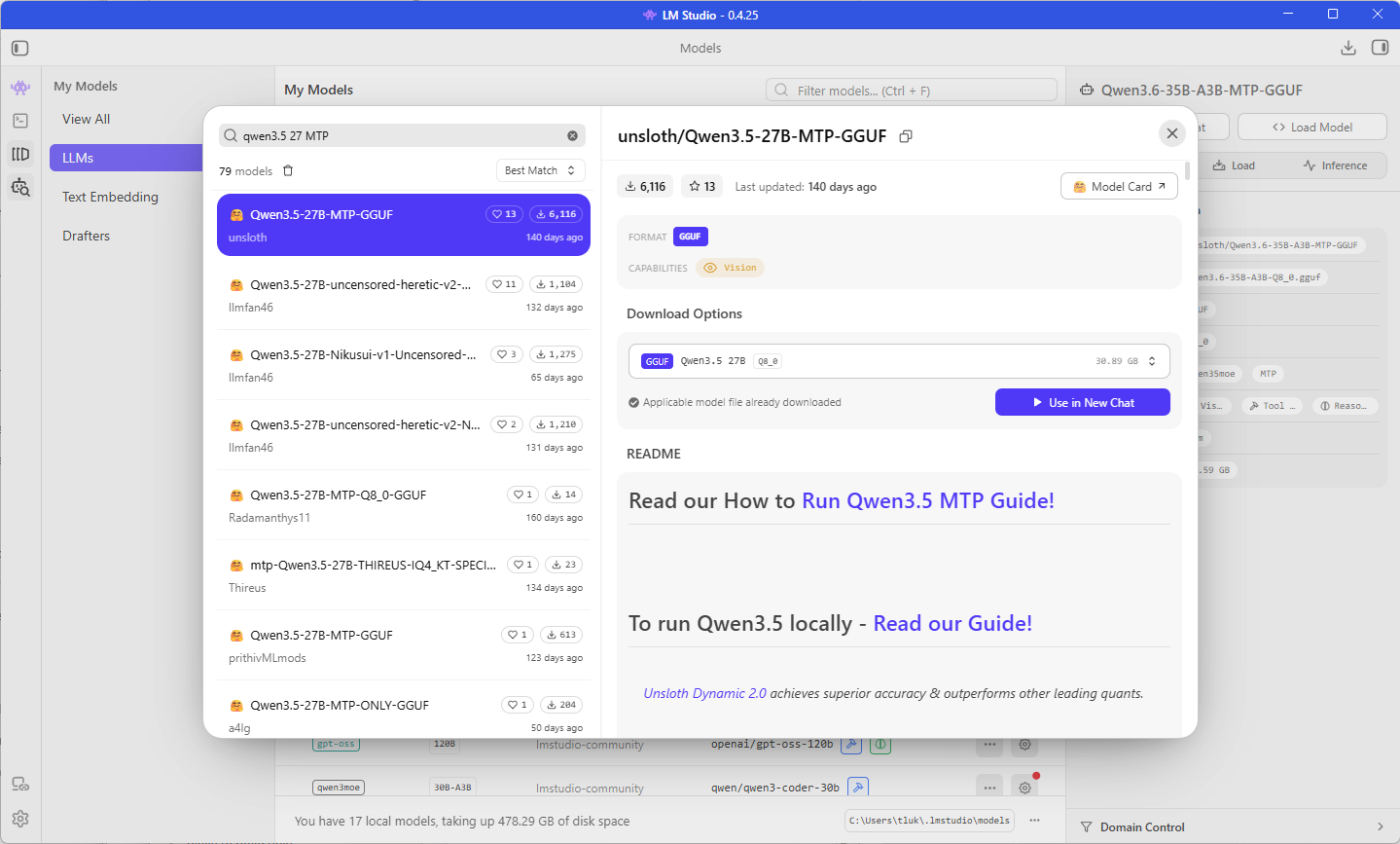
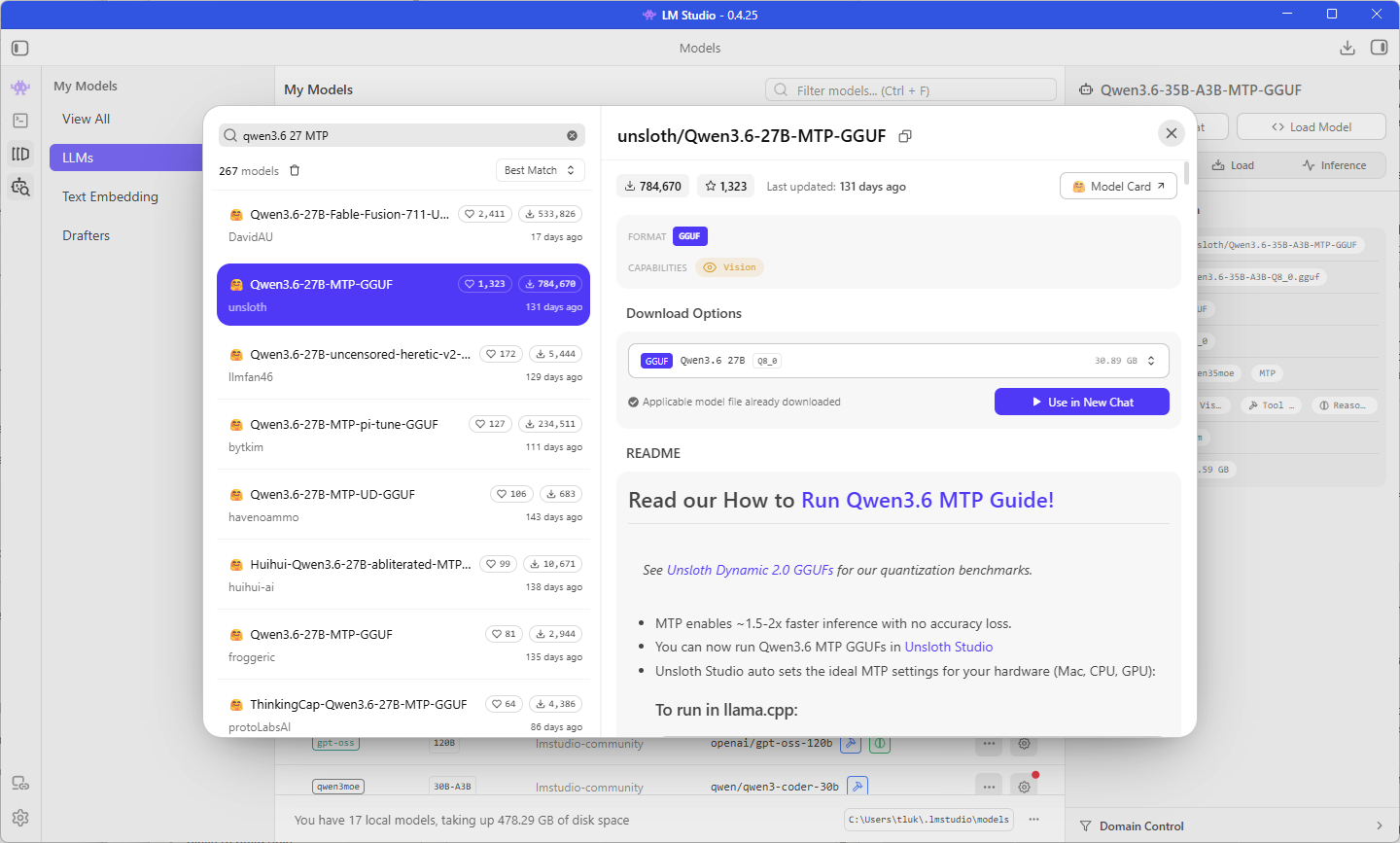
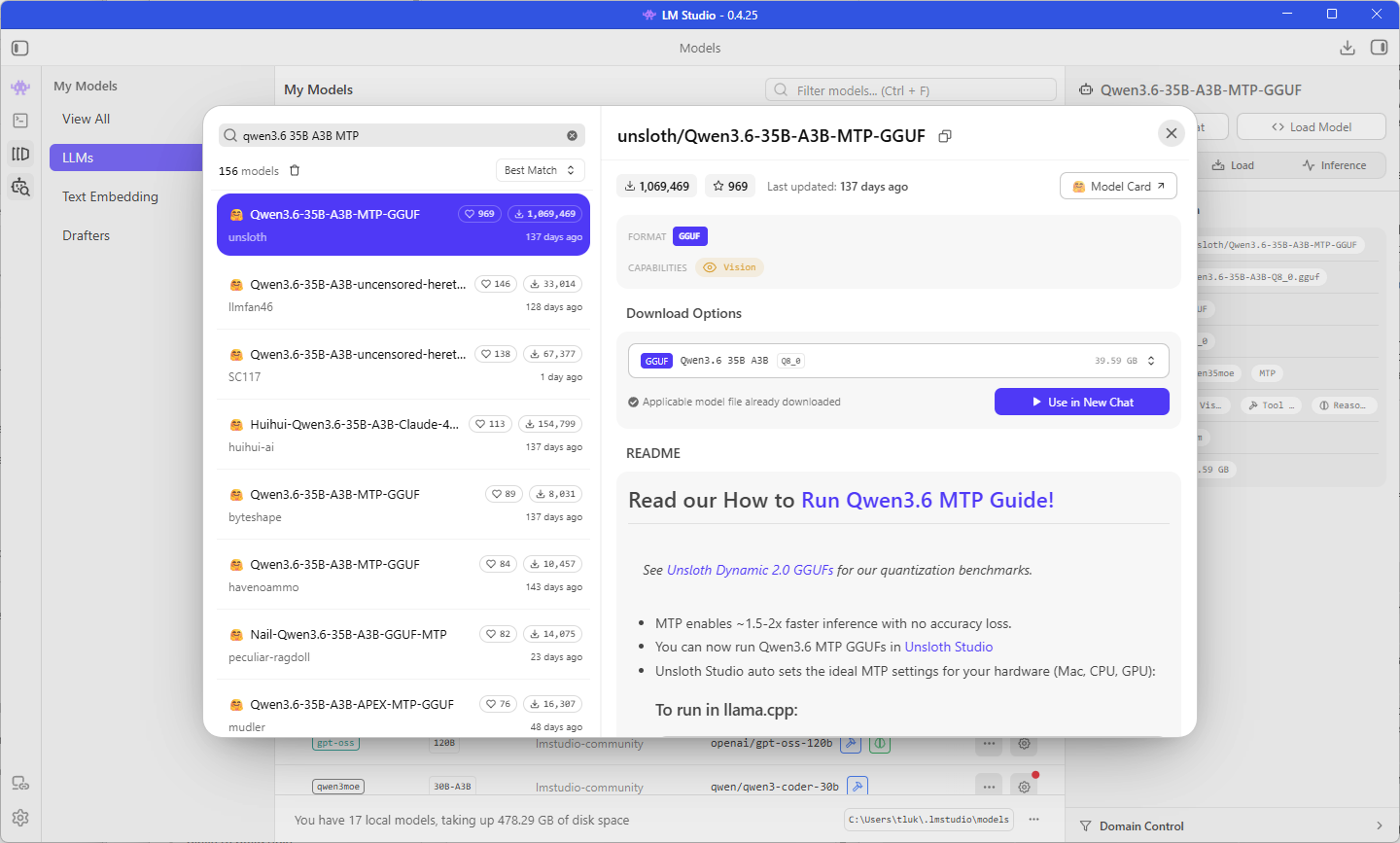
Use the Discover tab, which opens with Ctrl + 2 on Windows, to search for the Unsloth MTP builds below. The -MTP in the repository name is the part to look for, because the standard Unsloth and lmstudio-community files of the same models will not offer the MTP option.
| Model | Repository | Architecture | Quantization |
|---|---|---|---|
| Qwen3.5 27B MTP | unsloth/Qwen3.5-27B-MTP-GGUF | Dense | Q8_0 |
| Qwen3.6 27B MTP | unsloth/Qwen3.6-27B-MTP-GGUF | Dense | Q8_0 |
| Qwen3.6 35B A3B MTP | unsloth/Qwen3.6-35B-A3B-MTP-GGUF | Mixture-of-experts, about 3B active | Q8_0 |
Step #3 – Find the MTP load setting
Open the model picker with Ctrl + L, hold Alt while selecting Qwen3.5 27B MTP so LM Studio shows the load settings, and turn on Show advanced settings. The Speculative Decoding setting now includes an MTP option alongside Draft model, and selecting it shows the settings below. There is no model selector this time, because the guesses come from the model being loaded.
| Setting | Default | What it controls |
|---|---|---|
| Max draft tokens | 3 | The most tokens the MTP layer guesses before the target checks them |
| Min draft tokens | 0 | The fewest guessed tokens worth sending to the target for checking |
| Draft probability | 0 | Stop guessing once the MTP layer’s confidence falls below this value |
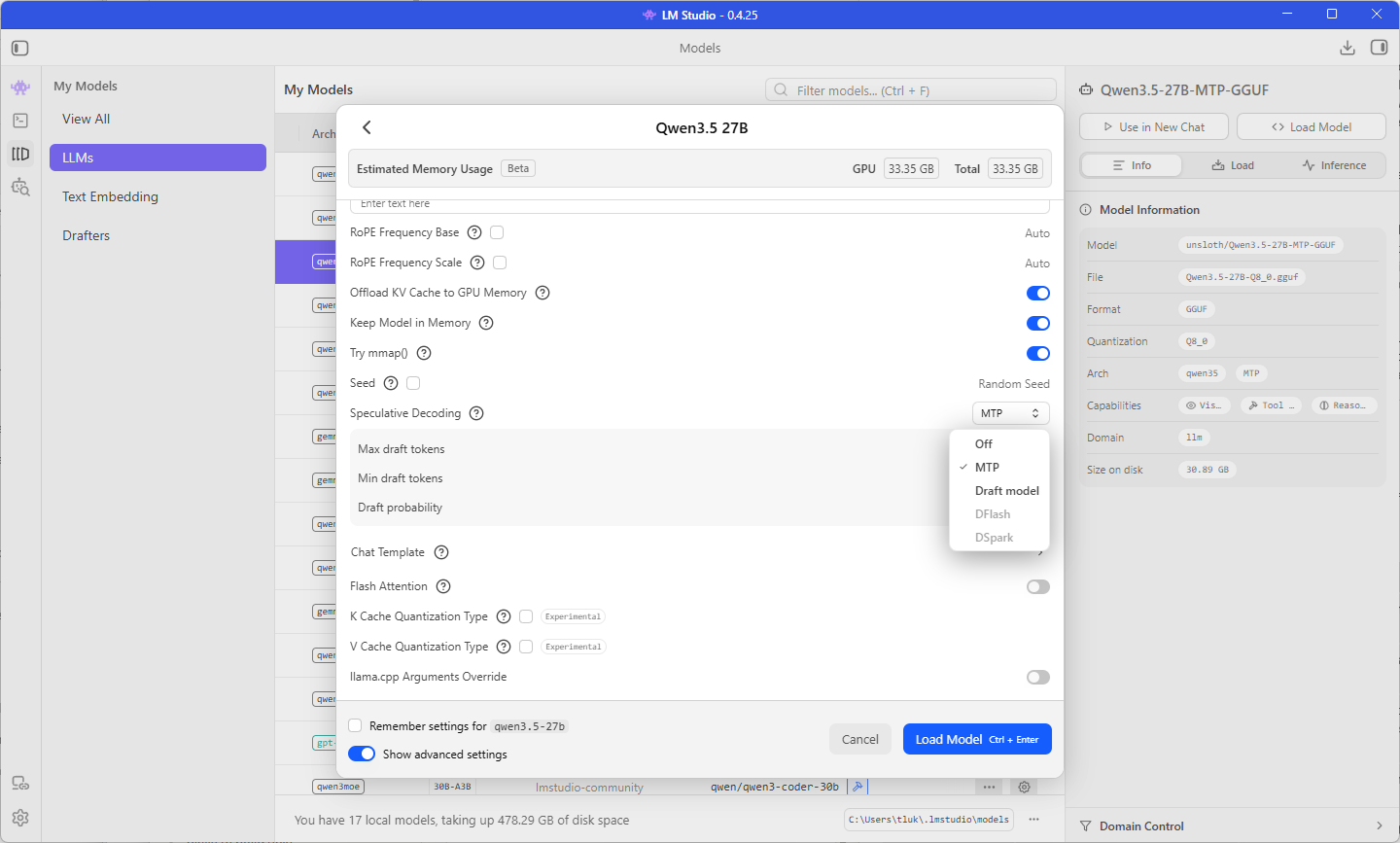
Opening the load settings for the standard Qwen3.5 27B from the previous post is a quick way to confirm the difference between the two files, because the MTP option should not be offered there.
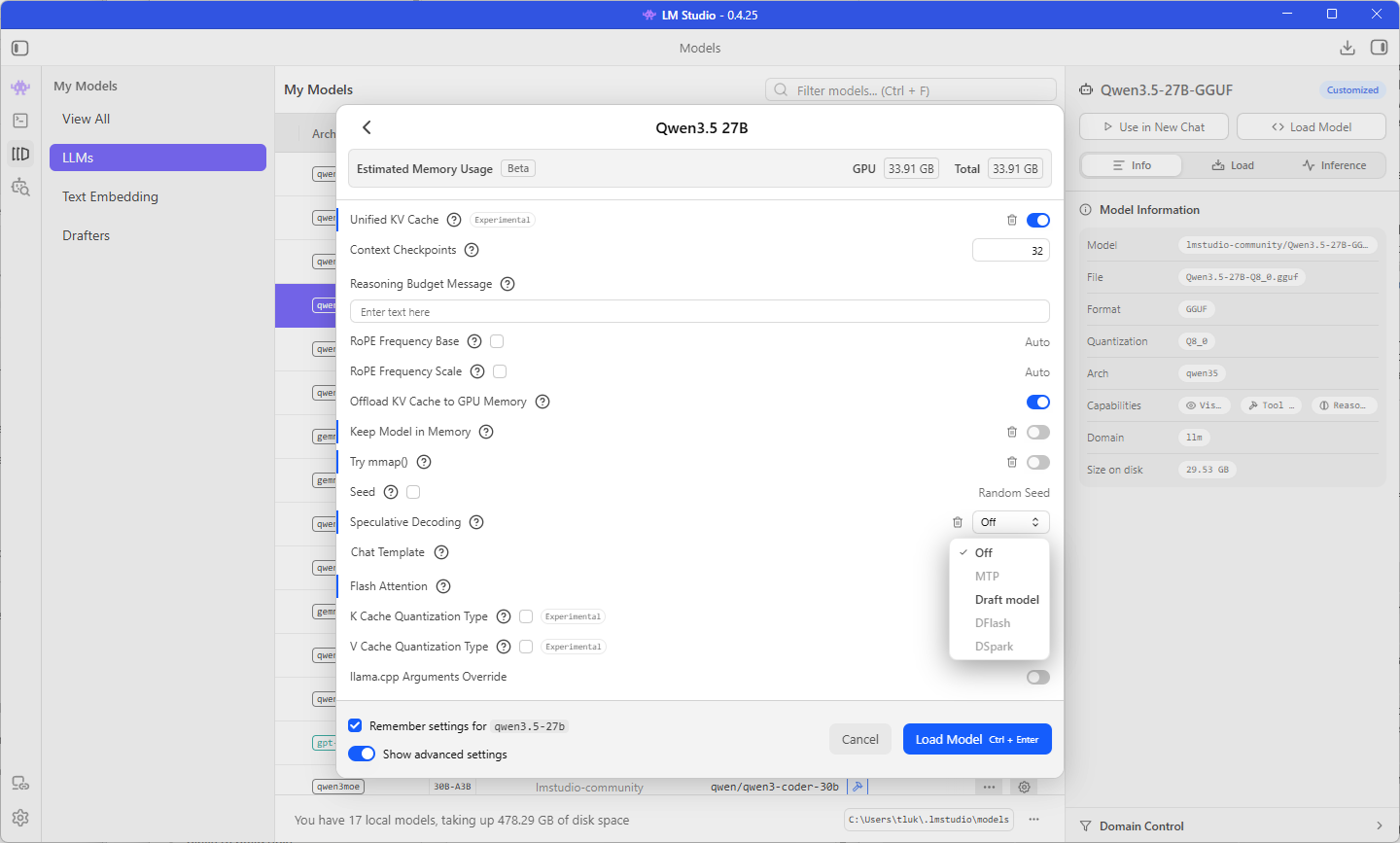
Step #4 – Compare Qwen3.5 27B MTP with MTP off and on
Load Qwen3.5 27B MTP with Speculative Decoding set to Off, which gives a baseline from the same file and keeps the MTP layer as the only difference between the two runs. Set Temperature to 0 and keep the Think button the same as it was in the previous post, then paste the prompt below into a new chat and note the tokens per second once the answer finishes. Send it two or three times in a new chat each time and use the typical figure.
Rename the variable $vmList to $virtualMachines everywhere it appears in this PowerShell function and return the complete function with no explanation.

function Get-StoppedVm {
    param([string] $ResourceGroup)
    $vmList = Get-AzVM -ResourceGroupName $ResourceGroup -Status
    $stopped = @()
    foreach ($vm in $vmList) {
        if ($vm.PowerState -ne 'VM running') {
            $stopped += [pscustomobject]@{
                Name       = $vm.Name
                PowerState = $vm.PowerState
                Location   = $vm.Location
            }
        }
    }
    Write-Output "Checked $($vmList.Count) virtual machines"
    return $stopped
}
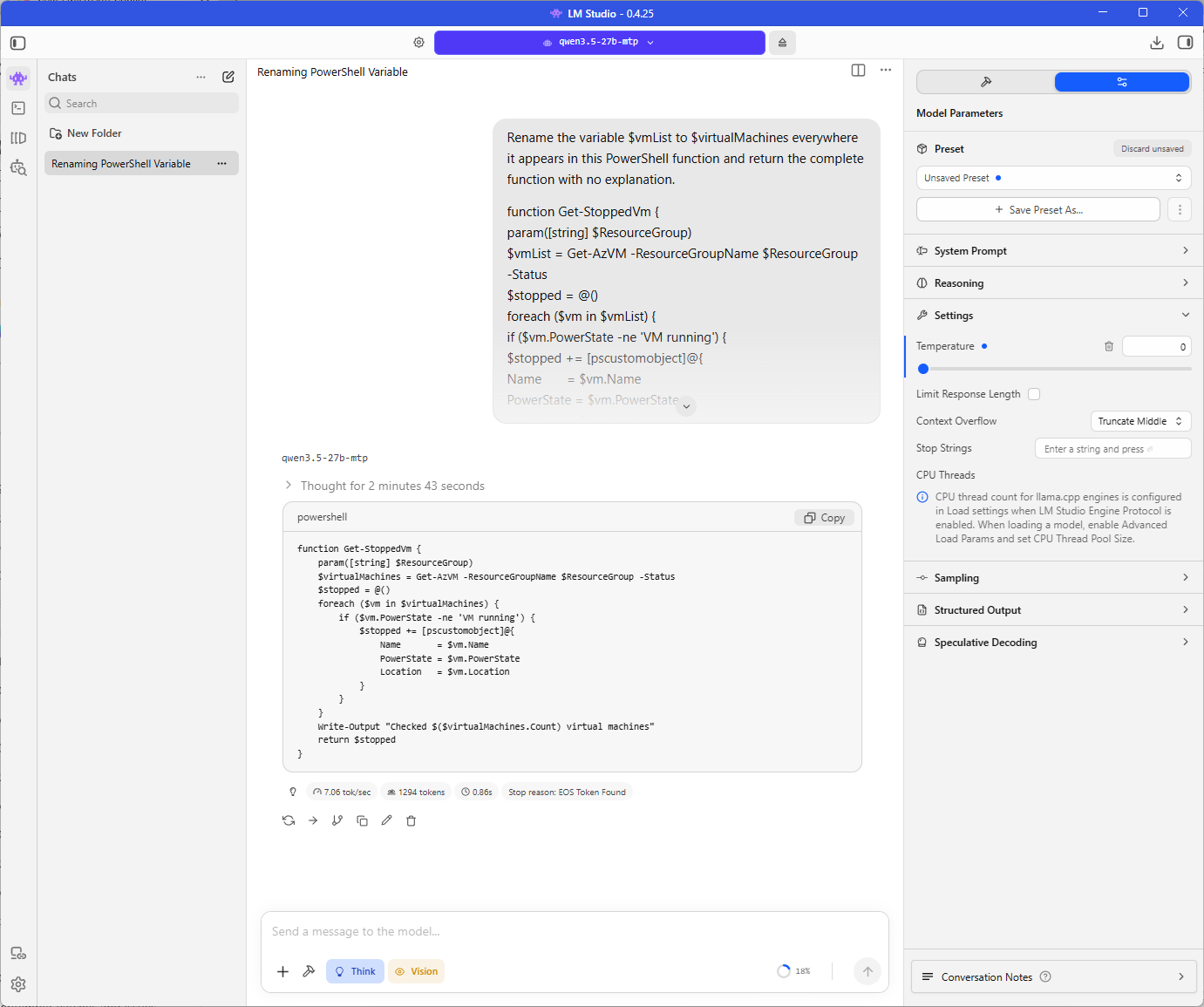
The baseline answered at 7.06 tokens per second, which is within 0.03 of the 7.09 the standard Qwen3.5 27B managed in the previous post, so the MTP file runs at the same speed as the standard file when MTP is off.
Eject the model, open its load settings again, change Speculative Decoding to the MTP option, load it, and send the same prompt in a new chat.
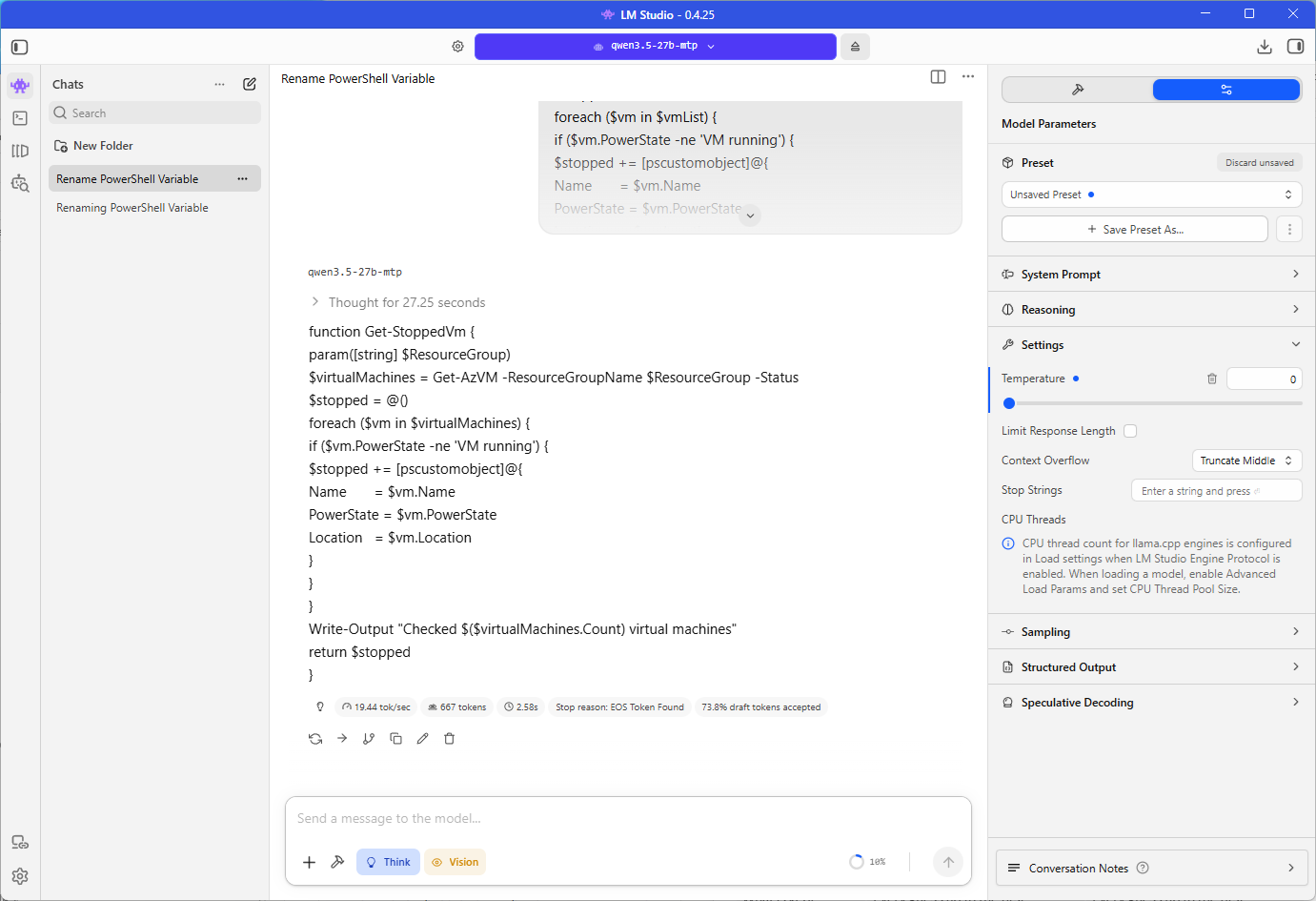
With MTP on and 3 draft tokens, the prompt answered at 19.44 tokens per second with LM Studio reporting 73.8% of draft tokens accepted, and a second run gave 19.76.
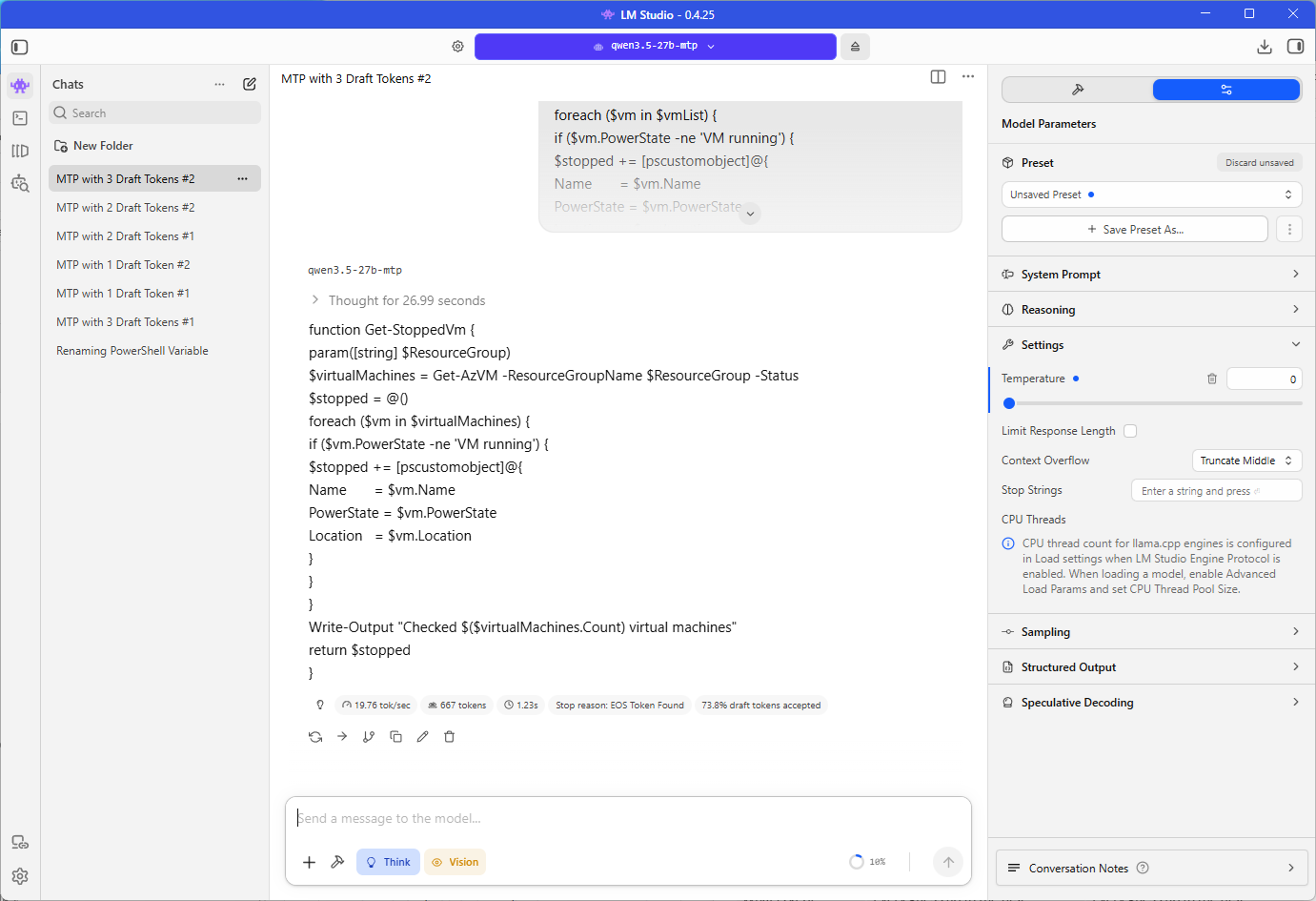
That is about 2.75 times the baseline and about 1.7 times the 11.20 tokens per second the Qwen3.5 2B draft model reached in the previous post.
The answers were not identical from run to run even though the temperature was 0 and the prompt never changed. In the baseline run the model reasoned for 2 minutes and 43 seconds and produced 1,294 tokens in total, while the MTP runs reasoned for 27 to 48 seconds and produced 667 tokens at 2 and 3 draft tokens and 719 tokens at 1 draft token. LM Studio’s count appears to include the reasoning, because 1,294 tokens at 7.06 tokens per second works out to just over 3 minutes, which matches the thought time plus the answer.
The tokens per second figures remain comparable across the runs because they are rates, and the time to finish an answer cannot be compared because each run wrote a different amount. I suspect the cause is the one I described in the previous post, tiny floating-point differences between checking several tokens at once and generating them one at a time, which can send a long reasoning chain down a different path.
Step #5 – Try different MTP draft token counts
Repeat the MTP run on Qwen3.5 27B MTP with the maximum draft tokens set to 1, 2, and 3, reloading the model each time, and record the tokens per second and the draft tokens accepted figure for each. I sent the prompt four times at every setting, twice with the minimum draft tokens at 0 and twice with it at 1, and the minimum made no difference because every run landed within 0.7 tokens per second of the others at the same maximum.
| Max draft tokens | Tokens per second, four runs | Typical | Speedup over 7.06 | Draft tokens accepted |
|---|---|---|---|---|
| 1 | 12.27, 12.21, 12.21, 11.97 | 12.2 | 72% | 49.2% |
| 2 | 16.30, 15.81, 16.25, 16.49 | 16.2 | 130% | 65.8% |
| 3 | 19.76, 19.44, 19.16, 19.36 | 19.4 | 175% | 73.8% |
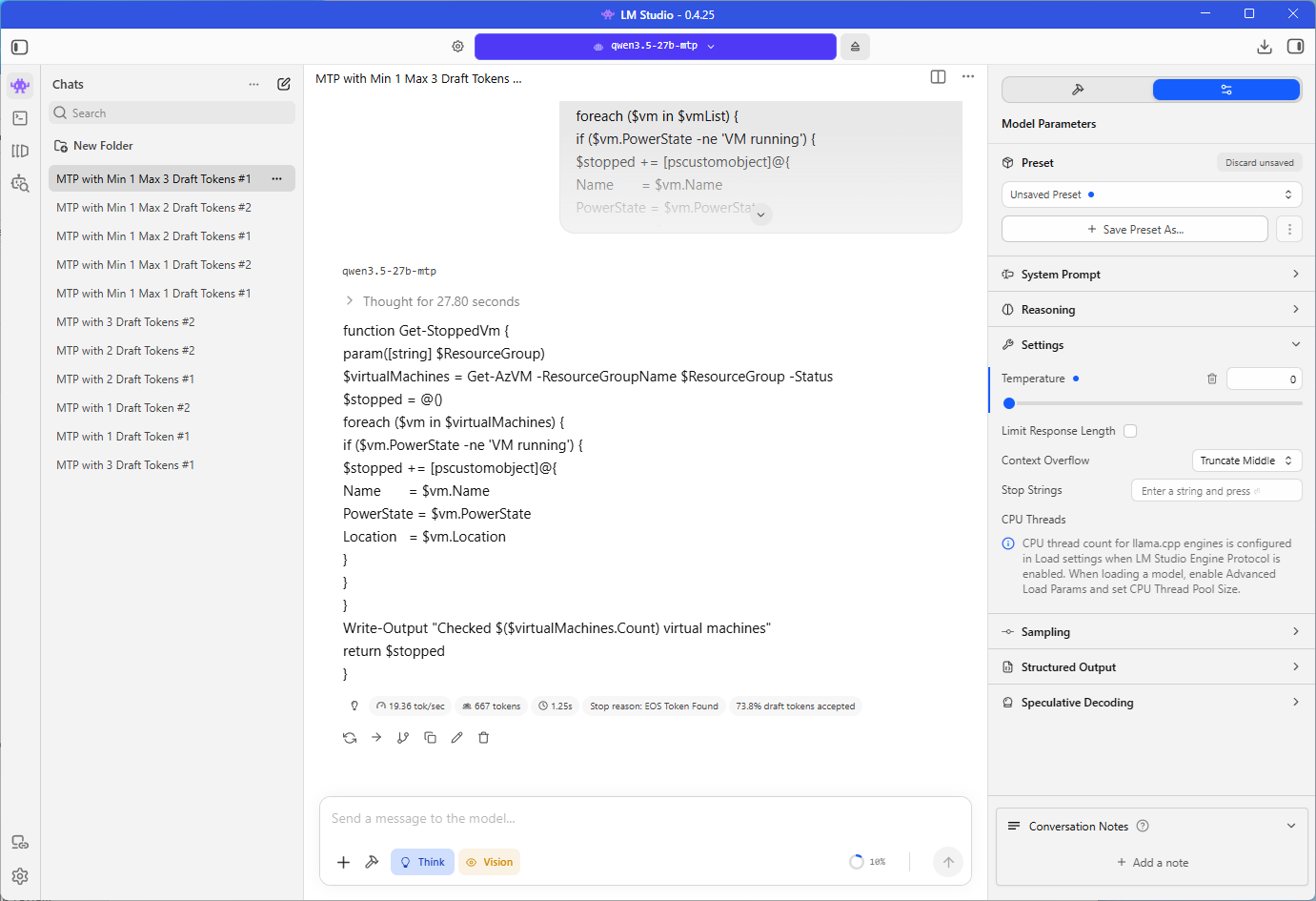
Each extra draft token added speed on the ZBook, from 12.2 to 16.2 to 19.4 tokens per second, and LM Studio’s accepted figure rose along with it, from 49.2% to 65.8% to 73.8%. Between 2 and 3 draft tokens the figure rose from 65.8% to 73.8%, where Unsloth reports a fall from 83% to 50% with 4 draft tokens.
The speed was still climbing at 3 draft tokens, which is the highest value I ran on Qwen3.5 27B MTP.
I also tried 512 and 1024 draft tokens to see how far the setting would go, and LM Studio refused to load the model with the error below. The rs cache in the message is the recurrent state cache llama.cpp allocates for models with recurrent layers, so the failure suggests that cache cannot be allocated at that draft token count.
Failed to initialize the context: failed to allocate buffer for rs cache
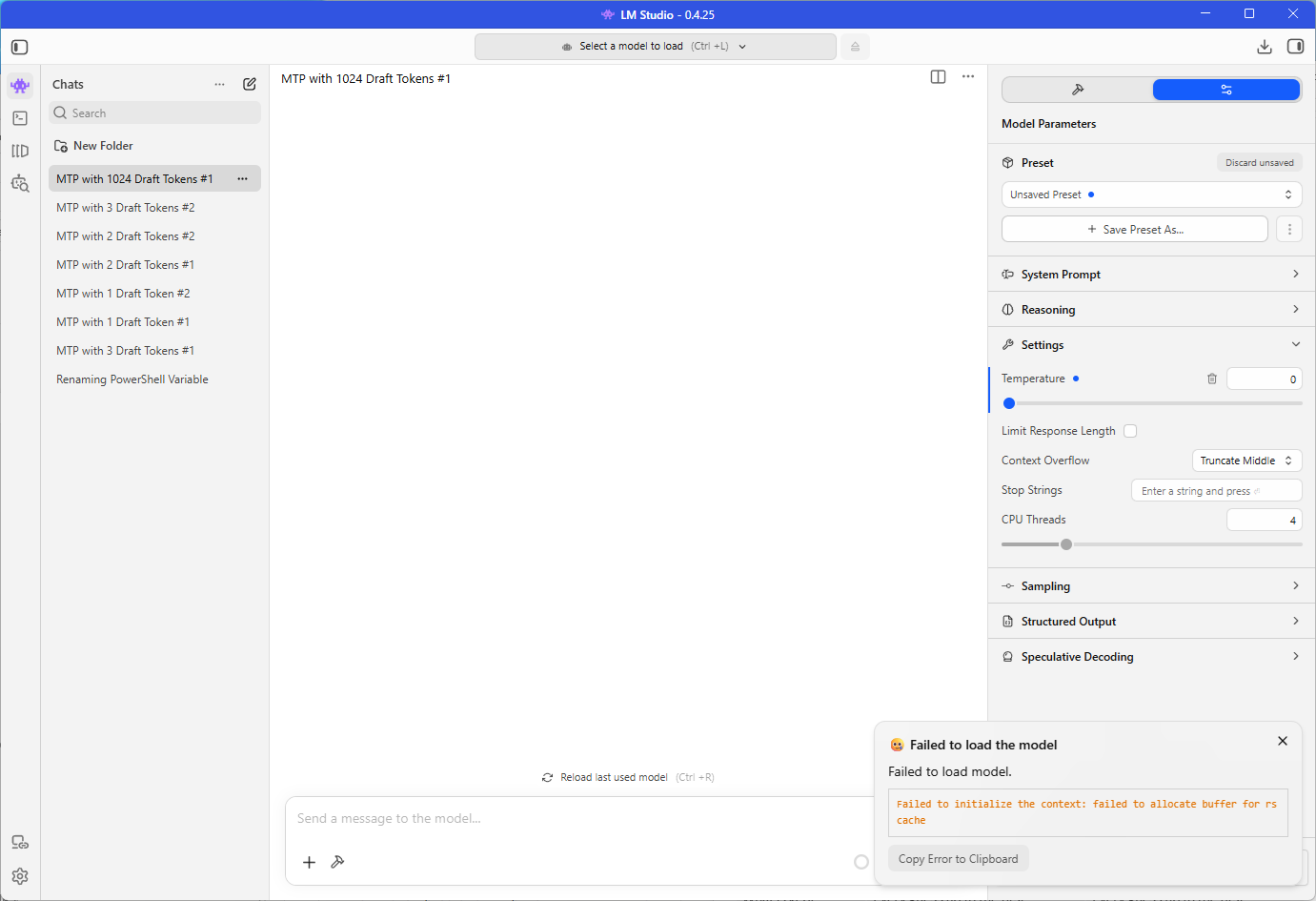
I used 3 draft tokens for Qwen3.5 27B MTP in the comparison in Step #9.
Step #6 – Compare Qwen3.6 27B MTP with MTP off and on
Eject Qwen3.5 27B MTP and repeat Step #4 with Qwen3.6 27B MTP, first with Speculative Decoding set to Off and then with MTP on, using the same prompt, temperature, and Think setting. Step #5 stopped at 3 draft tokens with the speed still climbing, so I ran Qwen3.6 27B MTP at every maximum from 1 to 7 with the minimum draft tokens at 1, one run per setting.
| Max draft tokens | Tokens per second | Speedup over 7.16 | Draft tokens accepted | Total tokens |
|---|---|---|---|---|
| Off | 7.16 | n/a | n/a | 935 |
| 1 | 12.44 | 74% | 49.4% | 745 |
| 2 | 15.94 | 123% | 65.8% | 745 |
| 3 | 19.38 | 171% | 73.8% | 745 |
| 4 | 20.81 | 191% | 78.5% | 745 |
| 5 | 20.73 | 190% | 79.7% | 960 |
| 6 | 22.33 | 212% | 82.2% | 943 |
| 7 | 20.81 | 191% | 83.1% | 960 |
With MTP off, Qwen3.6 27B answered at 7.16 tokens per second, close to the 7.06 from Qwen3.5 27B, which is expected because both are dense 27B models:
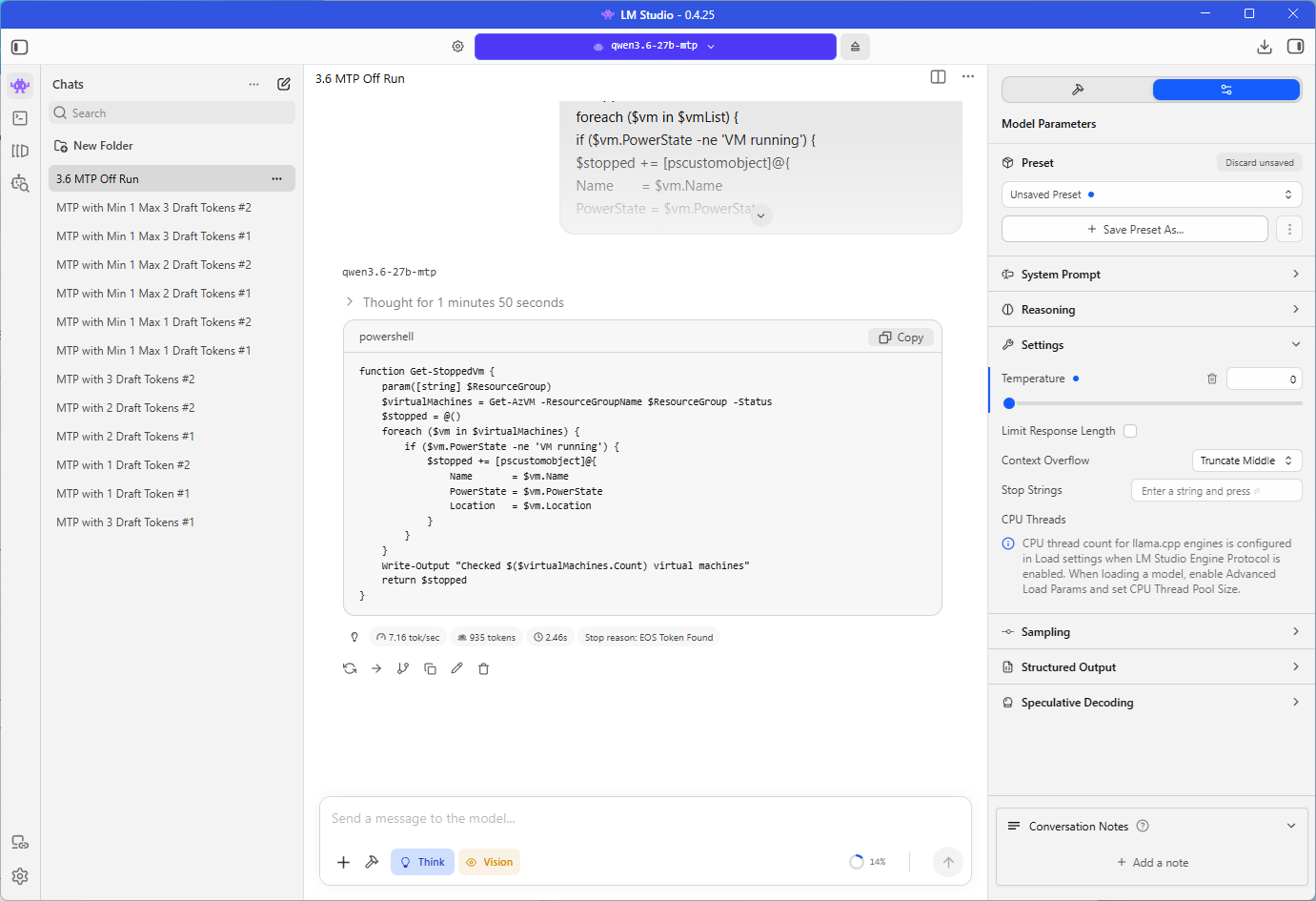
… at Q8_0. At 3 draft tokens it reached 19.38 tokens per second, almost identical to the 19.4 typical for Qwen3.5 27B MTP at the same setting.
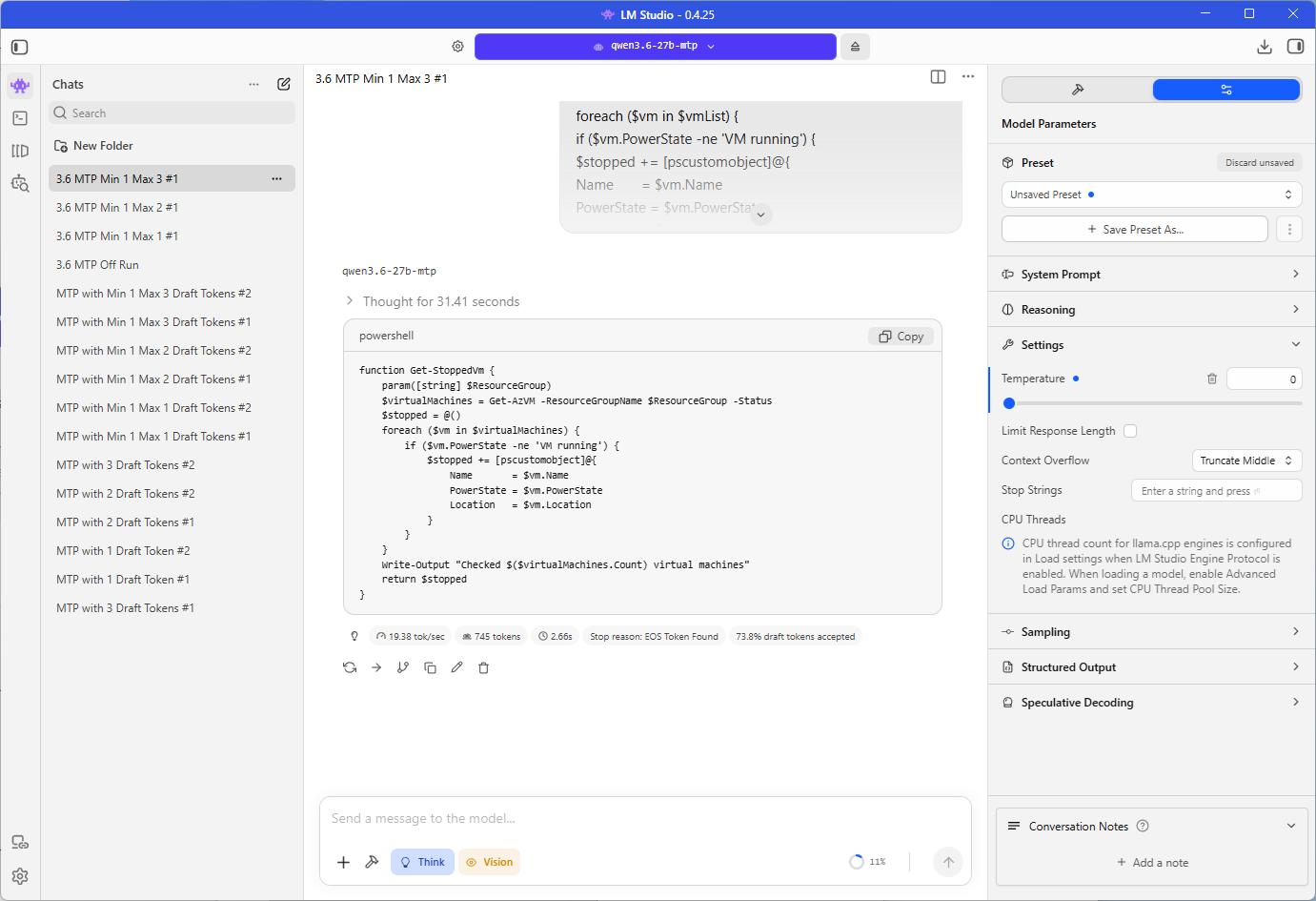
At 6 draft tokens it reached 22.33 tokens per second.
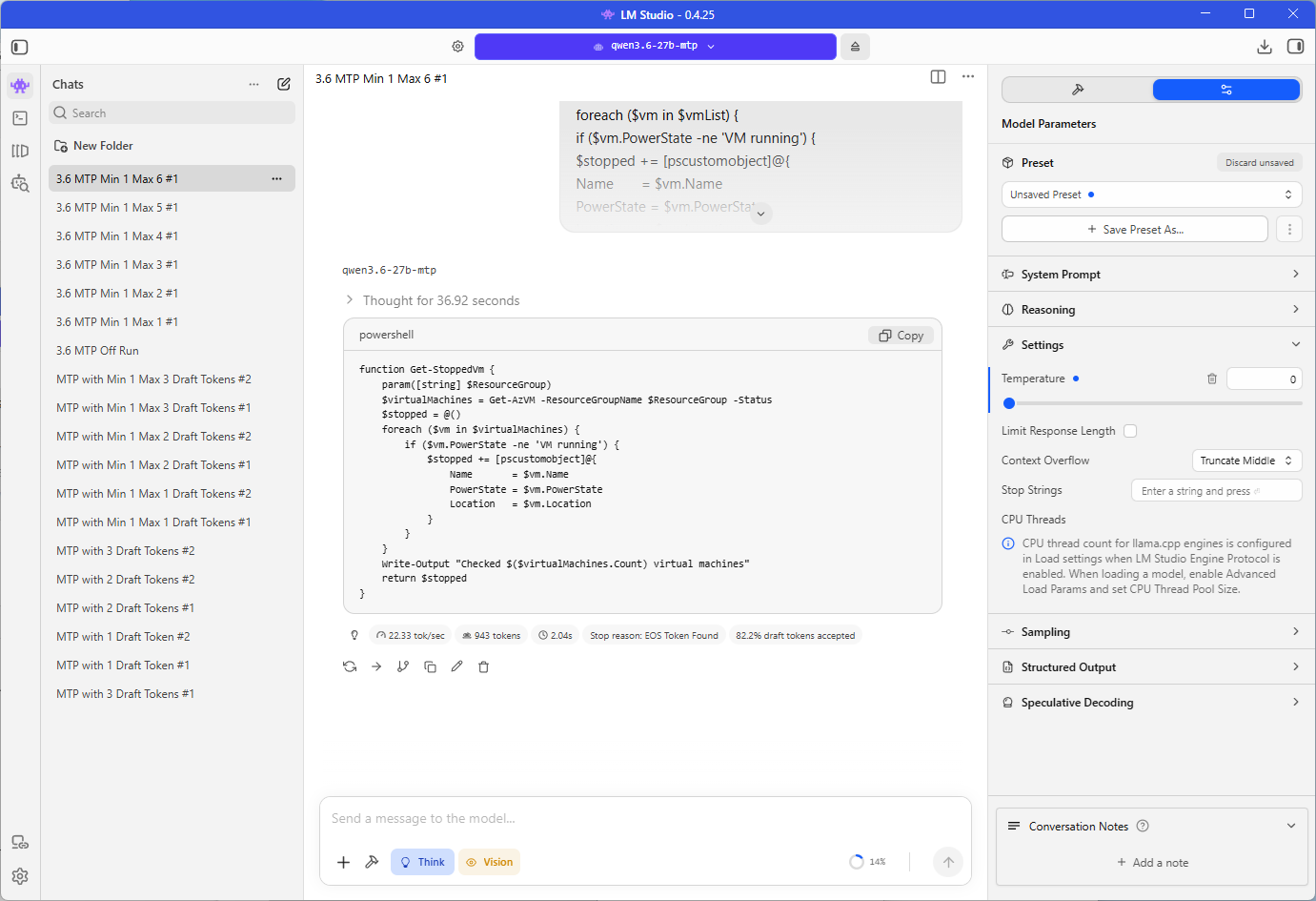
Speed kept climbing past 3 draft tokens, to 20.81 at 4, 20.73 at 5, and 22.33 at 6, before falling back to 20.81 at 7:
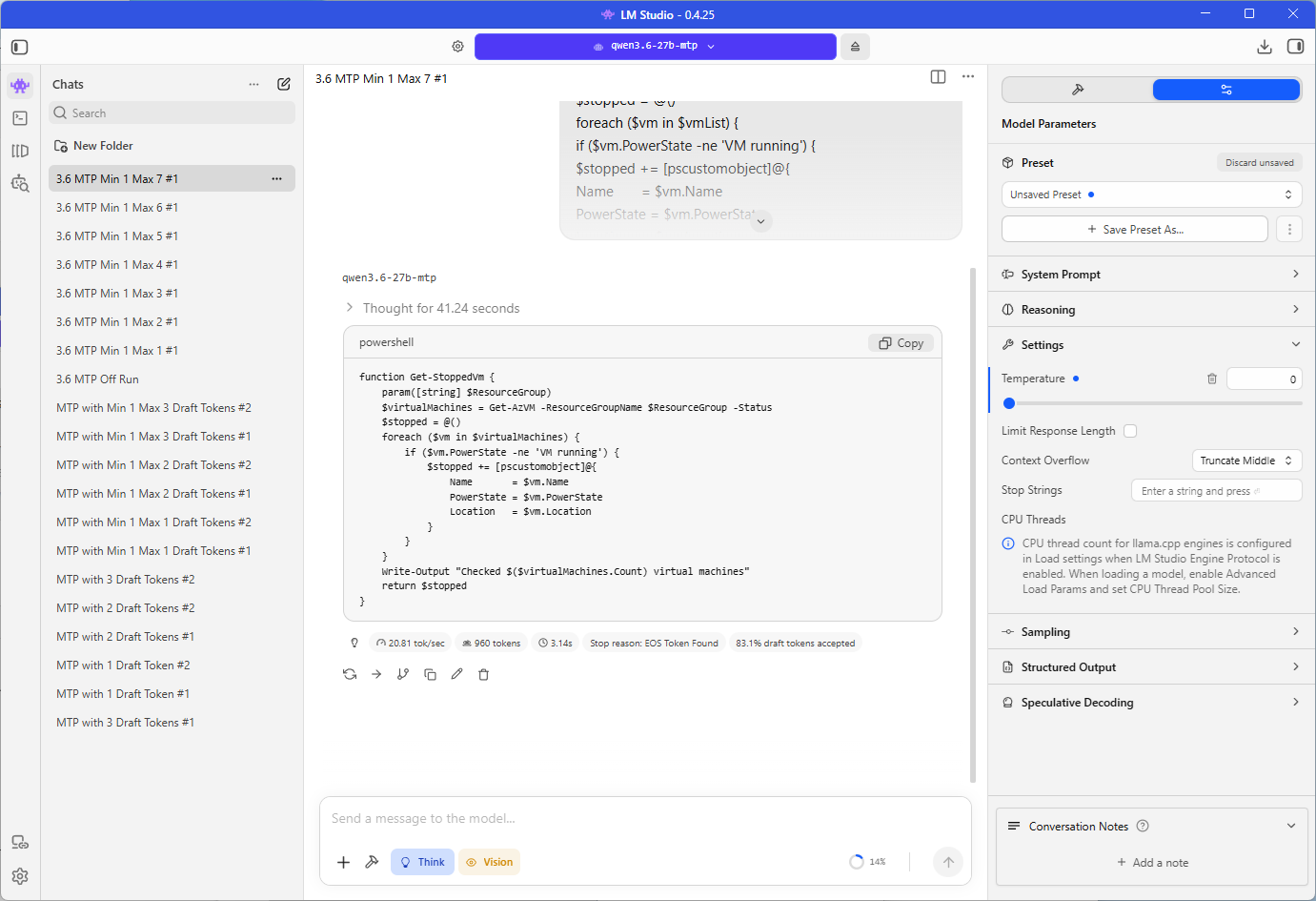
… so 6 draft tokens was the fastest setting I measured at 212% over the off run. Unsloth’s guide says not to exceed 2 draft tokens for Qwen3.6, and 6 was about 40% faster than the 15.94 tokens per second I measured at 2. I suspect the ZBook’s memory bandwidth explains why it keeps rewarding more draft tokens, because the GPU spends its time waiting on memory and extra tokens in the verification pass cost it very little, which is the reasoning from the previous post, although I have not tested that on other hardware.
I chose to run each Qwen3.6 setting once because the four runs per setting on Qwen3.5 stayed within 0.7 tokens per second of each other, and 6 draft tokens led the level group at 4, 5, and 7, which sat at 20.7 to 20.8 tokens per second, by about 1.5.
LM Studio’s draft tokens accepted figure rose at every step, from 49.4% at 1 draft token to 83.1% at 7, so by that measure it never fell the way Unsloth describes at 4 draft tokens.
With MTP off the model reasoned for 1 minute and 50 seconds and produced 935 tokens in total. Settings 1 to 4 all produced the same 745 tokens, and settings 5, 6, and 7 produced 943 to 960, which is consistent with the floating-point explanation from Step #4 because a larger verification batch changes the arithmetic more.
Step #7 – Compare Qwen3.6 35B A3B MTP with MTP off and on
Repeat Step #6 with Qwen3.6 35B A3B MTP, again with the off run and every maximum from 1 to 7, one run per setting.
| Max draft tokens | Tokens per second | Speedup over 38.64 | Draft tokens accepted | Total tokens |
|---|---|---|---|---|
| Off | 38.64 | n/a | n/a | 666 |
| 1 | 37.49 | -3% | 49.4% | 666 |
| 2 | 48.73 | 26% | 65.3% | 1,128 |
| 3 | 58.61 | 52% | 72.3% | 1,058 |
| 4 | 62.33 | 61% | 77.7% | 1,023 |
| 5 | 61.93 | 60% | 80.2% | 1,084 |
| 6 | 62.98 | 63% | 83.3% | 719 |
| 7 | 55.90 | 45% | 84.0% | 1,053 |
With MTP off, Qwen3.6 35B A3B answered at 38.64 tokens per second:
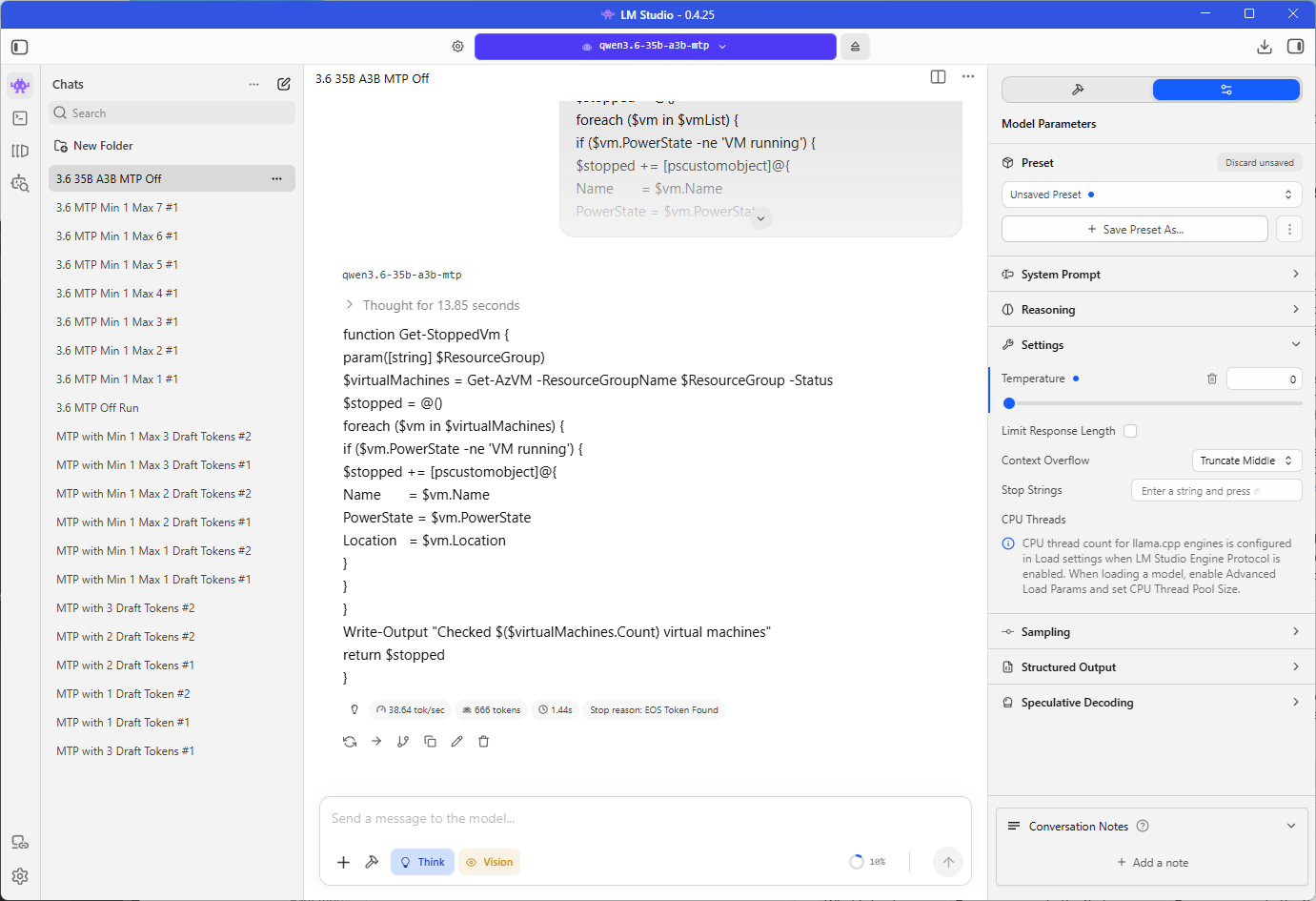
… about 5.4 times the 7.16 of the dense Qwen3.6 27B, because it reads only about 3B of its parameters for each token. That is well above the around 22 tokens per second I measured for Qwen3.6 35B A3B in the previous post, and the two tests differ in several ways.
| Previous post | This post | |
|---|---|---|
| File | Unsloth UD-Q8_K_XL, 37.47 GB | Unsloth Q8_0 MTP, 36.87 GB |
| Quantization | Unsloth Dynamic, which keeps its most sensitive layers at higher precision | Q8_0, 8-bit weights |
| Prompt | A short chat | The PowerShell rename prompt at a temperature of 0 |
| LM Studio | 0.4.24 | 0.4.25 |
I did not test which of these differences accounts for the gap, so the 38.64 tokens per second is the baseline for the MTP results in this post and I would not compare it directly with the 22 from the previous post.
MTP lifted it to 62.98 tokens per second at 6 draft tokens:
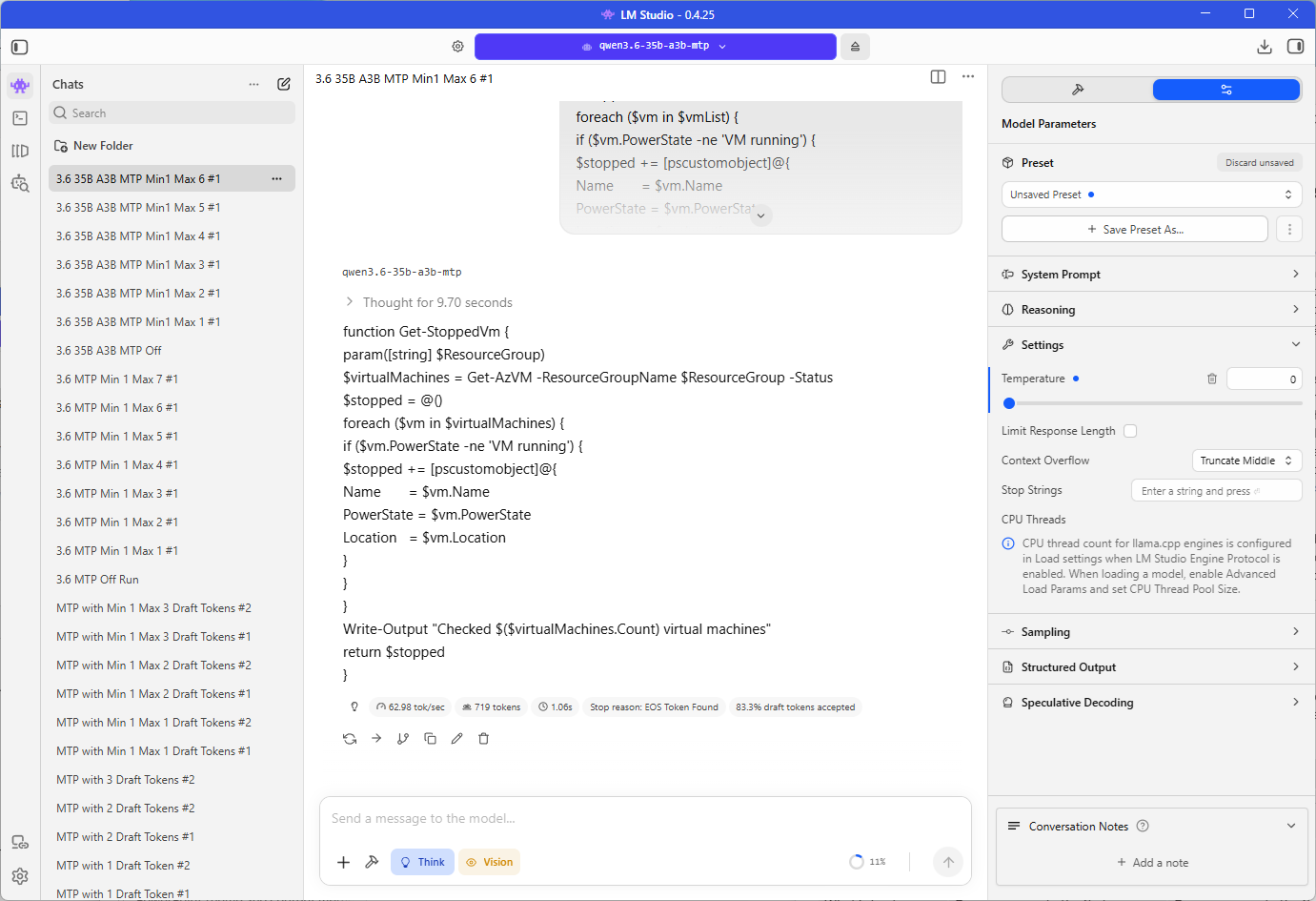
… a gain of 63% against 212% for the dense Qwen3.6 27B at the same setting, so the model that already read the fewest parameters per token had the least left to win back. That is still a larger gain than the 1.15 to 1.25 times Unsloth reports for mixture-of-experts models, and it made this the fastest configuration in the post by a wide margin.
The curve was flatter than the dense one. A single draft token gave 37.49 tokens per second:
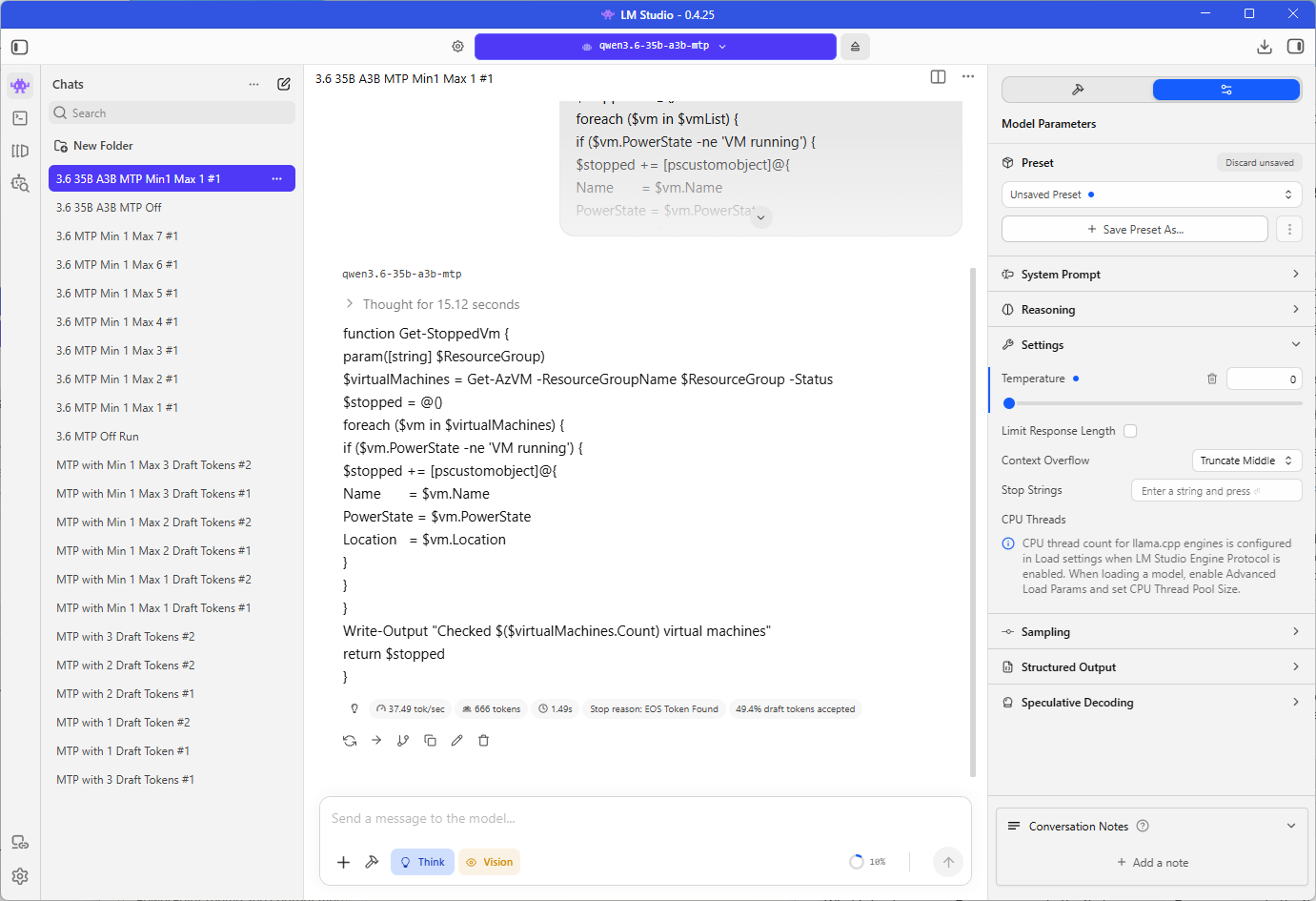
… which is 3% slower than the baseline, 2 gave 26%, 3 gave 52%, and 4, 5, and 6 were level at 61.9 to 63.0 tokens per second before 7 fell back to 55.90.
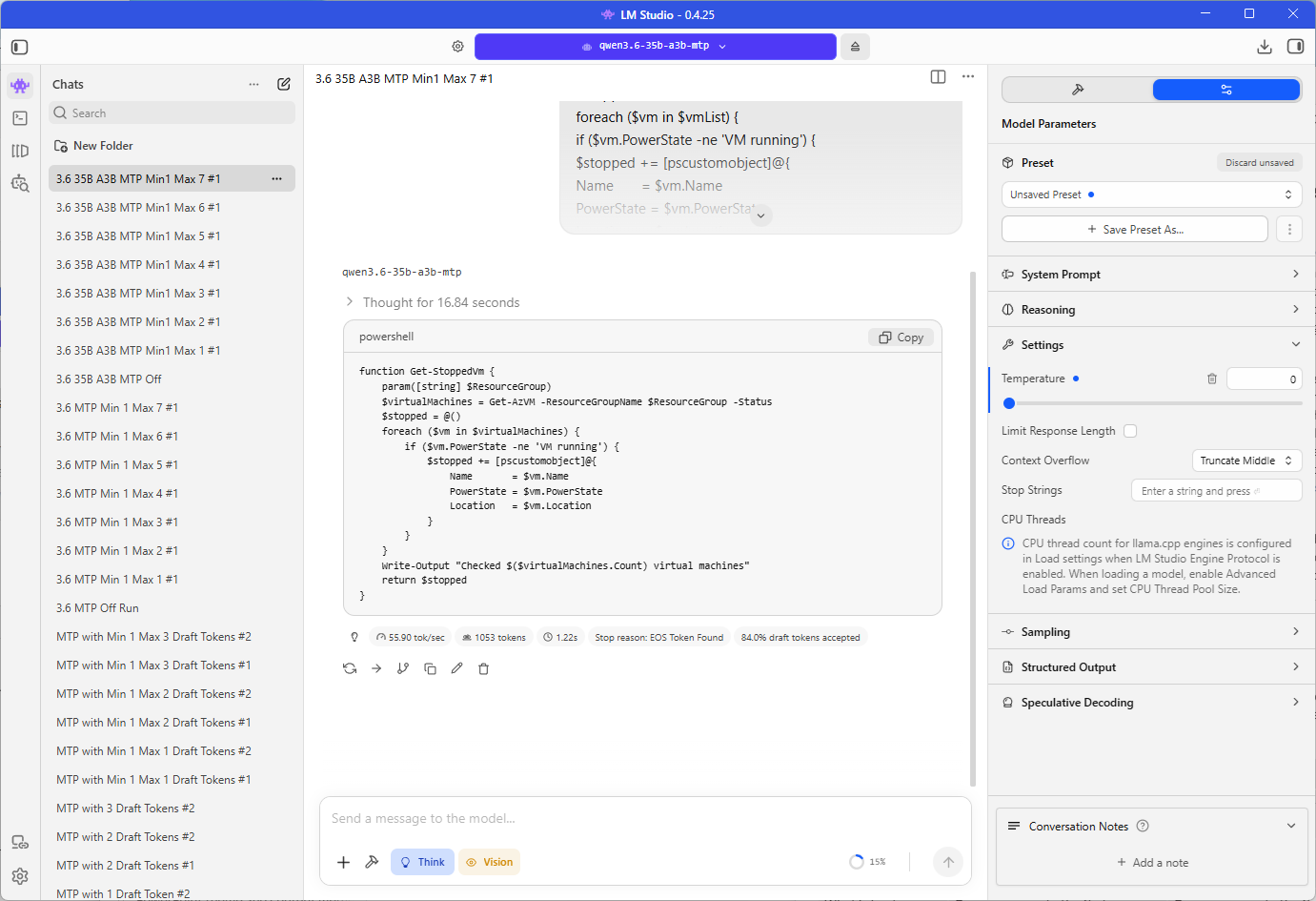
Each setting was a single run, as with the dense model, so the 0.65 tokens per second separating 4 from 6 is probably within run-to-run variation. I suspect the fall at 7 comes from the verification pass touching more experts as the batch grows, since each drafted token can route to different experts and every extra expert has to be read from memory, but I have not confirmed that.
The output length varied a lot, from 666 tokens with MTP off and at 1 draft token to 1,128 at 2 draft tokens, with the other settings between 719 and 1,084, so the tokens per second figures are the comparable measure and the time to finish an answer is not.
Set Speculative Decoding back to Off on each model once you are done, so the saved load settings do not carry MTP into the next session unintentionally.
Step #8 – Run the draft model on the Unsloth file
The draft model result in the previous post came from the lmstudio-community Qwen3.5 27B file and the MTP results here came from the Unsloth file, so I was curious whether using two different files caused such a large difference between the two methods and ran the draft model against the Unsloth file to find out.
Load Qwen3.5 27B MTP, set Speculative Decoding to Draft model, select Qwen3.5 2B as the draft, set the minimum draft tokens to 1 and the maximum to 3, where the previous post used the default minimum of 0, and send the same prompt at a temperature of 0, which I did three times. That puts both methods on the same target file and the same version of LM Studio.
LM Studio accepted Qwen3.5 2B as the draft for the Unsloth file without any trouble.
| Qwen3.5 27B, Unsloth MTP file | Tokens per second | Speedup over 7.06 | Draft tokens accepted |
|---|---|---|---|
| Speculative decoding off | 7.06 | n/a | n/a |
| Qwen3.5 2B draft model, 3 draft tokens | 12.4 | 76% | 68.9% |
| MTP, 3 draft tokens | 19.4 | 175% | 73.8% |
The three runs gave 12.31, 12.50, and 12.38 tokens per second:
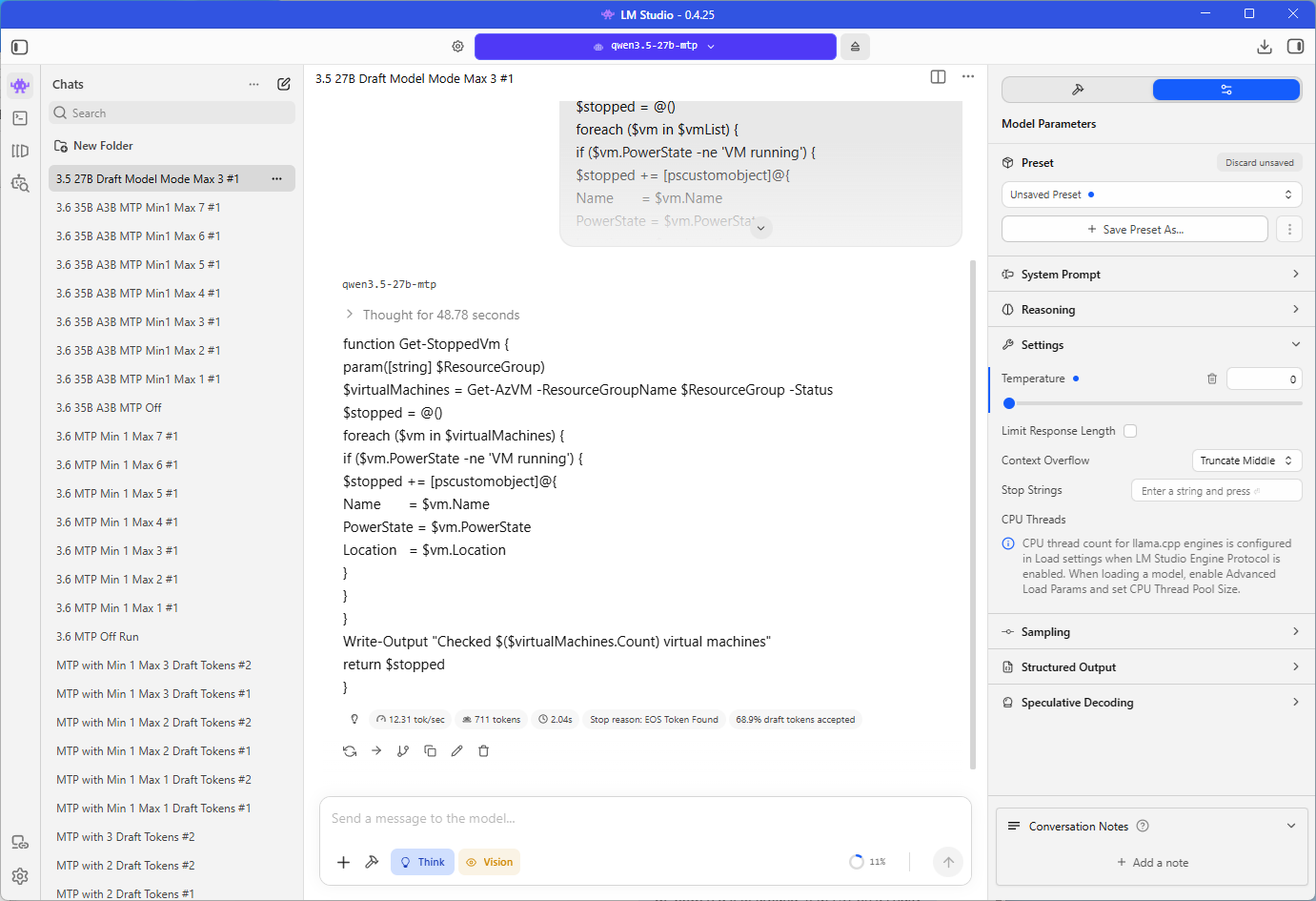
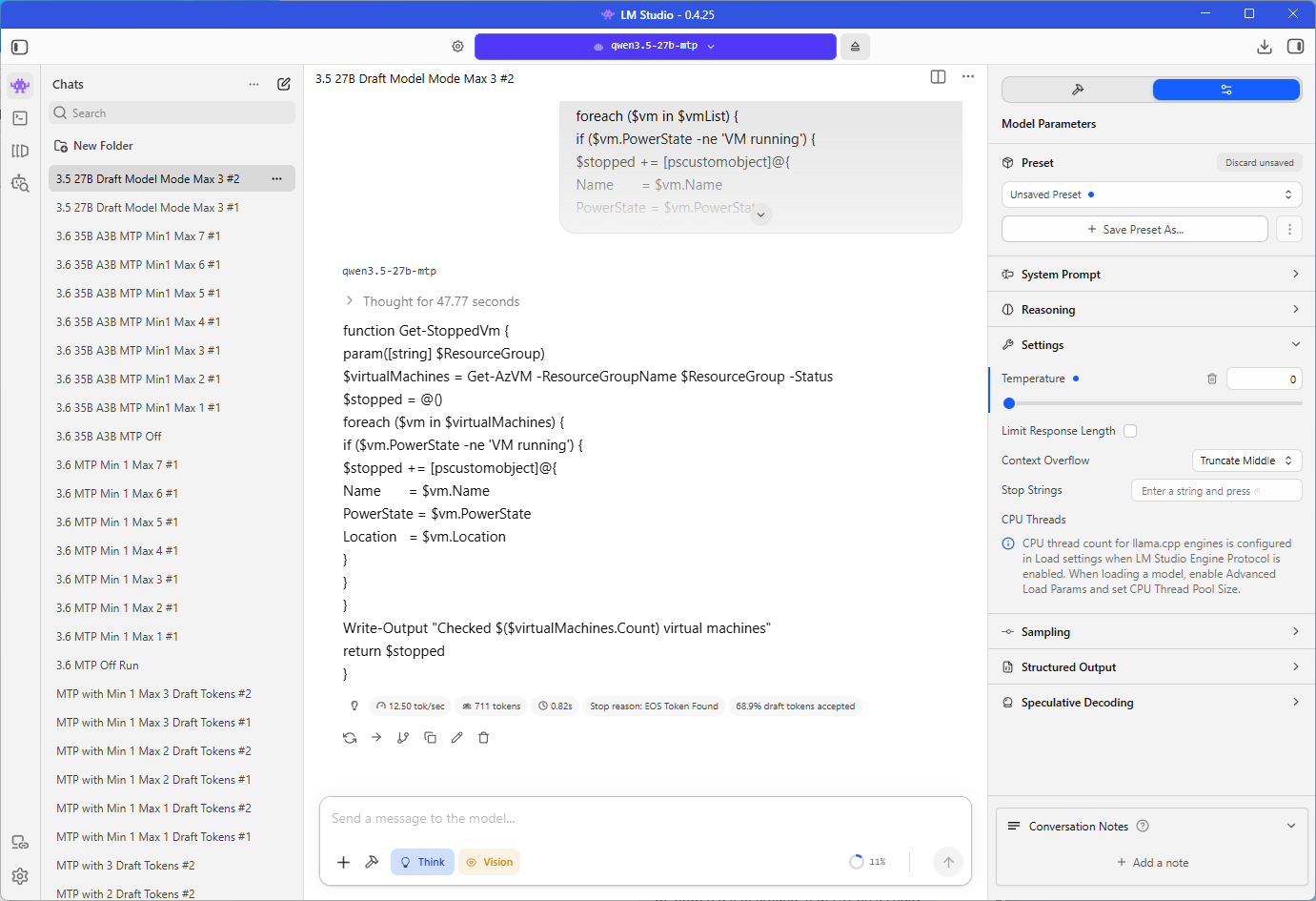
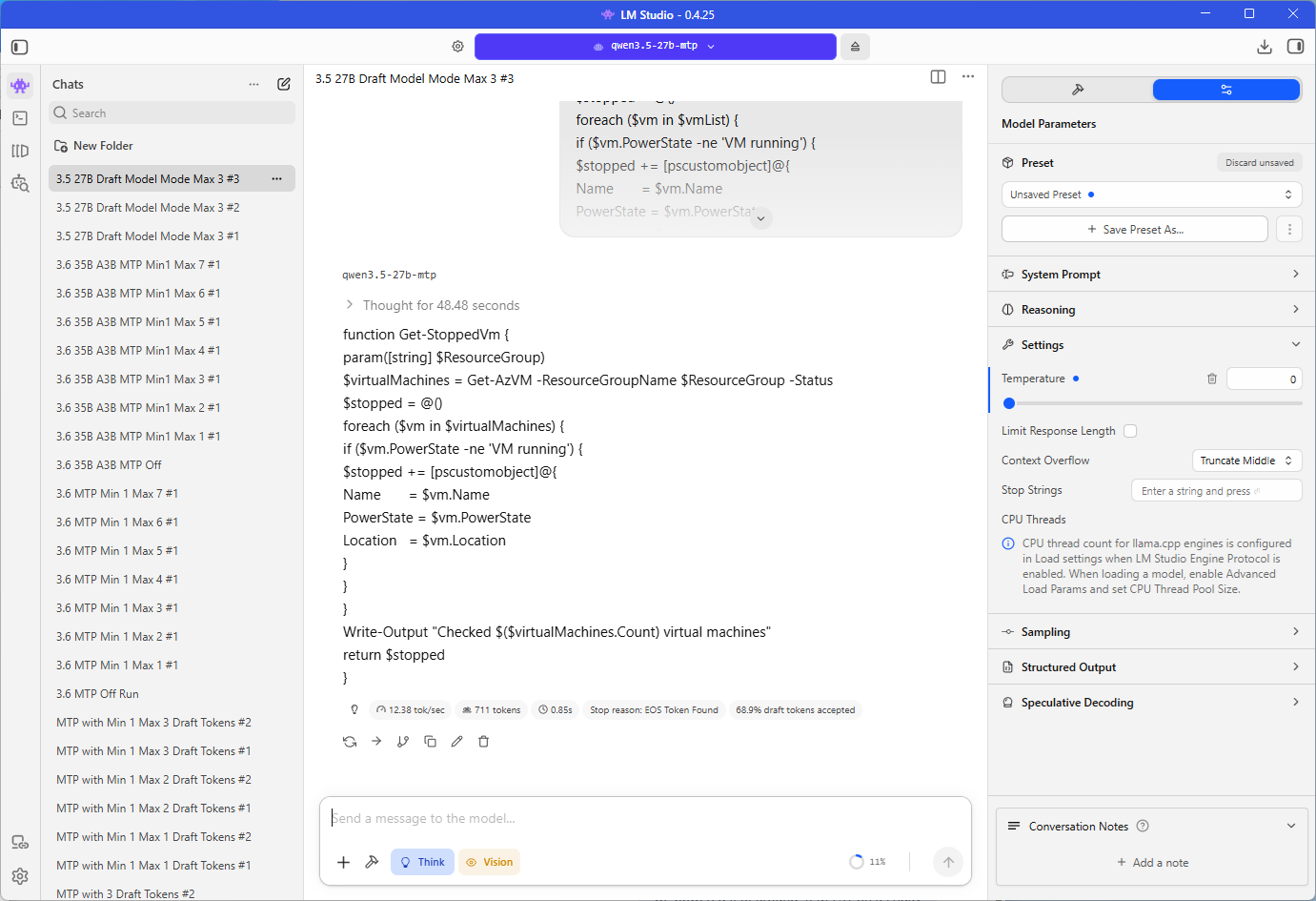
… and each produced the same 711 tokens with 68.9% of draft tokens accepted. That is a little above the 11.20 tokens per second and 64.3% from the previous post, so the file, the newer LM Studio version, and the higher minimum draft tokens together account for about 1.2 tokens per second of the 8.2 tokens per second gap between the two methods in the previous post, and MTP at 3 draft tokens was still about 1.6 times faster than the draft model on the same file.
Step #9 – Compare the results with the draft model
The first row comes from the previous post, and the rest come from this one.
| Configuration | Without tok/s | With tok/s | Speedup | Accepted draft tokens |
|---|---|---|---|---|
| Qwen3.5 27B + Qwen3.5 2B draft model | 7.09 | 11.20 | 58% | 64.3% |
| Qwen3.5 27B Unsloth file + Qwen3.5 2B draft model, 3 draft tokens | 7.06 | 12.4 | 76% | 68.9% |
| Qwen3.5 27B MTP, 3 draft tokens | 7.06 | 19.4 | 175% | 73.8% |
| Qwen3.6 27B MTP, 3 draft tokens | 7.16 | 19.38 | 171% | 73.8% |
| Qwen3.6 27B MTP, 6 draft tokens | 7.16 | 22.33 | 212% | 82.2% |
| Qwen3.6 35B A3B MTP, 3 draft tokens | 38.64 | 58.61 | 52% | 72.3% |
| Qwen3.6 35B A3B MTP, 6 draft tokens | 38.64 | 62.98 | 63% | 83.3% |
MTP beat the 2B draft model on Qwen3.5 27B by a wide margin, 19.4 against 12.4 tokens per second on the same Unsloth file with 3 draft tokens in both cases, and Qwen3.6 27B behaved the same way, reaching 19.38 at 3 draft tokens and 22.33 at 6. The gain was smaller on Qwen3.6 35B A3B, 63% at best against 212% on the dense 27B, but its 62.98 tokens per second was the highest figure of any configuration.
LM Studio’s Estimated Memory Usage did not change when I switched Qwen3.6 27B between Off and MTP, reading 34.02 GB both ways, so I did not use it to compare memory, and the roughly 1 GB for MTP earlier in the post is Unsloth’s figure.
Multi-Token Prediction against the draft model on the ZBook
#1 – The two methods side by side
Qwen3.5 27B is the one target I tested with both methods, so the table below puts its results from the two posts next to each other.
| Draft model, previous post | Draft model, Unsloth file, Step #8 | MTP, this post | |
|---|---|---|---|
| Target | Qwen3.5 27B Q8_0, 27.50 GB | Qwen3.5 27B MTP Q8_0, 28.77 GB | Qwen3.5 27B MTP Q8_0, 28.77 GB |
| Source of the guesses | Qwen3.5 2B Q8_0, 2.50 GB, loaded alongside the target | Qwen3.5 2B Q8_0, 2.50 GB, loaded alongside the target | One MTP layer inside the target file |
| Added size on disk | 2.50 GB | 2.50 GB | 1.27 GB, the difference between the two target files |
| LM Studio | 0.4.24 | 0.4.25 | 0.4.25 |
| Settings tested | The defaults, 3 max draft tokens | Min 1 and max 3 draft tokens, three runs | 1, 2, and 3 draft tokens, four runs each |
| Without speculative decoding | 7.09 tok/s | 7.06 tok/s | 7.06 tok/s |
| With speculative decoding | 11.20 tok/s | 12.4 tok/s | 19.4 tok/s at 3 draft tokens |
| Speedup | 58% | 76% | 175% |
| Draft tokens accepted | 64.3% | 68.9% | 73.8% |
The middle column runs the draft model against the same Unsloth file as the MTP runs, so it separates the effect of the file from the effect of the method. Compared with the standard lmstudio-community file, the Unsloth MTP file is 1.27 GB larger, but the two come from different publishers, so that gap is a rough guide to the size of the MTP layer and includes any other differences between the files. These are file sizes on disk and they leave out the memory each method uses at runtime.
#2 – How uneven my testing was
I tested the two methods unevenly. For the draft model I used LM Studio’s defaults of 3 draft tokens with two pairings, Qwen3.5 27B with Qwen3.5 2B and gpt-oss-120b with gpt-oss-20b, and the re-run on the Unsloth file in Step #8 stayed at 3 draft tokens, while for MTP I swept 1 to 3 draft tokens on Qwen3.5 27B with four runs per setting, swept 1 to 7 on both Qwen3.6 builds, and tested three targets.
MTP kept gaining speed past 3 draft tokens on both Qwen3.6 builds, so a draft model may have had speed left at higher counts as well, and I did not try a smaller draft such as the Qwen3.5 0.8B. The 1.6 times gap on the same file is therefore the gap at 3 draft tokens, and I expect a tuned draft model would narrow it, although I did not test by how much.
#3 – Why I think MTP was faster
The reason I think MTP was faster is the cost of making each guess. A draft model has to run a full pass of its own for every guess, which means reading the 2.50 GB of Qwen3.5 2B weights from memory each time, so three guesses read about 7.5 GB per round, roughly a quarter of the 27.50 GB the target reads to check them. On a memory-bandwidth-limited laptop like the ZBook that cost is substantial.
The MTP layer is a single transformer block, and if it is about the 1 GB that Unsloth’s figure suggests, three guesses read about 3 GB. Better guesses may also help, since the MTP layer starts from the target’s hidden state, and LM Studio reported 73.8% accepted for MTP against 68.9% for the draft model on the same file, but I am not sure how LM Studio defines that figure, so I lean on the speed more.
The two mixture-of-experts results point the same way.
| Pairing | Method | Without tok/s | With tok/s | Change | Draft tokens accepted |
|---|---|---|---|---|---|
| gpt-oss-120b | gpt-oss-20b draft model, 3 draft tokens | 40.14 | 22.93 | 43% slower | 71.8% |
| Qwen3.6 35B A3B | MTP, 3 draft tokens | 38.64 | 58.61 | 52% faster | 72.3% |
Both targets read only a few billion parameters per token and started near 40 tokens per second, and LM Studio reported almost the same accepted figure for each, 71.8% and 72.3%, yet the draft model run slowed down by 43% and the MTP run sped up by 52%.
The gpt-oss-20b draft uses 3.6B parameters for every guess, which is most of the 5.1B the gpt-oss-120b target uses per token, so I think the cost of making each guess decides the outcome more than the accepted figure does. These are different model families, and gpt-oss does not ship with MTP layers, with no MTP build of it that I could find, so I could not run MTP on the gpt-oss pairing and the comparison is an observation across the two posts.
Qwen3.6 27B wrote almost the same number of tokens with MTP off and at 6 draft tokens, 935 and 943, which makes their times comparable, and from the 7.16 and 22.33 tokens per second I estimate the answer at about 2 minutes and 10 seconds without MTP and about 42 seconds with it.
Final Thoughts on Multi-Token Prediction
Multi-token prediction does the same job as a draft model with a guesser that was trained alongside the target, reads the target’s own hidden state, and needs no second model in memory, so wherever a model ships with an MTP layer it is the first option I would try. On Qwen3.5 27B, MTP at 3 draft tokens reached about 19.4 tokens per second against 7.06 with it off, which is roughly 1.6 times the 12.4 tokens per second the Qwen3.5 2B draft model managed on the same file.
Qwen3.6 27B MTP went further, reaching 22.33 tokens per second at 6 draft tokens against 7.16 with it off, which was about 40% faster than the 2 draft tokens Unsloth recommends. The 35B A3B model gained less in relative terms, 63% at 6 draft tokens, but its 62.98 tokens per second was the highest figure in the post. Of the settings I tried, 4 to 6 draft tokens were at or near the fastest on both Qwen3.6 builds, so that is where I would start instead of the 2 that Unsloth recommends.
Does that make draft models obsolete? No, because MTP only works with models trained for it and with files that keep the extra layer, which means a second 29 GB download for each model I want to use it with, and Unsloth’s own guidance steers away from it for vision tasks and parallel requests. Draft models remain the fallback for any model family without an MTP build, and the order of magnitude rule from the previous post still decides whether a draft model is worth loading.
The Qwen3.6 35B A3B result fits the reasoning behind the gpt-oss pairing in the previous post, because the model that reads fewer parameters per token gained less, 63% against 212% for the dense Qwen3.6 27B, and the MTP layer is light enough that every setting from 2 draft tokens up beat the baseline, which the gpt-oss-20b draft could not manage.

