

TypeSafe AI announced its System One models and a model named Jev on September 15, 2026, and within a week my feeds were full of it, with DataCamp, LangChain, MindStudio, You.com, and Vercel all publishing their own “What is Jev?” explainers and TypeSafe’s X account passing 146,000 followers.
YouTube caught on just as quickly, with videos of Jev playing Doom by choosing an action from structured game state roughly 10 times a second at around $7 an hour in API charges, Justin Schroeder’s JevPilot, a Three.js driving simulator he describes as rebuilding Tesla Full Self Driving with Jev in less than an hour, where Jev picks from a table of candidate steering and speed paths up to four times a second, and a Browser Use web agent that picks both the action and the target element on a page in a single Jev request, completing a Zürich to London search on Google Flights in about 7 seconds.
Another name worth mentioning (I’ve always tried to avoid using “worth mentioning” as it sounds like AI writing but I swear I wrote this) that kept coming up in those same discussions is Laya from Convai Innovations, an open-weights model built around the same idea that you can download and run locally, and I share what I learned about it at the end of this post.

The claims behind the attention are substantial, since TypeSafe Jev returns typed decisions with calibrated probabilities instead of generating text, and TypeSafe reports it running 40 to 200 times faster and up to 444.6 times cheaper than frontier LLMs on the kind of classification and routing work I build into automation all the time. What excites me most is the idea of getting a probability attached to every answer, because a model that can tell my code how sure it is removes a lot of the defensive logic I currently write around chat models.
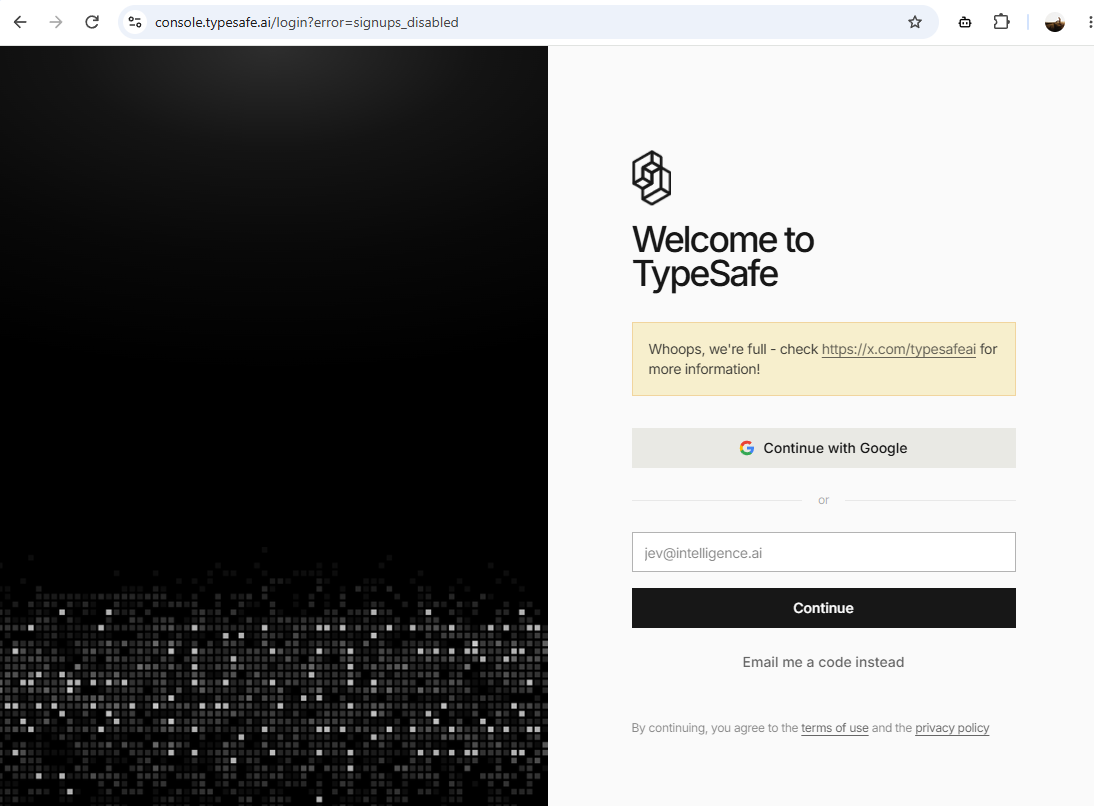
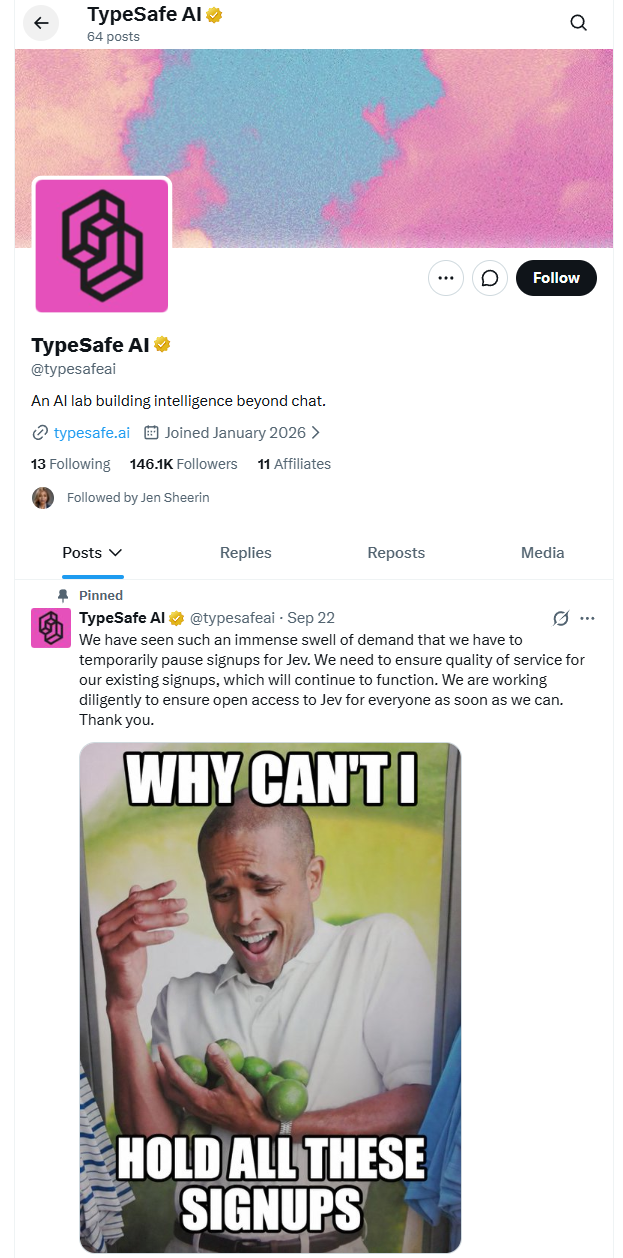
My first attempt to try it did not go smoothly. The typesafe.ai homepage announced that the waitlist was gone and TypeSafe was open to everyone, although the console turned my registration away with ?error=signups_disabled, and a pinned post on X from September 22 explained that demand had been so heavy that they had to temporarily pause new signups. I went looking for another way in and found that Vercel’s AI Gateway was already serving TypeSafe Jev, so I created a Vercel account, generated an API key, and had my first response back within a few minutes.
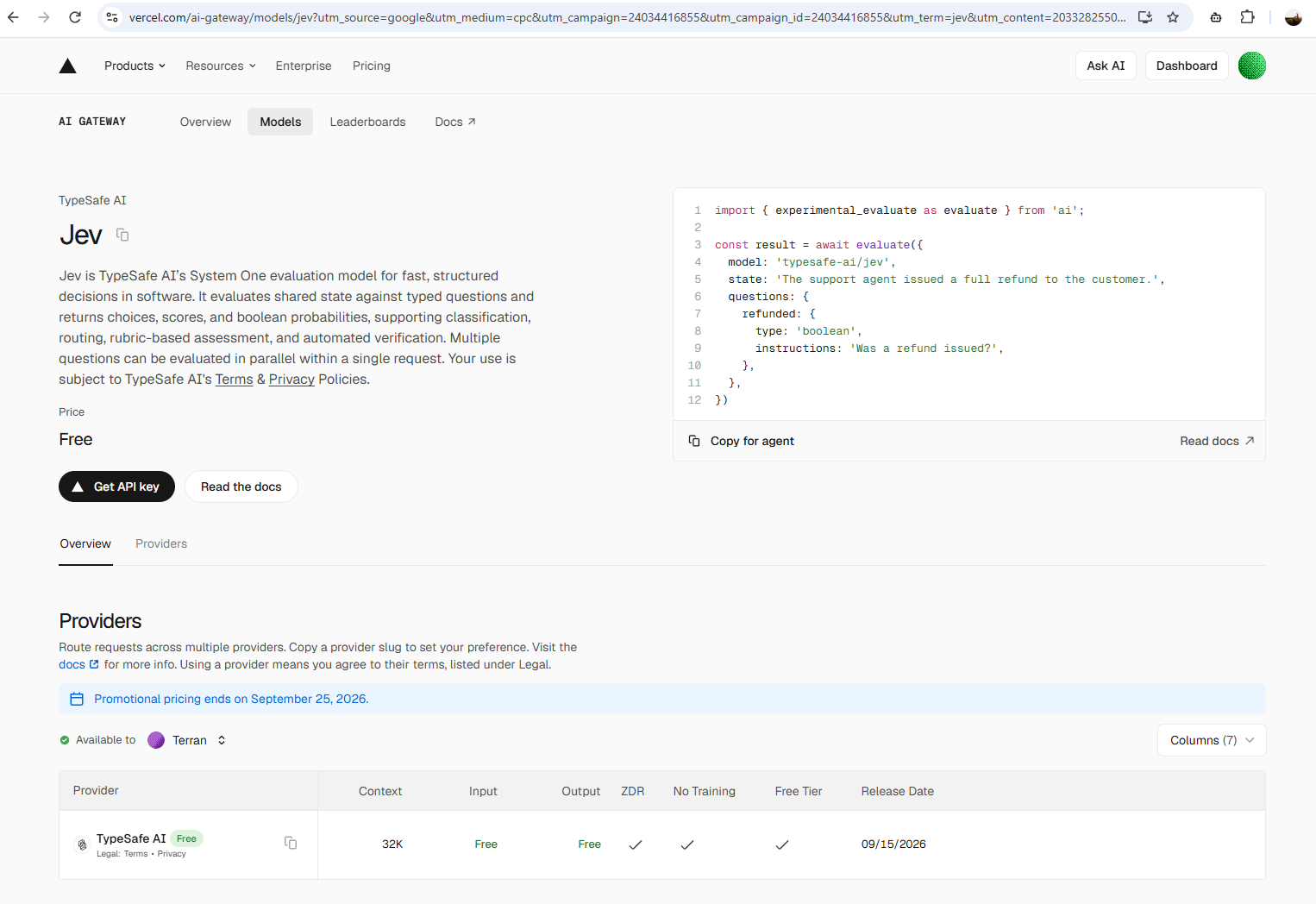
This post walks through what Jev is, how it differs from the text-generation models most of us are used to calling, how to access it through Vercel AI Gateway, and a small Azure Monitor alert triage example I built to see whether it is useful for the kind of automation I write about on this blog. Jev is free on AI Gateway at the time of writing, although Vercel’s promotional pricing ends on September 25, 2026, so anyone reading this after that date should expect to pay TypeSafe’s published rate of $0.042 per million input tokens.
What TypeSafe Jev is
Jev is an evaluation model that answers typed questions about a piece of state you hand it and returns probabilities, so it produces no prose at all. TypeSafe calls this category System One, a term coined along with System Two by psychologists Keith Stanovich and Richard West in a 2000 paper in Behavioral and Brain Sciences, and later popularized by Nobel laureate Daniel Kahneman in his 2011 book Thinking, Fast and Slow.
Seeing that name on an AI model amazed me because Thinking, Fast and Slow is one of my favourite books, and I read it over 10 years ago.
Kahneman describes two modes of thinking, System One being fast, automatic, and intuitive, and System Two being slow, deliberate, and effortful, and the distinction has stayed with me ever since, to the point where I reference it quite a bit in casual conversation when I want to be clear that the answer I just gave was an instinctive one and that a proper answer would need some deeper thinking. I won’t even go into Malcolm Gladwell’s Blink here, because anyone who has been on the receiving end of my snap-judgment tangents has heard that one enough already.
What I find interesting about TypeSafe’s use of the term is that Kahneman spends much of the book showing how our own System One is prone to biases and overconfidence. In chapter 7, “A Machine for Jumping to Conclusions,” he explains that System One builds the most coherent story it can from whatever information is in front of it, and that the confidence we feel comes from how coherent that story is rather than from how good the evidence is, and he dedicates all of Part III of the book, titled “Overconfidence,” to the consequences.
A System One model trained specifically to produce calibrated probabilities is therefore almost the opposite of the human version he wrote about.
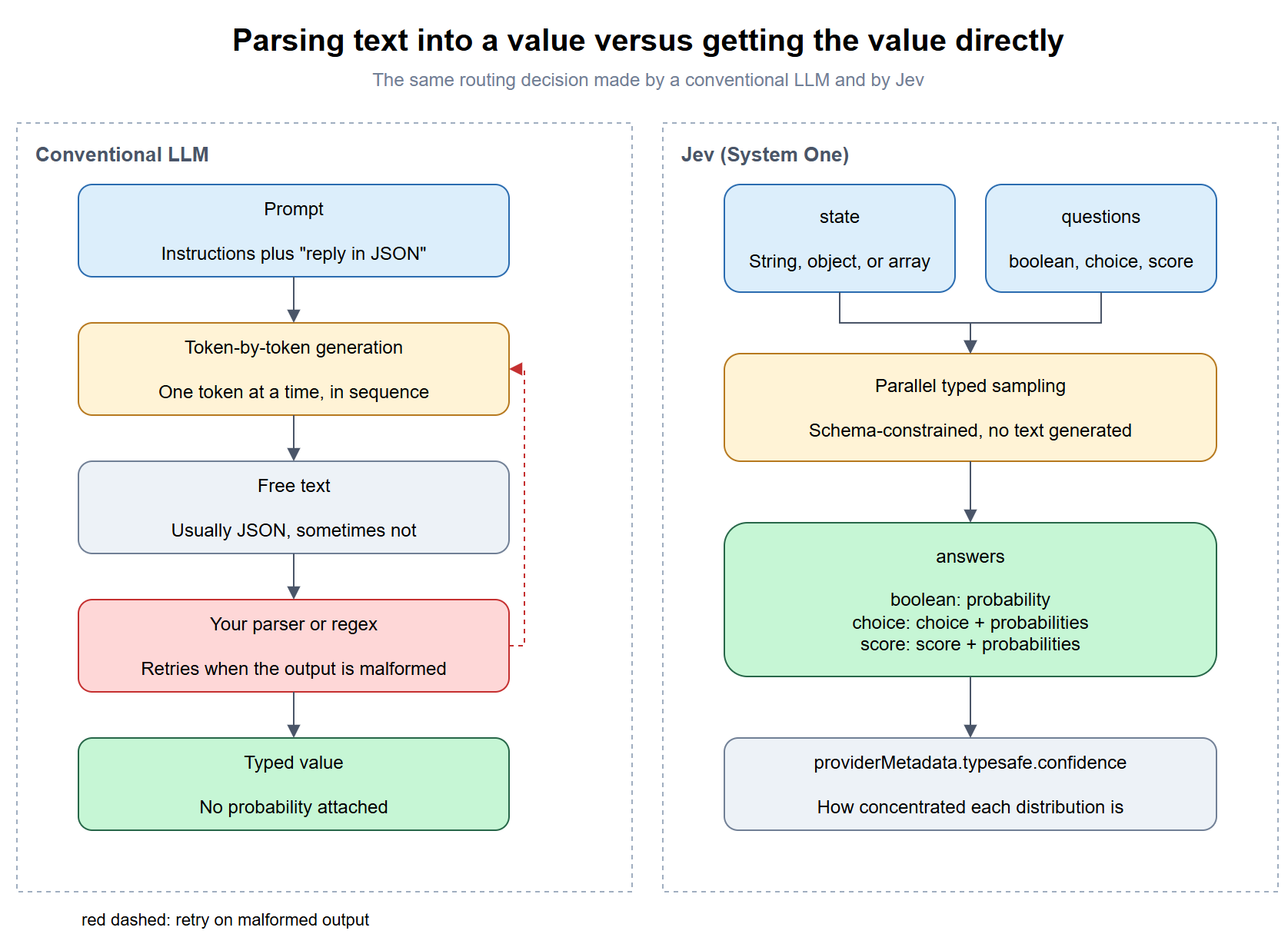
TypeSafe’s pitch is that a large share of what we currently ask frontier LLMs to do inside automation is really System One work. Deciding which queue a ticket belongs in, whether a log line indicates a failure, or how severe an alert is falls into that category, and today most of us handle it by prompting a chat model, asking it politely to reply in JSON, and then writing parsing and retry logic for the times it does not.
Jev removes that parsing step by design. You send a state, which can be a string, an object, or an array, alongside a set of named questions, and each question comes back as a typed answer with a probability distribution attached. According to TypeSafe’s launch post, the model samples these values in parallel rather than generating one token at a time, and it was trained with a method they call Reinforcement Learning for Calibrated Decisions (RLCD).
TypeSafe’s founder, Diogo Almeida, is a former OpenAI researcher who worked on ChatGPT, and TechCrunch reported that Jev is trained exclusively on synthetic data. The launch post positions RLCD against the two reinforcement learning methods behind most of today’s LLMs:
| Training method | What it optimizes for |
|---|---|
| Reinforcement Learning from Human Feedback (RLHF) | Write-ups and chat responses that human raters prefer |
| Reinforcement Learning with Verifiable Rewards (RLVR) | Outputs that can be verified programmatically, such as code that passes its tests or a math answer that can be checked |
| Reinforcement Learning for Calibrated Decisions (RLCD) | Answers with epistemically honest probabilities on System One tasks |
Calibration means that when a model trained with RLCD reports a probability of 0.7, it should be right about 70% of the time, and neither RLHF nor RLVR rewards a model for how accurately it reports its own certainty.
Jev supports three question types, and every answer is keyed by the name you gave the question:
| Question type | criteria shape |
Answer returned | Limits |
|---|---|---|---|
boolean |
Optional object with true and false descriptions |
probability between 0 and 1 |
None documented |
choice |
Object mapping option names to descriptions | choice plus a probabilities value for every option |
Up to 255 options |
score |
Array of level descriptions ordered lowest to highest | Interpolated score plus a probabilities value for every level |
2 to 10 levels |
Here is what each type looks like in practice, using the examples from Vercel’s evaluation documentation along with the answers it shows Jev returning:
| Question type | Example state |
Question and criteria |
Example answer |
|---|---|---|---|
boolean |
“The build failed with exit code 1.” | Did the build succeed? true is exit code 0, false is any non-zero exit code |
probability: 0.01 |
choice |
“My card was charged twice for one order.” | Route this support ticket to billing (payment or charge problems), shipping (delivery problems), or technical (application bugs) |
choice: "billing" with billing: 1, shipping: 0, and technical: 0 |
score |
“The PR adds tests, updates docs, and has a clear description.” | Rate the quality of this pull request from 0 (poor, no tests or docs) through 1 (fair, partial coverage) and 2 (good, tests and docs) to 3 (excellent, tests, docs, and clear rationale) | score: 2.97 with level 2 at 0.02 and level 3 at 0.98 |
The score answer shows how the interpolation works, with 2.97 landing just below the top level because Jev placed a small amount of probability on “good” as well as “excellent.”
There is a second statistic separate from the probabilities, called confidence, which TypeSafe returns under providerMetadata.typesafe.confidence for choice and score questions.
Vercel’s guide describes it as a summary of how concentrated the probability distribution is, ranging from 0 when probability is spread evenly across all options to 1 when all of it sits on a single option, and the pairing of the two values is what makes Jev interesting for routing decisions because you can branch on how sure the model is as well as on what it picked. TypeSafe rounds probabilities and scores to two decimal places, so a choice distribution can add up to 0.99, and I would not write any code that checks for an exact sum of 1.
Vercel’s own documentation draws a line that fits the trust-boundary approach I take with any AI in an automation pipeline. Jev can tell you that a customer asked for a refund or that a command looks destructive, although granting the refund or running the command depends on account status, policy, and permissions that Jev never sees, so that decision stays with your code or a human.
TypeSafe’s performance claims
TypeSafe’s launch post makes several substantial claims, and I have listed them here so they are clearly separated from what I observed myself:
| Claim | Source | Verified by me |
|---|---|---|
| 40 to 200 times faster than frontier LLMs on comparable System One tasks | TypeSafe launch post | No |
| Up to 444.6 times cheaper on their workflow evaluations | TypeSafe launch post | No |
| End-to-end response time of 70 to 500 ms | TypeSafe launch post, measured from West Coast servers | Partially, see Step #7 |
| 0% hallucination and no type errors | TypeSafe launch post | Type-safety yes by construction, the 0% figure is stated in the post itself as non-empirical |
Every benchmark in the launch post was produced by TypeSafe’s internal team, and I have not found an independent large-scale reproduction as of this writing, so I would test the speed and cost multipliers against your own workload before putting either number in a business case.
How to reach Jev through Vercel AI Gateway
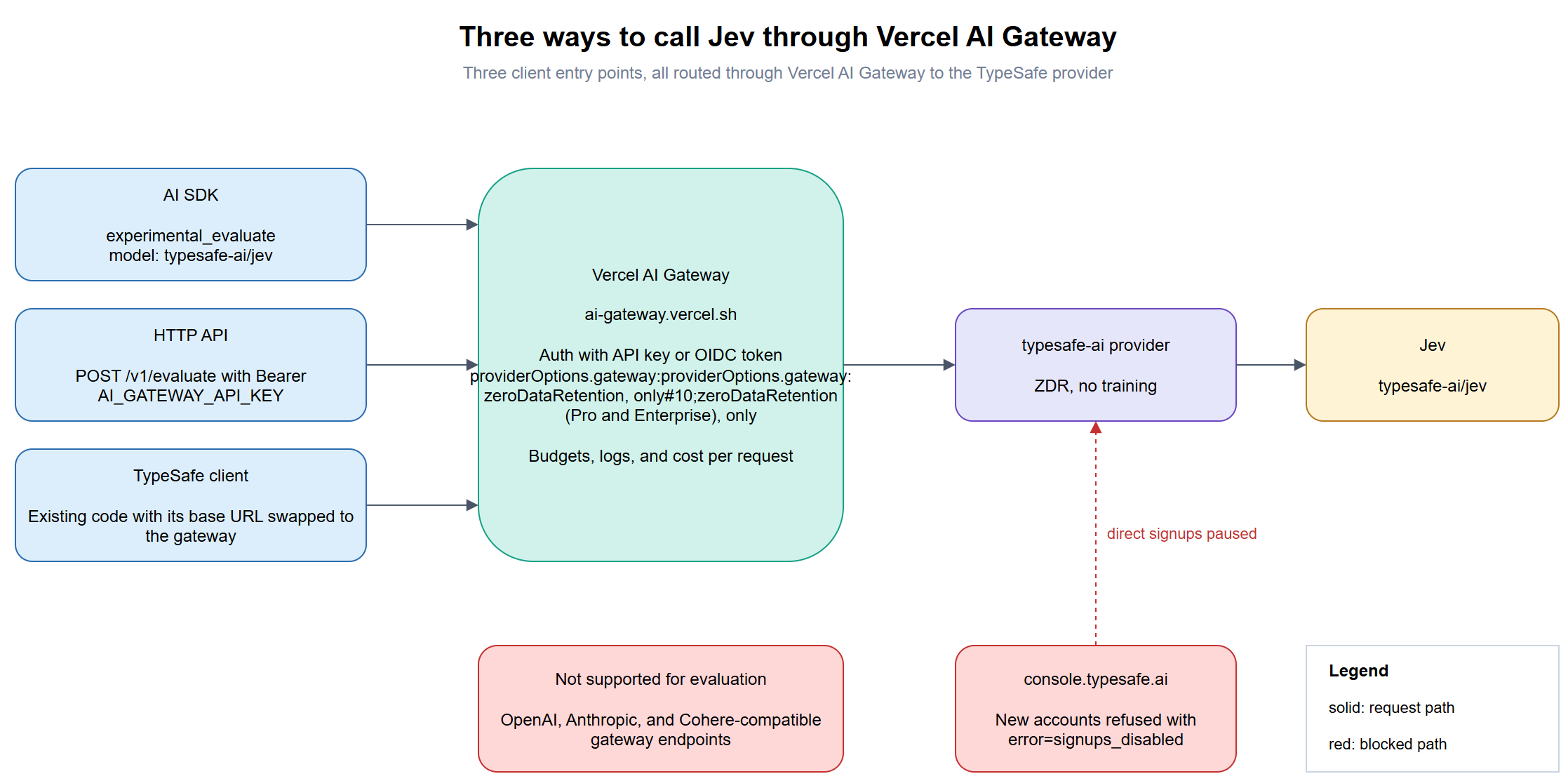
Vercel AI Gateway exposes Jev through three separate entry points, and which one you choose depends mostly on what you already have in place:
| Entry point | How you call it | Best fit |
|---|---|---|
| AI SDK | experimental_evaluate from the ai package, AI SDK 7 or later |
New TypeScript or Node.js projects |
| HTTP API | POST https://ai-gateway.vercel.sh/v1/evaluate with a Bearer token |
PowerShell, Python, or anything that can send JSON |
| TypeSafe-compatible API | An existing TypeSafe client with its base URL and API key changed | Teams that already have TypeSafe access and code |
One gotcha I ran into while reading the documentation is that evaluation is not available through AI Gateway’s OpenAI-compatible, Anthropic-compatible, or Cohere-compatible endpoints, so pointing an existing chat completions client at typesafe-ai/jev will not work regardless of how the request is shaped. I also noticed two small discrepancies between Vercel’s model page and its KB guide, and both of them are important if you are sizing a workload:
| Item | Vercel model page | Vercel KB guide or AI SDK docs |
|---|---|---|
| Context window | 32K | 64,000 tokens per request, with 32,000 of that for state |
| Model ID | typesafe-ai/jev |
The AI SDK reference example uses typesafe-ai/jev-latest |
I used typesafe-ai/jev for everything in this post. The Vercel provider table also lists zero data retention and no training for TypeSafe as the provider. Vercel’s documentation shows that ZDR can be enforced per request by adding providerOptions: { gateway: { zeroDataRetention: true } }, although I found out the hard way that this option only works on the Pro and Enterprise plans.
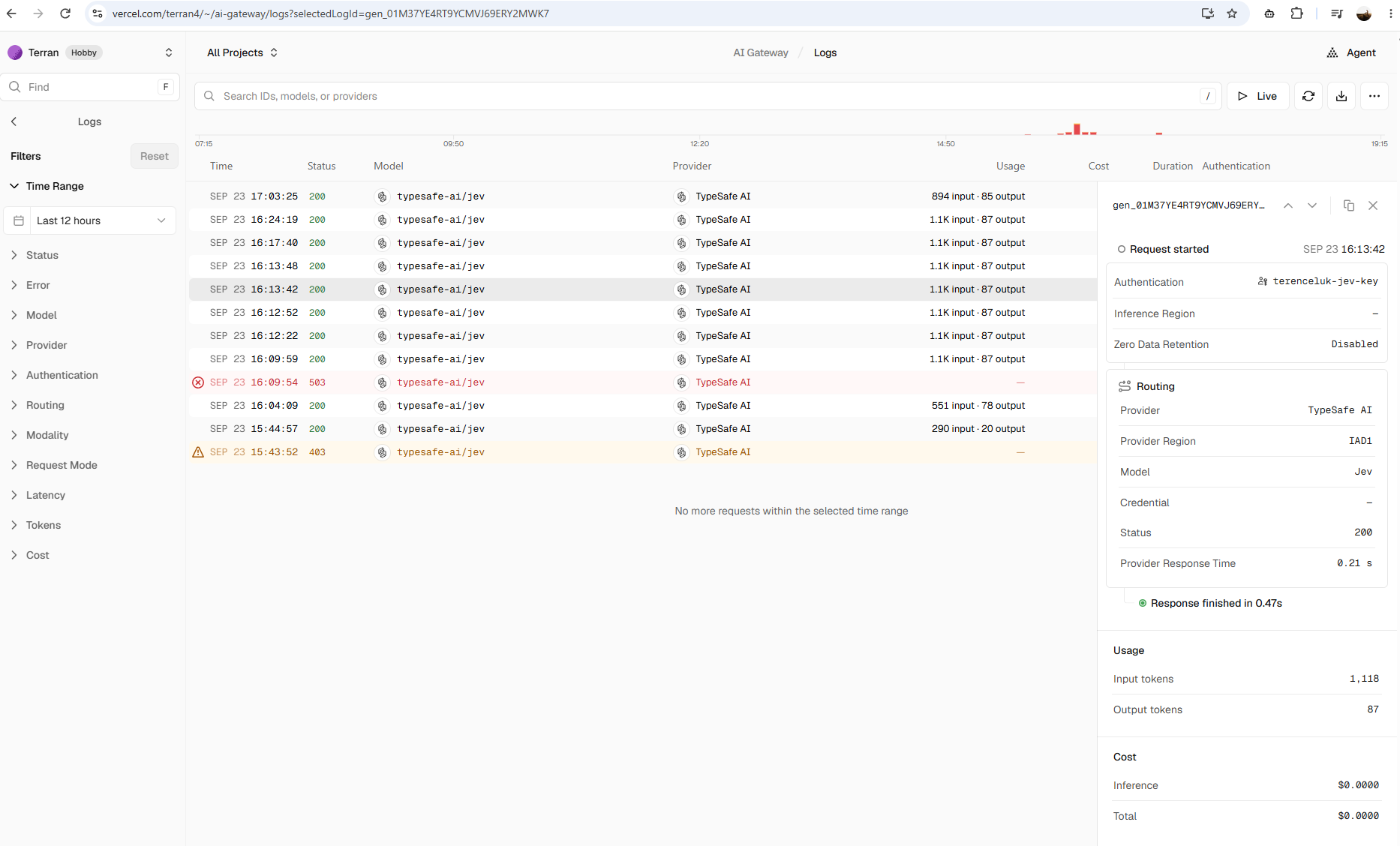
On my Hobby account the gateway rejected the request with a 403 ZdrUnauthorizedError stating that ZDR “is only available for Pro and Enterprise plans,” so I left the option out of the examples in this post. The request details in the AI Gateway Logs, which I cover in Step #7, show Zero Data Retention as Disabled on the requests I made on that plan.
Step #1 – Create a Vercel account and an AI Gateway API key
The Jev model page on Vercel lists the model as free with a Get API key button.
Signing up for a Vercel Hobby account and clicking through took me to the AI Gateway section of the dashboard, where I created a key named terenceluk-jev-key under AI Gateway > API Keys > Create API Key.
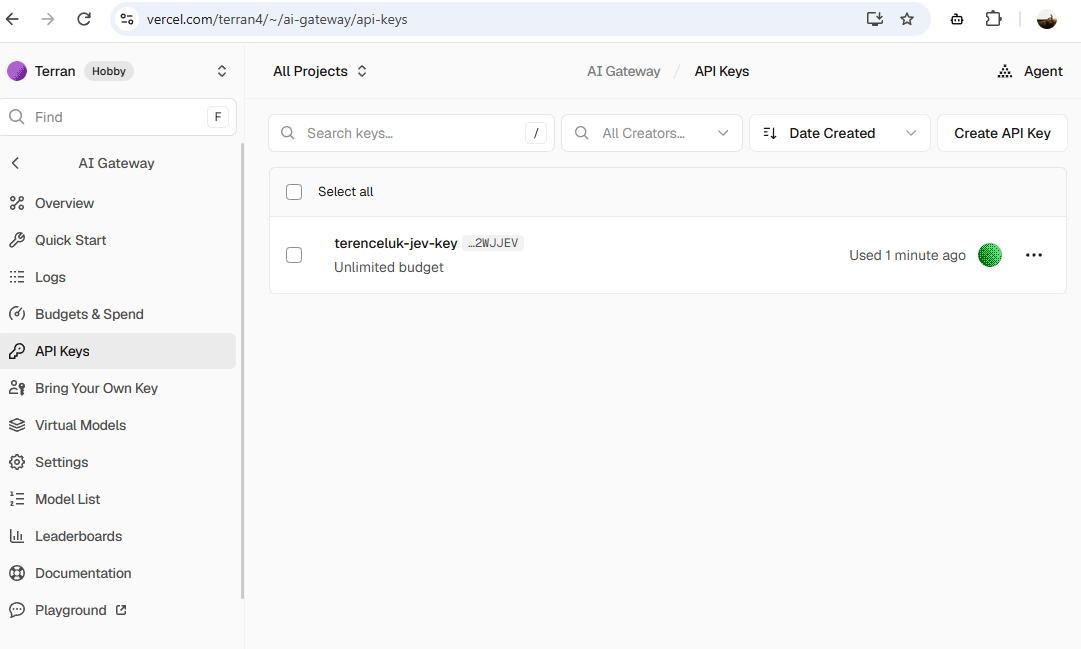
My key was created with an unlimited budget, and although Jev is free right now, the same key can call every other model on the gateway, so I would recommend setting a budget under Budgets & Spend before using the key anywhere beyond a personal test machine.
Once you have the key, store it in an environment variable for the current PowerShell session:
$env:AI_GATEWAY_API_KEY = "<your-ai-gateway-api-key>"
Step #2 – First call with PowerShell against the HTTP API
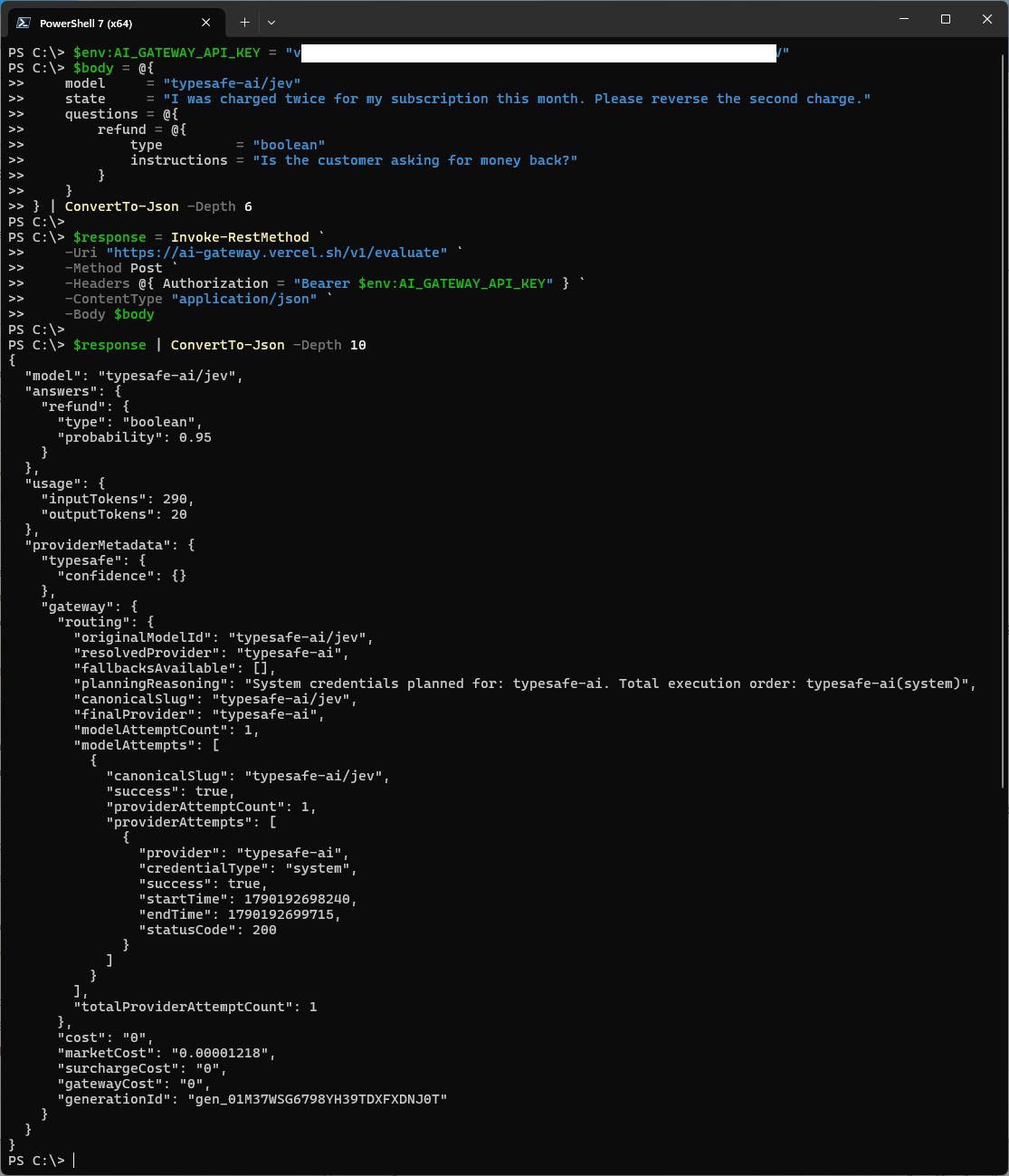
I wanted to confirm the key and the endpoint worked before involving any SDK, so the first test is a plain Invoke-RestMethod call against /v1/evaluate with a single boolean question, which I saved as Invoke-JevEvaluate.ps1:
$body = @{
    model     = "typesafe-ai/jev"
    state     = "I was charged twice for my subscription this month. Please reverse the second charge."
    questions = @{
        refund = @{
            type         = "boolean"
            instructions = "Is the customer asking for money back?"
        }
    }
} | ConvertTo-Json -Depth 6

$response = Invoke-RestMethod `
    -Uri "https://ai-gateway.vercel.sh/v1/evaluate" `
    -Method Post `
    -Headers @{ Authorization = "Bearer $env:AI_GATEWAY_API_KEY" } `
    -ContentType "application/json" `
    -Body $body

$response | ConvertTo-Json -Depth 10
The -Depth 10 on the last line is important because the gateway’s response nests providerMetadata.gateway.routing three levels deep and the default depth of 2 prints that object as the string System.Collections.Hashtable, which PowerShell 7 at least warns about and Windows PowerShell 5.1 does silently. The request body is shallow enough to serialize correctly at the default depth, although I set -Depth 6 there as well so the script keeps working if the questions grow more nested.
The response includes the answer, token usage, and the gateway’s routing and cost metadata:
{
  "model": "typesafe-ai/jev",
  "answers": {
    "refund": {
      "type": "boolean",
      "probability": 0.95
    }
  },
  "usage": {
    "inputTokens": 290,
    "outputTokens": 20
  },
  "providerMetadata": {
    "typesafe": {
      "confidence": {}
    },
    "gateway": {
      "routing": {
        "originalModelId": "typesafe-ai/jev",
        "resolvedProvider": "typesafe-ai",
        "fallbacksAvailable": [],
        "planningReasoning": "System credentials planned for: typesafe-ai. Total execution order: typesafe-ai(system)",
        "canonicalSlug": "typesafe-ai/jev",
        "finalProvider": "typesafe-ai",
        "modelAttemptCount": 1,
        "modelAttempts": [
          {
            "canonicalSlug": "typesafe-ai/jev",
            "success": true,
            "providerAttemptCount": 1,
            "providerAttempts": [
              {
                "provider": "typesafe-ai",
                "credentialType": "system",
                "success": true,
                "startTime": 1790192698240,
                "endTime": 1790192699715,
                "statusCode": 200
              }
            ]
          }
        ],
        "totalProviderAttemptCount": 1
      },
      "cost": "0",
      "marketCost": "0.00001218",
      "surchargeCost": "0",
      "gatewayCost": "0",
      "generationId": "gen_01M37WSG6798YH39TDXFXDNJ0T"
    }
  }
}
Jev returned a probability of 0.95 that the customer is asking for money back, and a few other details in the response stood out to me:
| Field | Value | What it tells me |
|---|---|---|
providerMetadata.typesafe.confidence |
{} |
Empty, because confidence is only returned for choice and score questions and this request only had a boolean |
cost |
"0" |
The promotional pricing was applied |
marketCost |
"0.00001218" |
What the request would have cost at list price, which is exactly 290 input tokens at $0.042 per million, confirming that the 20 output tokens are not billed |
providerAttempts startTime and endTime |
1,475 ms apart | The time the gateway spent on the call to TypeSafe for this request |
That 1,475 ms is well above the 70 to 500 ms TypeSafe quotes for end-to-end response time, although a single request made from my location through the gateway is not a benchmark, so I compare it against the other requests in Step #7.
Step #3 – Set up a Node.js project for the AI SDK
The HTTP API is enough for PowerShell automation, although the AI SDK gives you typed answers in TypeScript, which is where Jev’s type-safety is most noticeable. Create a folder and install the AI SDK along with tsx so the TypeScript files can run directly:
mkdir jev-demo
cd jev-demo
npm init -y
npm pkg set type=module
npm install ai@latest
npm install --save-dev tsx typescript @types/node
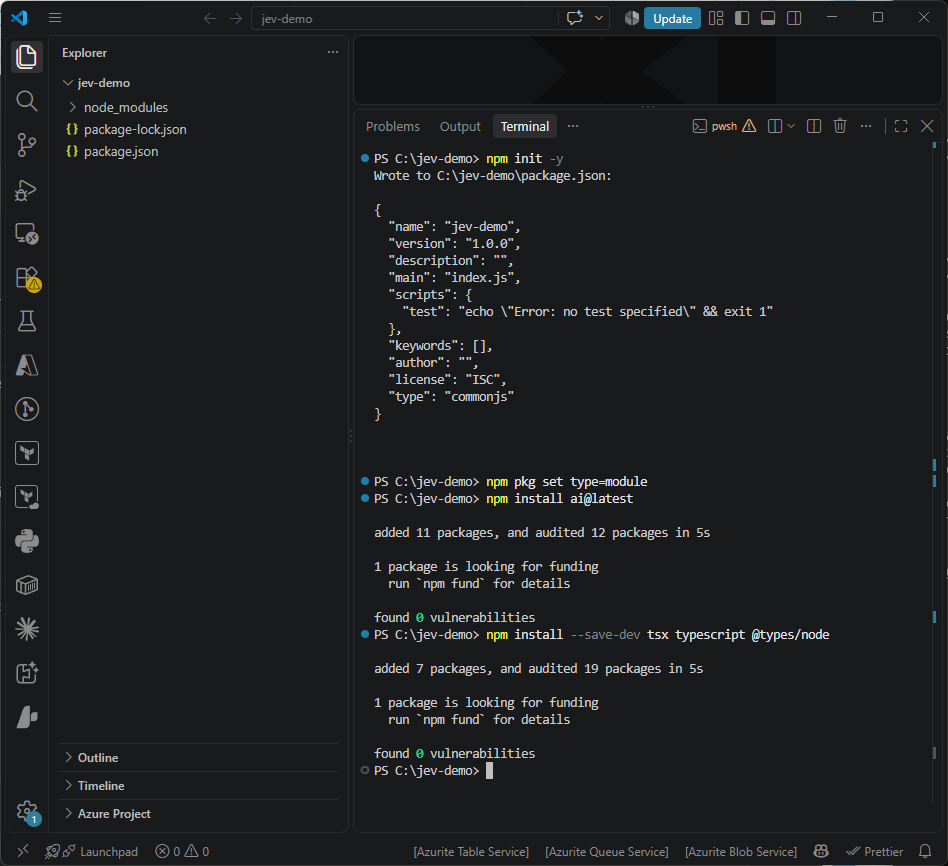
tsx runs the TypeScript files without type-checking them, so the scripts work without any further configuration, although VS Code will underline process with “Cannot find name ‘process'” until the folder has a tsconfig.json that loads Node’s type definitions. Save the following as tsconfig.json next to package.json to keep the editor quiet:
{
  "compilerOptions": {
    "target": "ES2022",
    "module": "NodeNext",
    "moduleResolution": "NodeNext",
    "types": ["node"],
    "skipLibCheck": true,
    "noEmit": true
  }
}
Evaluation requires AI SDK 7 or later, so confirm the installed version before going further:
npm list ai
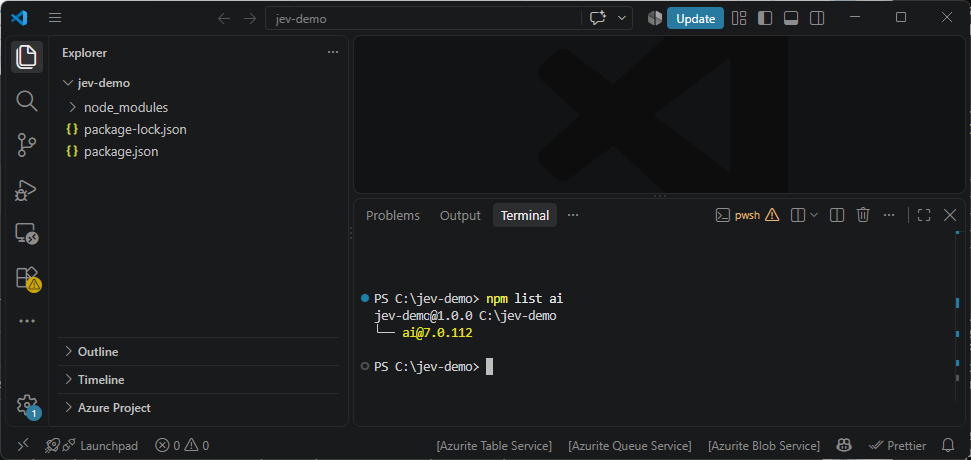
The AI SDK picks up AI_GATEWAY_API_KEY from the environment, so if you are running the scripts in a different terminal from Step #1, such as the VS Code terminal, set the key again in that terminal first:
$env:AI_GATEWAY_API_KEY = "<your-ai-gateway-api-key>"
Step #4 – All three question types in one request
This script sends a single support ticket to Jev and asks a choice, a score, and a boolean question against it in one round trip. Save it as evaluate-basic.ts:
import { experimental_evaluate as evaluate } from 'ai'

async function main() {
  const started = Date.now()

  const result = await evaluate({
    model: 'typesafe-ai/jev',
    state: {
      subject: 'Stripe sync broken',
      message:
        'Our Stripe connection has failed for three days and invoices are not being created. ' +
        'We have customers waiting on them. If this is not fixed today I want a credit for this month.',
      plan: 'pro',
      previousTickets: 2,
    },
    questions: {
      department: {
        type: 'choice',
        instructions: 'Which team should handle this ticket?',
        criteria: {
          billing: 'Charges, invoices, and refunds',
          technical: 'Bugs, outages, and integration failures',
          account: 'Login, permissions, and profile changes',
          other: 'Anything that does not fit the other teams',
        },
      },
      severity: {
        type: 'score',
        instructions: 'How severe is the issue for the customer?',
        criteria: [
          'Cosmetic or informational',
          'Degraded, but a workaround exists',
          'Blocking with no workaround',
          'Blocking and causing financial or data loss',
        ],
      },
      requestsRefund: {
        type: 'boolean',
        instructions: 'Is the customer asking for money back or a credit?',
        criteria: {
          true: 'The customer asks for a refund, credit, or reversal of a charge.',
          false: 'The customer does not ask for any money back.',
        },
      },
    },
  })

  console.log('Elapsed ms:', Date.now() - started)
  console.log('Answers:', JSON.stringify(result.answers, null, 2))
  console.log('Confidence:', JSON.stringify(result.providerMetadata?.typesafe?.confidence, null, 2))
  console.log('Usage:', JSON.stringify(result.usage))
}

main().catch((error) => {
  console.error(error)
  process.exit(1)
})
Run it with:
npx tsx evaluate-basic.ts
Elapsed ms: 769
Answers: {
  "department": {
    "type": "choice",
    "choice": "technical",
    "probabilities": {
      "account": 0,
      "other": 0,
      "technical": 0.98,
      "billing": 0.02
    }
  },
  "severity": {
    "type": "score",
    "score": 2.94,
    "probabilities": {
      "0": 0,
      "1": 0,
      "2": 0.06,
      "3": 0.94
    }
  },
  "requestsRefund": {
    "type": "boolean",
    "probability": 0.98
  }
}
Confidence: {
  "department": 0.97,
  "severity": 0.94
}
Usage: {"inputTokens":551,"outputTokens":78,"totalTokens":629}
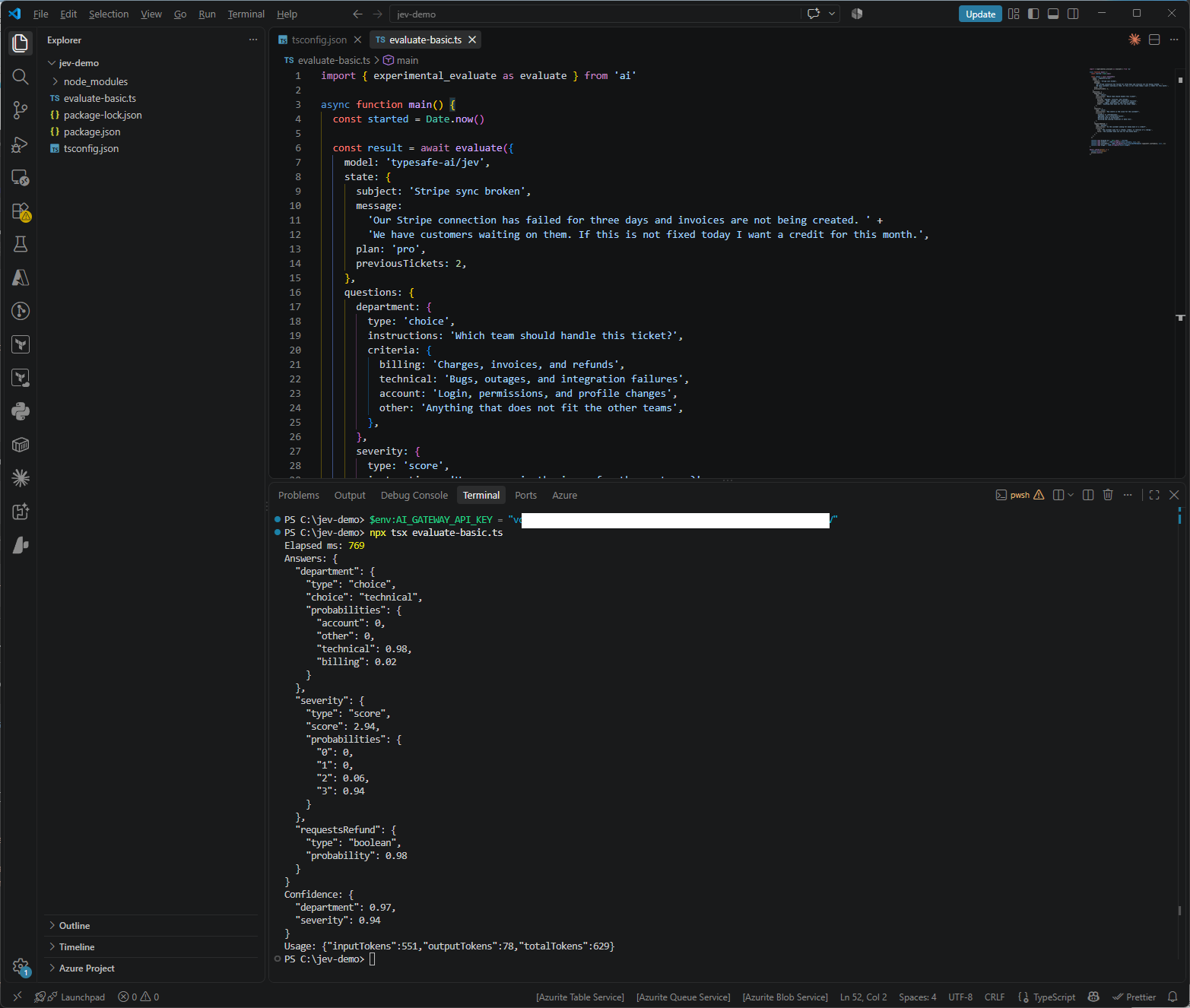
I deliberately wrote this ticket so that it straddles billing and technical, since the customer is reporting an integration failure while also asking for a credit, and the probability split on department shows how the model weighed the two. Jev put 0.98 on technical and only 0.02 on billing, which is the answer I would have given myself, since the broken integration is the problem that needs fixing and the credit is a consequence of it. The credit request was still picked up separately, with requestsRefund at 0.98, so splitting “who owns this ticket” and “does the customer want money back” into two questions meant neither answer had to compromise for the other.
Severity came back as 2.94 with 0.94 on the top level, “Blocking and causing financial or data loss,” which fits a customer whose invoices have not been created for three days, and the confidence values of 0.97 for department and 0.94 for severity would both clear the thresholds I use in Step #5. The script measured 769 ms end to end from my machine for all three questions, which includes the round trip to the gateway, and the request used 551 input tokens.
Step #5 – Triage an Azure Monitor alert
Support tickets are Vercel’s example, so I wanted to try something closer to my own work. Azure Monitor action groups can post alerts to a webhook, a Logic App, or an Azure Function using the common alert schema, and triaging those alerts is a classic System One task where a team needs to know which queue an alert belongs to, how urgent it really is compared to the severity someone picked when they created the rule months ago, and whether security should be looking at it.
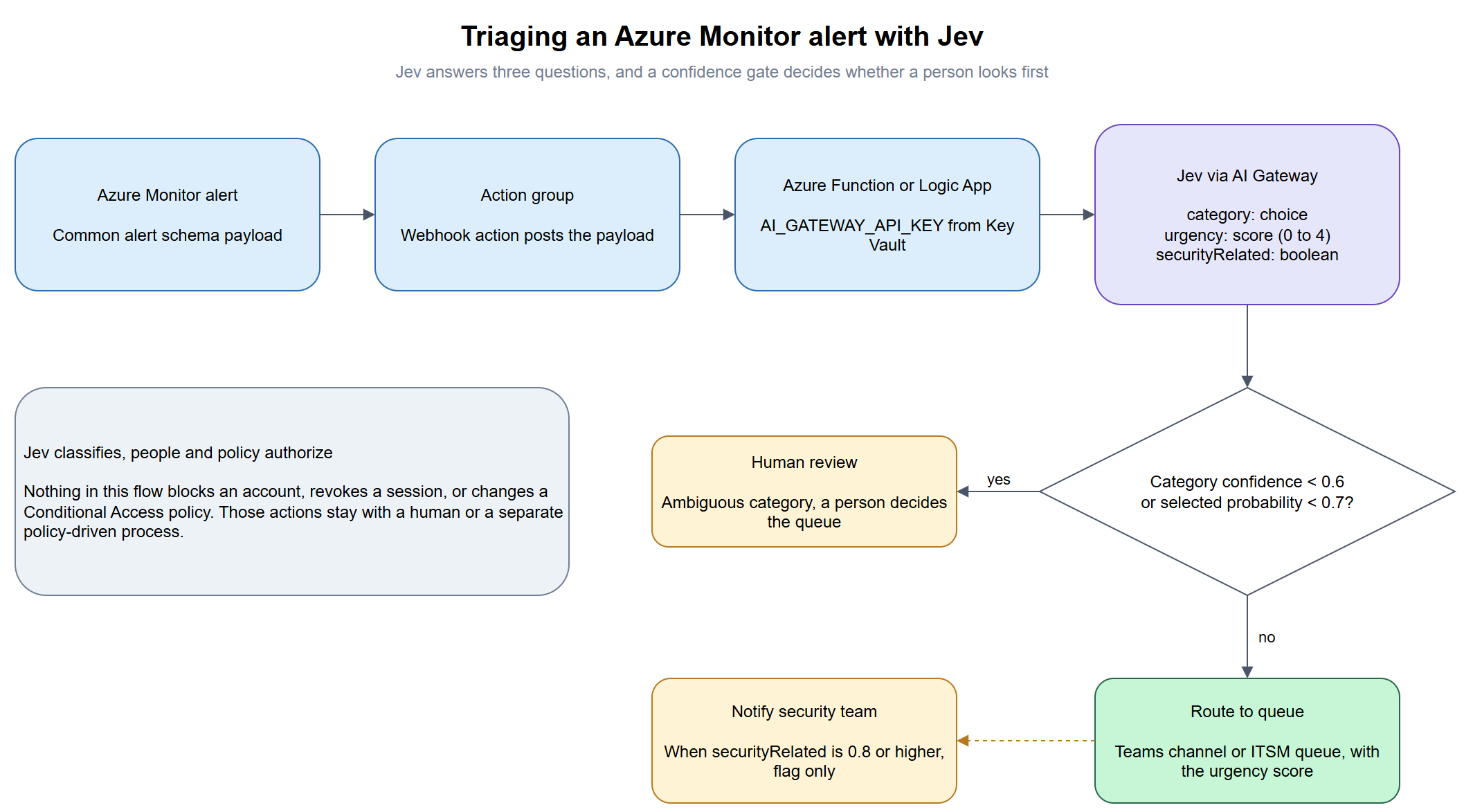
Save the following sample payload as sample-alert.json. It is a log search alert on Entra ID sign-in failures, simplified so the query’s summary values appear under dimensions where Jev can read them, since a real Log Alerts V2 payload only carries the split-by dimension values and a link to the search results. The resource IDs are fictitious:
{
  "schemaId": "azureMonitorCommonAlertSchema",
  "data": {
    "essentials": {
      "alertId": "/subscriptions/00000000-0000-0000-0000-000000000000/providers/Microsoft.AlertsManagement/alerts/11111111-1111-1111-1111-111111111111",
      "alertRule": "Entra ID - Failed sign-ins spike",
      "severity": "Sev3",
      "signalType": "Log",
      "monitorCondition": "Fired",
      "monitoringService": "Log Alerts V2",
      "alertTargetIDs": [
        "/subscriptions/00000000-0000-0000-0000-000000000000/resourcegroups/rg-monitoring/providers/microsoft.operationalinsights/workspaces/law-contoso-prod"
      ],
      "firedDateTime": "2026-09-22T03:14:07Z",
      "description": "More than 50 failed sign-ins in 15 minutes across the tenant."
    },
    "alertContext": {
      "conditionType": "LogQueryCriteria",
      "condition": {
        "windowSize": "PT15M",
        "allOf": [
          {
            "searchQuery": "SigninLogs | where ResultType != \"0\" | summarize Failures = count(), Accounts = dcount(UserPrincipalName), IPs = dcount(IPAddress) by bin(TimeGenerated, 15m)",
            "metricValue": 412,
            "operator": "GreaterThan",
            "threshold": "50",
            "dimensions": [
              { "name": "Accounts", "value": "187" },
              { "name": "IPs", "value": "3" },
              { "name": "TopResultType", "value": "50126" }
            ]
          }
        ]
      }
    }
  }
}
The rule was created as Sev3, although 412 failures across 187 accounts from only 3 IP addresses, with result type 50126 (invalid username or password), reads much more like a password spray than a user who forgot their password, and that gap between the configured severity and the real situation is exactly what I wanted Jev to catch.
Save the triage script as triage-alert.ts:
import { readFileSync } from 'node:fs'
import { experimental_evaluate as evaluate, type JSONValue } from 'ai'

const CONFIDENCE_FLOOR = 0.6
const PROBABILITY_FLOOR = 0.7

async function triage(alert: Record<string, JSONValue>) {
  const result = await evaluate({
    model: 'typesafe-ai/jev',
    state: alert,
    questions: {
      category: {
        type: 'choice',
        instructions: 'Which operations queue should own this Azure Monitor alert?',
        criteria: {
          identity: 'Entra ID sign-ins, Conditional Access, MFA, and account lockouts',
          network: 'Virtual networks, firewalls, VPN, ExpressRoute, DNS, and load balancers',
          compute: 'Virtual machines, App Service, Functions, and container workloads',
          data: 'Storage accounts, SQL, Cosmos DB, and backups',
          cost: 'Budgets, spend anomalies, and quota',
        },
      },
      urgency: {
        type: 'score',
        instructions:
          'How urgent is this alert based on its actual content, regardless of the severity configured on the rule?',
        criteria: [
          'Informational, no action needed',
          'Low, review during business hours',
          'Moderate, investigate today',
          'High, investigate within the hour',
          'Critical, active incident requiring immediate response',
        ],
      },
      securityRelated: {
        type: 'boolean',
        instructions: 'Could this alert indicate malicious activity that the security team should review?',
        criteria: {
          true: 'The pattern is consistent with an attack, compromise, or abuse of credentials or resources.',
          false: 'The pattern is consistent with a misconfiguration, capacity issue, or normal user error.',
        },
      },
    },
  })

  const { category, urgency, securityRelated } = result.answers
  const confidence = result.providerMetadata?.typesafe?.confidence as Record<string, number> | undefined
  const categoryConfidence = confidence?.category ?? 0
  const selectedProbability = category.probabilities?.[category.choice] ?? 0

  const decision =
    categoryConfidence < CONFIDENCE_FLOOR || selectedProbability < PROBABILITY_FLOOR
      ? { action: 'human-review', reason: 'ambiguous category' }
      : {
          action: 'route',
          queue: category.choice,
          urgency: urgency.score,
          notifySecurity: securityRelated.probability >= 0.8,
        }

  return { answers: result.answers, confidence, decision }
}

async function main() {
  const file = process.argv[2] ?? 'sample-alert.json'
  const alert = JSON.parse(readFileSync(file, 'utf8'))
  const started = Date.now()
  const outcome = await triage(alert)
  console.log('Elapsed ms:', Date.now() - started)
  console.log(JSON.stringify(outcome, null, 2))
}

main().catch((error) => {
  console.error(error)
  process.exit(1)
})
The thresholds are the same ones Vercel uses in its ticket routing guide, and they are only a starting point, since the right values depend on how costly a misrouted alert is for your team. Note that notifySecurity only flags the alert for the security team to look at, and nothing in this script blocks an account, revokes a session, or changes a Conditional Access policy, because those actions belong to a human or to a separate, policy-driven process.
Run it with:
npx tsx triage-alert.ts
Elapsed ms: 8346
{
  "answers": {
    "category": {
      "type": "choice",
      "choice": "identity",
      "probabilities": {
        "data": 0,
        "network": 0,
        "cost": 0,
        "identity": 1,
        "compute": 0
      }
    },
    "urgency": {
      "type": "score",
      "score": 3.66,
      "probabilities": {
        "0": 0,
        "1": 0,
        "2": 0.02,
        "3": 0.3,
        "4": 0.68
      }
    },
    "securityRelated": {
      "type": "boolean",
      "probability": 0.92
    }
  },
  "confidence": {
    "category": 1,
    "urgency": 0.71
  },
  "decision": {
    "action": "route",
    "queue": "identity",
    "urgency": 3.66,
    "notifySecurity": true
  }
}
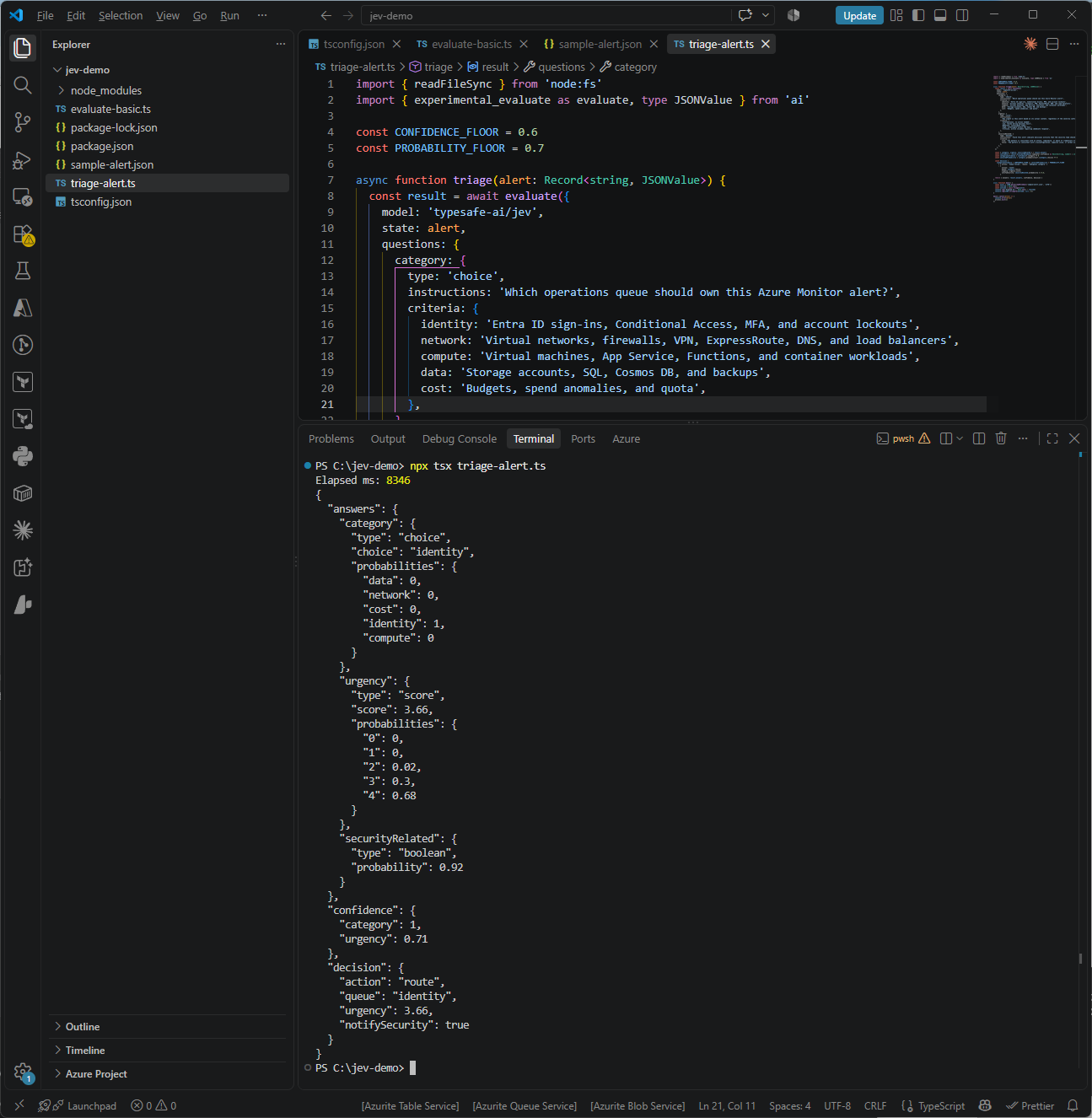
Jev caught the gap I was hoping it would. The rule was configured as Sev3, although Jev scored the urgency at 3.66 out of 4, with 0.68 on “Critical, active incident requiring immediate response” and 0.3 on “High, investigate within the hour,” so it treated the alert as far more serious than whoever created the rule expected it to be. It also put 0.92 on securityRelated, which is above the 0.8 threshold and set notifySecurity to true, and it assigned the alert to the identity queue with a probability of 1 and a confidence of 1, which is the least ambiguous answer I have seen from it so far.
The elapsed time is the result I did not expect, since the first run took 8,346 ms compared with 769 ms for the three-question ticket in Step #4, so I ran the same script four more times to see whether it was a one-off:
| Run | Script elapsed | Gateway duration (Logs) | category |
urgency score |
urgency confidence |
securityRelated |
|---|---|---|---|---|---|---|
| 1 | 8,346 ms | 2.62 s failed with a 503, then 3.01 s on the retry | identity, 1 | 3.66 | 0.71 | 0.92 |
| 2 | 3,260 ms | 3.10 s | identity, 1 | 3.59 | 0.66 | 0.92 |
| 3 | 3,486 ms | 2.80 s | identity, 1 | 3.63 | 0.69 | 0.92 |
| 4 | 800 ms | 0.47 s | identity, 1 | 3.58 | 0.65 | 0.92 |
| 5 | 376 ms | 0.19 s | identity, 1 | 3.57 | 0.65 | 0.91 |
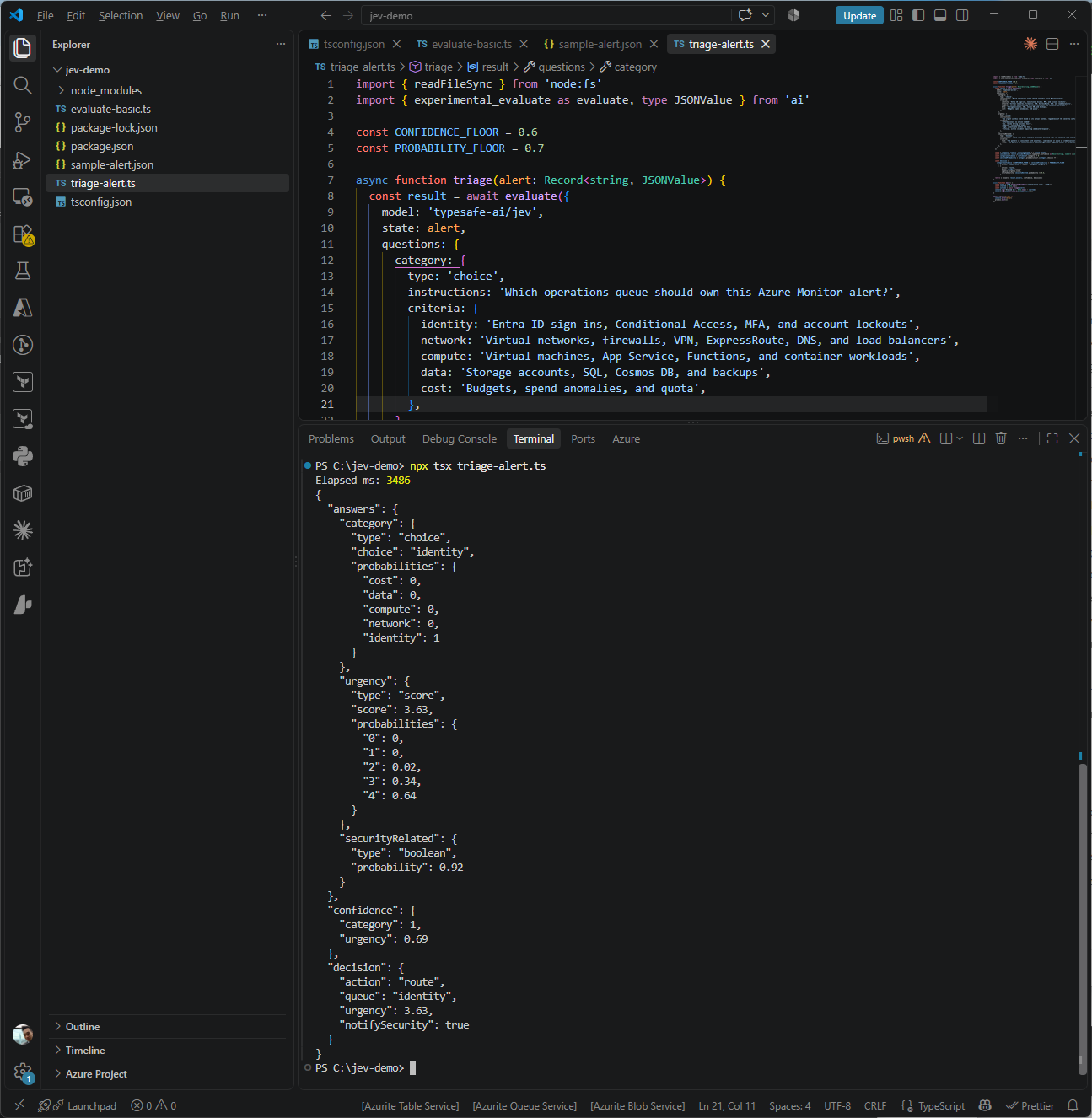
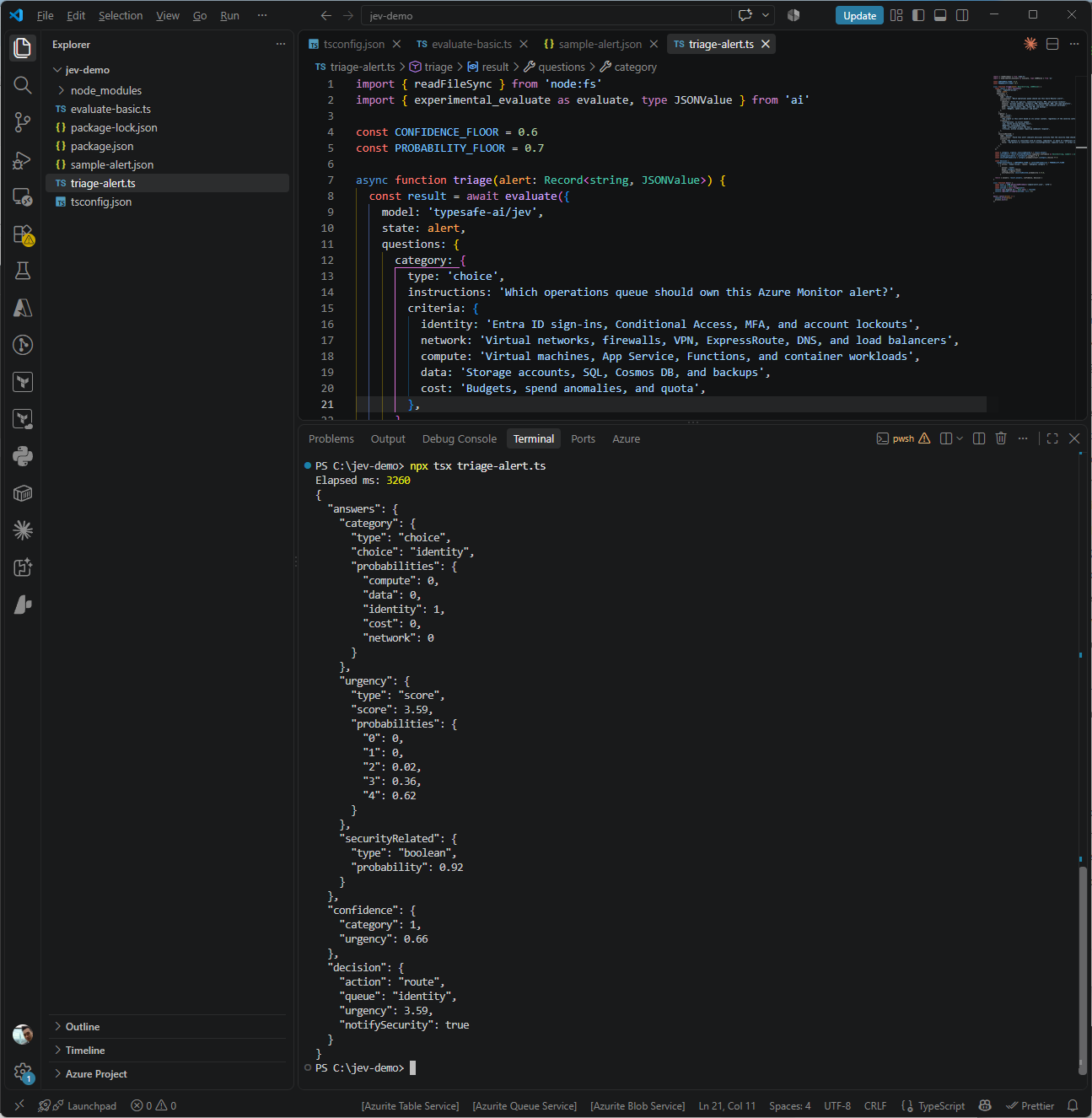
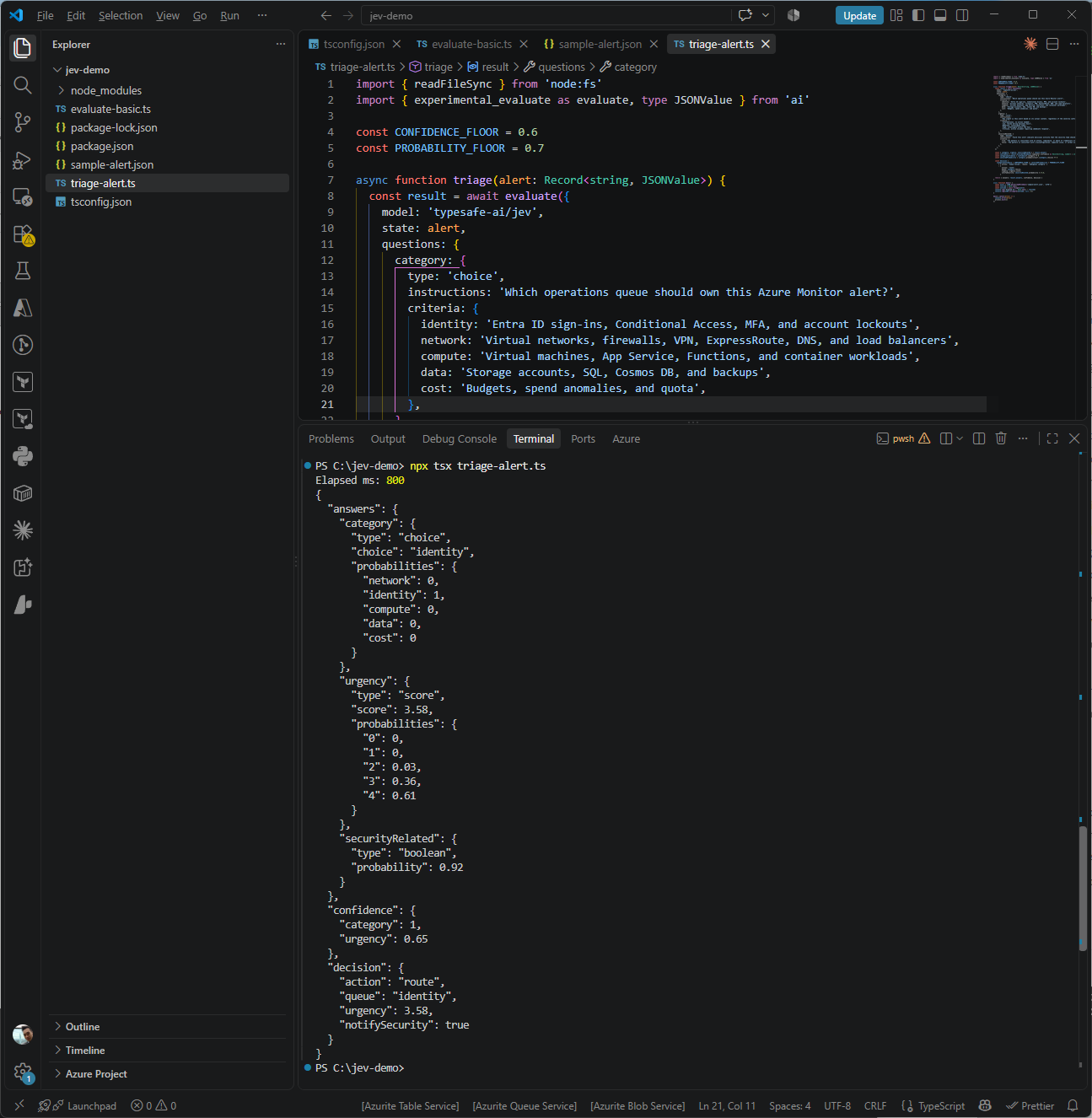
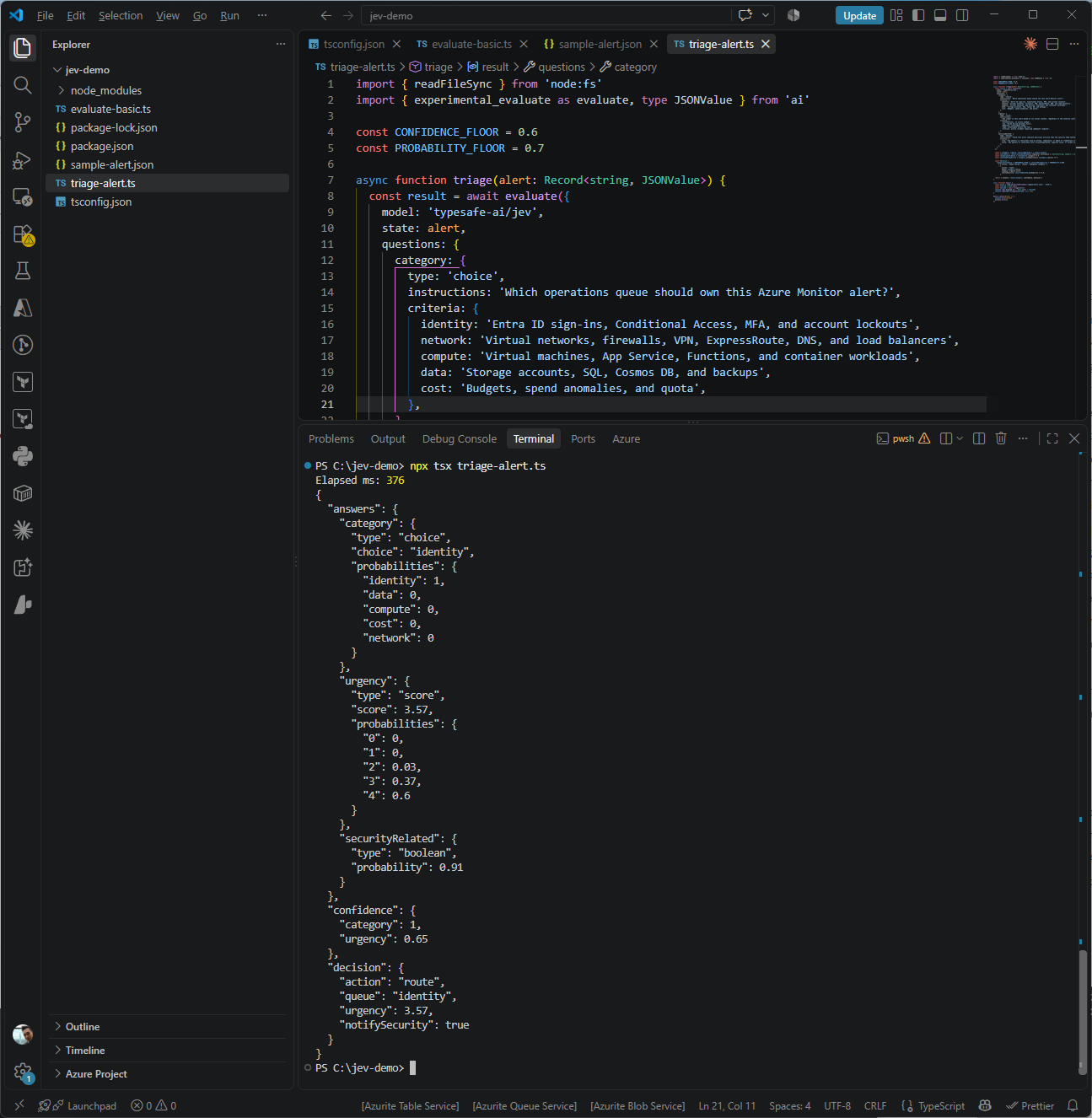
The AI Gateway Logs explained the first run. The initial request failed with a 503 from TypeSafe after 2.62 seconds, and the AI SDK retried it automatically, so the 8,346 ms my script measured was a failed call, a retry delay, and a successful 3.01 second call added together, and the script never saw the error. After that the gateway duration fell from around 3 seconds to 0.47 and then 0.19 seconds on the same payload, so the size of the alert was not the cause, and the last two runs landed inside the 70 to 500 ms TypeSafe quotes.
I cannot tell from five runs whether the slow start came from the gateway, from TypeSafe’s side while demand is this high, or from something that warms up after the first few requests, although anyone putting Jev in an alert pipeline should expect occasional 503s and a slow first call after a quiet period, and should log retries because the AI SDK hides them.
What I found more reassuring is how stable the answers were, with the same queue every time, securityRelated at 0.91 or 0.92, and an urgency score that only moved between 3.57 and 3.66 across all five runs.
To check the negative case as well, I created a second payload with the same rule, the same threshold, and the same result type, although this time 58 failures come from a single account on a single IP address. That pattern is usually a service account or an old device retrying with a password that was changed, which is noisy enough to trip the same rule although far less likely to be an attack than failures spread across 187 accounts. Save it as sample-alert-benign.json:
{
  "schemaId": "azureMonitorCommonAlertSchema",
  "data": {
    "essentials": {
      "alertId": "/subscriptions/00000000-0000-0000-0000-000000000000/providers/Microsoft.AlertsManagement/alerts/22222222-2222-2222-2222-222222222222",
      "alertRule": "Entra ID - Failed sign-ins spike",
      "severity": "Sev3",
      "signalType": "Log",
      "monitorCondition": "Fired",
      "monitoringService": "Log Alerts V2",
      "alertTargetIDs": [
        "/subscriptions/00000000-0000-0000-0000-000000000000/resourcegroups/rg-monitoring/providers/microsoft.operationalinsights/workspaces/law-contoso-prod"
      ],
      "firedDateTime": "2026-09-22T09:41:52Z",
      "description": "More than 50 failed sign-ins in 15 minutes across the tenant."
    },
    "alertContext": {
      "conditionType": "LogQueryCriteria",
      "condition": {
        "windowSize": "PT15M",
        "allOf": [
          {
            "searchQuery": "SigninLogs | where ResultType != \"0\" | summarize Failures = count(), Accounts = dcount(UserPrincipalName), IPs = dcount(IPAddress) by bin(TimeGenerated, 15m)",
            "metricValue": 58,
            "operator": "GreaterThan",
            "threshold": "50",
            "dimensions": [
              { "name": "Accounts", "value": "1" },
              { "name": "IPs", "value": "1" },
              { "name": "TopResultType", "value": "50126" }
            ]
          }
        ]
      }
    }
  }
}
The triage script reads the file name from the command line and falls back to sample-alert.json when none is given, so the benign payload runs with:
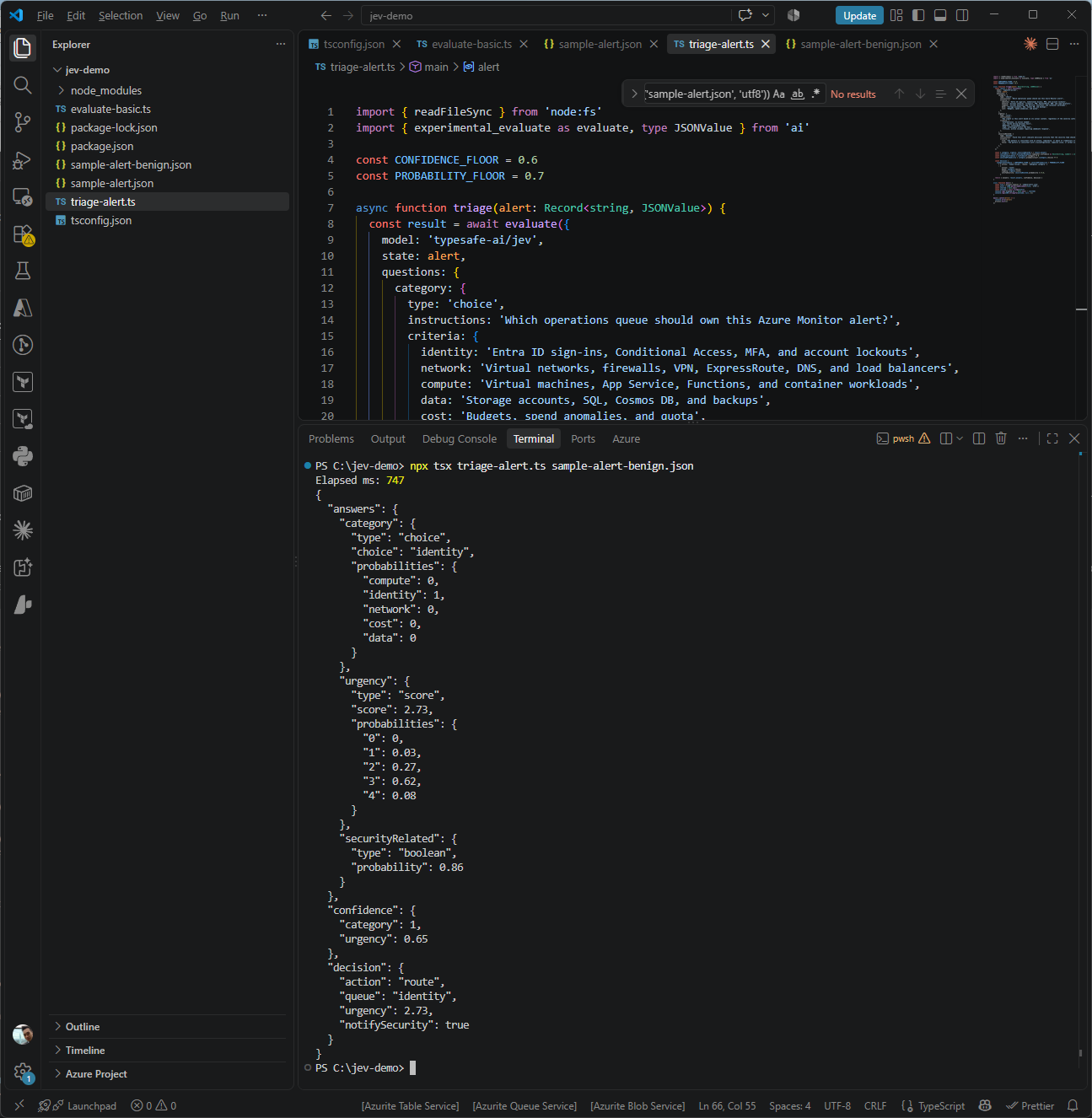
npx tsx triage-alert.ts sample-alert-benign.json
Elapsed ms: 747
{
  "answers": {
    "category": {
      "type": "choice",
      "choice": "identity",
      "probabilities": {
        "compute": 0,
        "identity": 1,
        "network": 0,
        "cost": 0,
        "data": 0
      }
    },
    "urgency": {
      "type": "score",
      "score": 2.73,
      "probabilities": {
        "0": 0,
        "1": 0.03,
        "2": 0.27,
        "3": 0.62,
        "4": 0.08
      }
    },
    "securityRelated": {
      "type": "boolean",
      "probability": 0.86
    }
  },
  "confidence": {
    "category": 1,
    "urgency": 0.65
  },
  "decision": {
    "action": "route",
    "queue": "identity",
    "urgency": 2.73,
    "notifySecurity": true
  }
}
| Password spray (5 runs) | Single account, single IP | |
|---|---|---|
category |
identity, 1 | identity, 1 |
urgency score |
3.57 to 3.66, mostly “Critical” | 2.73, mostly “High” at 0.62 and “Moderate” at 0.27 |
securityRelated |
0.91 to 0.92 | 0.86 |
notifySecurity |
true | true |
Jev lowered the urgency by almost a full level once the failures came from one account and one IP address, which is the direction I expected, although securityRelated only dropped from 0.92 to 0.86 and still cleared the 0.8 threshold, so the alert would still have gone to the security team. I went in thinking of this payload as the benign case, but looking at it again, 58 failed sign-ins against a single account from a single IP address, mostly with invalid password errors, is also what a targeted brute-force attempt looks like, and nothing in the payload lets anyone, human or model, rule that out.
I would rather have Jev flag this one for a second look than dismiss it, and if I wanted it to separate the two cases more cleanly, the payload would need evidence that can actually tell them apart, such as whether the account is a service account or whether the IP address is a known corporate address.
Step #6 – Wire it into an alert pipeline
The script above runs locally, and turning it into something an action group can call is a matter of wrapping triage() in an HTTP-triggered Azure Function or calling the HTTP API from a Logic App with an HTTP action, then posting the decision object to the right Teams channel or ITSM queue. I have not built the full pipeline for this post because the point was to see whether Jev’s answers were good enough to justify it, although the pieces map directly:
| Component | Role in the pipeline |
|---|---|
| Azure Monitor action group | Sends the common alert schema payload to a webhook |
| Azure Function or Logic App | Calls Jev through AI Gateway and applies the confidence gate |
| Azure Key Vault | Holds AI_GATEWAY_API_KEY, referenced from app settings |
| Teams or ITSM connector | Receives the routed alert or the human-review request |
Step #7 – Check usage and cost in AI Gateway
Every request shows up under AI Gateway > Logs in the Vercel dashboard with its status code, model, provider, token usage, cost, duration, and the API key that made it, which is the easiest place to check TypeSafe’s latency claim against real requests from my own location rather than from a West Coast server.
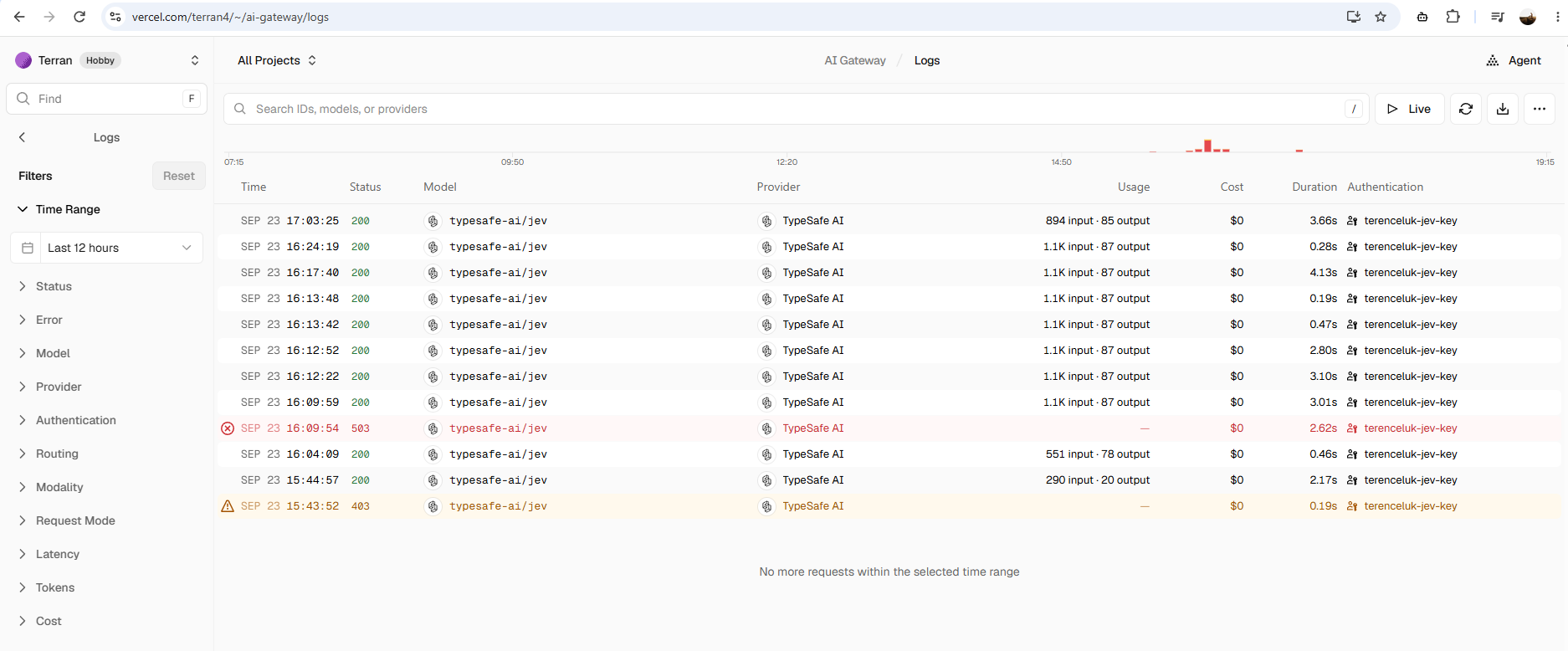
| Request | Status | Usage | Gateway duration | Cost during promo |
|---|---|---|---|---|
Step #2, first attempt with zeroDataRetention |
403 | None | 0.19 s | $0 |
| Step #2, PowerShell boolean | 200 | 290 input, 20 output | 2.17 s | $0, or $0.00001218 at list price |
| Step #4, three-question ticket | 200 | 551 input, 78 output | 0.46 s | $0, or about $0.000023 at list price |
| Step #5, password spray alert, first attempt | 503 | None | 2.62 s | $0 |
| Step #5, password spray alert, five runs | 200 | 1,118 input, 87 output each | 3.01 s down to 0.19 s | $0, or about $0.000047 each at list price |
| Step #5, single account alert | 200 | About 1,100 input, 87 output | 0.28 s | $0, or about $0.000047 at list price |
triage-explain.ts |
200 | 894 input, 85 output | 3.66 s | $0, or about $0.000038 at list price |
At $0.042 per million input tokens after the promotion ends, and with no charge for output tokens, a triage call on an alert payload of 1,118 input tokens works out to about $0.000047, or around 4.7 cents for every thousand alerts, so cost is unlikely to be the deciding factor for alert volumes in a typical tenant.
Clicking into an individual request shows more detail than the list view. For the fourth password spray run, the gateway reported a total of 0.47 seconds, of which TypeSafe’s own response time was 0.21 seconds, so roughly half of that request was spent in the gateway and on the network. The same panel lists the provider region as IAD1, which is Vercel’s Washington, D.C. region, and shows Zero Data Retention as Disabled, which confirms that this request ran without ZDR enforced on the Hobby plan.
Jev does not explain its answers
The first question I asked myself after seeing Jev’s output was whether a bare probability is a step backwards from an LLM that explains its answer in full sentences, and I think it is a fair concern in three situations:
| Situation | Why a missing explanation hurts |
|---|---|
| Debugging a wrong answer | When Jev sends an alert to the wrong queue, identity, 0.91 gives no hint of what in the payload it reacted to |
| The human-review queue | The person picking up an ambiguous alert would benefit from a sentence of context alongside the probabilities |
| Regulated decisions | Credit decisions in many jurisdictions require stated reasons, and GDPR Article 22, together with the right in Articles 13 to 15 to meaningful information about the logic involved, sets a similar bar for automated decisions about people |
The comparison is less one-sided than it first appears, because the explanation an LLM gives you is also generated text and is not guaranteed to reflect how the model actually reached its answer. Turpin et al. showed in “Language Models Don’t Always Say What They Think” (NeurIPS 2023) that chain-of-thought explanations can be plausible and still leave out the factor that drove the answer, and Anthropic’s 2025 paper “Reasoning Models Don’t Always Say What They Think” found the same pattern in reasoning models.
I also noticed this ties back to Kahneman, who writes in chapter 9 of Thinking, Fast and Slow that where attitudes are concerned, System Two acts more as an apologist for the emotions of System One than a critic of them, and an LLM explanation can play a similar role by producing a convincing story that is not a reliable record of the decision.
For automation, a calibrated number is also more usable than a paragraph, since my code cannot branch on “this could be a password spray because the failures span many accounts” although it can branch on 0.93 against a threshold of 0.8. Jev still leaves room for two ways of recovering some of the reasoning:
- Ask the reasoning as questions. Adding narrower boolean questions that describe the evidence gives you a structured rationale you can inspect and log, and because every question in a request is evaluated in parallel it costs very little.
- Change one input and watch the probability move. The single account alert in Step #5 already does this, and seeing urgency drop from around 3.6 to 2.73 while
securityRelatedonly moved from 0.92 to 0.86 when the account count and IP spread changed tells me more about what the model responds to than a self-reported explanation would.
The script below applies the first approach to the same sample-alert.json from Step #5. Save it as triage-explain.ts:
import { readFileSync } from 'node:fs'
import { experimental_evaluate as evaluate } from 'ai'

async function main() {
  const alert = JSON.parse(readFileSync('sample-alert.json', 'utf8'))

  const result = await evaluate({
    model: 'typesafe-ai/jev',
    state: alert,
    questions: {
      manyAccounts: {
        type: 'boolean',
        instructions: 'Do the failed sign-ins span a large number of distinct user accounts?',
      },
      fewSourceIps: {
        type: 'boolean',
        instructions: 'Do the failed sign-ins come from a small number of source IP addresses?',
      },
      invalidPasswordErrors: {
        type: 'boolean',
        instructions: 'Are the failures mostly invalid username or password errors rather than MFA or policy failures?',
      },
      securityRelated: {
        type: 'boolean',
        instructions: 'Could this alert indicate malicious activity that the security team should review?',
      },
    },
  })

  for (const [name, answer] of Object.entries(result.answers)) {
    if (answer.type === 'boolean') {
      console.log(`${name.padEnd(24)} ${answer.probability.toFixed(2)}`)
    }
  }
}

main().catch((error) => {
  console.error(error)
  process.exit(1)
})
npx tsx triage-explain.ts
manyAccounts             0.93
fewSourceIps             0.94
invalidPasswordErrors    0.59
securityRelated          0.95
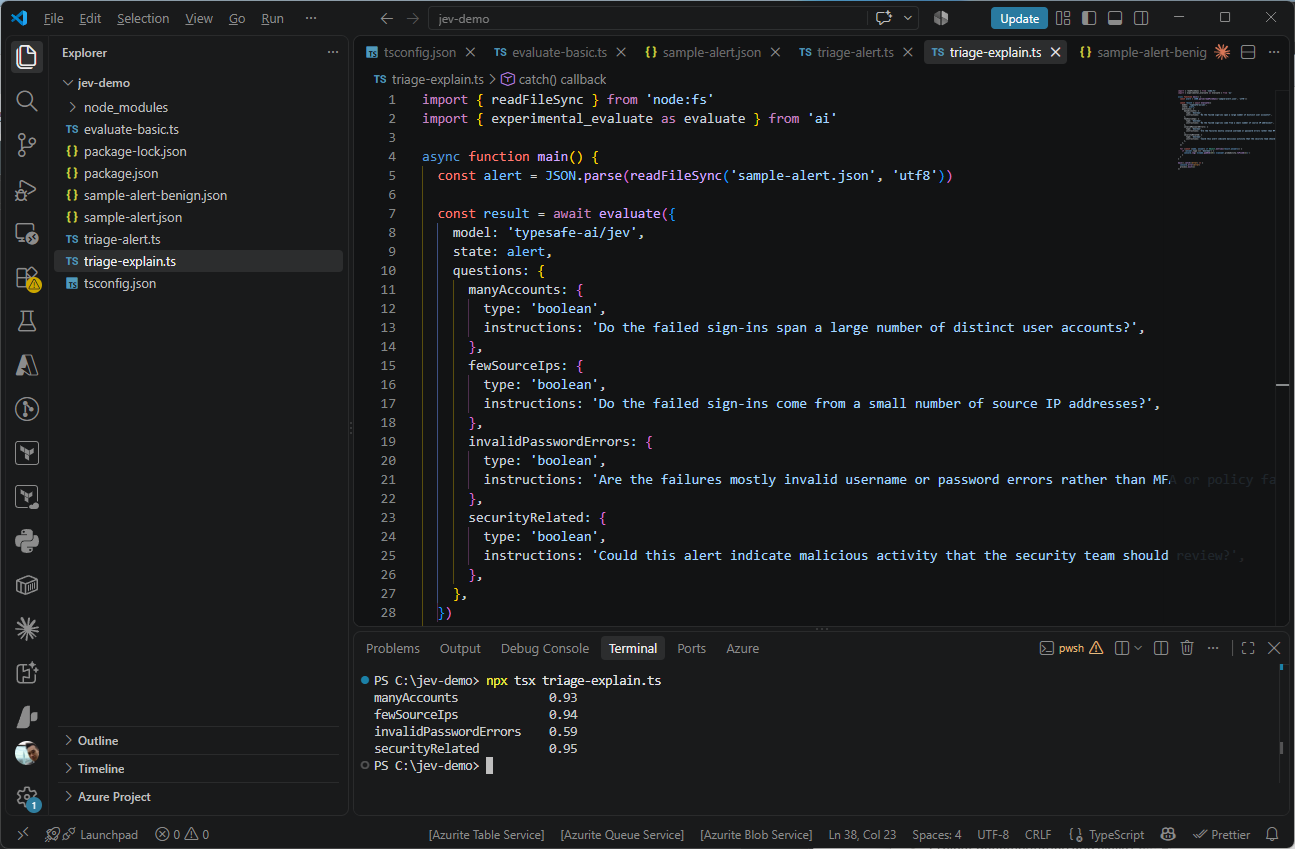
Two of the three evidence questions came back the way I expected, with 0.93 that the failures span many accounts and 0.94 that they come from few IP addresses, which together describe a password spray and line up with the 0.95 on securityRelated. The one that surprised me was invalidPasswordErrors at only 0.59, and I can see two reasons for it in the payload, since it only carries the code 50126 without the description that goes with it, and it only says 50126 was the top result type without saying what share of the 412 failures that represents.
Either way the fix is on my side, by including the ResultDescription text and a count per result type in the state instead of expecting the model to decode an error number or infer a proportion. This is also the kind of gap that an LLM explanation would most likely have smoothed over with a confident sentence, whereas a middling probability on a narrow question points straight at the piece of evidence that was missing or unclear.
The securityRelated probability of 0.95 here is slightly higher than the 0.91 to 0.92 from triage-alert.ts, and the most likely reason is the question itself, since this version has no criteria describing what counts as true or false, so the wording of a question is part of what you are measuring and the same question should use the same wording and criteria in every script.
When the person in the human-review queue does need words, the practical middle ground is to let Jev make the fast gate decision on every alert and only call an LLM to write a short summary for the small share of alerts that land in front of a person, which keeps the speed and cost benefit for the bulk of the traffic.
The real cost of having no explanation is that I cannot sanity-check a single answer by reading it, so the only way to judge Jev is statistically, by building a labeled set of alerts and checking whether its 0.8 answers turn out to be right roughly 80% of the time. That is more upfront work than skimming an LLM’s explanation, although it is also the honest way to evaluate either kind of model, and it is the test I would recommend to anyone considering Jev for a production workflow.
The PowerShell script, all three TypeScript files, both sample alert payloads, the package.json, and the tsconfig.json are available in my GitHub repo at https://github.com/terenceluk/blog-post-supporting-files/tree/main/jev-demo.
Final Thoughts on TypeSafe Jev
I went into this wanting to see whether Jev was actually different from the growing list of models and services being released every week, and after spending some time with it I think the answer is yes. The model is focused on a much narrower problem than the frontier chat models most of us are used to working with. Instead of generating text and asking developers to turn that text into a decision, it returns the decision directly along with probabilities that show how confident it is.
The Azure Monitor alert example was the part I found most interesting because alert triage is exactly the kind of task where I usually end up prompting a chat model, validating the response, and writing extra code to handle bad output. Jev eliminates most of that because there is no free-form text to parse. Whether that translates into better automation in practice is something I still need to test on a larger set of alerts, but the approach immediately made sense once I started working with it.
I am not ready to accept the performance, cost, or accuracy claims at face value because the benchmarks I found came from the vendors themselves, TypeSafe for Jev and Convai Innovations for Laya, and I only tested a handful of scenarios. What I did verify is that getting started was straightforward through Vercel AI Gateway, and the probability and confidence values open up some interesting possibilities for routing and triage workflows.
This is one of the more interesting AI releases I have looked at recently, not because it is trying to replace an LLM, but because it is attempting to solve a specific class of problems differently. Whether that approach holds up under broader testing is something I will be spending more time on.
Laya has been getting a lot of attention alongside Jev, largely because it is fully open, and its author, Nandakishor M, points out on the Laya site that he was publishing research in this direction well before TypeSafe’s announcement.
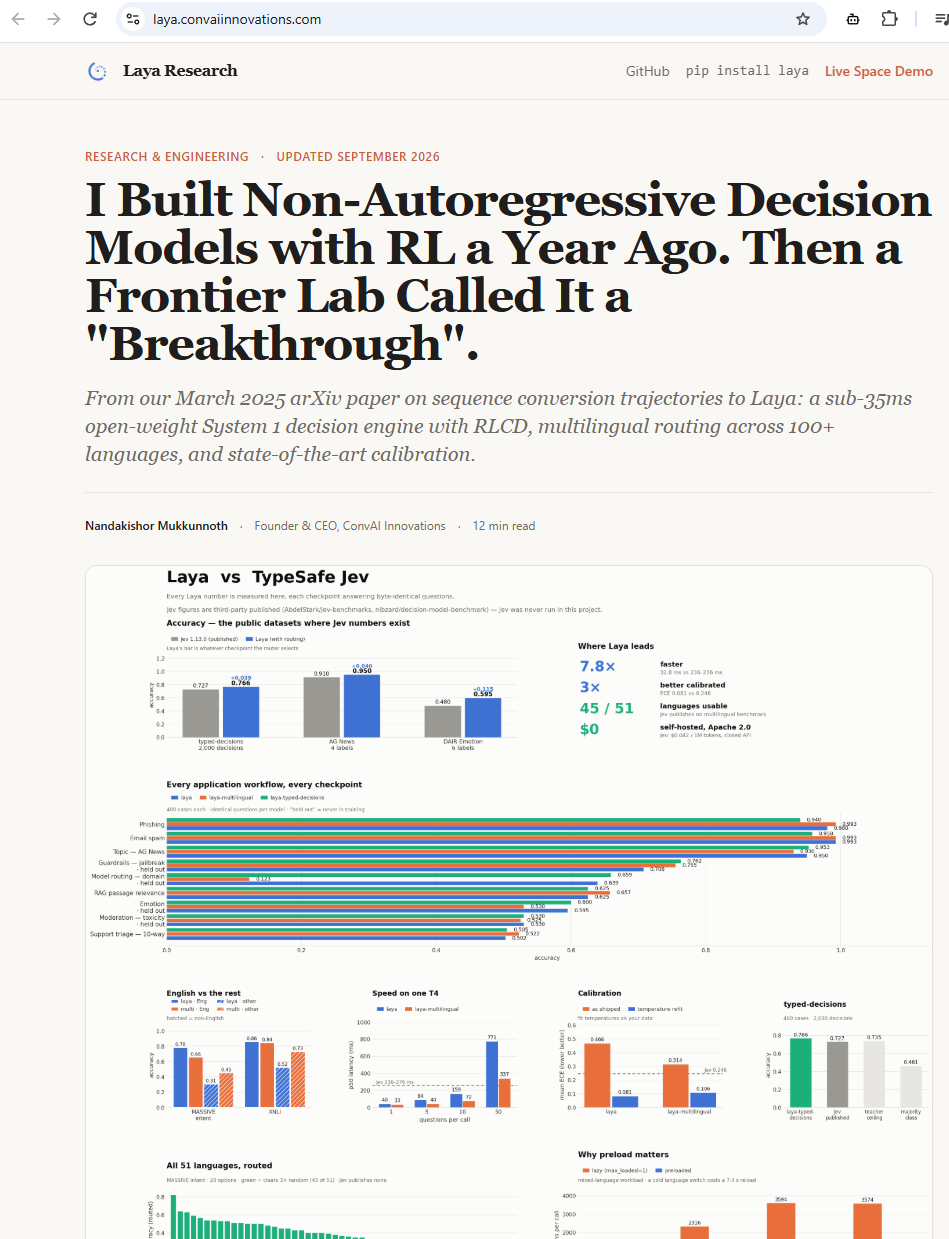
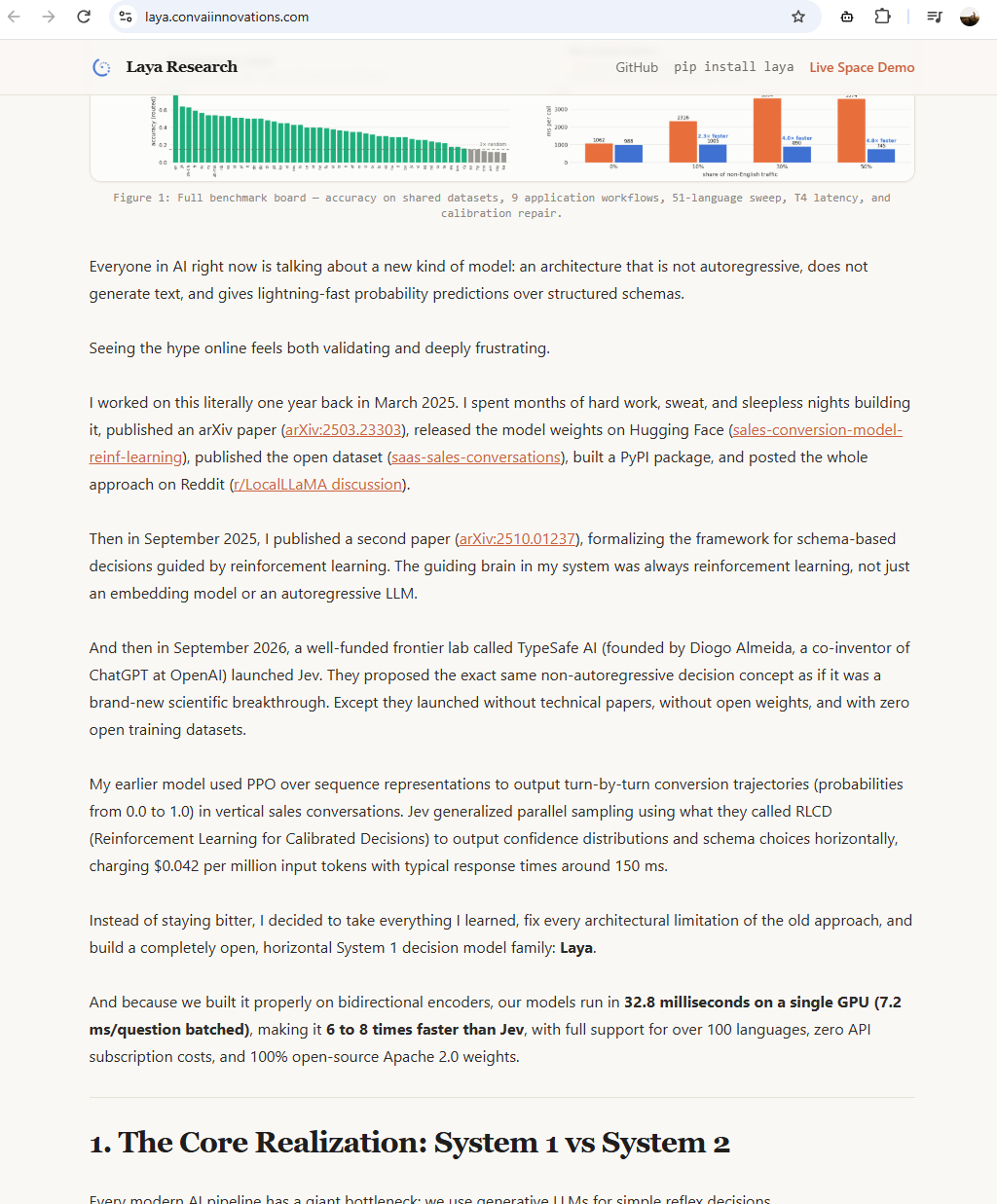
His March 2025 arXiv paper describes a reinforcement learning model that predicts sales conversions as a fast decision without generating text, and a September 2025 paper describes routing LLM queries based on a confidence estimate taken before generation. Those papers cover related problems, a single-task conversion predictor and a routing layer for LLMs, although they do show that the idea of fast, confidence-scored decisions without text generation predates Jev’s launch by more than a year.
Laya itself is released under the Apache 2.0 license, with a 421M parameter English checkpoint and a 322M parameter multilingual checkpoint that install with pip install laya and run on a local CPU or GPU without an API key. Its model card claims it answers a single question around 7.8 times faster than Jev with better calibration, while also admitting that it loses accuracy on choice questions with more than 20 options and tends to be over-confident without temperature scaling. Running models on my own hardware has been a recurring theme on this blog, so Laya is another item I will be blogging about once I have had time to put it through the same alert triage tests.

