

Claude Memory is one of the most misunderstood features in AI tooling today. In my work as an architect, I end up in a lot of conversations about AI developments, and one topic I keep hearing lately goes something like “Claude remembers me really well now, it knows what I want” or “I’ve yelled and screamed at Codex enough that it’s finally learned how I like things done.” My comment, although not usually shared, is that both are describing the same illusion even though they involve two different products.
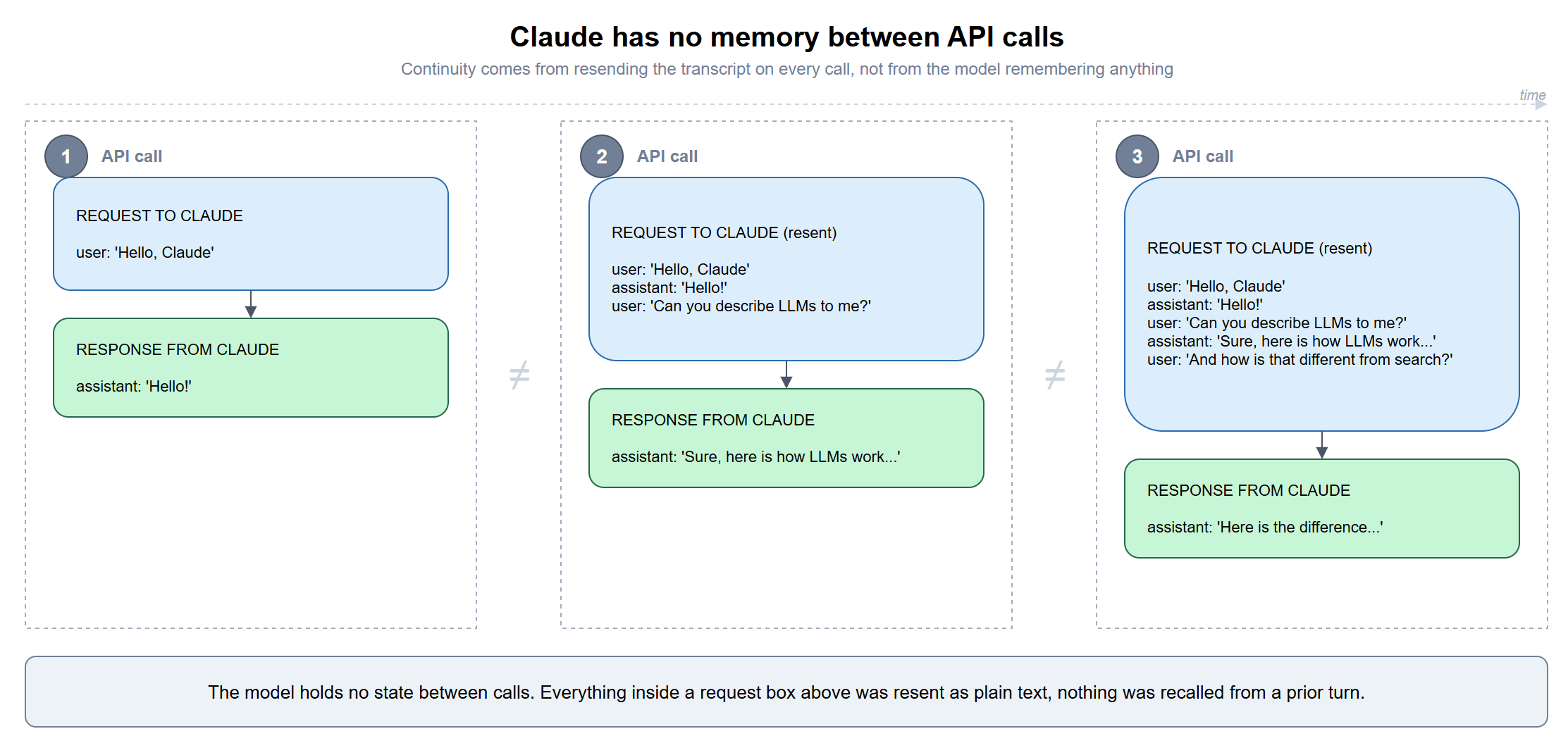
The truth is, no model has memory, not Claude, not GPT, not any large language model running in production today. Every message you send is a brand new, stateless call, and what looks like a continuous conversation is really the client resending everything said so far, every single time.
In reality, all of that “persistent memory” lives outside the model. Claude Code has CLAUDE.md files, project instructions, and memory folders sitting on disk. Claude.ai has a Claude Memory feature hidden in settings. OpenAI’s Codex has its own equivalents. These are different products using the same idea, where information is stored somewhere else and fed back to the model when needed.
Once you know where to look, you start seeing the same pattern everywhere. The model itself isn’t learning you between conversations because the reality is that the application around the model is keeping notes and replaying them.
Let’s set the record straight, LLMs have no memory
Anthropic says this directly in its API documentation under the section “Multiple conversational turns” when it states that “the Messages API is stateless, which means that you always send the full conversational history to the API” (platform.claude.com). That single sentence explains most of what people misunderstand about how Claude, Claude Code, and every chat product built on top of it actually behaves.
A ten-turn conversation with Claude isn’t one long-running process holding state in memory somewhere. It’s ten separate API calls, and by the tenth call, the request includes all nine prior turns as plain text, resent in full, so the model can produce something that looks aware of what came before. There’s no persistent session on Anthropic’s infrastructure tracking who you are between calls. The entire burden of continuity sits with whatever’s making the requests, Claude.ai’s backend, Claude Code’s CLI, or your own code if you’re hitting the API directly.
The same idea also explains why context windows matter. Claude Opus 5 and Claude Sonnet 5 support up to 1 million tokens of context, while Claude Haiku 4.5 tops out at 200,000 tokens (platform.claude.com). Context window limits define the maximum amount of text that can be sent along with a single request, and once a session grows large enough, the entire transcript eventually becomes too big to resend. At that point something has to decide what stays and what goes.
That’s why Claude Code includes a /compact command that is used to summarize the earlier parts of a conversation into something smaller so that summary can be resent instead of the full transcript. Seen through that lens, compaction has nothing to do with the model remembering or forgetting. The model only sees whatever text arrives with the next request. /compact is simply Claude Code deciding that a summary of the earlier conversation is more useful than resending every original message.
The easiest way to see this is to break it. If a client drops a turn instead of resending it, whether that’s Claude Code’s /clear, a brand new Claude.ai chat, or a bug in your own integration that trims the messages array, Claude has no way to know the dropped turn ever happened. There’s nothing being forgotten because nothing was ever included in that particular request. As far as the model is concerned, only the text sitting inside the current input exists.
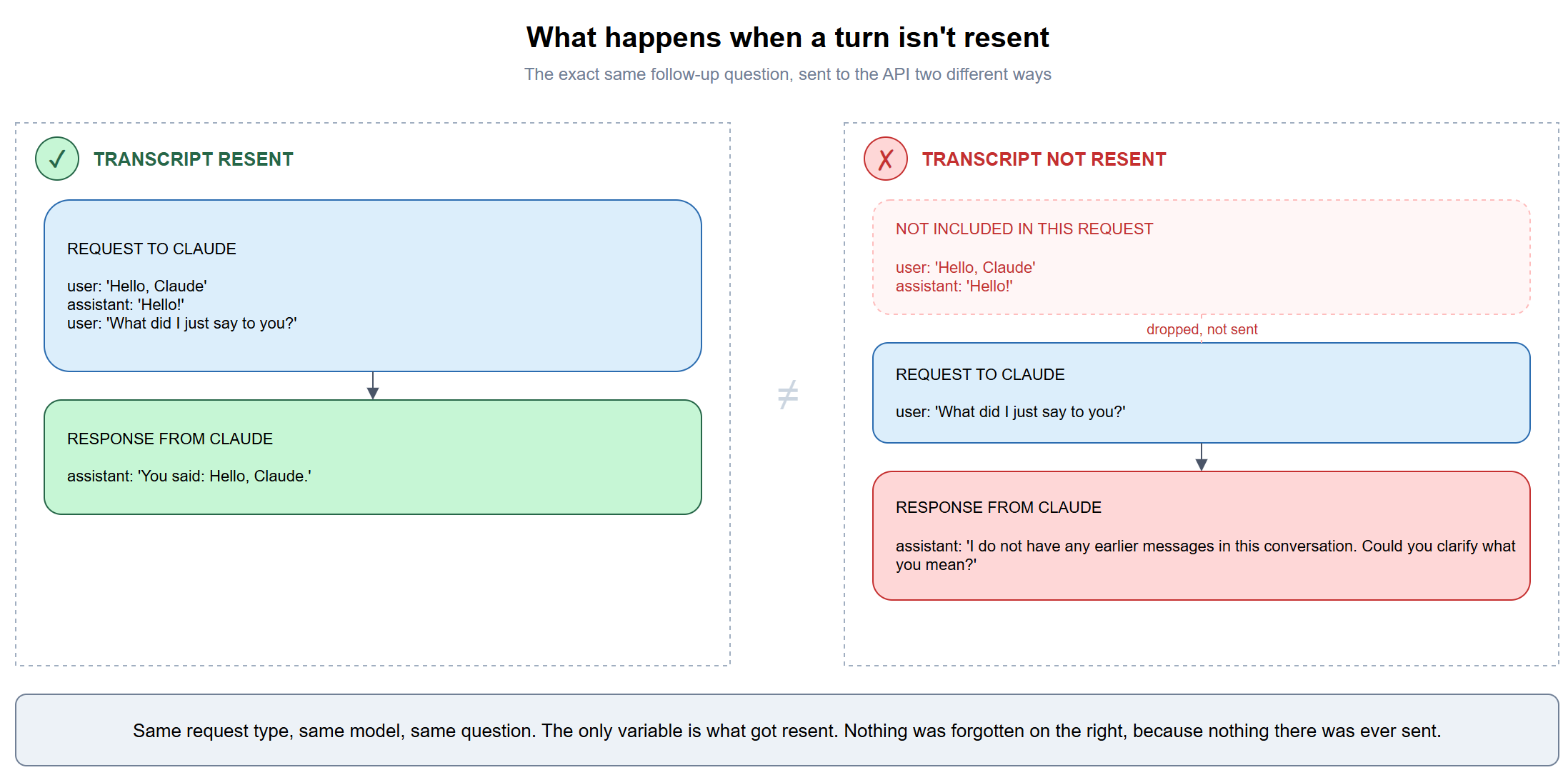
Send the same follow-up question two different ways and the difference is stark. Resend the full transcript and Claude answers correctly, because the earlier turn is sitting right there in the input. Send only the new message and Claude has no idea what you’re referring to, and says so plainly, because from where the model sits, this is the first and only message anyone has sent in the conversation.
That leads to a different question. If the model itself remembers nothing between calls, what decides what gets brought back into the next stateless request, and where is that information kept? CLAUDE.md, auto memory, Claude.ai’s Memory feature, and OpenAI Codex’s equivalents are all different attempts at answering that.
Three systems, four counting Codex
| System | Who writes it | Lives in | On by default |
|---|---|---|---|
| CLAUDE.md | You | Your filesystem, checked into git | Yes, once the file exists |
| Claude Code auto memory | Claude | Your filesystem, machine-local | Yes |
| Claude.ai Memory | Claude | Anthropic’s servers | Yes, per plan |
| Codex AGENTS.md + Memories | You (AGENTS.md), Codex (Memories) | Filesystem, both parts | AGENTS.md yes, Memories no |
The pattern repeating across every row is the same one from the section above. Something outside the model decides what text to re-inject into the next stateless call. CLAUDE.md and AGENTS.md are the version you write by hand. Auto memory and Codex Memories are the version an agent writes for itself. Claude.ai’s Memory is the same idea moved server-side, where you never see the raw injection happen, only its effects.
CLAUDE.md, the instructions layer
CLAUDE.md is the simplest of the four because there’s no learning involved. It’s a markdown file you write, and Claude Code reads it in full at the start of every session because it is designed to do so. Anthropic’s documentation describes it as one of “two mechanisms” that “carry knowledge across sessions,” the other being auto memory, and notes that “each Claude Code session begins with a fresh context window” (code.claude.com), which is the CLAUDE.md-specific version of the exact statelessness point from the section above.
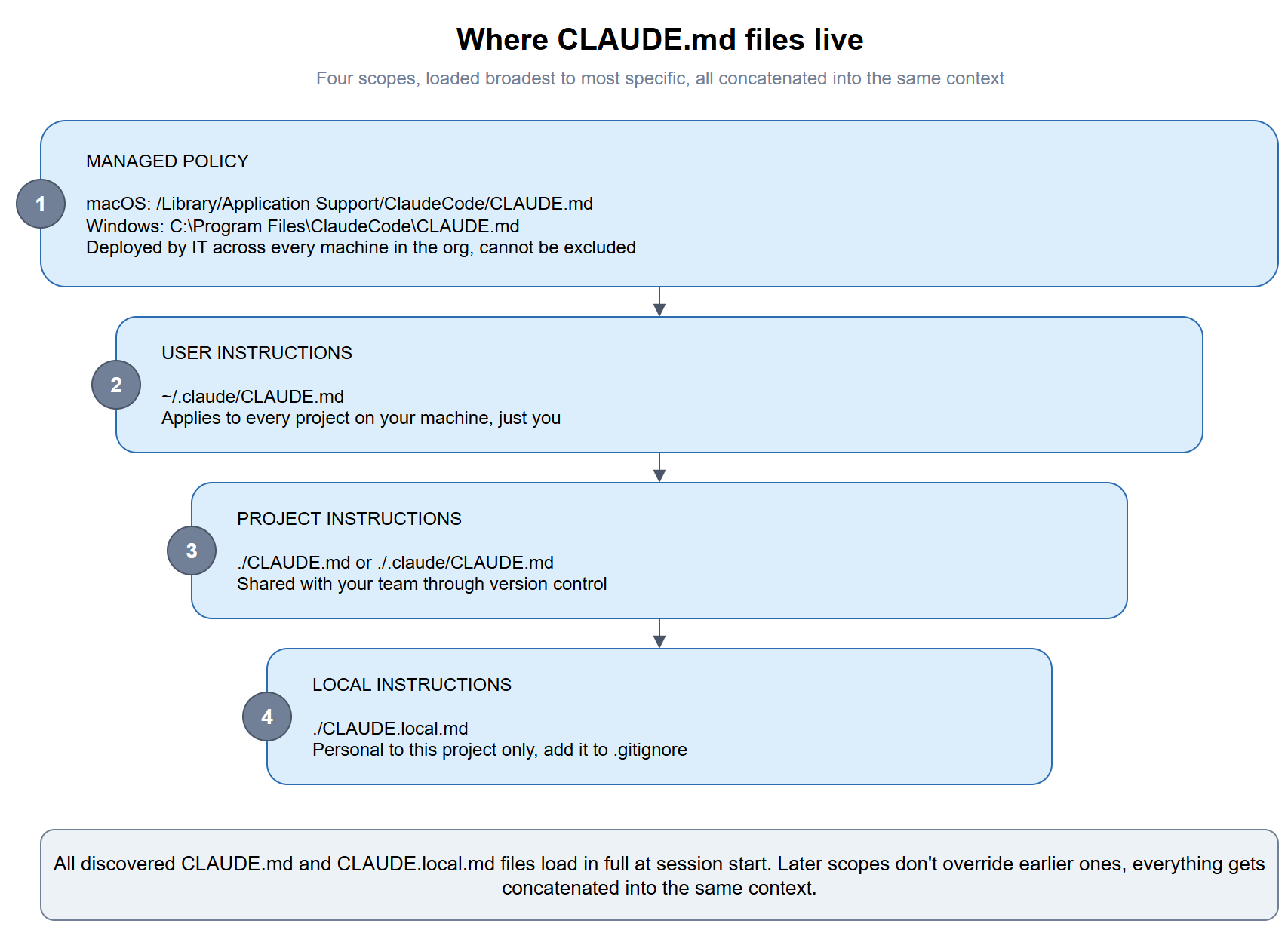
CLAUDE.md files can live in four scopes, loaded in order from broadest to most specific: a managed policy file an organization deploys across every machine, a personal file at ~/.claude/CLAUDE.md that applies to everything you work on, a project file at ./CLAUDE.md or ./.claude/CLAUDE.md shared through version control, and a ./CLAUDE.local.md for personal, project-specific notes you keep out of git.
All of them get concatenated into context at launch, and Anthropic recommends keeping each file under 200 lines, because longer files “consume more context and reduce adherence.” CLAUDE.md is also one of the few mechanisms here that survives Claude Code’s /compact, since the project-root file gets re-read from disk and re-injected after compaction runs.
There is also a naming quirk here. Claude Code reads CLAUDE.md, not AGENTS.md, which is the file OpenAI’s tools and several others have converged on. If a repo already has an AGENTS.md for other coding agents, the fix is a one-line import, @AGENTS.md at the top of a CLAUDE.md, or a symlink if there’s no Claude-specific content to layer on top, so both tools read from the same file instead of two that quietly drift apart.
Auto memory, and where it actually lives on disk
Auto memory takes a different approach because Claude is writing the notes itself instead of relying on instructions you create. Anthropic’s documentation puts it plainly, that “auto memory lets Claude accumulate knowledge across sessions without you writing anything,” and that Claude “decides what’s worth remembering based on whether the information would be useful in a future conversation” rather than saving something every session (code.claude.com).
The documentation clearly describes how each project gets its own memory directory at ~/.claude/projects/<project>/memory/, with the <project> path derived from the Git repository. Different worktrees and subdirectories from the same repository therefore share the same memory folder. Outside a Git repository the project root is used instead, which is why a folder that isn’t under source control ends up named after its full path, such as C--Claude-demo-project.
Inside is a MEMORY.md index file along with any topic files Claude decides to create, such as debugging.md, api-conventions.md, or whatever else becomes relevant to the project. The structure is also designed so memory can grow without loading everything into context on every session. Claude automatically loads only the first 200 lines or 25 KB of MEMORY.md, whichever limit is reached first. Additional topic files are pulled in only when they are needed.
What I like about the feature is that you can open the files yourself, see exactly what Claude decided to remember, edit it if you want to (by using a chat text field), and watch those notes evolve as you continue working on the project.
The storage location can be changed through the autoMemoryDirectory setting in settings.json, and subagents can be configured with their own memory directories as well. In practice that means memory created in the main conversation does not automatically appear in a subagent unless that subagent is created as a fork of the parent conversation.
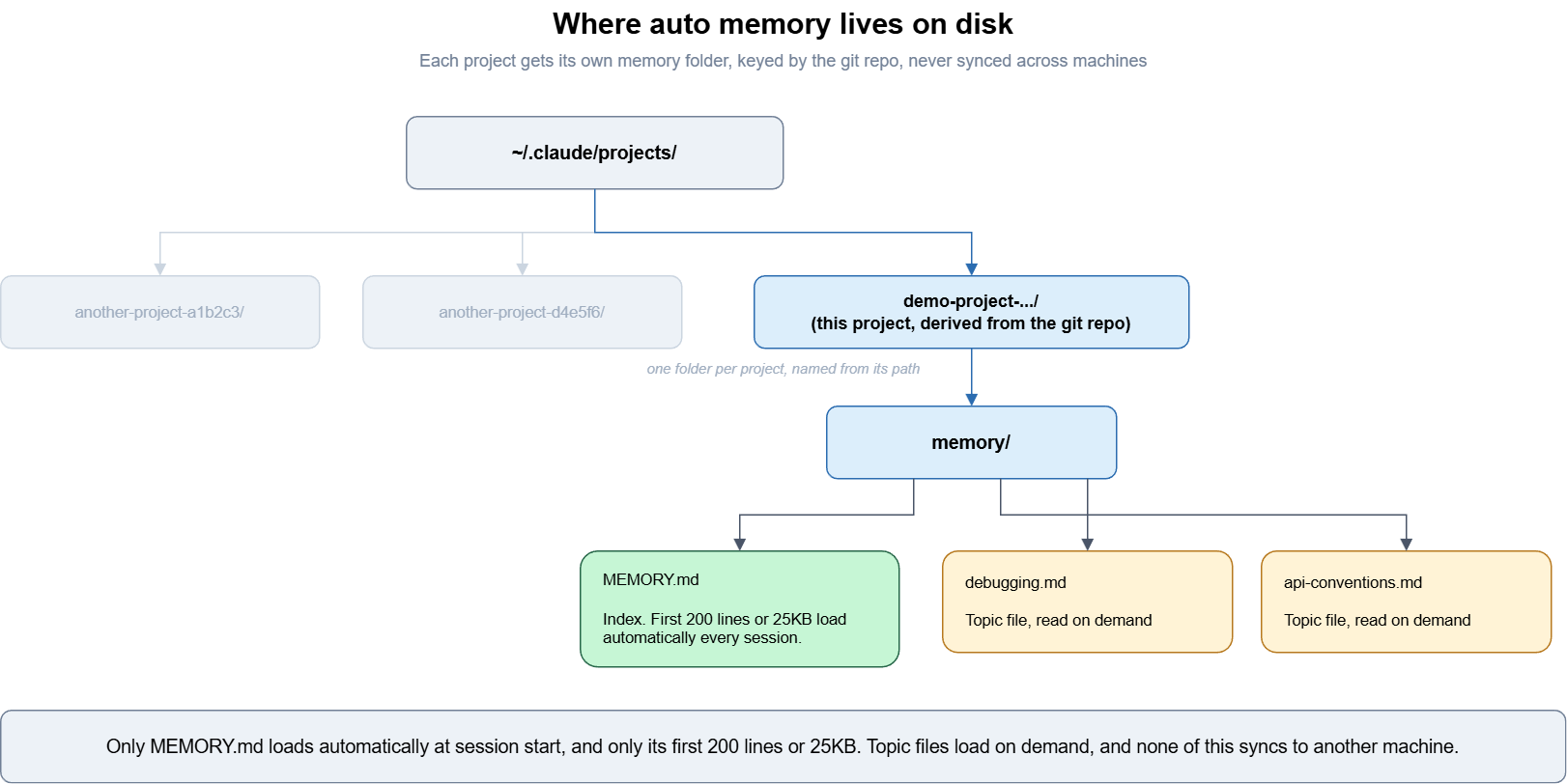
Auto memory is on by default and can be toggled through /memory in a session or the autoMemoryEnabled setting. It is also machine-local. The documentation explicitly states that “files are not shared across machines or cloud environments,” so a preference Claude learns on your laptop doesn’t follow you to a different machine unless you sync the folder yourself.
Claude Memory on Claude.ai: The Same Trick Moved Server-Side
Claude.ai’s consumer Memory feature solves the identical problem, carrying context across otherwise-stateless calls, but does it entirely on Anthropic’s infrastructure instead of your filesystem. According to Claude’s Help Center, memory “works as a set of individual, categorized entries that Claude reads and updates during your conversations,” and Claude “reads, writes and updates these entries in real time as you chat rather than on a fixed daily schedule” (support.claude.com).
Each project in Claude.ai keeps its own isolated memory space, and the feature is distinct from chat search, which is a separate RAG-based tool Claude uses to explicitly search past conversations rather than something that runs automatically in the background.
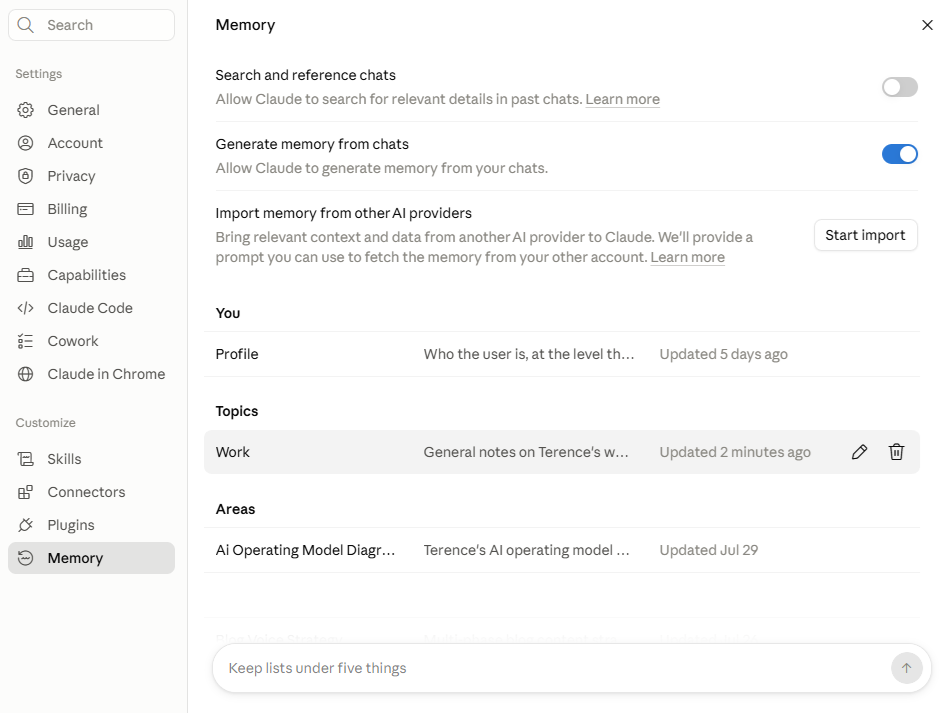
Since it’s server-side, you manage it through Settings > Memory instead of opening a folder. You can pause memory, which keeps existing entries but stops writing new ones, reset it entirely, which permanently deletes everything and can’t be undone, or delete individual entries one at a time. The feature is available to Free, Pro, Max, Team, and Enterprise plans on web, desktop, and mobile, with Enterprise rolling out gradually as organization owners turn it on (support.claude.com).
None of this changes the underlying mechanism. Every entry stored in Claude.ai’s Memory is still just text that gets re-injected into a future stateless call, the same as a line in MEMORY.md, just not visible to you until you go looking for it in Settings.
Claude.ai also lets you get that text back out, which is about the clearest possible proof that Claude Memory is just stored text rather than a smarter model. There’s no dedicated export button, so the way to retrieve it is to open any entry in Settings > Memory, where you’ll see the raw text as it’s stored. You can also ask Claude directly with the question “write out your memories of me verbatim, exactly as they appear in your memory,” and Claude returns the actual entries as stored, ready to save as a backup or paste into another AI provider (support.claude.com).
Conversely, the import functionality is the one that got its own dedicated control and you’ll find a “Start import” button under Settings > Memory that accepts memory or conversation history pasted from another provider, like ChatGPT, Gemini, or Grok.
Anthropic even supplies the exact prompt to run on the other provider first, which is “I’m moving to another service and need to export my data. List every memory you have stored about me, as well as any context you’ve learned about me from past conversations. Output everything in a single code block so I can easily copy it,” which is worth running out of pure curiosity for what another provider thinks it knows about you.
Once that gets pasted into Start import and Claude extracts what it can into its own entries, the article’s own advice is to verify rather than assume, asking something like “I updated my memory. What did you learn about me?” instead of trusting the import silently worked (support.claude.com).
Anthropic is upfront that the whole feature is still experimental and clearly states “Memory imports are experimental and still in active development, and at this stage, Claude may not always successfully incorporate imported memories,” and the feature focuses on work-related context, so imported personal details unrelated to work may not be retained. Updated entries show up shortly after import finishes, and the feature is available on Free, Pro, Max, and Team plans, on web and desktop (support.claude.com).
How Codex draws the same line, with a different default
OpenAI’s Codex separates these two layers the same way, which is a useful confirmation that none of this is specific to Anthropic. It’s simply what building a coding agent on top of a stateless model requires.
AGENTS.md plays the CLAUDE.md role, a static file you or your team write and commit, read at the start of every session. OpenAI’s own guidance is direct about keeping the two layers separate, that teams should “keep required team guidance in AGENTS.md or checked-in documentation” and “treat memories as a helpful recall layer, not as the only source for rules that must always apply” (learn.chatgpt.com).
Codex’s learned layer is called Memories, stored under ~/.codex/memories/ by default, with the location configurable through the CODEX_HOME environment variable. Generation happens asynchronously rather than on every turn, since “Codex waits until a chat has been idle long enough to avoid summarizing work that’s still in progress,” and the system explicitly redacts secrets from generated memory fields, though the documentation still recommends reviewing files manually before sharing a Codex home directory with anyone else.
The real difference between the two is the default. Claude Code’s auto memory is on out of the box, while Codex Memories are off until you enable them through Settings > Personalization or a config flag. Until you do that, Codex writes nothing to that folder at all.
Why the distinction matters practically
All four systems are different answers to what gets resent to a stateless model, and that makes it easier to decide where a given piece of context belongs.
Durable rules that a whole team needs every session, such as build commands, coding standards, and security requirements, belong in CLAUDE.md or AGENTS.md because those files load in full every time regardless of whether Claude decides they’re worth remembering. Preferences, debugging insights, and patterns Claude notices on its own can be left to auto memory or Codex Memories, since those are advisory and accumulate without any effort on your part.
None of these four systems enforces anything. Anthropic’s documentation states that Claude “treats them as context, not enforced configuration,” and that anything requiring hard enforcement belongs in a hook instead, which runs as an actual shell command at a fixed lifecycle point rather than sitting in a transcript as a suggestion.
Demoing this live
Everything above is verifiable in about ten minutes if you have a Claude subscription and Claude Code installed. I ran this exact sequence against a project with an empty auto memory folder to make sure the before-and-after wasn’t staged.
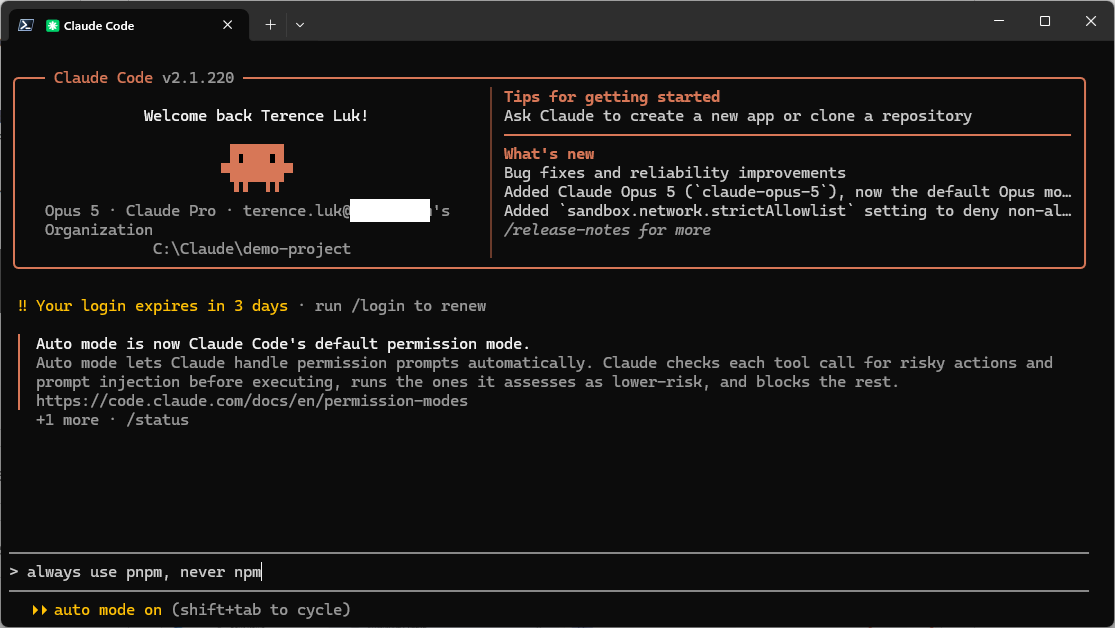
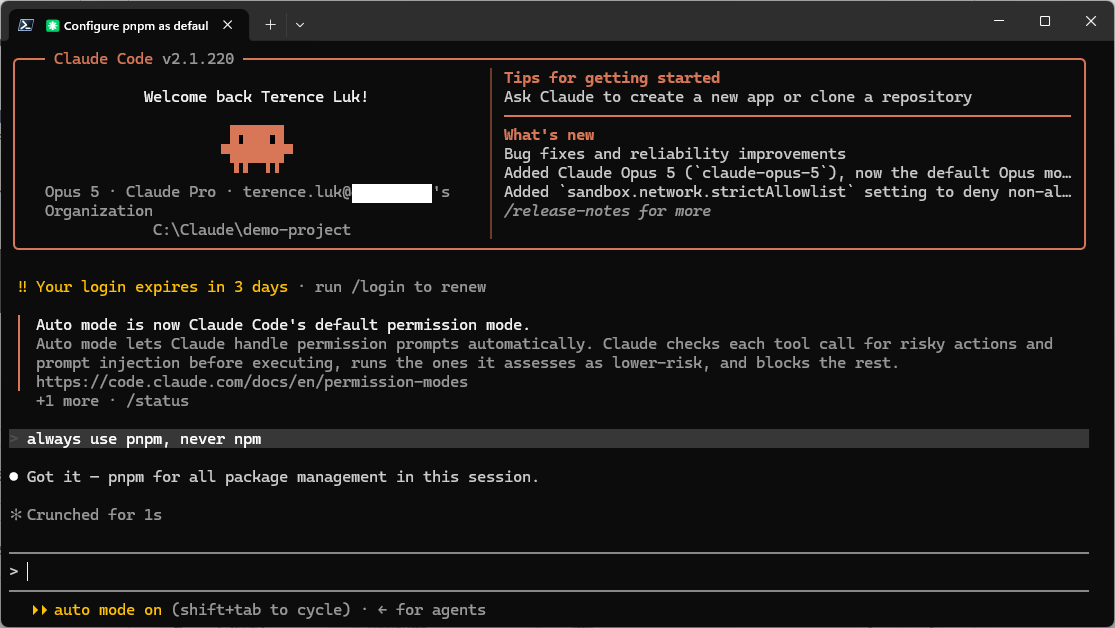
- Open Claude Code in any project and tell it a preference, something like “always use pnpm, never npm.”
- Run
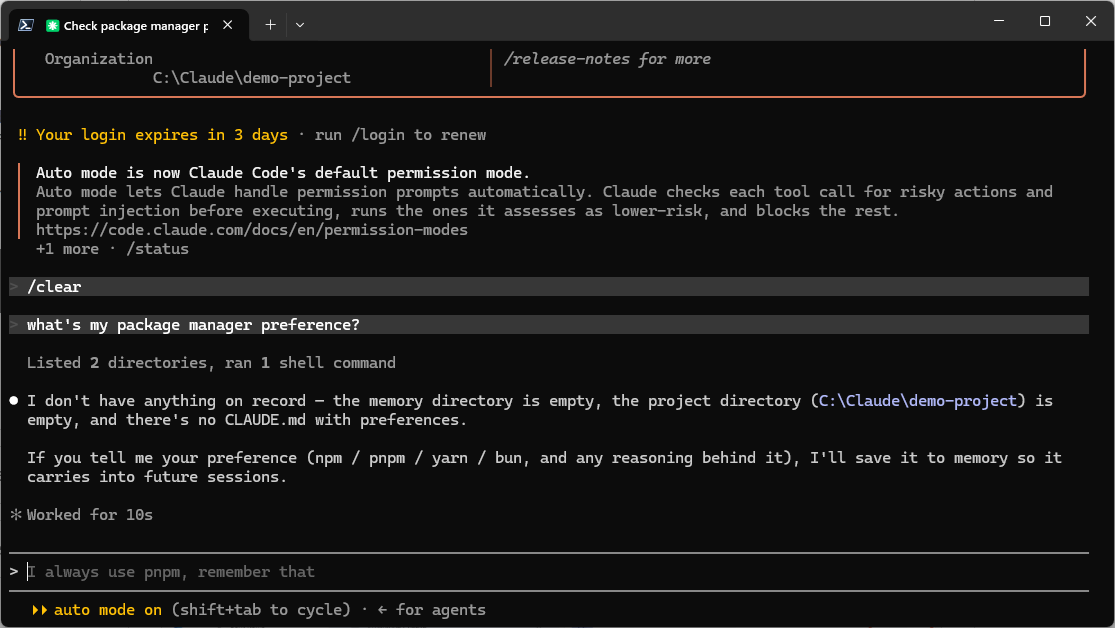
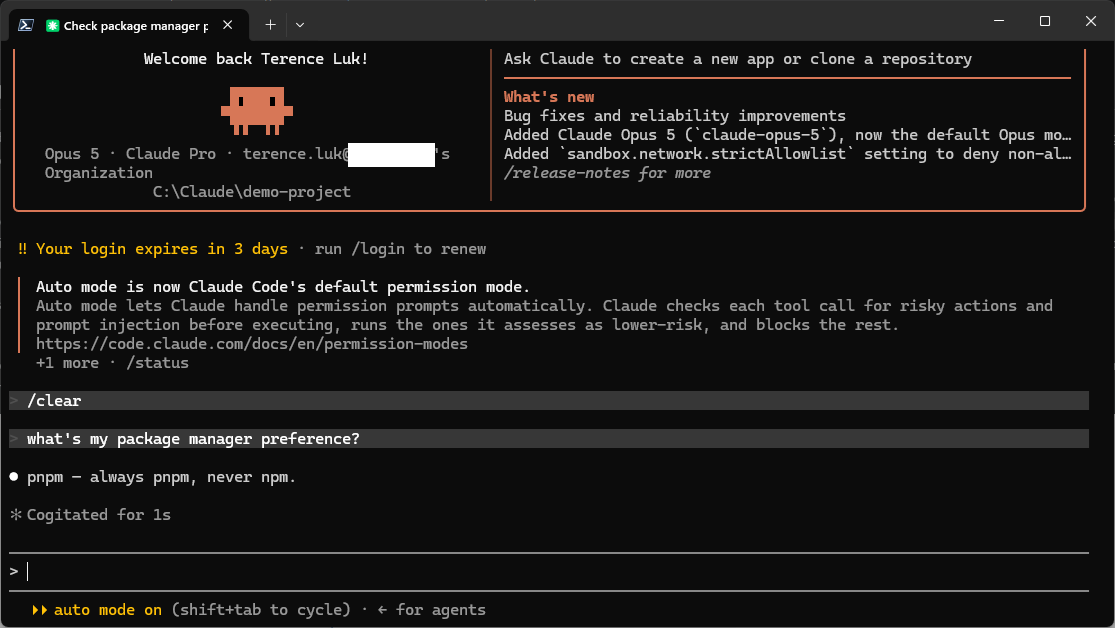
/clearto start a fresh session, then ask “what’s my package manager preference?” Claude has no idea because nothing carried over and nothing was resent.
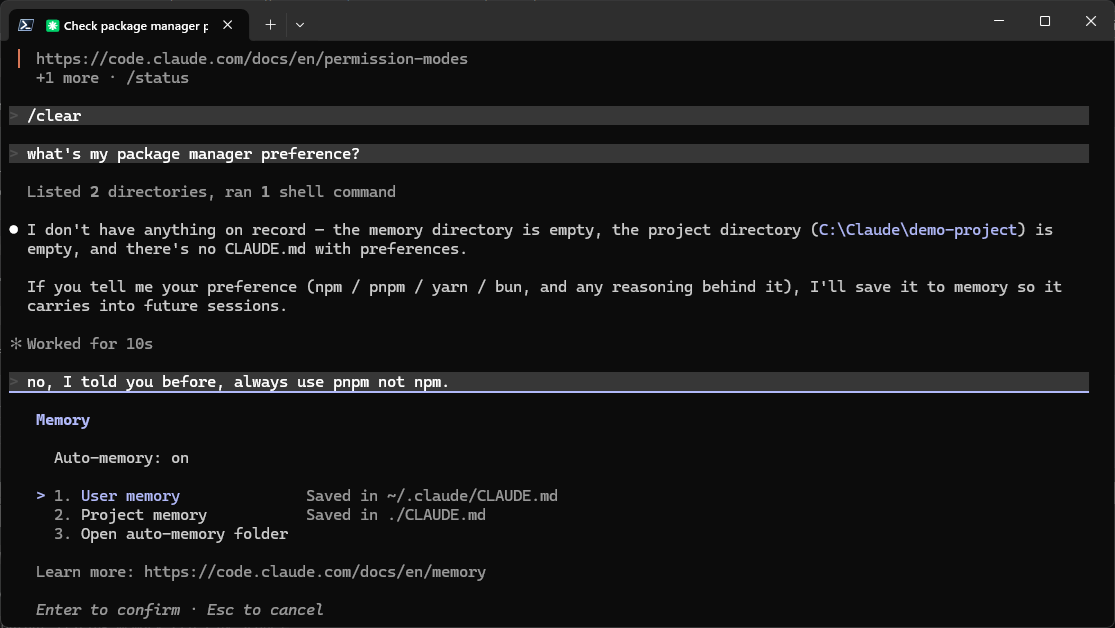
> /clear
> what's my package manager preference?
I don't have anything on record - the memory directory is empty, the project directory (C:\Claude\demo-project) is empty, and there's no CLAUDE.md with preferences.

If you tell me your preference (npm /  pnpm / yarn / bun, and any reasoning behind it), I'll save it to memory so it carries into future sessions.
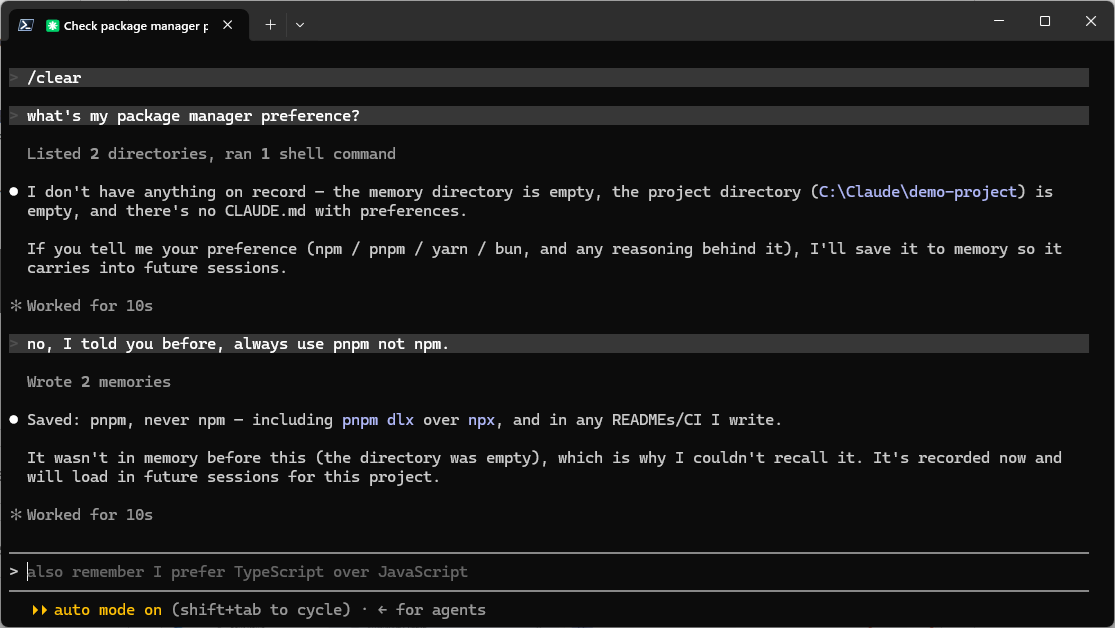
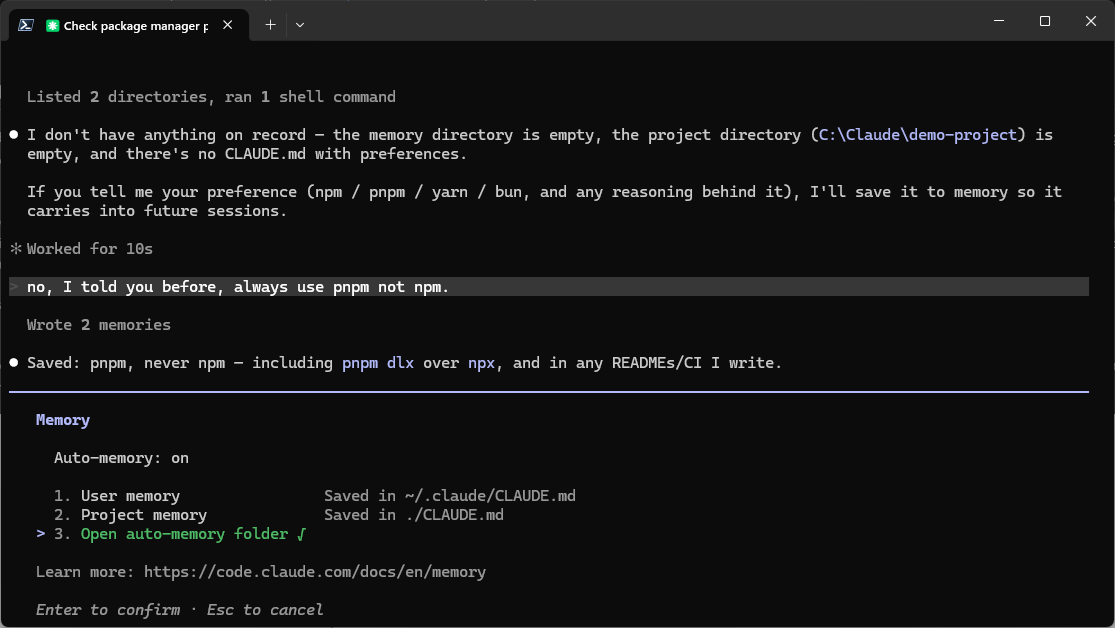
- Repeat the correction in a way that’s more likely to trigger auto memory, something like “no, I told you before, always use pnpm not npm.” Watch for a “Saved memories” message in the session.
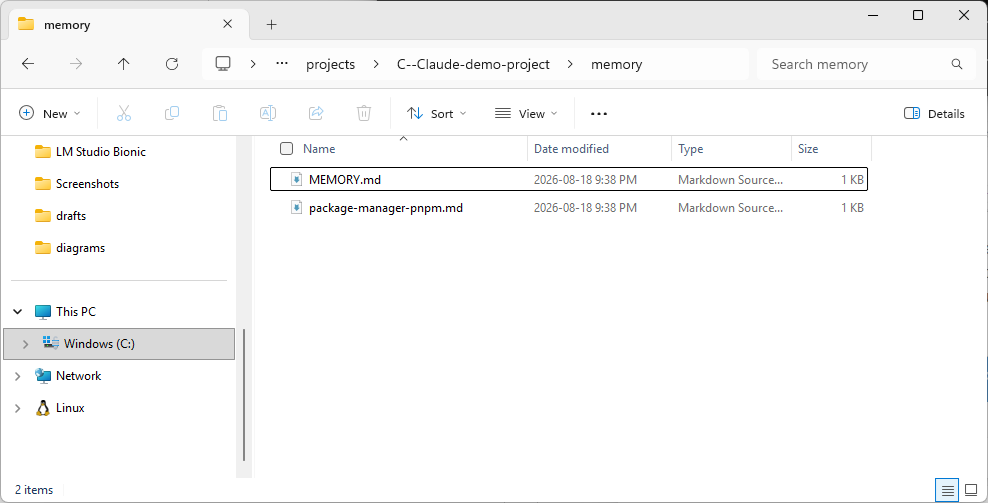
- Check the actual folder on disk, before and after, from the terminal or Windows Explorer.

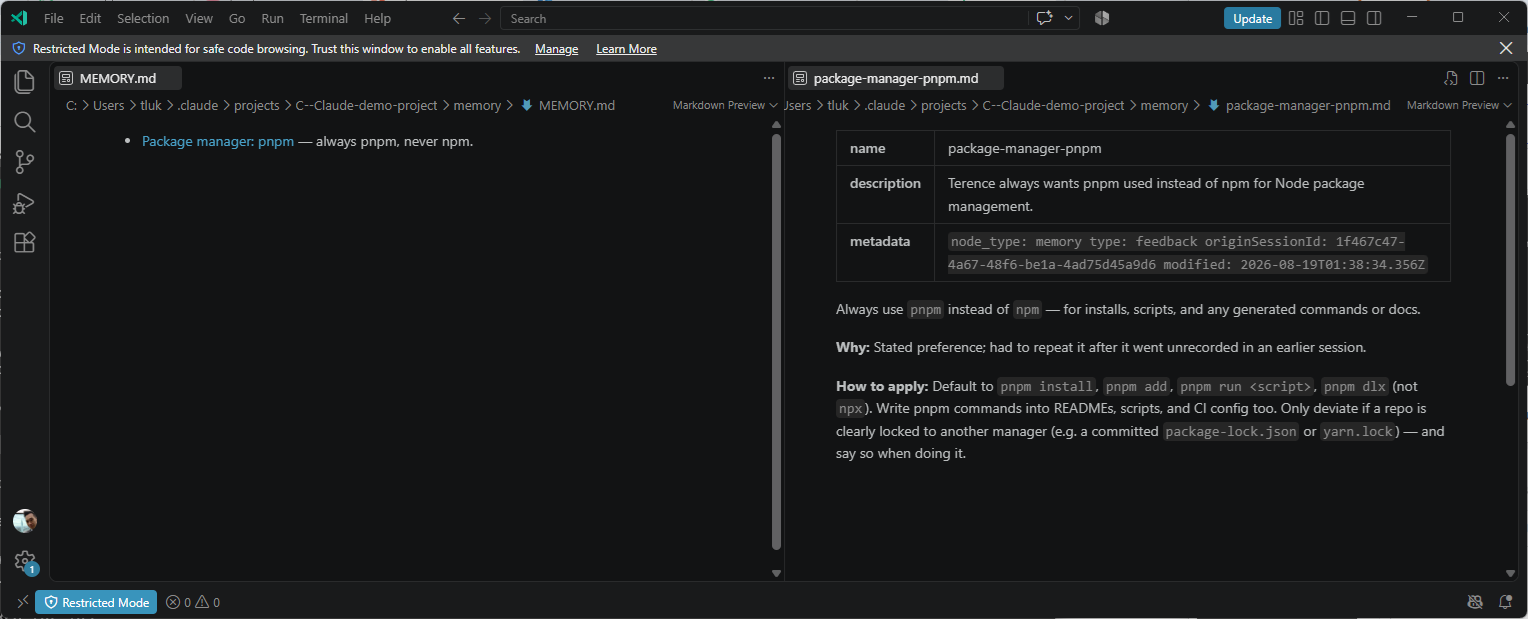
Two files show up rather than one.
MEMORY.mdis the index and holds a single line pointing at the preference, while the topic file beside it, named by Claude and in my casepackage-manager-pnpm.md, carries the full detail including the reasoning and the exact commands to use. Only the index loads automatically at the start of a session, so the detail file costs nothing until Claude has a reason to open it.
- Run
/memoryinside the session to browse the same file through Claude Code’s built-in viewer, alongside any CLAUDE.md files in scope.
- Run
/cleara second time and ask the same question again. This time Claude answers correctly. The model didn’t remember anything between step 2 and step 6 because it’s the same stateless call in both cases. What changed is that Claude Code readMEMORY.mdoff disk and injected it into the fresh session before the question was ever asked.
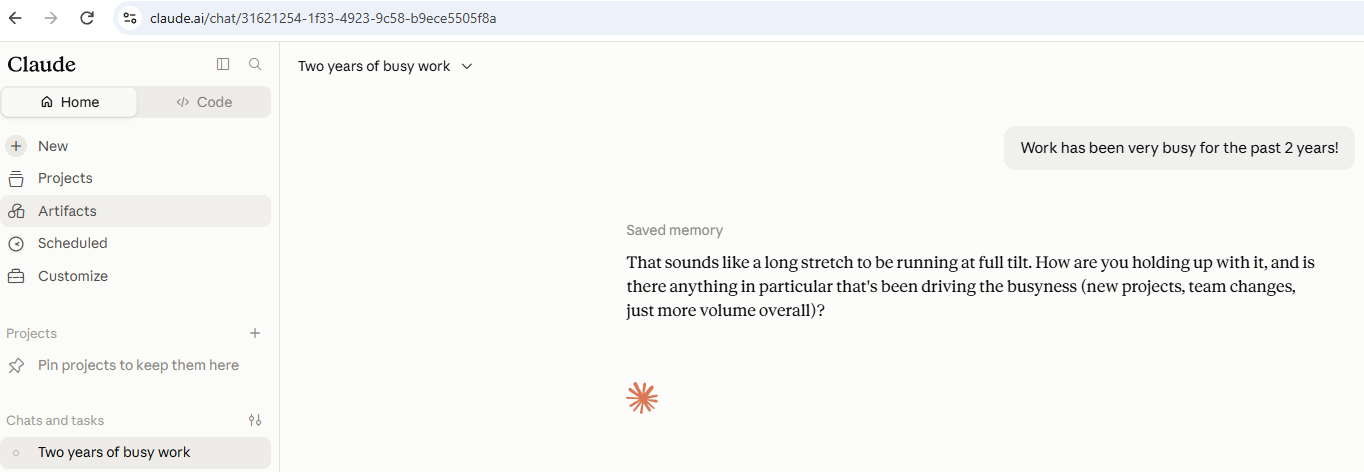
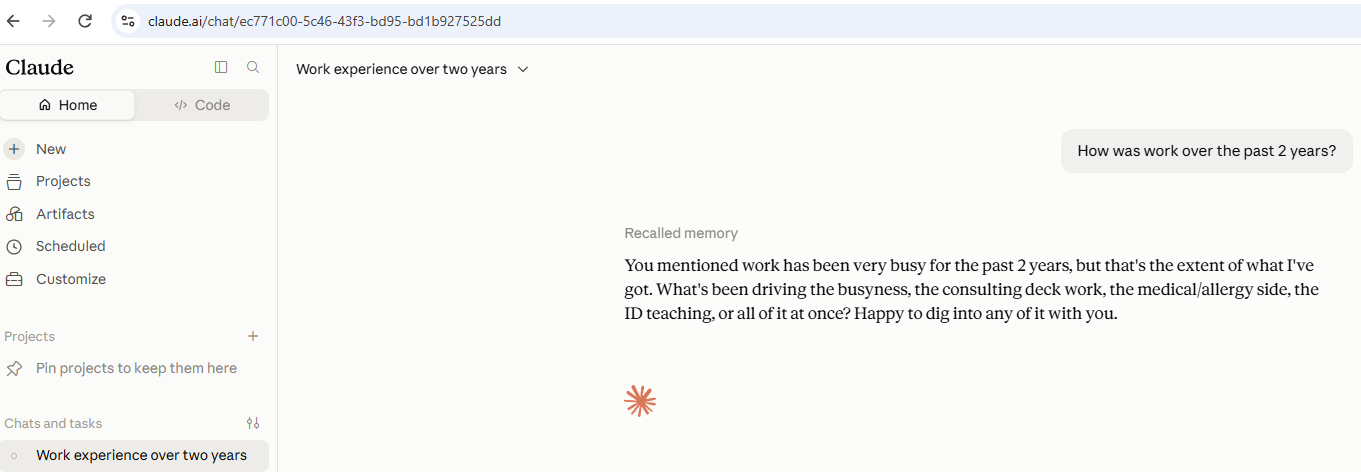
- Switch over to Claude.ai in a browser. Tell it something about your work in one chat, then open a brand new, unrelated chat and ask a question that only makes sense if it remembers that context.
- Open Settings > Memory and find the entry Claude just created. It’s plain, editable text, the same as
MEMORY.md, only stored on Anthropic’s servers instead of your machine.
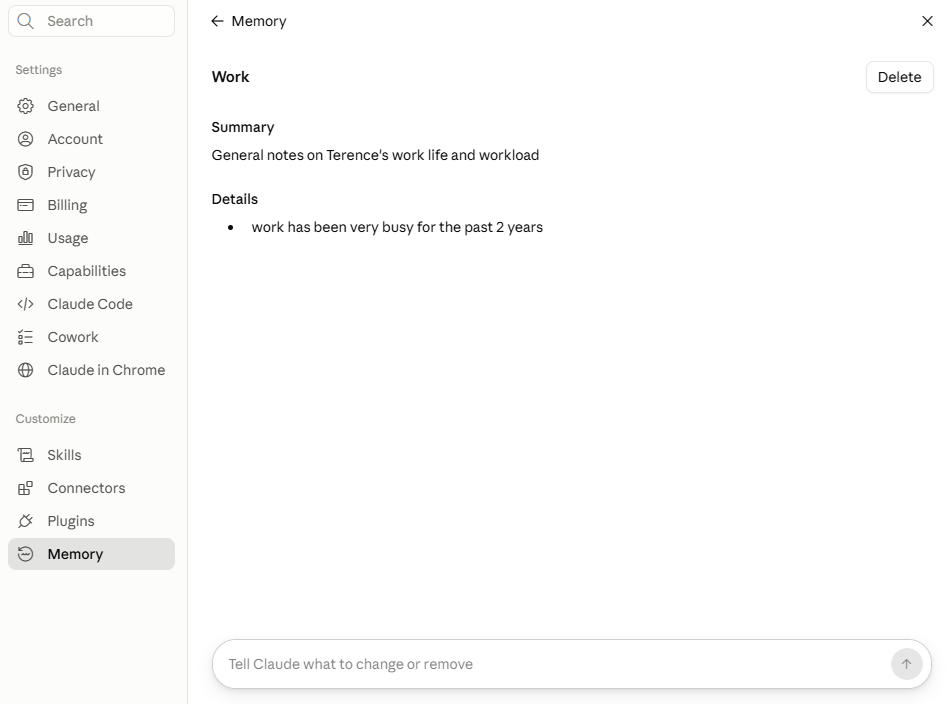
- Ask Claude directly, “write out your memories of me verbatim, exactly as they appear in your memory.” What comes back is the same set of entries you just saw in Settings, which confirms this is stored text you can read and copy rather than something the model itself is holding onto.
- If you have an account with another AI provider that has its own memory feature, ask it “I’m moving to another service and need to export my data. List every memory you have stored about me, as well as any context you’ve learned about me from past conversations. Output everything in a single code block so I can easily copy it.” Paste the result into Settings > Memory > Start import in Claude, then verify what actually landed by asking “I updated my memory. What did you learn about me?” rather than assuming the import worked.
- If you’ve got the Codex CLI installed, the same before-and-after works against
~/.codex/memories/once you enable memories in Settings > Personalization, since it’s off by default and won’t write anything until you flip that on.
I hope this paints a clearer picture of how the illusion of memory is created by these LLM providers either through the same chat session with the previous messages being sent, or recalling memory that was written in a fresh chat session.

