
Hub and Spoke Subnet Routing is one of the topics I’ve had to explain frequently in the past with colleagues and clients since Azure routing works so I’ve been meaning to write a post to describe and demonstrate some of the behavior that may not be well known unless someone has gone ahead and dive deep into the documentation, which I highly recommend: https://learn.microsoft.com/en-us/azure/virtual-network/virtual-networks-udr-overview.
Let’s take a common hub and spoke architecture as an example. In the following diagram, we have a hub virtual network with a firewall deployed and spokes connected to it.
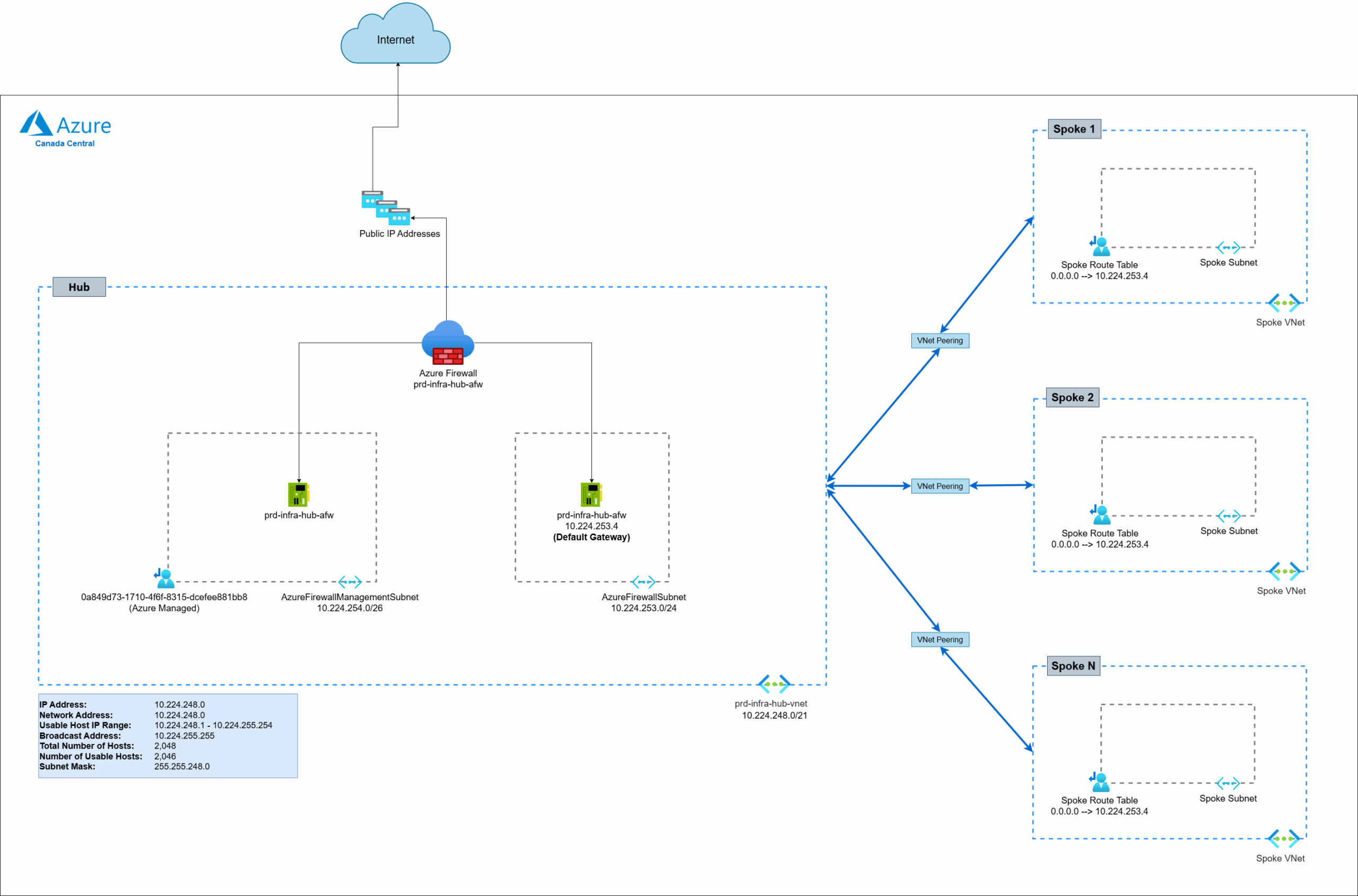
This is a common pattern where spokes uses the hub’s firewall as the default gateway to route traffic out to the internet with a default route of 0.0.0.0/0 –> 10.224.253.4:
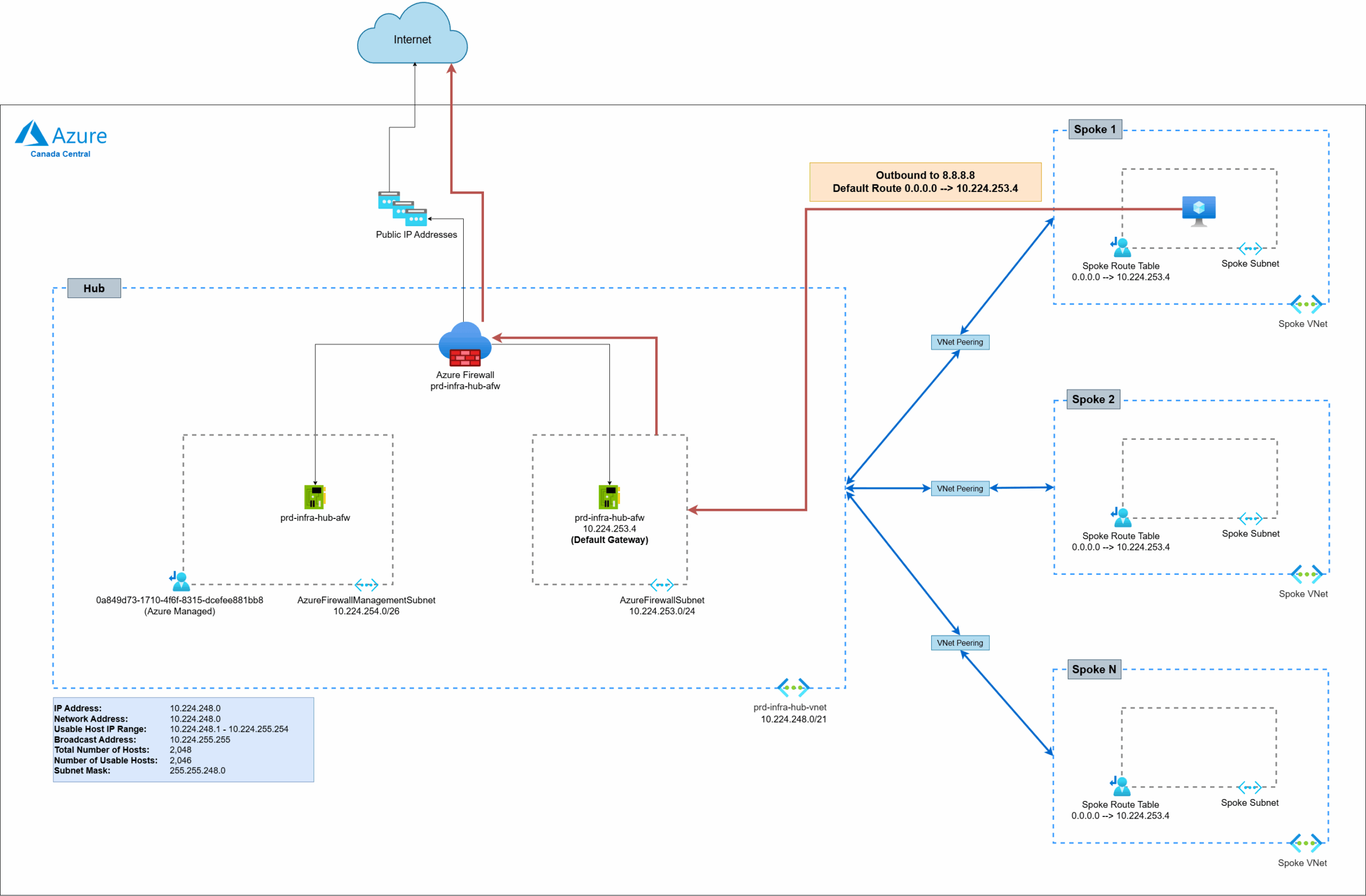
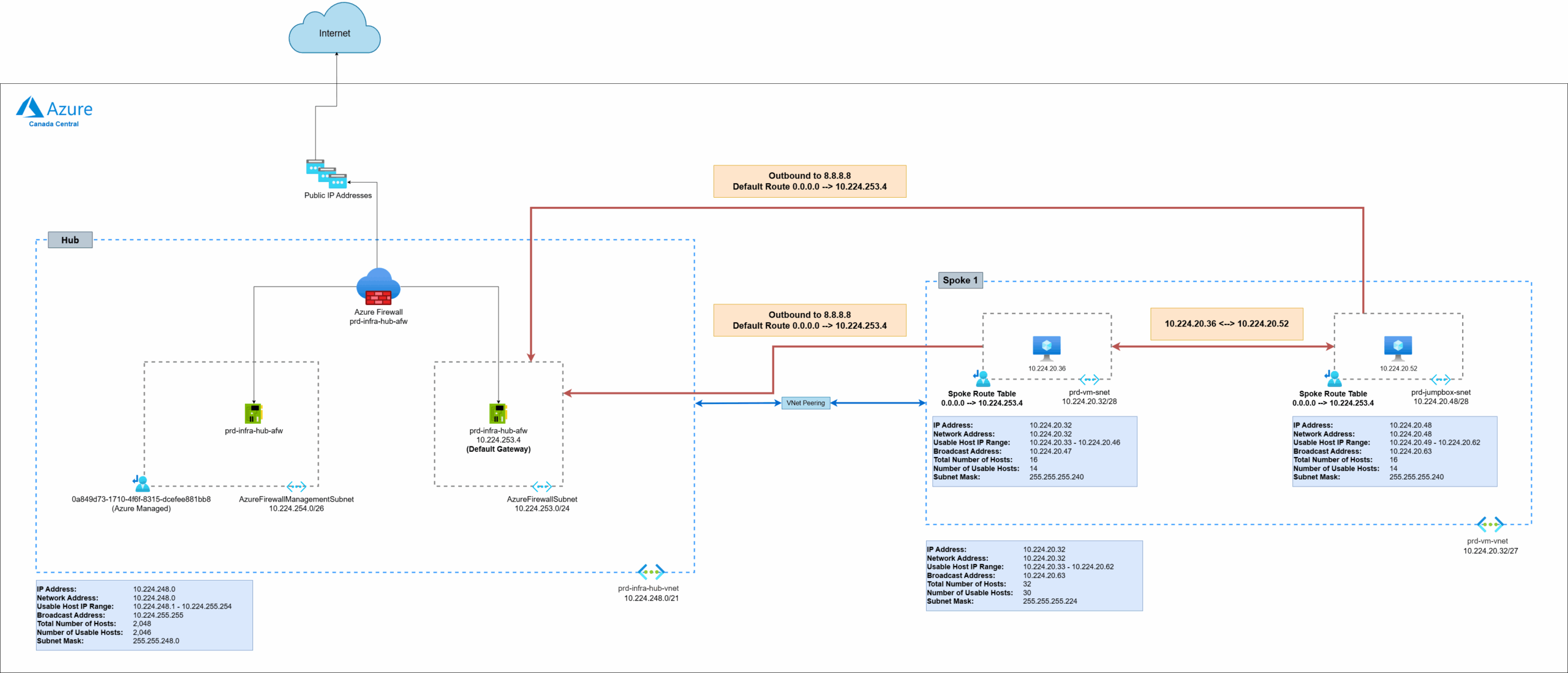
One of the misconceptions of having a route table with a UDR 0.0.0.0/0 default route added to the subnet is that all the traffic, including subnet to subnet traffic within the same VNet, will be routed to the firewall but that is actually not the case. The behavior of this simple configuration will still have all subnets within the same virtual network directly reach each other and not transit through the firewall:
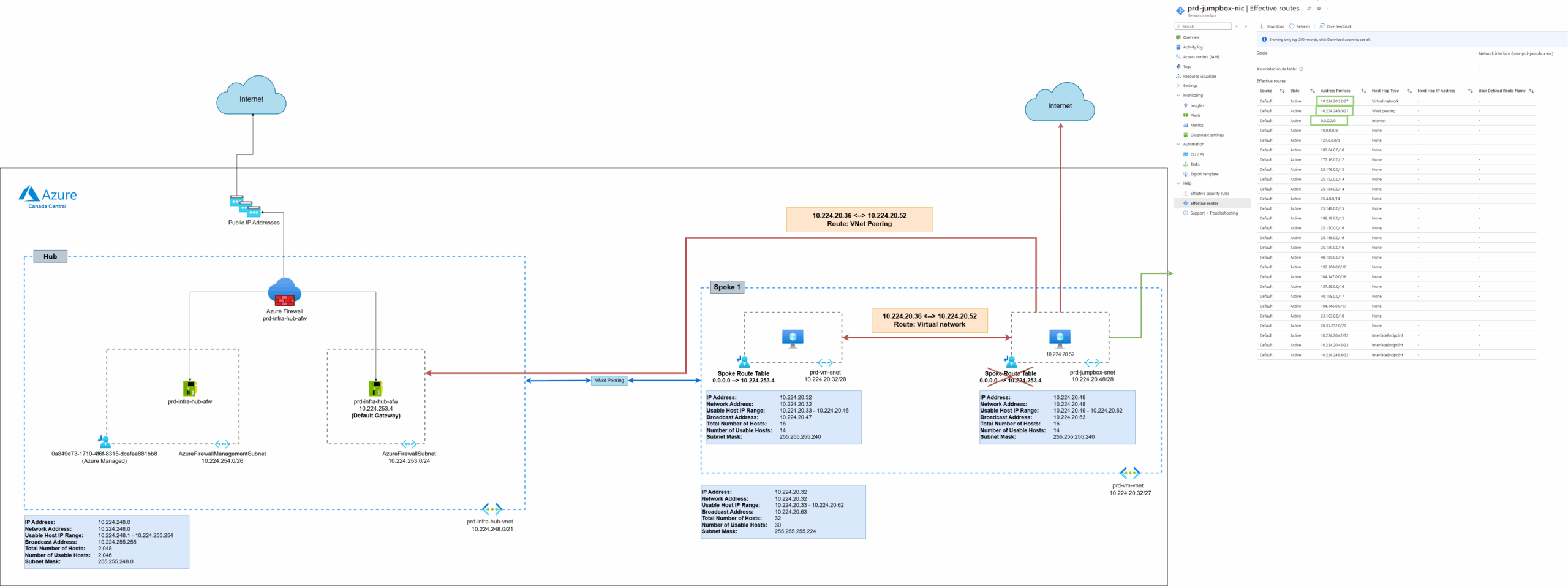
The reason for this behavior is because of the default routes that are automatically placed into the routing table by Azure. Let’s step back for a bit and remove the custom route table to view what type of routes that are added into the routing table by selecting a NIC (10.224.20.52 VM) that is in the subnet 10.224.20.48/28 and view its Effective routes as shown in the screenshot below. Notice how there are actually many routes that are added by default into the route table.
- The first route to 10.224.20.32/27 is the virtual network address space and the Next Hop Type is configured as the Virtual network (not towards the firewall in the hub)
- The second route to 10.224.253.0/21 is the address space hub network brought in through the VNet Peering and the Next Hop Type is through the peering
- The third route to 0.0.0.0/0 is and the Next Hop Type is directly to the internet
The remaining routes are a mix of RFC-1918 private address subnets (10.0.0.0/8, 172.16.0.0/12, 192.168.0.0/16) , RFC-5735 loopback address (127.0.0.8), RFC-6598 Carrier Grade NAT (100.64.0.0/10), followed by sets of Microsoft owned public addresses (e.g. 23.103.0.0/18 for Exchange Online):
Now let’s look what happens when we assign the route table with a default route back to the subnet. Note how a simple route table with UDR as such:
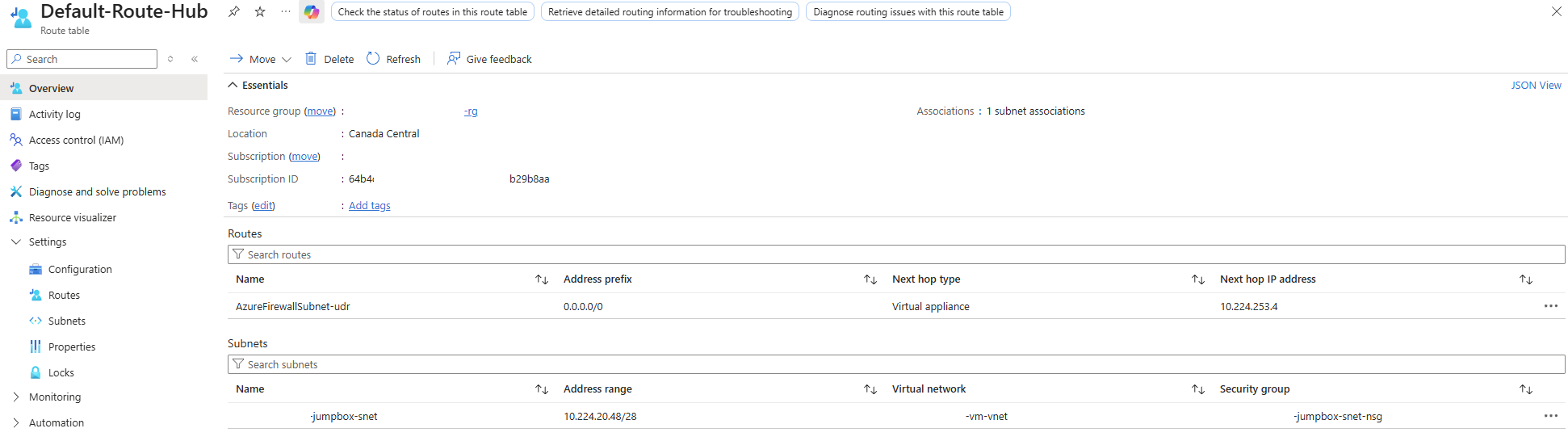
Will change the Effective routes as follow:
- No change to the first route to 10.224.20.32/27 of the virtual network address space with the Next Hop Type is configured as the Virtual network (not towards the firewall in the hub)
- No change to the second route to 10.224.253.0/21 of the address space hub network brought in through the VNet Peering with the Next Hop Type is through the peering
- The previous third route to 0.0.0.0/0 is with the Next Hop Type directly to the internet is now in an Invalid state
- The third route to 0.0.0.0/0 is now replace with the custom route defined by the route table and directs traffic to the firewall in the hub at 10.224.253.4
- All other routes to RFC-1918, RFC-5735, RFC-6598,and Microsoft owned addresses are now removed

So adding a route table with a single default table will forward every network aside from:
- Virtual network’s subnet
- Any peered virtual networks to the hub
These two items are important to note because of the following reasons.
Subnet to Subnet Traffic
- Any subnets within the same virtual network will not be sent to the firewall
- Security will need to be provided by NSGs attached to the subnet
Peered Network Traffic
- It is not obvious in this example but if we peer this VNet to another VNet, the default route here will not send that traffic to the hub even if the hub is connected to the other VNet
If there is a desire to route all traffic between the subnets that are in the same VNet, there are a few ways to accomplish this.
Hub and Spoke Subnet Routing Option #1 – Adding VNet to the route table
You can override the route of the VNet by adding a route for the VNet address space 10.224.20.32/27 into the route table and route it to the firewall. The issue here is that traffic between devices in the same subnet will now be routed to the firewall. I’ve only seen this at one client in the financial industry.
Option #2 – Adding each subnet to a route table
- Create a unique route table for each subnet in the VNet
- Add a route to every other subnet and direct it to the firewall
- Exclude adding a route to its own subnet (this avoids traffic within the same subnet from going to the firewall)
This can be a huge burden on the administration and management of the route tables as some VNets can have many subnets. It will only take a small mistake that will lead to unintended routing that bypasses the firewall if a route is missed.
Option #3 – Adding VNet to the route table and adding its own subnet into the route table
- Create a unique route table for each subnet in the VNet
- Create a route for the VNet address space and direct it to the hub firewall
- Create a route specific to the subnet’s own address space and configure it to be routed within the virtual network
While still an administrative burden, this has several advantages:
- The route table will always only have 3 routes, where 2 are always the same for each subnet and 1 is unique as it has its own address space
- There are less routes that need to get added (imagine having 10 subnets in a VNet)
- Assume the 2 routes that are always the same isn’t missed given its standardized for all the subnets in the VNet, missing the addition of the route specific to the subnet’s own address will just route traffic to the firewall rather than in Option #2 where missing a subnet route could mean having direct subnet to subnet communication
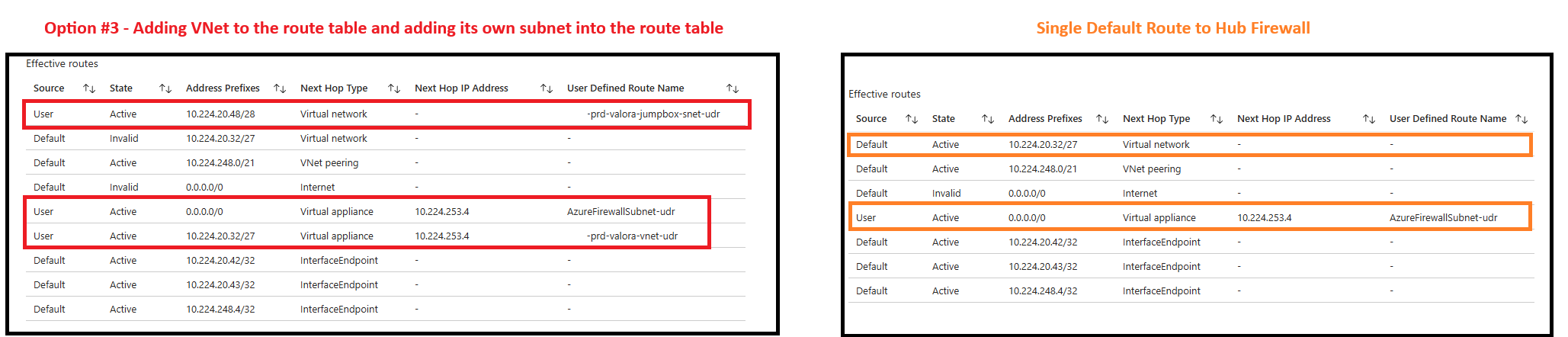
Let’s have a look at what happens when I add such a route to the subnet and how it affects the route table:

Here are the new effective routes.
Notice that we now have:
- Two routes are now rendered as invalid:
- The subnet’s VNet address space (10.224.20.32/27)
- The default route to the internet (0.0.0.0/0)
- Any routes within the same subnet should transit direct within the virtual network
- Traffic destinated for any network outside of the defined Address Prefixes should be directed to the hub firewall
- Traffic destined for addresses of the subnet’s VNet will be sent to the firewall
The key here is that the 10.224.20.48/28 (subnet address space) route is a more specific match and therefore would take precedence over 10.224.20.32/27 (VNet address space).
Understanding this routing behavior is particularly useful for architectures where you have resources in the same VNet but want their communication to traverse through firewall. A good example of such is a firewall put between an Application Gateway and a resource it is publishing as described here: https://learn.microsoft.com/en-us/azure/architecture/example-scenario/gateway/firewall-application-gateway#architecture-2
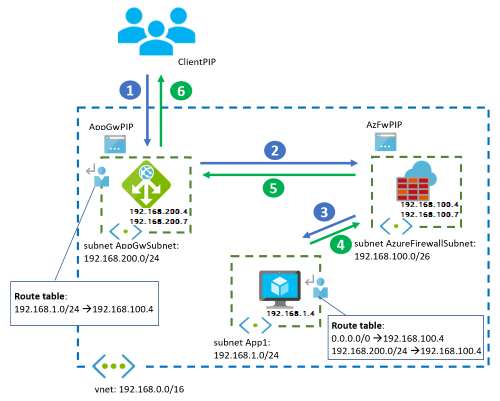
Having all of the resources in the same VNet will require custom routing to route traffic through the firewall.
Hope this Hub and Spoke Subnet Routing overview helps anyone who may be researching and looking for information about this topic. I’m always open to suggestions so if there are better ways of handling this, please send me a note.

