
For those who have been a part of designing Azure virtual networks and subnets, and now want to use multiple prefixes for subnets, will understand that careful planning is important as you want to ensure the allocation is sized appropriately for the solution you’re deploying because it can have a larger impact across the environment as it continues to grow.
Thought needs to be put towards the immediately need (how many IP addresses do I need today?) and the potential scale requirements in the future (how many IP addresses would I need tomorrow?) because you can’t easily resize VNets and subnets when resources are deployed within them.
You can always add more address space into a VNet to create more subnets but if you design your networks contiguously where your IP addresses are contiguous, you may end up creating a large gap between address spaces in the VNet, which in turn can lead to difficulty with summarizing IP addresses for routing or other network activities.
With the above challenge, I was excited when Microsoft announced the preview feature of adding multiple address prefixes for subnets earlier in the year as this allowed, albeit not an elegant solution and it has limitations on what it can be used for, the ability to increase the amount of IP addresses for a subnet that wasn’t sized large enough during the design.
Fast forward to September 4, 2025, this feature was GA-ed (Reference: https://azure.microsoft.com/en-us/updates?id=502583) so I wanted to take a moment to write this blog post demonstrating the feature.
The official Microsoft document for this feature can be found here:
Create multiple prefixes for a subnet in an Azure Virtual Network
https://learn.microsoft.com/en-us/azure/virtual-network/how-to-multiple-prefixes-subnet?tabs=powershell
Before I proceed, I do want to forewarn that this feature only support virtual machines and virtual machines scale sets and not other subnets used for VNet injection, delegated subnets except for GatewaySubnets delegated to VPN Gateway and ExpressRoute Gateway services.

As noted in the limitations above, the configuration of this feature at the time of this writing is only available via command line or Azure Resource Manager Templates.
With that out of the way let’s start with the following Virtual Network and Subnet design:

This example sizes the subnets with a /29, which although provide 8 IP addresses, the Azure Reserved IPs in the following results in only 3 being usable:
Network Address: First IP address of the range.
Default Gateway: Second IP address in the range.
Azure DNS Addresses: Two IP addresses mapped to Azure DNS.
Network Broadcast Address: The last IP address in the range.
This evidently means that if we are to place virtual machines or a virtual machine scale set with 3 virtual machines, we would be out of IP addresses:

Given that the address space for the Virtual Network is configured with 192.168.0.0/24, there are additional addresses available but without the multiple address prefixes for a subnet, we would need to create another subnet in the VNet and unable to continue scaling out the virtual machine scale set.

With the new multiple prefixes for subnets feature, we can achieve the following:

Configuring Multiple Prefixes for Subnets with PowerShell
Let’s go ahead and use PowerShell to create the additional subnet prefix. The following is the Virtual Network configuration displayed in the Azure portal:


The PowerShell cmdlets we’ll be executed are shown in the following screenshot:
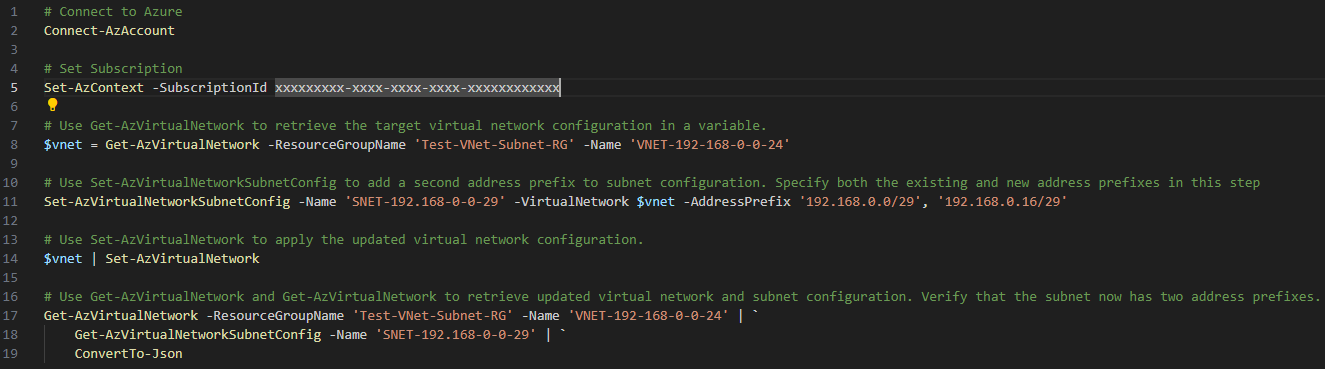
The code can be found here in my GitHub repo: https://github.com/terenceluk/Azure/blob/main/Azure%20Virtual%20Network/Configure-Subnet-Prefixes.ps1
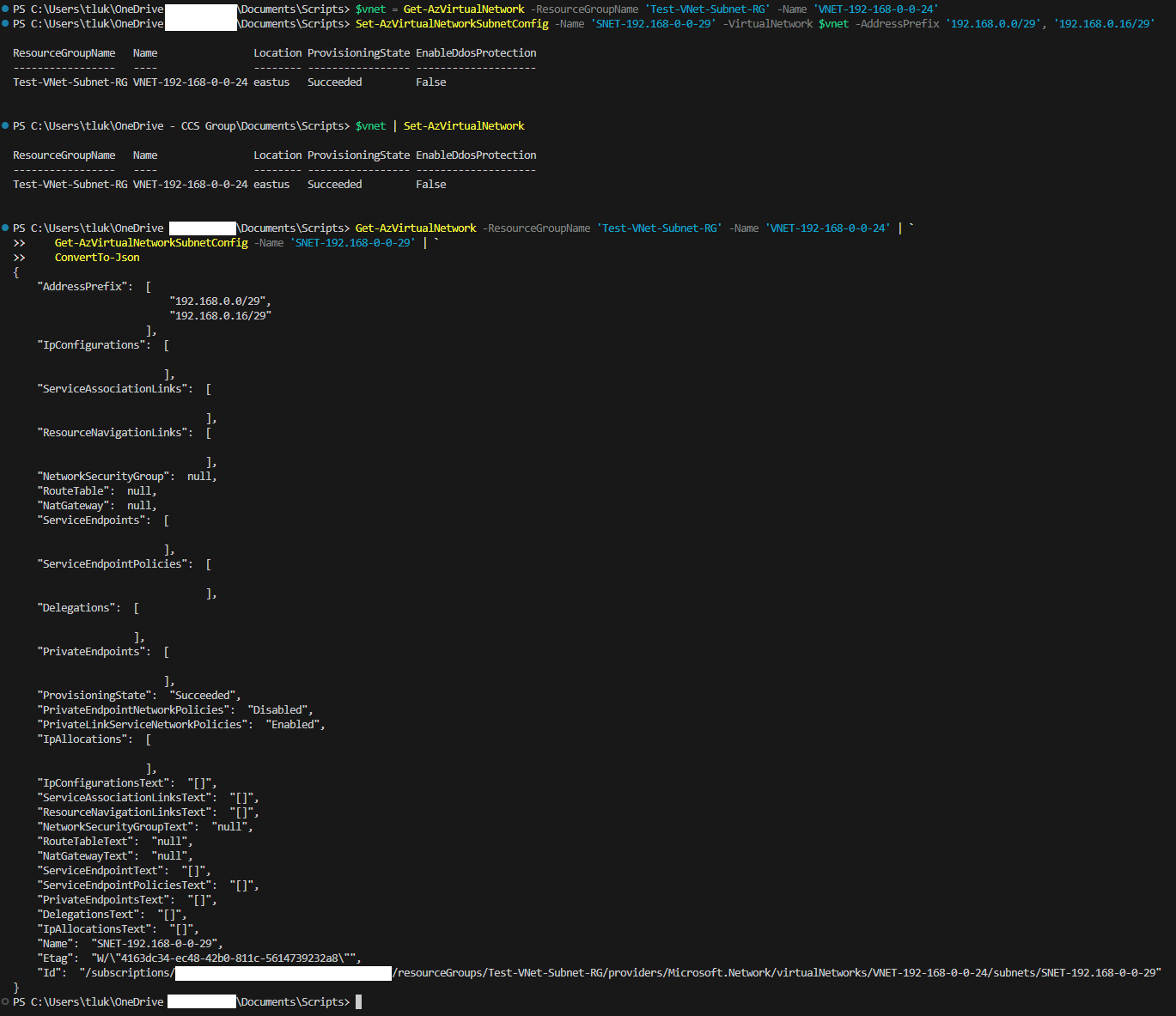
The execution of the code will display the following:
Upon the successful execution, we will see the following displayed in the Azure portal:
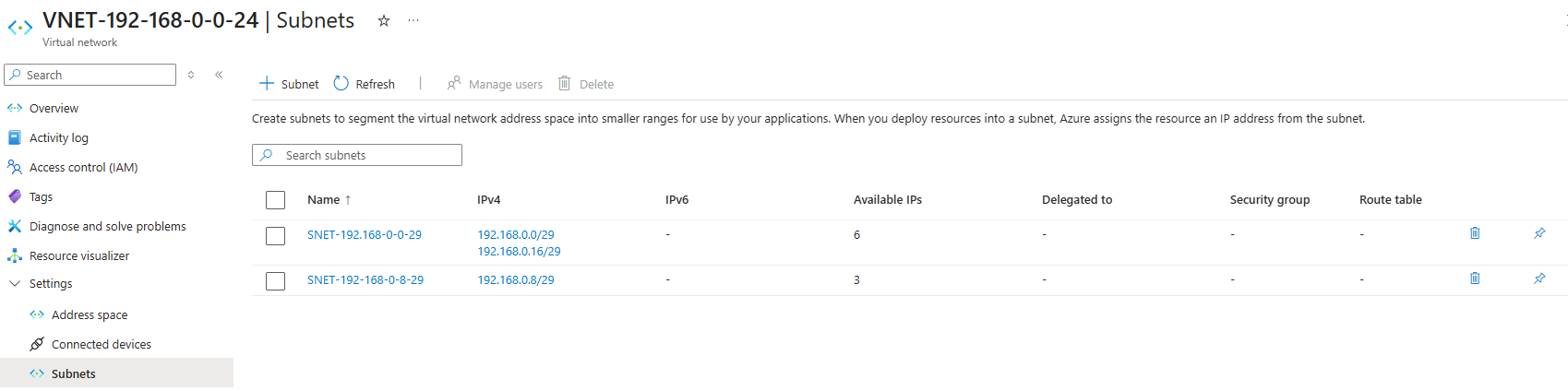
Note that the Available IPs for the subnet has no increased from 3 to 6.
Hope this helps for anyone who may be looking for how additional subnet prefixes now that the feature has gone GA (General Availability).

